Brightness Issues - Intel HD Graphics 5500

Hippopotanews

New member
Local time
1:05 PM
Messages
3
Hi,

After having issues with my W7-64 bit HP Envy 15 laptop, I decided to reinstall the OS. Everything went as planned until I installed the win64_153619 graphics driver from the Intel website.

Although the driver installed OK, the control panel interface is now different (now called Intel HD Graphics Control Panel)

dell81_flick_2.png


There's no longer brightness control. The power options in W7 only has 10 steps for brightness of which are either too bright or too dark. My question is, how can I have more control over brightness? Third party software?
 

My Computer

Computer type
Laptop
OS
7-64
I don't have this setup, but will on a new Toshiba Laptop with the Intel 5500 graphics that I just ordered. I'm posting to track this thread to see what transpires.

Sorry for hijacking it.
 

My Computer

Computer type
PC/Desktop
Computer Manufacturer/Model Number
My Own Build
OS
Windows 10 64 bit
CPU
Intel i7 6700K
Motherboard
ASUS ROG Maximus VIII Hero
Memory
16GB Corsair Dominator
Graphics Card(s)
Intel CPU Graphics
Sound Card
RealTek
Monitor(s) Displays
27" Dell S2719dgf
Screen Resolution
2560X1440
Hard Drives
1 TB Samsung 850 EVO SSD for Win 10 Pro
500GB Samsung 850 EVO SSD for Win 10 Insider
2 TB drive for backup
PSU
EVGA Supernova 750G2
Case
BeQuiet Silent Base 600
Cooling
Deepcool Captain 120EX
Keyboard
Microsoft Wireless 2000
Mouse
Microsoft wireless
Internet Speed
100 MB/sec (Cable)
Antivirus
Microsoft Defender and Malwarebytes
Browser
Edge/Firefox
Other Info
Cakewalk (Sonar) by BandLab and Studio One 4.1 Pro recording studio software. MOTU 896Mk3 Hybrid recording interface, Frontier Tranzport wireless control unit, Behringer X-Touch Control Surface.
Five USB connected optical drives for CD Audio production using Nero BurningROM
Update, I got the new Toshiba and it came with the Intel HD Graphics Control Panel installed. No options, like yours.
 

My Computer

Computer type
PC/Desktop
Computer Manufacturer/Model Number
My Own Build
OS
Windows 10 64 bit
CPU
Intel i7 6700K
Motherboard
ASUS ROG Maximus VIII Hero
Memory
16GB Corsair Dominator
Graphics Card(s)
Intel CPU Graphics
Sound Card
RealTek
Monitor(s) Displays
27" Dell S2719dgf
Screen Resolution
2560X1440
Hard Drives
1 TB Samsung 850 EVO SSD for Win 10 Pro
500GB Samsung 850 EVO SSD for Win 10 Insider
2 TB drive for backup
PSU
EVGA Supernova 750G2
Case
BeQuiet Silent Base 600
Cooling
Deepcool Captain 120EX
Keyboard
Microsoft Wireless 2000
Mouse
Microsoft wireless
Internet Speed
100 MB/sec (Cable)
Antivirus
Microsoft Defender and Malwarebytes
Browser
Edge/Firefox
Other Info
Cakewalk (Sonar) by BandLab and Studio One 4.1 Pro recording studio software. MOTU 896Mk3 Hybrid recording interface, Frontier Tranzport wireless control unit, Behringer X-Touch Control Surface.
Five USB connected optical drives for CD Audio production using Nero BurningROM
Fireberd, the previous drivers had an older interface with brightness controls. I can't remember the version number.

Have you come up with a solution?
 

My Computer

Computer type
Laptop
OS
7-64
The Custom Resolutions/Modes feature has been removed from the Intel® HD Graphics Control Panel. However, it is still an existing feature included with the driver. In order to access it, you will need to follow these steps:
  1. Navigate to the following directory; C:\Windows\System32.
  2. Look for the Intel application named CustomModeApp.exe.
  3. Open that .exe and you will be presented with an updated Custom Resolutions/Modes menu similar to that of older control panels.
 
Last edited:

My Computer

OS
Windows 7 Home Premium
CPU
i3 2100T
Motherboard
ASRock H67M-ITX
I haven't noticed any need for a brightness setting on my new PC. Thus I haven't looked for any "solution". Your problem may be specific to your PC.
 

My Computer

Computer type
PC/Desktop
Computer Manufacturer/Model Number
My Own Build
OS
Windows 10 64 bit
CPU
Intel i7 6700K
Motherboard
ASUS ROG Maximus VIII Hero
Memory
16GB Corsair Dominator
Graphics Card(s)
Intel CPU Graphics
Sound Card
RealTek
Monitor(s) Displays
27" Dell S2719dgf
Screen Resolution
2560X1440
Hard Drives
1 TB Samsung 850 EVO SSD for Win 10 Pro
500GB Samsung 850 EVO SSD for Win 10 Insider
2 TB drive for backup
PSU
EVGA Supernova 750G2
Case
BeQuiet Silent Base 600
Cooling
Deepcool Captain 120EX
Keyboard
Microsoft Wireless 2000
Mouse
Microsoft wireless
Internet Speed
100 MB/sec (Cable)
Antivirus
Microsoft Defender and Malwarebytes
Browser
Edge/Firefox
Other Info
Cakewalk (Sonar) by BandLab and Studio One 4.1 Pro recording studio software. MOTU 896Mk3 Hybrid recording interface, Frontier Tranzport wireless control unit, Behringer X-Touch Control Surface.
Five USB connected optical drives for CD Audio production using Nero BurningROM
The Custom Resolutions/Modes feature has been removed from the Intel® HD Graphics Control Panel. However, it is still an existing feature included with the driver. In order to access it, you will need to follow these steps:
  1. Navigate to the following directory; C:\Windows\System32.
  2. Look for the Intel application named CustomModeApp.exe.
  3. Open that .exe and you will be presented with an updated Custom Resolutions/Modes menu similar to that of older control panels.

CountryBumkin, I looked foe the application named CustomModeApp, but it's nowhere to be found in the System32 directory or anywhere else. I'm thinking about rolling back the driver.

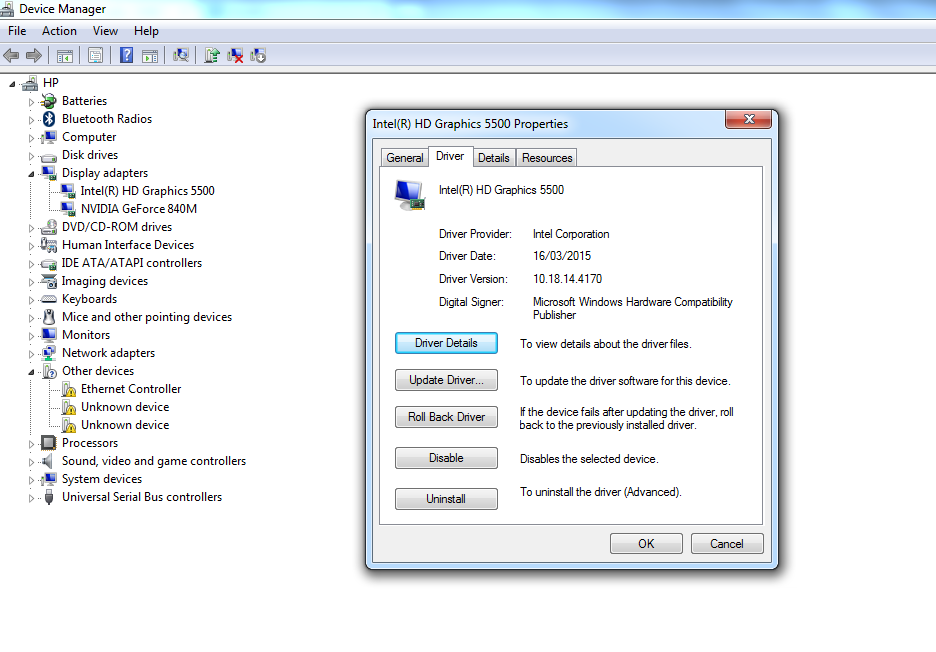
Here is my current driver details

OXK7gih.png
 

My Computer

Computer type
Laptop
OS
7-64
Back
Top