Solved Kaby Lake Intel HD Graphics 630 driver problems (red dark screen)

FLX90

New member
Local time
2:59 PM
Messages
9
Hi everybody,

I want to clone the SSD from my old Windows 7 Alienware 13 R1 to my "new" Alienware 13 R3.

I went through many problems so far:

- I switched from SATA to NVMe so need to convert MBR to GPT.
- Also inject Samsung drivers to my Windows-installation in WinPE.
- Enabled Windows Update for my 7700HQ via zeffys wufuc.
- Installed all necessary drivers (also Nvidia and Intel). But at this last point I'm struggling:

There are many drivers out there if you google the hardware-ID for the Intel HD Graphics 630.
I installed more than five different versions, but I've always the same problem after reboot.

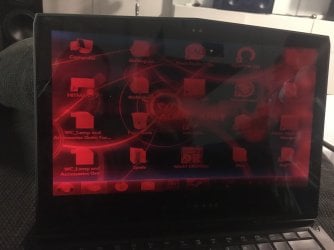
The screen is dark red. When I open applications with white background it gets so dark that it's black.

Changing resolution didn't solve the problem.


After some minutes I get a bluescreen:
STOP: 0x00000116
nvlddmkm.sys


So hopefully you can help me.
Upgrading to Windows 10 is no option.

Best regards
Felix
 

Attachments

  • IMG_9896.JPG
    IMG_9896.JPG
    341.4 KB · Views: 4

My Computer My Computer

At a glance

Windows 7 Professional x64
Computer type
PC/Desktop
OS
Windows 7 Professional x64
Without seeing your system specs and the complete BSOD, it appears that you have an NVIDIA graphics card and there's a problem with the driver. I would uninstall the driver from Device Manager, Display Adapters (I think you will uninstall the device). Shutdown and reboot. Download the appropriate driver from NVIDIA and install it. Does that help?
 

My Computer My Computer

At a glance

Windows 7 Pro SP1 64 bit8 GB
Computer type
Laptop
Computer Manufacturer/Model Number
Dell M6500 Precision Work Station
OS
Windows 7 Pro SP1 64 bit
Memory
8 GB
Screen Resolution
1920x
Internet Speed
30 Mbps
Antivirus
Norton Security
Browser
IE 11
Hey,

Yes, it is a GTX 1060 Mobile.

I uninstalled Intel and Nvidia driver with DDU and installed only Intel driver.
No BSOD anymore.

But still this strange red screen.
 

My Computer My Computer

At a glance

Windows 7 Professional x64
Computer type
PC/Desktop
OS
Windows 7 Professional x64
....still this strange red screen.
Have you checked that it's not a hardware fault? Try booting to the bios to check that. If you get the red screen there then it's nothing to do with Windows or its drivers.


Press F12 at the power up splash screen. You should get a one-time boot menu, with options to enter the bios setup, or to run built-in diagnostics.
 

My Computers My Computers

  • At a glance

    Windows 7 Home Premium x64AMD V1204GB
    Computer type
    Laptop
    Computer Manufacturer/Model Number
    Toshiba satellite C650D
    OS
    Windows 7 Home Premium x64
    CPU
    AMD V120
    Memory
    4GB
    Internet Speed
    150 Mbps
    Antivirus
    MSE
    Browser
    IE11, Edge, Firefox
    Other Info
    I also have W7 Pro on my System Two, and several W7 Hyper-V VMs. My other machines run Windows 10/11. Their specs are in my Ten Forums & Eleven Forum profiles.
  • At a glance

    Windows 7 Pro x64Intel i5-3320M8 GB
    Computer type
    Laptop
    System Manufacturer/Model Number
    Lenovo Thinkpad T430
    OS
    Windows 7 Pro x64
    CPU
    Intel i5-3320M
    Memory
    8 GB
    Hard Drives
    250GB Samsung SSD 860 EVO
    Antivirus
    MSE
Yes, of course.
Because of the dark screen I only can uninstall this driver in safe mode.
In safe mode everything looks great.
It also looks great when I deactivate Intel HD Graphics 630 in device manager.
Or when I Boot normally with uninstalled Intel driver.

I had Windows 10 on this laptop before and everything works great.
But Windows 10 is not an option.
 

My Computer My Computer

At a glance

Windows 7 Professional x64
Computer type
PC/Desktop
OS
Windows 7 Professional x64
Try going into UEFI/BIOS and disable the onboard GPU. Just use the Nvidia GPU and see if that helps.

If the Intel driver doesn't work and the Nvidia one does, then you only need the Nvidia driver. You don't need onboard since you already have a dedicated GPU.
 

My Computer My Computer

At a glance

Windows 7 Ultimate x64
Computer type
PC/Desktop
OS
Windows 7 Ultimate x64
What I think is that you have one or more Alienware wallpapers showing up. If you go here-

4K Alienware Wallpaper (72+ images)

and scroll down, the first one in red is in your screenshot.

Also, it appears to be in German. There appears to be a button for Felix (that you?) and a Guest.

Might be some kind of game.
 

My Computer My Computer

At a glance

Windows 7 Pro SP1 64 bit8 GB
Computer type
Laptop
Computer Manufacturer/Model Number
Dell M6500 Precision Work Station
OS
Windows 7 Pro SP1 64 bit
Memory
8 GB
Screen Resolution
1920x
Internet Speed
30 Mbps
Antivirus
Norton Security
Browser
IE 11
Try going into UEFI/BIOS and disable the onboard GPU. Just use the Nvidia GPU and see if that helps.

If the Intel driver doesn't work and the Nvidia one does, then you only need the Nvidia driver. You don't need onboard since you already have a dedicated GPU.

DGPU is routed through IGPU so unfortunately no option in BIOS.
It is also not possible to install Nvidia driver without having Intel driver installed (because of this DGPU —> IGPU thing)


wither 2: Don’t no what you mean. This is my login screen. As is said I can only uninstall Intel driver in safe mode because I don’t see anything (when I open an application with white background the screen is complete black)


Is it possible that I need the specific OEM Intel driver for this laptop from DELL?
 

My Computer My Computer

At a glance

Windows 7 Professional x64
Computer type
PC/Desktop
OS
Windows 7 Professional x64
I guess I don't understand this-

"The screen is dark red. When I open applications with white background it gets so dark that it's black."

I thought the red you were referring to was what you showed in your screen shot but, you're saying that's your normal log-in screen?
 

My Computer My Computer

At a glance

Windows 7 Pro SP1 64 bit8 GB
Computer type
Laptop
Computer Manufacturer/Model Number
Dell M6500 Precision Work Station
OS
Windows 7 Pro SP1 64 bit
Memory
8 GB
Screen Resolution
1920x
Internet Speed
30 Mbps
Antivirus
Norton Security
Browser
IE 11
wither 2:
Here is another picture after log in.

F22 Simpilot:
Unfortunately these are Win10 drivers.
I modified igdlh64.inf to install Intel GPU driver on Windows 7. (NTamd64.10.0...14393 --> NTamd64.6.1...7601)

I can install it but the driver is unable to load.
Maybe some reg keys are in the wrong key or files in wrong folder ...
 

Attachments

  • IMG_9930.JPG
    IMG_9930.JPG
    786.1 KB · Views: 2

My Computer My Computer

At a glance

Windows 7 Professional x64
Computer type
PC/Desktop
OS
Windows 7 Professional x64
As I understand it, the Alienware wallpaper overlays the desktop normally when you log in. The red overlay on that is what's abnormal.

I don't know if what I'm seeing is normal but it looks like your screen resolution is in VGA. Why is that?

Would you provide your system specs using the procedures provided here- System Info - See Your System Specs
 

My Computer My Computer

At a glance

Windows 7 Pro SP1 64 bit8 GB
Computer type
Laptop
Computer Manufacturer/Model Number
Dell M6500 Precision Work Station
OS
Windows 7 Pro SP1 64 bit
Memory
8 GB
Screen Resolution
1920x
Internet Speed
30 Mbps
Antivirus
Norton Security
Browser
IE 11
It's 800 x 600 px. I played around with resolution but it doesn't matter. Problem remains.


Specs:

CPU: Intel(R) Core(TM) i7-7700HQ CPU @ 2.80GHz
Motherboard: Alienware Alienware 13 R3
BIOS: BIOS Date: 07/21/20 14:16:01 Ver: 05.0000C
Total Memory: 16,00 GB / Usable: 15,87 GB
HDD: NVMe Samsung SSD 970 SCSI Disk Device
Sound Card: (1) High Definition Audio-Gerät (2) High Definition Audio-Gerät [no driver]
Graphics Card: (1) Standard-VGA-Grafikkarte (2) Standard-VGA-Grafikkarte [no driver / IGPU: Intel HD Graphics 630 / DGPU: NIVIDIA GeForce GTX 1060 Mobile]
OS: Microsoft Windows 7 Professional 64-Bit 7601 Multiprocessor Free Service Pack 1
 

My Computer My Computer

At a glance

Windows 7 Professional x64
Computer type
PC/Desktop
OS
Windows 7 Professional x64
What happens if you remove the Alienware wallpaper?

Would you run msinfo32, save the file and attach the generated .nfo file?
 

My Computer My Computer

At a glance

Windows 7 Pro SP1 64 bit8 GB
Computer type
Laptop
Computer Manufacturer/Model Number
Dell M6500 Precision Work Station
OS
Windows 7 Pro SP1 64 bit
Memory
8 GB
Screen Resolution
1920x
Internet Speed
30 Mbps
Antivirus
Norton Security
Browser
IE 11
Any luck with this?
 

My Computer My Computer

At a glance

Windows 7 Pro SP1 64 bit8 GB
Computer type
Laptop
Computer Manufacturer/Model Number
Dell M6500 Precision Work Station
OS
Windows 7 Pro SP1 64 bit
Memory
8 GB
Screen Resolution
1920x
Internet Speed
30 Mbps
Antivirus
Norton Security
Browser
IE 11
Hey, sorry didn‘t had the time yet for generating nfo.

Removing wallpaper didn’t help.
 

My Computer My Computer

At a glance

Windows 7 Professional x64
Computer type
PC/Desktop
OS
Windows 7 Professional x64
Hey,


sorry for late reply.


I attached the nfo generated by msinfo32.
 

Attachments

My Computer My Computer

At a glance

Windows 7 Professional x64
Computer type
PC/Desktop
OS
Windows 7 Professional x64

My Computer My Computer

At a glance

Windows 7 Pro SP1 64 bit8 GB
Computer type
Laptop
Computer Manufacturer/Model Number
Dell M6500 Precision Work Station
OS
Windows 7 Pro SP1 64 bit
Memory
8 GB
Screen Resolution
1920x
Internet Speed
30 Mbps
Antivirus
Norton Security
Browser
IE 11
Problem is finally "solved".


The graphics card is defect and I had to return the laptop.


Is it possible that I damaged the card with this windows 7 driver?
 

My Computer My Computer

At a glance

Windows 7 Professional x64
Computer type
PC/Desktop
OS
Windows 7 Professional x64
I doubt you damaged the card with that driver.

I'm glad you figured it out and hope the problem gets fixed.
 

My Computer My Computer

At a glance

Windows 7 Pro SP1 64 bit8 GB
Computer type
Laptop
Computer Manufacturer/Model Number
Dell M6500 Precision Work Station
OS
Windows 7 Pro SP1 64 bit
Memory
8 GB
Screen Resolution
1920x
Internet Speed
30 Mbps
Antivirus
Norton Security
Browser
IE 11
Back
Top