Radeon Error Message

acemorgan

New member
Already called Asus tech support they really sux bigtime!! My RMA replacement has the same exact issue so I know & I'm convinced it's not the card now.
Just installed a new GPU Asus Radeon XT6900XT-T16 card and Installed (tried) several different Radeon Driver Versions for windows 7 from their site & on AMD's site as well. they are: newest one Adrenalin 2020-22.6.1, Adrenalin 2020-21-5.2, Adrenalin-21.3.1, Adrenalin-20.12.1
One of the main problem is that the brightness on the monitor screen that goes darker & darker when opening up more then one window and closing them it will become brighter again. and also its gets to bright that it makes the black text look so faded. Most likely its the drivers issues for that.
Another problem is that I can't open the control panel or able to use it when clicking on the icon for the Radeon software.
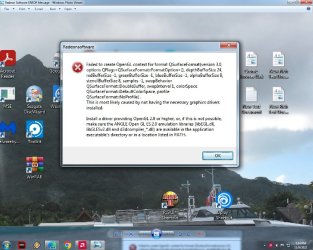
This is a screen shot of the Error message-
Would this mean that I have to find (research) one of those KB update files for the Windows 7 that I don't have possible now installed or need to get?
 

Attachments
  • Radeon Software Screenshot picture2.jpg
    Radeon Software Screenshot picture2.jpg
    374.8 KB · Views: 2
  • Radeon Software- Screenshot Picture.jpg
    Radeon Software- Screenshot Picture.jpg
    439.7 KB · Views: 2
Last edited:

My Computer

Computer type
PC/Desktop
Computer Manufacturer/Model Number
Asus
OS
Windows 7 x64
CPU
Intel processor
Motherboard
Asus
Memory
corsair
Graphics Card(s)
Asus
Hard Drives
Seagate
Antivirus
Pc Matic
Browser
IE
Just installed a new GPU Asus Radeon XT6900XT-T16

Hi,

Your graphics card does not have official support for Windows 7 by the manufacturer, and Windows 7 does not have support for your graphics card. Did ASUS Support not point this out?

unsupported#.png

However there is plenty to try in order to get your card to work.

First, create a system restore point. Next, please try installing the latest version of DirectX for Windows 7, version DirectX 11.1.

Here is a Microsoft guide on how to do this: How to install the latest version of DirectX - Microsoft Support
After installation succeeds, restart your computer.

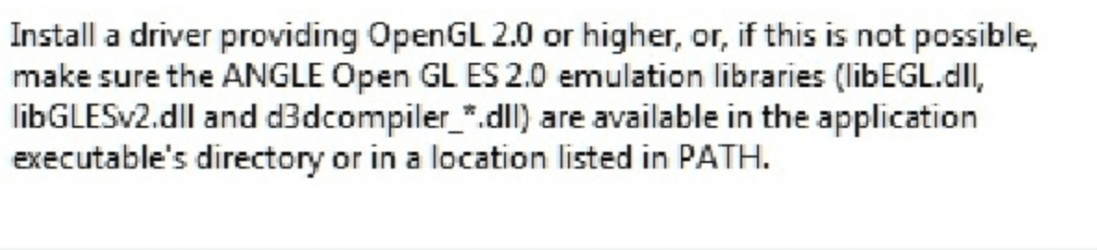
If after installing DirectX 11.1 and restarting the issue is still present, lets look at the error code:
image.png

I looked online for "ANGLE Open GL ES 2.0 Emulation Libraries" and the first link on Google found a zip file which after extracting found it to contain libGLESv2.dll and libEGL.dll. (I cannot provide the link due to forum policy). I found a d3dcompiler.dll with a separate search.

Since the error message appears when you try to open Radeon Software, as the error message shows, you need to put the .dll files into the software's location.

Before doing that, again, make a system restore point. This will ensure if there is a problem caused by doing this you can revert to before the changes.

To find the location of the Radeon Software, right click on the Radeon Software icon on your desktop, then, go to properties and "Open file location". Place the .dlls there. Restart your computer, then try opening Radeon Software again.

Fox Computers

- - - Updated - - -

In fact before doing anything, create a system repair disc, so that you can use the restore points you have created.

Create a system repair disc - Microsoft Support
 

My Computers

System One System Two

  • OS
    Windows 7 Starter SP1
  • Computer type
    PC/Desktop
Asus sales dept told me on the phone before I purchased the card that this Video card is compatible and will work for my windows seven I'm still using on my computer so I went ahead and bought it. I keep getting the run around with someone new saying that their happy to help me now for over 2 months now. It just keep going in circles with someone new each week repeating my same issue over and over again constantly.
I look at the link you gave me for the DX to check which one I have. I noticed it's DX 11.0 I have installed. DirectX DiagnosticTool System information.jpg I see I can get the DX 11.1 to download from the link for my windows seven. Will this hopefully Be all I need to do. Something about those three files I seen you mentioned, wouldn't those already be included in the Radeon Drivers for the windows7 64 to be installed? I tried to right click on the small Radeon icon on the lower right side of the task bar to open the properties but it doesn't open or the control panel when clicked onto it.
 

My Computer

Computer type
PC/Desktop
Computer Manufacturer/Model Number
Asus
OS
Windows 7 x64
CPU
Intel processor
Motherboard
Asus
Memory
corsair
Graphics Card(s)
Asus
Hard Drives
Seagate
Antivirus
Pc Matic
Browser
IE
Thank you for the update.

Unfortunately it would sound as though you have been mis-sold by ASUS representatives. As previously pointed out, AMD only lists that the RX 6900 XT graphics card only has official support for Windows 10 64-Bit and Windows 11.

Windows 7 lost security and technical support by Microsoft in January 2020, and your graphics card released on December 8, 2020 - as such it would only make sense for AMD not to have invested the time/resources to create a 7 compatible driver.

Another problem here is your pairing of a top of the range graphics card from 2020 with a processor from 2008. There are all kinds of problems with the Core 2 Quad line-up now and modern software, it would be unsurprising if you are not able to play many of the latest games.

Regardless of the above, here is a link for you to get DirectX 11.1 taken from the previously posted link;

Download Platform Update for Windows 7 from Official Microsoft Download Center

Let me know if this makes any difference, if there is no change we can look at other solutions.
 

My Computers

System One System Two

  • OS
    Windows 7 Starter SP1
  • Computer type
    PC/Desktop
Back
Top