
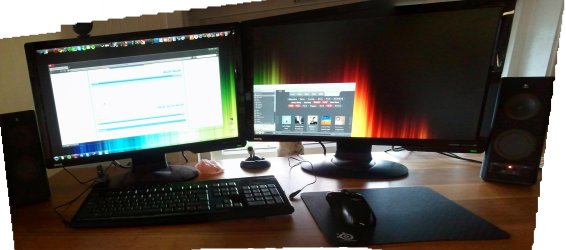
Broken cursor on main monitor

Sure...

Like this?
 

Attachments

  • desk.jpg
    desk.jpg
    416.9 KB · Views: 381

My Computer My Computer

At a glance

Windows 7 Ultimate 64bitIntel i5 7508GB (4x2GB) Corsair DominatorATI 5850
Computer Manufacturer/Model Number
Custom
OS
Windows 7 Ultimate 64bit
CPU
Intel i5 750
Motherboard
Gigabyte P55a-UD6
Memory
8GB (4x2GB) Corsair Dominator
Graphics Card(s)
ATI 5850
Sound Card
Intergrated in Motherboard
Monitor(s) Displays
BenQ HD2412D (x2)
Screen Resolution
1920x1080
Hard Drives
Samsung 320GB
Samsung 500GB
WD 1TB
Seagate 1TB
PSU
650W Chieftec
Case
Cooler Master Elite 310
Cooling
Noctua NH-U12P SE2
Keyboard
Fujitsu Siemens Wireless Keyboard
Mouse
Fujitsu Siemens Wireless Mouse
Internet Speed
10/10Mbits
Thats perfect. It looks like there is nothing wrong. Have you tried reconnecting both of the screens? This is a hard problem to sort out.
 

My Computer My Computer

At a glance

Windows 7 Ultimate x64Celeron(R) Dual-Core CPU T3500 @ 2.10GHz4.00GBMobile Intel® 4 Series Express Chipset Family...
Computer Manufacturer/Model Number
Dell Inspiron 1545
OS
Windows 7 Ultimate x64
CPU
Celeron(R) Dual-Core CPU T3500 @ 2.10GHz
Motherboard
Dell Motherboard Model 0G848F
Memory
4.00GB
Graphics Card(s)
Mobile Intel® 4 Series Express Chipset Family (4500MHD)
Sound Card
IDT Hight Definition Audio
Monitor(s) Displays
Generic PnP Monitor
Screen Resolution
1366 x 768
Hard Drives
WDCW WD1600BEVT-75ZCT2 150GB ATA Device
Keyboard
Standard PS/2 Keyboard
Mouse
Wireless Optical Mouse
Internet Speed
48.0Mpbs
I'll try to do that next time I get the error...
Thanks
 

My Computer My Computer

At a glance

Windows 7 Ultimate 64bitIntel i5 7508GB (4x2GB) Corsair DominatorATI 5850
Computer Manufacturer/Model Number
Custom
OS
Windows 7 Ultimate 64bit
CPU
Intel i5 750
Motherboard
Gigabyte P55a-UD6
Memory
8GB (4x2GB) Corsair Dominator
Graphics Card(s)
ATI 5850
Sound Card
Intergrated in Motherboard
Monitor(s) Displays
BenQ HD2412D (x2)
Screen Resolution
1920x1080
Hard Drives
Samsung 320GB
Samsung 500GB
WD 1TB
Seagate 1TB
PSU
650W Chieftec
Case
Cooler Master Elite 310
Cooling
Noctua NH-U12P SE2
Keyboard
Fujitsu Siemens Wireless Keyboard
Mouse
Fujitsu Siemens Wireless Mouse
Internet Speed
10/10Mbits
Okay. Report back to us if there is anything else you need. I'll be right here! :)
 

My Computer My Computer

At a glance

Windows 7 Ultimate x64Celeron(R) Dual-Core CPU T3500 @ 2.10GHz4.00GBMobile Intel® 4 Series Express Chipset Family...
Computer Manufacturer/Model Number
Dell Inspiron 1545
OS
Windows 7 Ultimate x64
CPU
Celeron(R) Dual-Core CPU T3500 @ 2.10GHz
Motherboard
Dell Motherboard Model 0G848F
Memory
4.00GB
Graphics Card(s)
Mobile Intel® 4 Series Express Chipset Family (4500MHD)
Sound Card
IDT Hight Definition Audio
Monitor(s) Displays
Generic PnP Monitor
Screen Resolution
1366 x 768
Hard Drives
WDCW WD1600BEVT-75ZCT2 150GB ATA Device
Keyboard
Standard PS/2 Keyboard
Mouse
Wireless Optical Mouse
Internet Speed
48.0Mpbs
I have the same problem on my dual monitor setup. It seems to happen more frequently with some of the ATI drivers than others. Usually, switching between my Age of Conan video game and the desktop will trigger it, although it seems like other programs have caused the problem before as well.

Sometimes when I click the task bar and then click in / out of the program it can fix it, but other times the mouse pointer problem persists even after the game is closed. The only way I've been able to solve it is to fully reboot. Doing a log out / log in doesn't solve it, changing mouse pointers, screen resolutions, wallpapers, etc. none of that type of stuff fixes it.

It's very frustrating because I rarely ever have to reboot my Windows 7 PC, so now having to do it because of a video driver / mouse pointer is sad.

FWIW I have the xfx Radeon HD 5970.
 

My Computer My Computer

At a glance

Windows 7
OS
Windows 7
Yeah, it's happening more frequently here as well.
Seems to be different drivers having different effects.
Not sure which driver is the best.

And yes, only workaround seems to be a restart. Which is really sad.
 

My Computer My Computer

At a glance

Windows 7 Ultimate 64bitIntel i5 7508GB (4x2GB) Corsair DominatorATI 5850
Computer Manufacturer/Model Number
Custom
OS
Windows 7 Ultimate 64bit
CPU
Intel i5 750
Motherboard
Gigabyte P55a-UD6
Memory
8GB (4x2GB) Corsair Dominator
Graphics Card(s)
ATI 5850
Sound Card
Intergrated in Motherboard
Monitor(s) Displays
BenQ HD2412D (x2)
Screen Resolution
1920x1080
Hard Drives
Samsung 320GB
Samsung 500GB
WD 1TB
Seagate 1TB
PSU
650W Chieftec
Case
Cooler Master Elite 310
Cooling
Noctua NH-U12P SE2
Keyboard
Fujitsu Siemens Wireless Keyboard
Mouse
Fujitsu Siemens Wireless Mouse
Internet Speed
10/10Mbits
I rolled back to the 10.5 drivers and so far so good.
 

My Computer My Computer

At a glance

Windows 7
OS
Windows 7
I have this same problem and have been having it for months.
Windows 7 Ult. 64-bit, Gigabyte ATI Radeon HD 5770, dual monitor (2x Acer X243H) setup.

The mouse cursor is only an issue on my primary monitor, and is fine on my second. (it is broken as I type).

I have the latest drivers (10.12) and Windows is up to date via Windows update.

Glad that I am not the only one with this issue.
 

My Computer My Computer

At a glance

Genuine Windows 7 Ultimate 64-bitIntel Core-i7 860 @ 2.8GHz6 GB Kingston 1600MHz HyperX RAMATI Radeon HD 5770
OS
Genuine Windows 7 Ultimate 64-bit
CPU
Intel Core-i7 860 @ 2.8GHz
Motherboard
Gigabyte GA-P55A-UD6
Memory
6 GB Kingston 1600MHz HyperX RAM
Graphics Card(s)
ATI Radeon HD 5770
Monitor(s) Displays
2 x 24" Acer X243H
Hard Drives
1 x 600GB SATA III (6GBps) Western Digital Velociraptor
1 x 1TB Western Digital SATA III (6GBps) Caviar Black
PSU
Thermaltake Evo_blue 750w
Case
Coolermaster HAF 932 Full ATX
Cooling
Coolermaster V8
Keyboard
Logitech G15
Mouse
Logitech Mx18
I just started having this issue, so from the thread it sounds to be related to the ATI video drivers? Anyone find a solution yet? I'm going to try upgrading my video drivers, also to note that I can sometimes get the problem to go away by moving my mouse repeatedly back and forth between screens, weird how it only happens on the primary. I have windows 7 premium 64, on HP 480t with ATI 5770.

Regards,

BT
 

My Computer My Computer

At a glance

Windows 7 Home 64I79GATI HD 5770
Computer Manufacturer/Model Number
HP
OS
Windows 7 Home 64
CPU
I7
Motherboard
HP
Memory
9G
Graphics Card(s)
ATI HD 5770
Sound Card
integrated
Monitor(s) Displays
dual HP 23"
Hard Drives
1 1.5T WD + 5 2T Hitachi
PSU
HP
Case
HP
Cooling
HP
11.5 Catalyst drivers solved this problem for me.
 

My Computer My Computer

At a glance

Windows 7
OS
Windows 7
Well I had the default ATI drivers installed by HP, went online and downloaded the latest. So far so good (I was actually experiencing the problem and haven't rebooted), in device manager it says driver version 8.861.0.0. Catalyst Control Center says 11.6. Thanks to everyone in this thread.

Regards,


BT
 

My Computer My Computer

At a glance

Windows 7 Home 64I79GATI HD 5770
Computer Manufacturer/Model Number
HP
OS
Windows 7 Home 64
CPU
I7
Motherboard
HP
Memory
9G
Graphics Card(s)
ATI HD 5770
Sound Card
integrated
Monitor(s) Displays
dual HP 23"
Hard Drives
1 1.5T WD + 5 2T Hitachi
PSU
HP
Case
HP
Cooling
HP
I started seeing this problem as soon as my organization migrated from XP to Windows 7. Our help desk solved this by control panel > hardware and sound > devices and printers > mouse > pointers. Change the Windows 7 default scheme "Aero" to "Windows Standard." This fixes the problem.
 

My Computer My Computer

At a glance

windows 7
OS
windows 7
I have exactly that same problem! But the cursor looks fine on any captures.
I get my problem when I'm playing a specific mode on a game. Only happens there. I've tried the game's forum, and a lot of people seem to be having this problem. The common factor, though, is that everyone has an ATI (AMD) graphics processor.
I have to restart now to get a normal cursor again.

Please share any solutions if found?
 

My Computer My Computer

At a glance

Windows 7 Home Premium 64bit
OS
Windows 7 Home Premium 64bit
Back
Top