Freeing up space on main HD

onioining

New member
Local time
12:47 PM
Messages
7
I have two Crucial 60 GB SSIDs and one conventional 1TB HD. I try to keep only the essentials on the C drive, but I still sit near capacity. By my count the OS takes up about 20GB, and I can account for about 20 more GBs, meaning there's 20 GB that I can't figure out what they're used for. I also can't figure out if/how I can move some of the other programs (like Microsoft Office).

I suppose my questions are:

Can I move Office and other applications to other drives without re-installing? My Gigabyte motherboard folder? My graphics card folder? My Intel processor folder? I'd like to use this drive just to optimize OS operations, and the second SSID to optimize other programs operations, while using the third large drive to store data.

Is there any way I can get a good look at where all that storage space is going? Right now I just click on "properties" of individual folders and look for big stuff I can manually move.

I've moved "my documents" to the conventional drive. Any other simple folders I can move to free up space? Can I move my recylcling bin? Can I set my download folder to a different drive?

Any tips or tricks I can do to keep non-essential data from being stored on my C drive?

Should I just bite the bullet and purchase a larger SSID drive to use for my OS? Is 60GB not really enough for a primary drive?

For reference, I'm showing 1.8 GB free on my C drive, ~10GB free on G, and over 700 GB free on H. I also have an F drive which is very small (1GB) and I believe is dedicated to the OS. I keep all music, pictures, videos, and audio files (except those I'm actively working on, which sit in the G drive) on the big drive, as well as all my backups. I have games on G, as well as any application I had the option of installing on another drive.

I am, of course, happy to provide any information I have missed. Any help is appreciated.
 

My Computer My Computer

At a glance

Windows 7 Ultimate x64Intel i5-357016 GB DDR3nVidia GeoForce 9800 GT
Computer type
PC/Desktop
Computer Manufacturer/Model Number
Custom
OS
Windows 7 Ultimate x64
CPU
Intel i5-3570
Motherboard
gigabyte
Memory
16 GB DDR3
Graphics Card(s)
nVidia GeoForce 9800 GT
Sound Card
Realtec Audio
Hard Drives
Crucial 60 GB SSID X2
1 TB conventional
Antivirus
avast
Browser
chrome
Do you use hibernation?

Do you know how much space is allotted to your page file?

Have you recently run Disk Cleanup (the Windows built in tool) and told it to clean up system files?

How large is C\users\your user name\appdata?

You can download and run Treesize Free from jam-software.com to tell you where the space on your hard drive is being used.

http://www.jam-software.com/treesize_free/

I have Windows 7 and about 55 applications on an 80 GB SSD. Total occupied space is 35 GB after over 3 years.
 

My Computer My Computer

At a glance

Windows 7 Home Premium SP1, 64-bitIntel Skylake i5-6600K, not overclocked8 GB HyperX DDR4-2666 (2 x 4 GB)none; graphics are integrated on CPU
Computer type
PC/Desktop
Computer Manufacturer/Model Number
Ignatz Special; 4 speed manual gearbox; factory air conditioning; one of one
OS
Windows 7 Home Premium SP1, 64-bit
CPU
Intel Skylake i5-6600K, not overclocked
Motherboard
AsRock Z170M Extreme 4, micro ATX
Memory
8 GB HyperX DDR4-2666 (2 x 4 GB)
Graphics Card(s)
none; graphics are integrated on CPU
Sound Card
onboard: Realtek ALC1150; external: USB Behringer UF0-202
Monitor(s) Displays
Dell S2340M 23 inch IPS
Screen Resolution
1600 x 900
Hard Drives
System: Crucial MX100 series SSD, 128 GB;
Data: Samsung Spinpoint 103SJ, 1 TB;
Backup: WD Caviar Green WD30EZRX-00D8PB0, 3 TB
PSU
Rosewill SilentNight 500 watt fanless, semi-modular
Case
Antec Solo II
Cooling
Noctua NH-U12S; Noctua F12 intake, Noctua S12A exhaust
Keyboard
Microsoft 200 6JH-00001 USB
Mouse
Dell or Microsoft optical wired; USB
Antivirus
Microsoft Security Essentials and Malwarebytes Premium
Browser
Pale Moon
Other Info
All fans PWM; speeds at idle: CPU circa 500 rpm; intake circa 600 rpm; exhaust circa 600 rpm; CPU temps 27 idle and 47 C load in a warm room (27 C/81 F) when running Intel Extreme Tuning Utility stress test.
Do you use hibernation?

As in sleep settings? Yes. I generally have the display turn off after half an hour, and the system sleep after two hours.

Do you know how much space is allotted to your page file?

Hm. 16347 MB, but I only see it for all drives. Perhaps that's mostly or entirely on the C drive and I can move it?

Have you recently run Disk Cleanup (the Windows built in tool) and told it to clean up system files?

Yes, regularly. I have to just to have a bit of space available to keep things running. That said, you reminded me that I hadn't done so today. That was 6 GB it had built up, probably in a few weeks. Well, kinda. When I look at the drive itself, it only shows an increase of about 2 GB. When I cleaned the drive, it told me I deleted 6 GB.

Is there perhaps an ongoing process that I can move where it stores it's data to another drive? What's filling up this temp data? Chrome?

How large is C\users\your user name\appdata?

It doesn't seem to exist. I have 2.08 GBs in my user folder. Doesn't seem to come from any one folder in particular.

You can download and run Treesize Free from jam-software.com to tell you where the space on your hard drive is being used.

TreeSize Free - Quickly Scan Directory Sizes and Find Space Hogs

Will do.

I have Windows 7 and about 55 applications on an 80 GB SSD. Total occupied space is 35 GB after over 3 years.

Sweet. So, I'm doing something wrong, but I can fix that expending time rather than money. I figured this should be working fine. For the most part I don't ask much of my system, and my hardware should be more than adequate. Good to know there's light at the end of this tunnel.
 

My Computer My Computer

At a glance

Windows 7 Ultimate x64Intel i5-357016 GB DDR3nVidia GeoForce 9800 GT
Computer type
PC/Desktop
Computer Manufacturer/Model Number
Custom
OS
Windows 7 Ultimate x64
CPU
Intel i5-3570
Motherboard
gigabyte
Memory
16 GB DDR3
Graphics Card(s)
nVidia GeoForce 9800 GT
Sound Card
Realtec Audio
Hard Drives
Crucial 60 GB SSID X2
1 TB conventional
Antivirus
avast
Browser
chrome

My Computer My Computer

At a glance

Windows 7 Ultimate x64Intel i5-357016 GB DDR3nVidia GeoForce 9800 GT
Computer type
PC/Desktop
Computer Manufacturer/Model Number
Custom
OS
Windows 7 Ultimate x64
CPU
Intel i5-3570
Motherboard
gigabyte
Memory
16 GB DDR3
Graphics Card(s)
nVidia GeoForce 9800 GT
Sound Card
Realtec Audio
Hard Drives
Crucial 60 GB SSID X2
1 TB conventional
Antivirus
avast
Browser
chrome
Your system specs say you have 116 GB of RAM.

I assume you mean 16 GB.

Your hibernation file is taking up 16 GB of space.

You can get rid of the hibernation file entirely and get back that 16 GB.

I'm not positive, but I think maybe you can reduce the size of it, but continue to use hibernation if you have to use it.

Your appdata folder is likely hidden. You'd have to set your viewing options under tools in explorer to be able to see it, but if the entire user folder is only 2 GB, it's probably not worth pursuing at the moment.

You could change your page file to something like 1 GB minimum and 2 GB maximum also.

I'll see if I can find out if hibernation file can be reduced in size.

You might want to post a screen shot of what Tree Size found.
 

My Computer My Computer

At a glance

Windows 7 Home Premium SP1, 64-bitIntel Skylake i5-6600K, not overclocked8 GB HyperX DDR4-2666 (2 x 4 GB)none; graphics are integrated on CPU
Computer type
PC/Desktop
Computer Manufacturer/Model Number
Ignatz Special; 4 speed manual gearbox; factory air conditioning; one of one
OS
Windows 7 Home Premium SP1, 64-bit
CPU
Intel Skylake i5-6600K, not overclocked
Motherboard
AsRock Z170M Extreme 4, micro ATX
Memory
8 GB HyperX DDR4-2666 (2 x 4 GB)
Graphics Card(s)
none; graphics are integrated on CPU
Sound Card
onboard: Realtek ALC1150; external: USB Behringer UF0-202
Monitor(s) Displays
Dell S2340M 23 inch IPS
Screen Resolution
1600 x 900
Hard Drives
System: Crucial MX100 series SSD, 128 GB;
Data: Samsung Spinpoint 103SJ, 1 TB;
Backup: WD Caviar Green WD30EZRX-00D8PB0, 3 TB
PSU
Rosewill SilentNight 500 watt fanless, semi-modular
Case
Antec Solo II
Cooling
Noctua NH-U12S; Noctua F12 intake, Noctua S12A exhaust
Keyboard
Microsoft 200 6JH-00001 USB
Mouse
Dell or Microsoft optical wired; USB
Antivirus
Microsoft Security Essentials and Malwarebytes Premium
Browser
Pale Moon
Other Info
All fans PWM; speeds at idle: CPU circa 500 rpm; intake circa 600 rpm; exhaust circa 600 rpm; CPU temps 27 idle and 47 C load in a warm room (27 C/81 F) when running Intel Extreme Tuning Utility stress test.
Reduce Hibernation file size to the minimum (50% of RAM size):

Type cmd in start search menu

Right click cmd.exe (Command Prompt) and choose Run as administrator

Type: powercfg.exe -H -Size 50 and press enter

Another thing: how much space have you allotted to System Restore? That can be adjusted or turned off entirely if you don't use it. It's a good tool, so I wouldn't get rid of it entirely.
 

My Computer My Computer

At a glance

Windows 7 Home Premium SP1, 64-bitIntel Skylake i5-6600K, not overclocked8 GB HyperX DDR4-2666 (2 x 4 GB)none; graphics are integrated on CPU
Computer type
PC/Desktop
Computer Manufacturer/Model Number
Ignatz Special; 4 speed manual gearbox; factory air conditioning; one of one
OS
Windows 7 Home Premium SP1, 64-bit
CPU
Intel Skylake i5-6600K, not overclocked
Motherboard
AsRock Z170M Extreme 4, micro ATX
Memory
8 GB HyperX DDR4-2666 (2 x 4 GB)
Graphics Card(s)
none; graphics are integrated on CPU
Sound Card
onboard: Realtek ALC1150; external: USB Behringer UF0-202
Monitor(s) Displays
Dell S2340M 23 inch IPS
Screen Resolution
1600 x 900
Hard Drives
System: Crucial MX100 series SSD, 128 GB;
Data: Samsung Spinpoint 103SJ, 1 TB;
Backup: WD Caviar Green WD30EZRX-00D8PB0, 3 TB
PSU
Rosewill SilentNight 500 watt fanless, semi-modular
Case
Antec Solo II
Cooling
Noctua NH-U12S; Noctua F12 intake, Noctua S12A exhaust
Keyboard
Microsoft 200 6JH-00001 USB
Mouse
Dell or Microsoft optical wired; USB
Antivirus
Microsoft Security Essentials and Malwarebytes Premium
Browser
Pale Moon
Other Info
All fans PWM; speeds at idle: CPU circa 500 rpm; intake circa 600 rpm; exhaust circa 600 rpm; CPU temps 27 idle and 47 C load in a warm room (27 C/81 F) when running Intel Extreme Tuning Utility stress test.
Your system specs say you have 116 GB of RAM.

I assume you mean 16 GB.

Hah. Indeed. Fixed.

Your hibernation file is taking up 16 GB of space.

You can get rid of the hibernation file entirely and get back that 16 GB.

Well, there I go. Time to learn what the devil a hibernation file does.

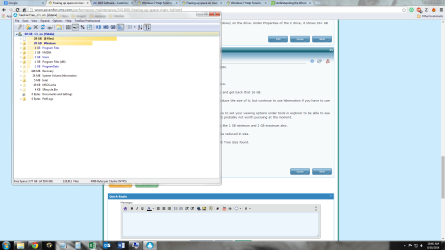
You might want to post a screen shot of what Tree Size found.

Done.
 

Attachments

  • treesize shot.png
    treesize shot.png
    98.8 KB · Views: 2
Last edited:

My Computer My Computer

At a glance

Windows 7 Ultimate x64Intel i5-357016 GB DDR3nVidia GeoForce 9800 GT
Computer type
PC/Desktop
Computer Manufacturer/Model Number
Custom
OS
Windows 7 Ultimate x64
CPU
Intel i5-3570
Motherboard
gigabyte
Memory
16 GB DDR3
Graphics Card(s)
nVidia GeoForce 9800 GT
Sound Card
Realtec Audio
Hard Drives
Crucial 60 GB SSID X2
1 TB conventional
Antivirus
avast
Browser
chrome
Reduce Hibernation file size to the minimum (50% of RAM size):

Type cmd in start search menu

Right click cmd.exe (Command Prompt) and choose Run as administrator

Type: powercfg.exe -H -Size 50 and press enter

That helped a ton. I'm up to over 7 GB available.

Another thing: how much space have you allotted to System Restore? That can be adjusted or turned off entirely if you don't use it. It's a good tool, so I wouldn't get rid of it entirely.

I had none of the C drive allocated. I thought I'd set it to use the H drive to store points, but now that I look again, it seems like that isn't working properly. I had set the slider to have plenty of space dedicated, but had the "turn oiff system protection" selected. If I try to set it to be set to "restore system settings and previous versions of files" it gives me a warning about deleting shadow files faster.

Can I use a different drive to save restore points?
 

My Computer My Computer

At a glance

Windows 7 Ultimate x64Intel i5-357016 GB DDR3nVidia GeoForce 9800 GT
Computer type
PC/Desktop
Computer Manufacturer/Model Number
Custom
OS
Windows 7 Ultimate x64
CPU
Intel i5-3570
Motherboard
gigabyte
Memory
16 GB DDR3
Graphics Card(s)
nVidia GeoForce 9800 GT
Sound Card
Realtec Audio
Hard Drives
Crucial 60 GB SSID X2
1 TB conventional
Antivirus
avast
Browser
chrome
So... The scan shows 28 GBs used (20 by windows) on the drive. Under Properties of the C drive, it shows 55+ GB being used. That's a lot of missing bytes.

Looks to me like the scan shows about 60 used:

28 gb in 8 unknown files; expand it on the left to see what they are

20 gb in Windows

4 in programs

2 in NVidia

etc.

See my post above about System Restore and reducing hibernation without eliminating it.

If you want to eliminate it entirely, don't type in that portion about size 50. If you do that, you can't hibernate at all.
 

My Computer My Computer

At a glance

Windows 7 Home Premium SP1, 64-bitIntel Skylake i5-6600K, not overclocked8 GB HyperX DDR4-2666 (2 x 4 GB)none; graphics are integrated on CPU
Computer type
PC/Desktop
Computer Manufacturer/Model Number
Ignatz Special; 4 speed manual gearbox; factory air conditioning; one of one
OS
Windows 7 Home Premium SP1, 64-bit
CPU
Intel Skylake i5-6600K, not overclocked
Motherboard
AsRock Z170M Extreme 4, micro ATX
Memory
8 GB HyperX DDR4-2666 (2 x 4 GB)
Graphics Card(s)
none; graphics are integrated on CPU
Sound Card
onboard: Realtek ALC1150; external: USB Behringer UF0-202
Monitor(s) Displays
Dell S2340M 23 inch IPS
Screen Resolution
1600 x 900
Hard Drives
System: Crucial MX100 series SSD, 128 GB;
Data: Samsung Spinpoint 103SJ, 1 TB;
Backup: WD Caviar Green WD30EZRX-00D8PB0, 3 TB
PSU
Rosewill SilentNight 500 watt fanless, semi-modular
Case
Antec Solo II
Cooling
Noctua NH-U12S; Noctua F12 intake, Noctua S12A exhaust
Keyboard
Microsoft 200 6JH-00001 USB
Mouse
Dell or Microsoft optical wired; USB
Antivirus
Microsoft Security Essentials and Malwarebytes Premium
Browser
Pale Moon
Other Info
All fans PWM; speeds at idle: CPU circa 500 rpm; intake circa 600 rpm; exhaust circa 600 rpm; CPU temps 27 idle and 47 C load in a warm room (27 C/81 F) when running Intel Extreme Tuning Utility stress test.
Another thing: how much space have you allotted to System Restore? That can be adjusted or turned off entirely if you don't use it. It's a good tool, so I wouldn't get rid of it entirely.

I had none of the C drive allocated. I thought I'd set it to use the H drive to store points, but now that I look again, it seems like that isn't working properly. I had set the slider to have plenty of space dedicated, but had the "turn oiff system protection" selected. If I try to set it to be set to "restore system settings and previous versions of files" it gives me a warning about deleting shadow files faster.

Can I use a different drive to save restore points?

I don't know if you can put restore points on another drive.

Mine is set to use about 7 GB; that's good for 8 or 10 restore points, dating back a month or so on average.

You could delete all current restore points and then re-set System Restore to whatever you want and keep your eyes on it.

What about your page file?
 

My Computer My Computer

At a glance

Windows 7 Home Premium SP1, 64-bitIntel Skylake i5-6600K, not overclocked8 GB HyperX DDR4-2666 (2 x 4 GB)none; graphics are integrated on CPU
Computer type
PC/Desktop
Computer Manufacturer/Model Number
Ignatz Special; 4 speed manual gearbox; factory air conditioning; one of one
OS
Windows 7 Home Premium SP1, 64-bit
CPU
Intel Skylake i5-6600K, not overclocked
Motherboard
AsRock Z170M Extreme 4, micro ATX
Memory
8 GB HyperX DDR4-2666 (2 x 4 GB)
Graphics Card(s)
none; graphics are integrated on CPU
Sound Card
onboard: Realtek ALC1150; external: USB Behringer UF0-202
Monitor(s) Displays
Dell S2340M 23 inch IPS
Screen Resolution
1600 x 900
Hard Drives
System: Crucial MX100 series SSD, 128 GB;
Data: Samsung Spinpoint 103SJ, 1 TB;
Backup: WD Caviar Green WD30EZRX-00D8PB0, 3 TB
PSU
Rosewill SilentNight 500 watt fanless, semi-modular
Case
Antec Solo II
Cooling
Noctua NH-U12S; Noctua F12 intake, Noctua S12A exhaust
Keyboard
Microsoft 200 6JH-00001 USB
Mouse
Dell or Microsoft optical wired; USB
Antivirus
Microsoft Security Essentials and Malwarebytes Premium
Browser
Pale Moon
Other Info
All fans PWM; speeds at idle: CPU circa 500 rpm; intake circa 600 rpm; exhaust circa 600 rpm; CPU temps 27 idle and 47 C load in a warm room (27 C/81 F) when running Intel Extreme Tuning Utility stress test.

My Computer My Computer

At a glance

Windows 7 Ultimate x64Intel i5-357016 GB DDR3nVidia GeoForce 9800 GT
Computer type
PC/Desktop
Computer Manufacturer/Model Number
Custom
OS
Windows 7 Ultimate x64
CPU
Intel i5-3570
Motherboard
gigabyte
Memory
16 GB DDR3
Graphics Card(s)
nVidia GeoForce 9800 GT
Sound Card
Realtec Audio
Hard Drives
Crucial 60 GB SSID X2
1 TB conventional
Antivirus
avast
Browser
chrome
It's getting ideas based on the size of your RAM.

Discussing a page file is a never-ending conversation. Has been ever since I touched a keyboard.

Many will say you don't need a page file at all with 16 GB of RAM. As I understand it, doing that can occasionally get you in trouble as some programs expect to find one and may crash if you don't have one.

Mine is set to 1024 MB min and 2048 MB max; no issue at all ever.

Try that and re-run Tree Size and see where you are.

System Restore points will show up in Tree Size as "System Volume Information". Mine shows right now as 6.6 GB.
 

My Computer My Computer

At a glance

Windows 7 Home Premium SP1, 64-bitIntel Skylake i5-6600K, not overclocked8 GB HyperX DDR4-2666 (2 x 4 GB)none; graphics are integrated on CPU
Computer type
PC/Desktop
Computer Manufacturer/Model Number
Ignatz Special; 4 speed manual gearbox; factory air conditioning; one of one
OS
Windows 7 Home Premium SP1, 64-bit
CPU
Intel Skylake i5-6600K, not overclocked
Motherboard
AsRock Z170M Extreme 4, micro ATX
Memory
8 GB HyperX DDR4-2666 (2 x 4 GB)
Graphics Card(s)
none; graphics are integrated on CPU
Sound Card
onboard: Realtek ALC1150; external: USB Behringer UF0-202
Monitor(s) Displays
Dell S2340M 23 inch IPS
Screen Resolution
1600 x 900
Hard Drives
System: Crucial MX100 series SSD, 128 GB;
Data: Samsung Spinpoint 103SJ, 1 TB;
Backup: WD Caviar Green WD30EZRX-00D8PB0, 3 TB
PSU
Rosewill SilentNight 500 watt fanless, semi-modular
Case
Antec Solo II
Cooling
Noctua NH-U12S; Noctua F12 intake, Noctua S12A exhaust
Keyboard
Microsoft 200 6JH-00001 USB
Mouse
Dell or Microsoft optical wired; USB
Antivirus
Microsoft Security Essentials and Malwarebytes Premium
Browser
Pale Moon
Other Info
All fans PWM; speeds at idle: CPU circa 500 rpm; intake circa 600 rpm; exhaust circa 600 rpm; CPU temps 27 idle and 47 C load in a warm room (27 C/81 F) when running Intel Extreme Tuning Utility stress test.
I have several desktops with 60GB SSDs and my C is appr. 30GB used space. Here is what I do:

1. I get rid of the hiberfile since hibernation is useless. The command is powercfg -h off

2. I reduce the pagefile to 2GB. That is plenty for any system with 4GB of RAM or more

3. I reduce the shadowstorage to 3GB. That is enough for 3 or 4 restore points. Have a look how big your shadow storage is. The command is: vssadmin list shadowstorage

With those actions I never ran into any problems.
 

My Computer My Computer

At a glance

Vista, Windows7, Mint Mate, Zorin, Windows 8from 1.6GHz Duo to i7
Computer Manufacturer/Model Number
HP, Dell, Gateway, Toshiba - 4 laptops and 2 desktops
OS
Vista, Windows7, Mint Mate, Zorin, Windows 8
CPU
from 1.6GHz Duo to i7
Monitor(s) Displays
2x HP w2207
Hard Drives
5x HDD, 7x SSD, 12x Externals
Keyboard
with trackball - no mices
Mouse
Trackball mice
Internet Speed
DSL 6000
Back
Top