Solved broken explorer preview Office 2010

nabilalk

New member
Power User
Local time
9:23 PM
Messages
299
I can't see any previews in Explorer for Office files, docx, pptx, etc...I just see blank spaces. I'm sure a fix is out there, but since Msft decided to name these preview handlers, its tough to Google anything with the word preview and find anything relevant.

My PDF previews are broken too.

32 bit Win 7 Pro.

Solution: Reformat fix broken preview pane
 
Last edited:

My Computer

Computer Manufacturer/Model Number
Gateway M6827
OS
Win 7 Professional 32-bit
CPU
Intel Core 2 Duo CPU T5750 @ 2.00 GHz
Memory
3GB
Monitor(s) Displays
ViewSonic Vx900
Screen Resolution
1280x1024
Hard Drives
150GB Hard Drive
Might help to run the Diagnostics to find and repair the installation:

Open Word - touch the Office Button -> Word Options -> Resources, then click on "Run Microsoft Office Diagnostics."
 

My Computer

Computer type
PC/Desktop
Computer Manufacturer/Model Number
Packard Bell
OS
Windows 7 Home Premium 64bit
CPU
Intel(R) Core(TM) i3-2120 CPU @ 3.30GHz
Motherboard
Packard Bell IPISB-AG
Memory
3.00 GB
Graphics Card(s)
(1) Intel(R) HD Graphics (2) VNC Mirror Driver
Sound Card
Realtek High Definition Audio
Monitor(s) Displays
AIO LCD
Screen Resolution
1920 x 1080
Hard Drives
WDC WD10EADX-22TDHB0 ATA Device
Fixed hard disk media
4 partitions
931.51 GB
Keyboard
Wireless
Mouse
Wireless
Antivirus
Microsoft Security Essentials
Browser
IE; Firefox
Other Info
Also:
Samsung N220 Plus Netbook - Windows 7 Home
HP laptop
iPad 5
Might help to run the Diagnostics to find and repair the installation:

Open Word - touch the Office Button -> Word Options -> Resources, then click on "Run Microsoft Office Diagnostics."

I don't think the problem is with Office as I just installed 2010. I believe its with Explorer. Also, I don't see the Diagnostics option in Options. 2010 does not have the Office button.
 

My Computer

Computer Manufacturer/Model Number
Gateway M6827
OS
Win 7 Professional 32-bit
CPU
Intel Core 2 Duo CPU T5750 @ 2.00 GHz
Memory
3GB
Monitor(s) Displays
ViewSonic Vx900
Screen Resolution
1280x1024
Hard Drives
150GB Hard Drive
I don't think the problem is with Office as I just installed 2010. I believe its with Explorer. Also, I don't see the Diagnostics option in Options. 2010 does not have the Office button.
Sorry about that - I have been away from home (and my copy of Office 2010) all day - I'll take another look at your problem again now that I am back. :)

Just to be sure that I am clear - you mean explorer which is accessed from a right-click on the Start button? This would open Your Libraries.
 

My Computer

Computer type
PC/Desktop
Computer Manufacturer/Model Number
Packard Bell
OS
Windows 7 Home Premium 64bit
CPU
Intel(R) Core(TM) i3-2120 CPU @ 3.30GHz
Motherboard
Packard Bell IPISB-AG
Memory
3.00 GB
Graphics Card(s)
(1) Intel(R) HD Graphics (2) VNC Mirror Driver
Sound Card
Realtek High Definition Audio
Monitor(s) Displays
AIO LCD
Screen Resolution
1920 x 1080
Hard Drives
WDC WD10EADX-22TDHB0 ATA Device
Fixed hard disk media
4 partitions
931.51 GB
Keyboard
Wireless
Mouse
Wireless
Antivirus
Microsoft Security Essentials
Browser
IE; Firefox
Other Info
Also:
Samsung N220 Plus Netbook - Windows 7 Home
HP laptop
iPad 5
I don't think the problem is with Office as I just installed 2010. I believe its with Explorer. Also, I don't see the Diagnostics option in Options. 2010 does not have the Office button.
Sorry about that - I have been away from home (and my copy of Office 2010) all day - I'll take another look at your problem again now that I am back. :)

Just to be sure that I am clear - you mean explorer which is accessed from a right-click on the Start button? This would open Your Libraries.

Thanks man.
 

My Computer

Computer Manufacturer/Model Number
Gateway M6827
OS
Win 7 Professional 32-bit
CPU
Intel Core 2 Duo CPU T5750 @ 2.00 GHz
Memory
3GB
Monitor(s) Displays
ViewSonic Vx900
Screen Resolution
1280x1024
Hard Drives
150GB Hard Drive
I don't think the problem is with Office as I just installed 2010. I believe its with Explorer. Also, I don't see the Diagnostics option in Options. 2010 does not have the Office button.
Just to be sure that I am clear - you mean explorer which is accessed from a right-click on the Start button? This would open Your Libraries.
Thanks man.

How are you accessing your 'Explorer'?
 

My Computer

Computer type
PC/Desktop
Computer Manufacturer/Model Number
Packard Bell
OS
Windows 7 Home Premium 64bit
CPU
Intel(R) Core(TM) i3-2120 CPU @ 3.30GHz
Motherboard
Packard Bell IPISB-AG
Memory
3.00 GB
Graphics Card(s)
(1) Intel(R) HD Graphics (2) VNC Mirror Driver
Sound Card
Realtek High Definition Audio
Monitor(s) Displays
AIO LCD
Screen Resolution
1920 x 1080
Hard Drives
WDC WD10EADX-22TDHB0 ATA Device
Fixed hard disk media
4 partitions
931.51 GB
Keyboard
Wireless
Mouse
Wireless
Antivirus
Microsoft Security Essentials
Browser
IE; Firefox
Other Info
Also:
Samsung N220 Plus Netbook - Windows 7 Home
HP laptop
iPad 5

My Computer

Computer Manufacturer/Model Number
Gateway M6827
OS
Win 7 Professional 32-bit
CPU
Intel Core 2 Duo CPU T5750 @ 2.00 GHz
Memory
3GB
Monitor(s) Displays
ViewSonic Vx900
Screen Resolution
1280x1024
Hard Drives
150GB Hard Drive
Good information here:
Include folders in a library

Extract from the link:
.
A library gathers content from various folders. You can include folders from different locations in the same library, and then view and arrange the files in those folders as one collection. For example, if you keep some of your pictures on an external hard drive, you can include a folder from that hard drive in your Pictures library, and then access that folder's files in your Pictures library whenever the hard drive is connected to your computer.

3af4496c-d730-451b-bfde-8b21755d6056.jpg
The navigation pane, showing the Pictures library with three included folders

To learn more about what types of folders you can include in a library, see Libraries: frequently asked questions.


My Computer

Computer type
PC/Desktop
Computer Manufacturer/Model Number
Packard Bell
OS
Windows 7 Home Premium 64bit
CPU
Intel(R) Core(TM) i3-2120 CPU @ 3.30GHz
Motherboard
Packard Bell IPISB-AG
Memory
3.00 GB
Graphics Card(s)
(1) Intel(R) HD Graphics (2) VNC Mirror Driver
Sound Card
Realtek High Definition Audio
Monitor(s) Displays
AIO LCD
Screen Resolution
1920 x 1080
Hard Drives
WDC WD10EADX-22TDHB0 ATA Device
Fixed hard disk media
4 partitions
931.51 GB
Keyboard
Wireless
Mouse
Wireless
Antivirus
Microsoft Security Essentials
Browser
IE; Firefox
Other Info
Also:
Samsung N220 Plus Netbook - Windows 7 Home
HP laptop
iPad 5
I know about the Libraries. But how does that relate to the broken Explorer previews in the preview pane?
 

My Computer

Computer Manufacturer/Model Number
Gateway M6827
OS
Win 7 Professional 32-bit
CPU
Intel Core 2 Duo CPU T5750 @ 2.00 GHz
Memory
3GB
Monitor(s) Displays
ViewSonic Vx900
Screen Resolution
1280x1024
Hard Drives
150GB Hard Drive
Can you post a view - screen print - of the window?
 

My Computer

Computer type
PC/Desktop
Computer Manufacturer/Model Number
Packard Bell
OS
Windows 7 Home Premium 64bit
CPU
Intel(R) Core(TM) i3-2120 CPU @ 3.30GHz
Motherboard
Packard Bell IPISB-AG
Memory
3.00 GB
Graphics Card(s)
(1) Intel(R) HD Graphics (2) VNC Mirror Driver
Sound Card
Realtek High Definition Audio
Monitor(s) Displays
AIO LCD
Screen Resolution
1920 x 1080
Hard Drives
WDC WD10EADX-22TDHB0 ATA Device
Fixed hard disk media
4 partitions
931.51 GB
Keyboard
Wireless
Mouse
Wireless
Antivirus
Microsoft Security Essentials
Browser
IE; Firefox
Other Info
Also:
Samsung N220 Plus Netbook - Windows 7 Home
HP laptop
iPad 5
Can you post a view - screen print - of the window?
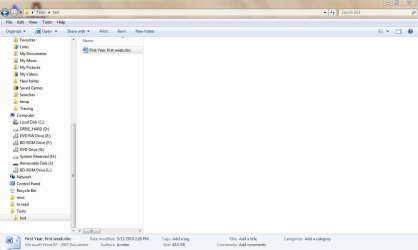
preview pane is blank. This occurs with all Office document types and PDFs as well. I'm using 32 bit Win 7 Pro
 

Attachments

  • blank explorer preview.jpg
    blank explorer preview.jpg
    50.8 KB · Views: 51

My Computer

Computer Manufacturer/Model Number
Gateway M6827
OS
Win 7 Professional 32-bit
CPU
Intel Core 2 Duo CPU T5750 @ 2.00 GHz
Memory
3GB
Monitor(s) Displays
ViewSonic Vx900
Screen Resolution
1280x1024
Hard Drives
150GB Hard Drive
Are the files which you don't see, from Office 2010 or earlier versions?
 

My Computer

Computer type
PC/Desktop
Computer Manufacturer/Model Number
Packard Bell
OS
Windows 7 Home Premium 64bit
CPU
Intel(R) Core(TM) i3-2120 CPU @ 3.30GHz
Motherboard
Packard Bell IPISB-AG
Memory
3.00 GB
Graphics Card(s)
(1) Intel(R) HD Graphics (2) VNC Mirror Driver
Sound Card
Realtek High Definition Audio
Monitor(s) Displays
AIO LCD
Screen Resolution
1920 x 1080
Hard Drives
WDC WD10EADX-22TDHB0 ATA Device
Fixed hard disk media
4 partitions
931.51 GB
Keyboard
Wireless
Mouse
Wireless
Antivirus
Microsoft Security Essentials
Browser
IE; Firefox
Other Info
Also:
Samsung N220 Plus Netbook - Windows 7 Home
HP laptop
iPad 5
Hi,

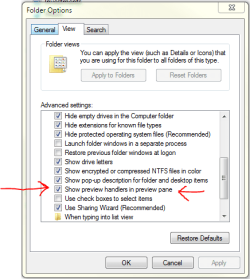
Can I just check something? If you click on the Tools Folder Options in Explorer, and then select View, is the option shown in the image below ticked?

Regards,
Golden
 

Attachments

  • Capture.PNG
    Capture.PNG
    15.3 KB · Views: 23

My Computer

Computer type
PC/Desktop
Computer Manufacturer/Model Number
Golden Mk. I.4
OS
Windows 10 Pro x64 ; Xubuntu x64
CPU
Intel i7 860 @ 2.80 GHz O/C'ed to 4.0GHz
Motherboard
Gigabyte P55A-UD3R Rev.1. Award BIOS F13
Memory
16GB Corsair Vengance DDR3 @ 661 MHz Dual Channel (9-9-9-24)
Graphics Card(s)
EVGA NVidia GTX 560 1024MB
Sound Card
Realtek Integrated
Monitor(s) Displays
Dual Samsung SyncMaster 2494HS
Screen Resolution
1920*1080 and 1920*1080
Hard Drives
1*Samsung 840 EVO 120GB SSD;
1*OCZ Vertex 2 60GB SSD;
2*Samsung F3 SpinPoint 1TB in RAID0;
1*Samsung F1 SpinPoint 1TB;
2*Western Digital 1TB External USB 3.0
1*Western Digital 500GB External USB 3.0
1*Seagate 500GB External USB 2.0
PSU
Thermaltake ToughPower QFan 750W
Case
Thermaltake Element S VK60001W2Z
Cooling
Corsair H60 Water Cooling, 2*230mm and 2*80mm case fans
Keyboard
Logitech G110
Mouse
Logitech MX518
Hi,

Can I just check something? If you click on the Tools Folder Options in Explorer, and then select View, is the option shown in the image below ticked?

Regards,
Golden
I can't see any version of office files and yes the box is ticked.
 

My Computer

Computer Manufacturer/Model Number
Gateway M6827
OS
Win 7 Professional 32-bit
CPU
Intel Core 2 Duo CPU T5750 @ 2.00 GHz
Memory
3GB
Monitor(s) Displays
ViewSonic Vx900
Screen Resolution
1280x1024
Hard Drives
150GB Hard Drive
Mmmm....OK let me investigate a bit more.

Do you use Outlook? Can you preview files sent to you using Outlook?
 

My Computer

Computer type
PC/Desktop
Computer Manufacturer/Model Number
Golden Mk. I.4
OS
Windows 10 Pro x64 ; Xubuntu x64
CPU
Intel i7 860 @ 2.80 GHz O/C'ed to 4.0GHz
Motherboard
Gigabyte P55A-UD3R Rev.1. Award BIOS F13
Memory
16GB Corsair Vengance DDR3 @ 661 MHz Dual Channel (9-9-9-24)
Graphics Card(s)
EVGA NVidia GTX 560 1024MB
Sound Card
Realtek Integrated
Monitor(s) Displays
Dual Samsung SyncMaster 2494HS
Screen Resolution
1920*1080 and 1920*1080
Hard Drives
1*Samsung 840 EVO 120GB SSD;
1*OCZ Vertex 2 60GB SSD;
2*Samsung F3 SpinPoint 1TB in RAID0;
1*Samsung F1 SpinPoint 1TB;
2*Western Digital 1TB External USB 3.0
1*Western Digital 500GB External USB 3.0
1*Seagate 500GB External USB 2.0
PSU
Thermaltake ToughPower QFan 750W
Case
Thermaltake Element S VK60001W2Z
Cooling
Corsair H60 Water Cooling, 2*230mm and 2*80mm case fans
Keyboard
Logitech G110
Mouse
Logitech MX518
Can you post a view - screen print - of the window?
preview pane is blank. This occurs with all Office document types and PDFs as well. I'm using 32 bit Win 7 Pro
The view you show, appears to me, to be through "My Computer".

Can you you view all of the files if you open Word 2010?
 

My Computer

Computer type
PC/Desktop
Computer Manufacturer/Model Number
Packard Bell
OS
Windows 7 Home Premium 64bit
CPU
Intel(R) Core(TM) i3-2120 CPU @ 3.30GHz
Motherboard
Packard Bell IPISB-AG
Memory
3.00 GB
Graphics Card(s)
(1) Intel(R) HD Graphics (2) VNC Mirror Driver
Sound Card
Realtek High Definition Audio
Monitor(s) Displays
AIO LCD
Screen Resolution
1920 x 1080
Hard Drives
WDC WD10EADX-22TDHB0 ATA Device
Fixed hard disk media
4 partitions
931.51 GB
Keyboard
Wireless
Mouse
Wireless
Antivirus
Microsoft Security Essentials
Browser
IE; Firefox
Other Info
Also:
Samsung N220 Plus Netbook - Windows 7 Home
HP laptop
iPad 5
Can you post a view - screen print - of the window?
preview pane is blank. This occurs with all Office document types and PDFs as well. I'm using 32 bit Win 7 Pro
The view you show, appears to me, to be through "My Computer".

Can you you view all of the files if you open Word 2010?
I can view any Word document or text file in Word 2010. My issue is with the explorer preview pane. I hope I understood your question.
 

My Computer

Computer Manufacturer/Model Number
Gateway M6827
OS
Win 7 Professional 32-bit
CPU
Intel Core 2 Duo CPU T5750 @ 2.00 GHz
Memory
3GB
Monitor(s) Displays
ViewSonic Vx900
Screen Resolution
1280x1024
Hard Drives
150GB Hard Drive
OK, I have it at last! :D

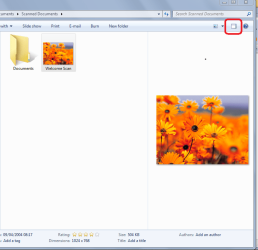
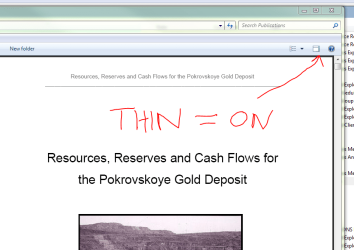
You must have at some tome touched the show/hid preview pane - see below - just touch the icon in the red circle and your preview pane will re-appear!
.
 

Attachments

  • preview.PNG
    preview.PNG
    51.5 KB · Views: 10

My Computer

Computer type
PC/Desktop
Computer Manufacturer/Model Number
Packard Bell
OS
Windows 7 Home Premium 64bit
CPU
Intel(R) Core(TM) i3-2120 CPU @ 3.30GHz
Motherboard
Packard Bell IPISB-AG
Memory
3.00 GB
Graphics Card(s)
(1) Intel(R) HD Graphics (2) VNC Mirror Driver
Sound Card
Realtek High Definition Audio
Monitor(s) Displays
AIO LCD
Screen Resolution
1920 x 1080
Hard Drives
WDC WD10EADX-22TDHB0 ATA Device
Fixed hard disk media
4 partitions
931.51 GB
Keyboard
Wireless
Mouse
Wireless
Antivirus
Microsoft Security Essentials
Browser
IE; Firefox
Other Info
Also:
Samsung N220 Plus Netbook - Windows 7 Home
HP laptop
iPad 5
Hi Irene,

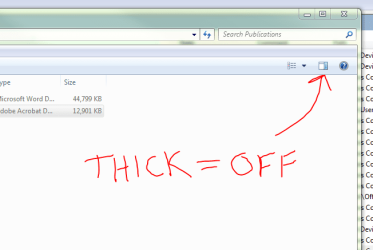
I think he has already tried that - if you look in his attached image in Post #11, you will see the preview has been activated (compare his image to mine below). My gut feeling is that the functionality has somehow been disabled (possibly somewhere in Policies). I'm having a bit of a dig for it.......

Regards,
Golden
 

Attachments

  • 1.PNG
    1.PNG
    15.2 KB · Views: 11
  • 2.PNG
    2.PNG
    37.3 KB · Views: 6
Last edited:

My Computer

Computer type
PC/Desktop
Computer Manufacturer/Model Number
Golden Mk. I.4
OS
Windows 10 Pro x64 ; Xubuntu x64
CPU
Intel i7 860 @ 2.80 GHz O/C'ed to 4.0GHz
Motherboard
Gigabyte P55A-UD3R Rev.1. Award BIOS F13
Memory
16GB Corsair Vengance DDR3 @ 661 MHz Dual Channel (9-9-9-24)
Graphics Card(s)
EVGA NVidia GTX 560 1024MB
Sound Card
Realtek Integrated
Monitor(s) Displays
Dual Samsung SyncMaster 2494HS
Screen Resolution
1920*1080 and 1920*1080
Hard Drives
1*Samsung 840 EVO 120GB SSD;
1*OCZ Vertex 2 60GB SSD;
2*Samsung F3 SpinPoint 1TB in RAID0;
1*Samsung F1 SpinPoint 1TB;
2*Western Digital 1TB External USB 3.0
1*Western Digital 500GB External USB 3.0
1*Seagate 500GB External USB 2.0
PSU
Thermaltake ToughPower QFan 750W
Case
Thermaltake Element S VK60001W2Z
Cooling
Corsair H60 Water Cooling, 2*230mm and 2*80mm case fans
Keyboard
Logitech G110
Mouse
Logitech MX518
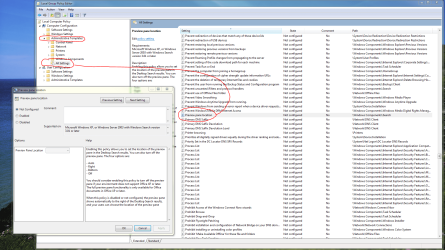
OK......this is worth a go, although I'm not sure how it would have changed (is this PC in a corporate environment by any chance?). The Preview pane can be disabled by using a specific policy : lets check to see it that is the case.

1. Click Start Orb, and in the search box type gpedit.msc and hit enter. (gpedit = group policy editor)
2. Navigate to Preview Pane Location as shown in the attached image.
3. Right-click on the option, and then select edit.
4. Is the Preview Pane Location shown as Not configured, Enabled, or Disabled? (refer to the attached image)

Regards,
Golden
 

Attachments

  • Capture.PNG
    Capture.PNG
    159.2 KB · Views: 191

My Computer

Computer type
PC/Desktop
Computer Manufacturer/Model Number
Golden Mk. I.4
OS
Windows 10 Pro x64 ; Xubuntu x64
CPU
Intel i7 860 @ 2.80 GHz O/C'ed to 4.0GHz
Motherboard
Gigabyte P55A-UD3R Rev.1. Award BIOS F13
Memory
16GB Corsair Vengance DDR3 @ 661 MHz Dual Channel (9-9-9-24)
Graphics Card(s)
EVGA NVidia GTX 560 1024MB
Sound Card
Realtek Integrated
Monitor(s) Displays
Dual Samsung SyncMaster 2494HS
Screen Resolution
1920*1080 and 1920*1080
Hard Drives
1*Samsung 840 EVO 120GB SSD;
1*OCZ Vertex 2 60GB SSD;
2*Samsung F3 SpinPoint 1TB in RAID0;
1*Samsung F1 SpinPoint 1TB;
2*Western Digital 1TB External USB 3.0
1*Western Digital 500GB External USB 3.0
1*Seagate 500GB External USB 2.0
PSU
Thermaltake ToughPower QFan 750W
Case
Thermaltake Element S VK60001W2Z
Cooling
Corsair H60 Water Cooling, 2*230mm and 2*80mm case fans
Keyboard
Logitech G110
Mouse
Logitech MX518
Back
Top