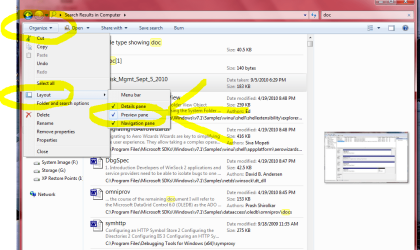
Solved broken explorer preview Office 2010

If they aren't indexed in Windows Explorer they won't be listed in Office from my understanding.

If they are checked they should be indexed. It was one of those potential problems that was simple to check.

I may have been over hopeful it was the problem and would resolve your situation but I was searching and looking for a solution to the best of my ability and knowledge. Learning new things as I'm going.

It isn't like others and myself are not trying.

Mike
 

My Computer My Computer

Computer Manufacturer/Model Number
Hopalong/ Godzilla
OS
Windows7 Pro 64bit SP-1; Windows XP Pro 32bit
CPU
Intel Core i7-870 Lynnfield 2.93GHz LGA 1156 95W Quad-Core
Motherboard
ASUS P7P55D-E PRO
Memory
8GB@1400MHz Crucial Ballistix DDR3-1600 4x2GB
Graphics Card(s)
ASUS ENGTX460 DirectCU/2DI/1GD5 1GB 256-bit GDDR5
Sound Card
VIA Onboard
Monitor(s) Displays
Asus VS248H-P 24"; Samsung SyncMaster 941BW 19"ws
Screen Resolution
1920x1080; 1440x900
Hard Drives
Samsung 830 120GB SSD
Intel 320 120GB SSD
Western Digital Caviar Black WD7501AALS 750GB 7200 RPM SATA 3.0Gb/s
Western Digital Caviar Black WD6401AALS 640GB 7200 RPM SATA 3.0Gb/s
PSU
COOLER MASTER Silent Pro RS850-AMBAJ3-US 850W Modular
Case
COOLER MASTER HAF 932 RC-932-KKN5-GP Black
Cooling
Scythe "Mugen-2 Rev.B" (2 ScytheKaze-Jyuni PWM fans)
Keyboard
Logitech K-320
Mouse
Kensington
Antivirus
Avast Inernet Suite
Browser
IE 9 ; Chrome

My Computer My Computer

Computer type
PC/Desktop
Computer Manufacturer/Model Number
Packard Bell
OS
Windows 7 Home Premium 64bit
CPU
Intel(R) Core(TM) i3-2120 CPU @ 3.30GHz
Motherboard
Packard Bell IPISB-AG
Memory
3.00 GB
Graphics Card(s)
(1) Intel(R) HD Graphics (2) VNC Mirror Driver
Sound Card
Realtek High Definition Audio
Monitor(s) Displays
AIO LCD
Screen Resolution
1920 x 1080
Hard Drives
WDC WD10EADX-22TDHB0 ATA Device
Fixed hard disk media
4 partitions
931.51 GB
Keyboard
Wireless
Mouse
Wireless
Antivirus
Microsoft Security Essentials
Browser
IE; Firefox
Other Info
Also:
Samsung N220 Plus Netbook - Windows 7 Home
HP laptop
iPad 5
I did not see Step 1 checked for, and you have already preformed Step 3.

I'm thinking it is Step 2 or the Note at the bottom of the quote that may be the culprit here, if the OP has a non Microsoft media player installed.
Step 1:
Check if the option "Show thumbnails instead of icons" is selected on the computer.
a. Click Start, click Control Panel. (Classic View)
b. Click on the System icon.
c. Click on the advanced system settings link.
d. Under Performance, click on the Settings button.
e. In the Visual Effects tab, Check "Show thumbnails instead of icons"
f. Apply the changes, restart the computer and check if the issue persists.


Step 2:
This problem also occurs because Windows may not update the thumbnail cache.
To resolve this problem, reset the thumbnail cache. To do this, follow these steps:
a. Click Start, click All Programs, click Accessories, click System Tools, and then click Disk Cleanup.
b. If you are prompted, click My files only.
c. In the Files to delete list, click to select Thumbnails.
Note: Configure other options that you want.
d. Click OK, and then click Delete files.
e. Restart the computer and check the result.


Step 3:
If the issue persists, run sfc (system file checker) scan to scan and fix missing or corrupt system files
See How to use the System File Checker tool to troubleshoot missing or corrupted system files on Windows Vista or on Windows 7

NOTE:
Sometimes non Microsoft media players may cause this issue. Disable them and check the result. Performing clean boot is like disabling non Microsoft programs.
See How to troubleshoot a problem by performing a clean boot in Windows Vista or in Windows 7
Source: http://answers.microsoft.com/en-us/...views-in/f88d16a5-d05d-4c29-aa28-47dff6023d20
 

My Computer My Computer

Computer type
PC/Desktop
Computer Manufacturer/Model Number
Gateway DX4831-01e (Mid-Tower Desktop)
OS
Originally Win 7 Hm Prem x64 Ver 6.1.7600 Build 7601-SP1 | Upgraded to Windows 10 December 14, 2019
CPU
Intel i3 530 2.93GHz, 2933MHz 2 Cores 4 Logical Processors
Motherboard
Gateway H57M01 133 megahertz
Memory
6GB of 1,333MHz DDR3 SDRAM
Graphics Card(s)
32MB Intel Graphics Media Accelerator HD IGChip
Sound Card
Realtek High Definition Audio
Monitor(s) Displays
Gateway HX2000 20inch TFT active matrix TN
Screen Resolution
1600 x 900 x 59 hertz
Hard Drives
WDC WD10EADS-00M2B0 [HDD] (1000.20 GB) -- drive 0,
HL-DT-ST DVDRAM GH41N [CD-ROM dr]
Four card readers, and Four USB 2.0
PSU
300watts.
Case
Mid-Tower Desktop
Cooling
Stock from Gateway
Keyboard
Natural Ergonomic Keyboard 4000, see Other Info
Mouse
Orig. Gateway wore out now using Insignia USB wired optical
Internet Speed
Vz FIOS 10ms png 57.64Mbps down 65.53Mbps up Speedtest.org
Antivirus
Zamana Anti-logger with Anti-malware, MSE, Windows Firewall,
Browser
IE11.0.9600.19399-Upd ver11.0.135, Firefox 68.0.1 x64
Other Info
System Specs by Belarc.

BIOS: American Megatrends Inc. P01-A0 11/17/2009

Replaced the MS 'Natural' Standard PS/2 Enhanced 101-102 Keyboard with a new Natural Ergonomic Keyboard 4000 on August 1st 2014.

Canon Pixma MG3222 Printer.

Updated to IE11 on 12102015 | Fios Quantum Router g1100

Additional AV: SpywareBlaster, manual Mbam, SAS
If they aren't indexed in Windows Explorer they won't be listed in Office from my understanding.

If they are checked they should be indexed. It was one of those potential problems that was simple to check.

I may have been over hopeful it was the problem and would resolve your situation but I was searching and looking for a solution to the best of my ability and knowledge. Learning new things as I'm going.

It isn't like others and myself are not trying.

Mike
Oh I appreciate the help, so my apologies if the opposite appears. I'm just frustrated with the situation.
 

My Computer My Computer

Computer Manufacturer/Model Number
Gateway M6827
OS
Win 7 Professional 32-bit
CPU
Intel Core 2 Duo CPU T5750 @ 2.00 GHz
Memory
3GB
Monitor(s) Displays
ViewSonic Vx900
Screen Resolution
1280x1024
Hard Drives
150GB Hard Drive
I did not see Step 1 checked for, and you have already preformed Step 3.

I'm thinking it is Step 2 or the Note at the bottom of the quote that may be the culprit here, if the OP has a non Microsoft media player installed.
Step 1:
Check if the option "Show thumbnails instead of icons" is selected on the computer.
a. Click Start, click Control Panel. (Classic View)
b. Click on the System icon.
c. Click on the advanced system settings link.
d. Under Performance, click on the Settings button.
e. In the Visual Effects tab, Check "Show thumbnails instead of icons"
f. Apply the changes, restart the computer and check if the issue persists.


Step 2:
This problem also occurs because Windows may not update the thumbnail cache.
To resolve this problem, reset the thumbnail cache. To do this, follow these steps:
a. Click Start, click All Programs, click Accessories, click System Tools, and then click Disk Cleanup.
b. If you are prompted, click My files only.
c. In the Files to delete list, click to select Thumbnails.
Note: Configure other options that you want.
d. Click OK, and then click Delete files.
e. Restart the computer and check the result.


Step 3:
If the issue persists, run sfc (system file checker) scan to scan and fix missing or corrupt system files
See How to use the System File Checker tool to troubleshoot missing or corrupted system files on Windows Vista or on Windows 7

NOTE:
Sometimes non Microsoft media players may cause this issue. Disable them and check the result. Performing clean boot is like disabling non Microsoft programs.
See How to troubleshoot a problem by performing a clean boot in Windows Vista or in Windows 7
Source: http://answers.microsoft.com/en-us/...views-in/f88d16a5-d05d-4c29-aa28-47dff6023d20
tried all 3 steps, with no luck. On another note, the only previews I am able to see are images. So the preview pane does work, just not for any file types except for images. Weird huh?
 
Last edited:

My Computer My Computer

Computer Manufacturer/Model Number
Gateway M6827
OS
Win 7 Professional 32-bit
CPU
Intel Core 2 Duo CPU T5750 @ 2.00 GHz
Memory
3GB
Monitor(s) Displays
ViewSonic Vx900
Screen Resolution
1280x1024
Hard Drives
150GB Hard Drive

My Computer My Computer

Computer type
PC/Desktop
Computer Manufacturer/Model Number
Gateway DX4831-01e (Mid-Tower Desktop)
OS
Originally Win 7 Hm Prem x64 Ver 6.1.7600 Build 7601-SP1 | Upgraded to Windows 10 December 14, 2019
CPU
Intel i3 530 2.93GHz, 2933MHz 2 Cores 4 Logical Processors
Motherboard
Gateway H57M01 133 megahertz
Memory
6GB of 1,333MHz DDR3 SDRAM
Graphics Card(s)
32MB Intel Graphics Media Accelerator HD IGChip
Sound Card
Realtek High Definition Audio
Monitor(s) Displays
Gateway HX2000 20inch TFT active matrix TN
Screen Resolution
1600 x 900 x 59 hertz
Hard Drives
WDC WD10EADS-00M2B0 [HDD] (1000.20 GB) -- drive 0,
HL-DT-ST DVDRAM GH41N [CD-ROM dr]
Four card readers, and Four USB 2.0
PSU
300watts.
Case
Mid-Tower Desktop
Cooling
Stock from Gateway
Keyboard
Natural Ergonomic Keyboard 4000, see Other Info
Mouse
Orig. Gateway wore out now using Insignia USB wired optical
Internet Speed
Vz FIOS 10ms png 57.64Mbps down 65.53Mbps up Speedtest.org
Antivirus
Zamana Anti-logger with Anti-malware, MSE, Windows Firewall,
Browser
IE11.0.9600.19399-Upd ver11.0.135, Firefox 68.0.1 x64
Other Info
System Specs by Belarc.

BIOS: American Megatrends Inc. P01-A0 11/17/2009

Replaced the MS 'Natural' Standard PS/2 Enhanced 101-102 Keyboard with a new Natural Ergonomic Keyboard 4000 on August 1st 2014.

Canon Pixma MG3222 Printer.

Updated to IE11 on 12102015 | Fios Quantum Router g1100

Additional AV: SpywareBlaster, manual Mbam, SAS

My Computer My Computer

Computer Manufacturer/Model Number
Gateway M6827
OS
Win 7 Professional 32-bit
CPU
Intel Core 2 Duo CPU T5750 @ 2.00 GHz
Memory
3GB
Monitor(s) Displays
ViewSonic Vx900
Screen Resolution
1280x1024
Hard Drives
150GB Hard Drive
Never mind it only worked on two files.:(
When I tracked them down they weren't actually .doc

Arrrgggghhhhh!!!!!!!!!
It shows previews of SOME things but nothing you are looking for. :cry:

Sorry.
 

Attachments

  • Preview3.PNG
    Preview3.PNG
    70 KB · Views: 50

My Computer My Computer

Computer Manufacturer/Model Number
Hopalong/ Godzilla
OS
Windows7 Pro 64bit SP-1; Windows XP Pro 32bit
CPU
Intel Core i7-870 Lynnfield 2.93GHz LGA 1156 95W Quad-Core
Motherboard
ASUS P7P55D-E PRO
Memory
8GB@1400MHz Crucial Ballistix DDR3-1600 4x2GB
Graphics Card(s)
ASUS ENGTX460 DirectCU/2DI/1GD5 1GB 256-bit GDDR5
Sound Card
VIA Onboard
Monitor(s) Displays
Asus VS248H-P 24"; Samsung SyncMaster 941BW 19"ws
Screen Resolution
1920x1080; 1440x900
Hard Drives
Samsung 830 120GB SSD
Intel 320 120GB SSD
Western Digital Caviar Black WD7501AALS 750GB 7200 RPM SATA 3.0Gb/s
Western Digital Caviar Black WD6401AALS 640GB 7200 RPM SATA 3.0Gb/s
PSU
COOLER MASTER Silent Pro RS850-AMBAJ3-US 850W Modular
Case
COOLER MASTER HAF 932 RC-932-KKN5-GP Black
Cooling
Scythe "Mugen-2 Rev.B" (2 ScytheKaze-Jyuni PWM fans)
Keyboard
Logitech K-320
Mouse
Kensington
Antivirus
Avast Inernet Suite
Browser
IE 9 ; Chrome
Never mind it only worked on two files.:(
When I tracked them down they weren't actually .doc

Arrrgggghhhhh!!!!!!!!!
It shows previews of SOME things but nothing you are looking for. :cry:

Sorry.

You are going above and beyond with your efforts. Hopefully a solution can be found, but if not, I can reformat. I'm due for one soon anyway.
 

My Computer My Computer

Computer Manufacturer/Model Number
Gateway M6827
OS
Win 7 Professional 32-bit
CPU
Intel Core 2 Duo CPU T5750 @ 2.00 GHz
Memory
3GB
Monitor(s) Displays
ViewSonic Vx900
Screen Resolution
1280x1024
Hard Drives
150GB Hard Drive
I don't know if a reformat if your refering to reinstall Windows will do anything.

I'm not getting the previews either. Not the ones you are looking for.

Mike
 

My Computer My Computer

Computer Manufacturer/Model Number
Hopalong/ Godzilla
OS
Windows7 Pro 64bit SP-1; Windows XP Pro 32bit
CPU
Intel Core i7-870 Lynnfield 2.93GHz LGA 1156 95W Quad-Core
Motherboard
ASUS P7P55D-E PRO
Memory
8GB@1400MHz Crucial Ballistix DDR3-1600 4x2GB
Graphics Card(s)
ASUS ENGTX460 DirectCU/2DI/1GD5 1GB 256-bit GDDR5
Sound Card
VIA Onboard
Monitor(s) Displays
Asus VS248H-P 24"; Samsung SyncMaster 941BW 19"ws
Screen Resolution
1920x1080; 1440x900
Hard Drives
Samsung 830 120GB SSD
Intel 320 120GB SSD
Western Digital Caviar Black WD7501AALS 750GB 7200 RPM SATA 3.0Gb/s
Western Digital Caviar Black WD6401AALS 640GB 7200 RPM SATA 3.0Gb/s
PSU
COOLER MASTER Silent Pro RS850-AMBAJ3-US 850W Modular
Case
COOLER MASTER HAF 932 RC-932-KKN5-GP Black
Cooling
Scythe "Mugen-2 Rev.B" (2 ScytheKaze-Jyuni PWM fans)
Keyboard
Logitech K-320
Mouse
Kensington
Antivirus
Avast Inernet Suite
Browser
IE 9 ; Chrome
I don't know if a reformat if your refering to reinstall Windows will do anything.

I'm not getting the previews either. Not the ones you are looking for.

Mike

Oh really? So maybe its an Office 2010 thing then? But don't you get previews with mp3s or txt files?
 

My Computer My Computer

Computer Manufacturer/Model Number
Gateway M6827
OS
Win 7 Professional 32-bit
CPU
Intel Core 2 Duo CPU T5750 @ 2.00 GHz
Memory
3GB
Monitor(s) Displays
ViewSonic Vx900
Screen Resolution
1280x1024
Hard Drives
150GB Hard Drive
MP3's do show preview. So do txt.

doc and pdf no preview. I'm using Foxit Reader so that may be the reason on pdf's.

Your not getting any of those?

So now I understand your thinking on a reformat/ reinstall.

There is also a repair install option if you have a Windows disk- not the recovery like HP and Dell uses.
http://www.sevenforums.com/tutorials/3413-repair-install.html

This repairs registry etc. but retains files and documents etc.

Worth a read before re installing from scratch.

Mike
 

My Computer My Computer

Computer Manufacturer/Model Number
Hopalong/ Godzilla
OS
Windows7 Pro 64bit SP-1; Windows XP Pro 32bit
CPU
Intel Core i7-870 Lynnfield 2.93GHz LGA 1156 95W Quad-Core
Motherboard
ASUS P7P55D-E PRO
Memory
8GB@1400MHz Crucial Ballistix DDR3-1600 4x2GB
Graphics Card(s)
ASUS ENGTX460 DirectCU/2DI/1GD5 1GB 256-bit GDDR5
Sound Card
VIA Onboard
Monitor(s) Displays
Asus VS248H-P 24"; Samsung SyncMaster 941BW 19"ws
Screen Resolution
1920x1080; 1440x900
Hard Drives
Samsung 830 120GB SSD
Intel 320 120GB SSD
Western Digital Caviar Black WD7501AALS 750GB 7200 RPM SATA 3.0Gb/s
Western Digital Caviar Black WD6401AALS 640GB 7200 RPM SATA 3.0Gb/s
PSU
COOLER MASTER Silent Pro RS850-AMBAJ3-US 850W Modular
Case
COOLER MASTER HAF 932 RC-932-KKN5-GP Black
Cooling
Scythe "Mugen-2 Rev.B" (2 ScytheKaze-Jyuni PWM fans)
Keyboard
Logitech K-320
Mouse
Kensington
Antivirus
Avast Inernet Suite
Browser
IE 9 ; Chrome
MP3's do show preview. So do txt.

doc and pdf no preview. I'm using Foxit Reader so that may be the reason on pdf's.

Your not getting any of those?

So now I understand your thinking on a reformat/ reinstall.

There is also a repair install option if you have a Windows disk- not the recovery like HP and Dell uses.
http://www.sevenforums.com/tutorials/3413-repair-install.html

This repairs registry etc. but retains files and documents etc.

Worth a read before re installing from scratch.

Mike
Thanks for that, I will check out the repair. I don't have preview for mp3, PDF, txt etc...I also use Foxit, but even if I switch to Adobe Acrobat as the default, I don't get PDF previews back.
 

My Computer My Computer

Computer Manufacturer/Model Number
Gateway M6827
OS
Win 7 Professional 32-bit
CPU
Intel Core 2 Duo CPU T5750 @ 2.00 GHz
Memory
3GB
Monitor(s) Displays
ViewSonic Vx900
Screen Resolution
1280x1024
Hard Drives
150GB Hard Drive
I just really get annoyed when we/I can't find the answer. LOL

See you tomorrow about time for bed here.

We will see what the morning brings.:thumbsup:

Mike
 

My Computer My Computer

Computer Manufacturer/Model Number
Hopalong/ Godzilla
OS
Windows7 Pro 64bit SP-1; Windows XP Pro 32bit
CPU
Intel Core i7-870 Lynnfield 2.93GHz LGA 1156 95W Quad-Core
Motherboard
ASUS P7P55D-E PRO
Memory
8GB@1400MHz Crucial Ballistix DDR3-1600 4x2GB
Graphics Card(s)
ASUS ENGTX460 DirectCU/2DI/1GD5 1GB 256-bit GDDR5
Sound Card
VIA Onboard
Monitor(s) Displays
Asus VS248H-P 24"; Samsung SyncMaster 941BW 19"ws
Screen Resolution
1920x1080; 1440x900
Hard Drives
Samsung 830 120GB SSD
Intel 320 120GB SSD
Western Digital Caviar Black WD7501AALS 750GB 7200 RPM SATA 3.0Gb/s
Western Digital Caviar Black WD6401AALS 640GB 7200 RPM SATA 3.0Gb/s
PSU
COOLER MASTER Silent Pro RS850-AMBAJ3-US 850W Modular
Case
COOLER MASTER HAF 932 RC-932-KKN5-GP Black
Cooling
Scythe "Mugen-2 Rev.B" (2 ScytheKaze-Jyuni PWM fans)
Keyboard
Logitech K-320
Mouse
Kensington
Antivirus
Avast Inernet Suite
Browser
IE 9 ; Chrome
I just really get annoyed when we/I can't find the answer. LOL

See you tomorrow about time for bed here.

We will see what the morning brings.:thumbsup:

Mike
Reformat fixed things. I now have proper previews for PDF, Office 2010 files, txt, videos, mp3's etc.
 

My Computer My Computer

Computer Manufacturer/Model Number
Gateway M6827
OS
Win 7 Professional 32-bit
CPU
Intel Core 2 Duo CPU T5750 @ 2.00 GHz
Memory
3GB
Monitor(s) Displays
ViewSonic Vx900
Screen Resolution
1280x1024
Hard Drives
150GB Hard Drive

My Computer My Computer

Computer type
PC/Desktop
Computer Manufacturer/Model Number
Packard Bell
OS
Windows 7 Home Premium 64bit
CPU
Intel(R) Core(TM) i3-2120 CPU @ 3.30GHz
Motherboard
Packard Bell IPISB-AG
Memory
3.00 GB
Graphics Card(s)
(1) Intel(R) HD Graphics (2) VNC Mirror Driver
Sound Card
Realtek High Definition Audio
Monitor(s) Displays
AIO LCD
Screen Resolution
1920 x 1080
Hard Drives
WDC WD10EADX-22TDHB0 ATA Device
Fixed hard disk media
4 partitions
931.51 GB
Keyboard
Wireless
Mouse
Wireless
Antivirus
Microsoft Security Essentials
Browser
IE; Firefox
Other Info
Also:
Samsung N220 Plus Netbook - Windows 7 Home
HP laptop
iPad 5
Nice one - good job Irene and Hopalong.
 

My Computer My Computer

Computer type
PC/Desktop
Computer Manufacturer/Model Number
Golden Mk. I.4
OS
Windows 10 Pro x64 ; Xubuntu x64
CPU
Intel i7 860 @ 2.80 GHz O/C'ed to 4.0GHz
Motherboard
Gigabyte P55A-UD3R Rev.1. Award BIOS F13
Memory
16GB Corsair Vengance DDR3 @ 661 MHz Dual Channel (9-9-9-24)
Graphics Card(s)
EVGA NVidia GTX 560 1024MB
Sound Card
Realtek Integrated
Monitor(s) Displays
Dual Samsung SyncMaster 2494HS
Screen Resolution
1920*1080 and 1920*1080
Hard Drives
1*Samsung 840 EVO 120GB SSD;
1*OCZ Vertex 2 60GB SSD;
2*Samsung F3 SpinPoint 1TB in RAID0;
1*Samsung F1 SpinPoint 1TB;
2*Western Digital 1TB External USB 3.0
1*Western Digital 500GB External USB 3.0
1*Seagate 500GB External USB 2.0
PSU
Thermaltake ToughPower QFan 750W
Case
Thermaltake Element S VK60001W2Z
Cooling
Corsair H60 Water Cooling, 2*230mm and 2*80mm case fans
Keyboard
Logitech G110
Mouse
Logitech MX518
Glad you got it fixed.

Mike
 

My Computer My Computer

Computer Manufacturer/Model Number
Hopalong/ Godzilla
OS
Windows7 Pro 64bit SP-1; Windows XP Pro 32bit
CPU
Intel Core i7-870 Lynnfield 2.93GHz LGA 1156 95W Quad-Core
Motherboard
ASUS P7P55D-E PRO
Memory
8GB@1400MHz Crucial Ballistix DDR3-1600 4x2GB
Graphics Card(s)
ASUS ENGTX460 DirectCU/2DI/1GD5 1GB 256-bit GDDR5
Sound Card
VIA Onboard
Monitor(s) Displays
Asus VS248H-P 24"; Samsung SyncMaster 941BW 19"ws
Screen Resolution
1920x1080; 1440x900
Hard Drives
Samsung 830 120GB SSD
Intel 320 120GB SSD
Western Digital Caviar Black WD7501AALS 750GB 7200 RPM SATA 3.0Gb/s
Western Digital Caviar Black WD6401AALS 640GB 7200 RPM SATA 3.0Gb/s
PSU
COOLER MASTER Silent Pro RS850-AMBAJ3-US 850W Modular
Case
COOLER MASTER HAF 932 RC-932-KKN5-GP Black
Cooling
Scythe "Mugen-2 Rev.B" (2 ScytheKaze-Jyuni PWM fans)
Keyboard
Logitech K-320
Mouse
Kensington
Antivirus
Avast Inernet Suite
Browser
IE 9 ; Chrome
Thankyou

Thanks Irene - that had frustrated me for a few days until I read your post. Even though I have used so many PCs where it was working, I had lost the plot on this one on a PC I recently set up. I was also chasing down a blind alley by looking at the status line icon as that changes on preview too --- well for .pdf it does but not for MSOffice items (how hard would that be ?) apparently.

What is the point of the "show preview" option under Tools which seems just designed to frustrate the explorer hide/show preview button ?
 

My Computer My Computer

OS
ULT 32 and 64
Here it is the "REAL" solution (worked for me)

Add this to your registry: (select text, copy to notepad, save as file.txt, rename file.txt to file.reg)

Windows Registry Editor Version 5.00

[HKEY_CLASSES_ROOT\AppID\{6d2b5079-2f0b-48dd-ab7f-97cec514d30b}]
@="Preview Handler Surrogate Host"
"DllSurrogate"=hex(2):25,00,53,00,79,00,73,00,74,00,65,00,6d,00,52,00,6f,00,6f,\
00,74,00,25,00,5c,00,73,00,79,00,73,00,74,00,65,00,6d,00,33,00,32,00,5c,00,\
70,00,72,00,65,00,76,00,68,00,6f,00,73,00,74,00,2e,00,65,00,78,00,65,00,00,\
00
 

My Computer My Computer

Computer Manufacturer/Model Number
OEM
OS
Windows 7 Ultimate 32bit
CPU
Core 2 Quad 9450
Motherboard
Asus Striker II Formula
Memory
4GB DDR2 1066
Graphics Card(s)
Nvidia GTX560ti
Sound Card
SoundBlaster X-Fi Titanium
Monitor(s) Displays
Samsung SyncMaster P2250
Hard Drives
SSD OCZ Agility 3 128MB
WD Caviar Black 1TB
PSU
Corsair 750w
Case
Corsair
Back
Top