Brother Software says no enough disk space

QuickFix00

New member
Local time
5:45 AM
Messages
5
I just got a Brother MFC-J6510DW Multi/Printer/scanner.
I Have 2 pc's with a fairly fresh instal of windows 7 64bit (maybe about a week old)
On my PC the software installed fine and works great, on my business partners pc i get an error when it come to installing the network driver and a few of the tool
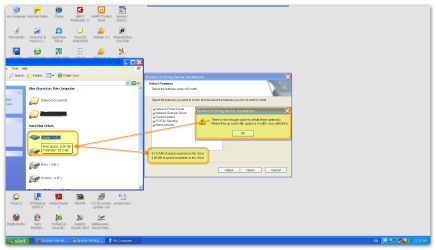
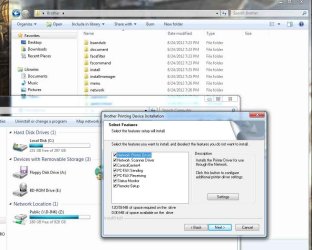
The error says that there is not enough disk space.. when in fact there are over 200gig's left on the HD
been working on this for about 6 hours and just cannon come up with a fix for it. I have deleted the reg entries, used CCleaner just in case i missed something, tries a new user account, tried running as admin, and aslo (just cuz I read it on a forum) I tried downloading the xp software and running it in compatability mode

anyway i have attached a picture of the error, with Local Disk beside it

Any help would be greatly appreciated
 

Attachments
  • Warren printer.jpg
    Warren printer.jpg
    89.2 KB · Views: 34

My Computer My Computer

OS
Windows 7 64bit
CPU
Core 2 Quad 2.4G
Memory
4 Gig Kingston 800hz
Graphics Card(s)
Radeon HD5400
Welcome to Seven Forums QuickFix00. It is an oddity, but you might try installing it in Safe mode with networking:

http://www.sevenforums.com/tutorials/69585-safe-mode.html

It would be a workaround, but perhaps easier then finding out why this installer does not see the correct disk space. A Guy
 

My Computer My Computer

Computer type
PC/Desktop
OS
Windows 10 Home x64
CPU
INTEL Core i5-750 Quad-Core 3.37GHz
Motherboard
ASUS P7P55D
Memory
HyperX Fury Black Series 8GB (2 x 4GB) 1866Mhz
Graphics Card(s)
EVGA GeForce GTX 750 Superclocked 1GB 128-Bit GDDR5
Monitor(s) Displays
LG 32MA68HY 32" IPS
Screen Resolution
1920 x 1080
Hard Drives
Samsung 840 Evo 120GB, SEAGATE 500GB Barracuda® 7200.12, SATA 3 Gb/s, 7200 RPM, 16MB cache
PSU
ANTEC TruePower New TP-550, 80 PLUS, 550W
Case
ANTEC Three Hundred Illusion
Cooling
COOLER MASTER Hyper 212 Plus, 4 x 120mm 1 x 140mm Noctua's
Internet Speed
85 + Mbps
Antivirus
Avast
Browser
Vivaldi
Thanx A Guy for the thought.. tried it this morning and no luck.... still "not enough space" :/
 

My Computer My Computer

OS
Windows 7 64bit
CPU
Core 2 Quad 2.4G
Memory
4 Gig Kingston 800hz
Graphics Card(s)
Radeon HD5400
I'd suggest running Chkdsk. Boot to safe mode with command prompt per the above tutorial. When the safe mode command prompt loads type in:

chkdsk C: /F

Press enter

Let the check run and reboot into Windows. See if that helped. A Guy
 

My Computer My Computer

Computer type
PC/Desktop
OS
Windows 10 Home x64
CPU
INTEL Core i5-750 Quad-Core 3.37GHz
Motherboard
ASUS P7P55D
Memory
HyperX Fury Black Series 8GB (2 x 4GB) 1866Mhz
Graphics Card(s)
EVGA GeForce GTX 750 Superclocked 1GB 128-Bit GDDR5
Monitor(s) Displays
LG 32MA68HY 32" IPS
Screen Resolution
1920 x 1080
Hard Drives
Samsung 840 Evo 120GB, SEAGATE 500GB Barracuda® 7200.12, SATA 3 Gb/s, 7200 RPM, 16MB cache
PSU
ANTEC TruePower New TP-550, 80 PLUS, 550W
Case
ANTEC Three Hundred Illusion
Cooling
COOLER MASTER Hyper 212 Plus, 4 x 120mm 1 x 140mm Noctua's
Internet Speed
85 + Mbps
Antivirus
Avast
Browser
Vivaldi
just tryed that.. no luck
this has got to be one of the weirdest problems i have ever seen
again thx for the help A Guy
 

My Computer My Computer

OS
Windows 7 64bit
CPU
Core 2 Quad 2.4G
Memory
4 Gig Kingston 800hz
Graphics Card(s)
Radeon HD5400
It just occurred to me, you are trying to install from a CD, or a download from the web? If from the CD, you might try copying the files to your HDD 1st, and run the installer from there. I find these drivers and utilities for your printer on the net:

Brother Solutions Center: MFC-J6510DW: Downloads: Others

A Guy
 

My Computer My Computer

Computer type
PC/Desktop
OS
Windows 10 Home x64
CPU
INTEL Core i5-750 Quad-Core 3.37GHz
Motherboard
ASUS P7P55D
Memory
HyperX Fury Black Series 8GB (2 x 4GB) 1866Mhz
Graphics Card(s)
EVGA GeForce GTX 750 Superclocked 1GB 128-Bit GDDR5
Monitor(s) Displays
LG 32MA68HY 32" IPS
Screen Resolution
1920 x 1080
Hard Drives
Samsung 840 Evo 120GB, SEAGATE 500GB Barracuda® 7200.12, SATA 3 Gb/s, 7200 RPM, 16MB cache
PSU
ANTEC TruePower New TP-550, 80 PLUS, 550W
Case
ANTEC Three Hundred Illusion
Cooling
COOLER MASTER Hyper 212 Plus, 4 x 120mm 1 x 140mm Noctua's
Internet Speed
85 + Mbps
Antivirus
Avast
Browser
Vivaldi
yep it was from a cd... I did copy the entire cd to a folder and run it from that, just cuz it was loading faster.. still no go... tried downloading right from brother web site and still no luck..

But looking down the list with the link you just gave, i think i'm gonna try a few different tools.. not just the full pkg install
Maybe update the firmware to :/
 

My Computer My Computer

OS
Windows 7 64bit
CPU
Core 2 Quad 2.4G
Memory
4 Gig Kingston 800hz
Graphics Card(s)
Radeon HD5400
If you have enough disk space :D

A Guy
 

My Computer My Computer

Computer type
PC/Desktop
OS
Windows 10 Home x64
CPU
INTEL Core i5-750 Quad-Core 3.37GHz
Motherboard
ASUS P7P55D
Memory
HyperX Fury Black Series 8GB (2 x 4GB) 1866Mhz
Graphics Card(s)
EVGA GeForce GTX 750 Superclocked 1GB 128-Bit GDDR5
Monitor(s) Displays
LG 32MA68HY 32" IPS
Screen Resolution
1920 x 1080
Hard Drives
Samsung 840 Evo 120GB, SEAGATE 500GB Barracuda® 7200.12, SATA 3 Gb/s, 7200 RPM, 16MB cache
PSU
ANTEC TruePower New TP-550, 80 PLUS, 550W
Case
ANTEC Three Hundred Illusion
Cooling
COOLER MASTER Hyper 212 Plus, 4 x 120mm 1 x 140mm Noctua's
Internet Speed
85 + Mbps
Antivirus
Avast
Browser
Vivaldi
LOL fair enough :P
 

My Computer My Computer

OS
Windows 7 64bit
CPU
Core 2 Quad 2.4G
Memory
4 Gig Kingston 800hz
Graphics Card(s)
Radeon HD5400
I just got a Brother MFC-J6510DW Multi/Printer/scanner.
I Have 2 pc's with a fairly fresh instal of windows 7 64bit (maybe about a week old)
On my PC the software installed fine and works great, on my business partners pc i get an error when it come to installing the network driver and a few of the tool
The error says that there is not enough disk space.. when in fact there are over 200gig's left on the HD
been working on this for about 6 hours and just cannon come up with a fix for it. I have deleted the reg entries, used CCleaner just in case i missed something, tries a new user account, tried running as admin, and aslo (just cuz I read it on a forum) I tried downloading the xp software and running it in compatability mode

anyway i have attached a picture of the error, with Local Disk beside it

Any help would be greatly appreciated

I am facing very similar problem while installing MFL-Pro software - just like you. I tried deleting all past traces of this application from the registry even. The firmware of my printer all ready stands upgraded long back and hence I am unable to upgrade it again.
Please let me know if you are able to over come this bug.
Tnx
 

Attachments

  • Snap_2012.09.02 00.57.29_003.png
    Snap_2012.09.02 00.57.29_003.png
    91.5 KB · Views: 15
Last edited:

My Computer My Computer

OS
Win XP SP3
What a luck!
After having posted my problem I was wondering why it is showing no space.
The installation was not offering me any choice about the drive on I wish I can install the application. This only struck me that may be the setup is trying to install it in the first drive of my computer. And the first drive happened to be Floppy drive. I immediately disabled the floppy drive in my device manager - opened 'my computer' and confirmed there was no 'A' drive. Thereafter it was a smooth affair. Software was installed in a jiffy.:D
Believe me I had sent this problem to Brother USA by email and also as feedback for their FAQ but received no response all these days.
Thanks to this forum as after posting it I got immediate resolution to my problem though of my own but the fact is that it was only after posting here.
 

My Computer My Computer

OS
Win XP SP3

My Computer My Computer

Computer type
PC/Desktop
OS
Windows 10 Home x64
CPU
INTEL Core i5-750 Quad-Core 3.37GHz
Motherboard
ASUS P7P55D
Memory
HyperX Fury Black Series 8GB (2 x 4GB) 1866Mhz
Graphics Card(s)
EVGA GeForce GTX 750 Superclocked 1GB 128-Bit GDDR5
Monitor(s) Displays
LG 32MA68HY 32" IPS
Screen Resolution
1920 x 1080
Hard Drives
Samsung 840 Evo 120GB, SEAGATE 500GB Barracuda® 7200.12, SATA 3 Gb/s, 7200 RPM, 16MB cache
PSU
ANTEC TruePower New TP-550, 80 PLUS, 550W
Case
ANTEC Three Hundred Illusion
Cooling
COOLER MASTER Hyper 212 Plus, 4 x 120mm 1 x 140mm Noctua's
Internet Speed
85 + Mbps
Antivirus
Avast
Browser
Vivaldi
What a luck!
After having posted my problem I was wondering why it is showing no space.
The installation was not offering me any choice about the drive on I wish I can install the application. This only struck me that may be the setup is trying to install it in the first drive of my computer. And the first drive happened to be Floppy drive. I immediately disabled the floppy drive in my device manager - opened 'my computer' and confirmed there was no 'A' drive. Thereafter it was a smooth affair. Software was installed in a jiffy.:D
Believe me I had sent this problem to Brother USA by email and also as feedback for their FAQ but received no response all these days.
Thanks to this forum as after posting it I got immediate resolution to my problem though of my own but the fact is that it was only after posting here.

Welcome to Seven Forums Battleaxe. Good for you, good info. I had seen posts about making sure it was trying to install on the disk with the free space. Hadn't thought about what you posted :thumbsup:

A Guy
 

My Computer My Computer

Computer type
PC/Desktop
OS
Windows 10 Home x64
CPU
INTEL Core i5-750 Quad-Core 3.37GHz
Motherboard
ASUS P7P55D
Memory
HyperX Fury Black Series 8GB (2 x 4GB) 1866Mhz
Graphics Card(s)
EVGA GeForce GTX 750 Superclocked 1GB 128-Bit GDDR5
Monitor(s) Displays
LG 32MA68HY 32" IPS
Screen Resolution
1920 x 1080
Hard Drives
Samsung 840 Evo 120GB, SEAGATE 500GB Barracuda® 7200.12, SATA 3 Gb/s, 7200 RPM, 16MB cache
PSU
ANTEC TruePower New TP-550, 80 PLUS, 550W
Case
ANTEC Three Hundred Illusion
Cooling
COOLER MASTER Hyper 212 Plus, 4 x 120mm 1 x 140mm Noctua's
Internet Speed
85 + Mbps
Antivirus
Avast
Browser
Vivaldi
Thanks!,
This problem had bothered me for months together and since the printer & its scanner was though working without this software application but not reproducing the exact colors, I did not bothered much. Only after reading the post about the same issue I took it as a challenge. Installing the software had helped me even in proving that the scanner & printer's output had nothing to do with it. The color printouts are in very light colors than the originals. The same thing goes for scanner - a sharp & vivid photograph when scanned showed light & dull colors.
There's a consumer case already against 'Brother' for not giving proper support. Honestly I'll never ever buy Brother printer again - even at half of the market price.
There's yet another piece of advice for all my friend users of this Brother printers. Please use best quality dye based and/or pigment ink - both works fine but like your refrigerator, never switch off these Brother inkjet printers. And even if you had to switch it off then not more than 12 hrs. Else your print-head will get clogged and Brother only needs an excuse to void your warranty.
Thanks again & God bless!
 
Last edited:

My Computer My Computer

OS
Win XP SP3
Back
Top