browser keeps crashing

ro187

New member
Local time
6:00 PM
Messages
5
Hi guys
Both my internet explorer and google chrome keeps crashing, with or without internet connection. When i open ie, i get a pop up message "internet explorer has stopped working. Windows can check online for a solution" . Have tried the "check online for a solution" option. Nothing happens. When i open google chrome i get the same message.

My pc recently had a virus that used to convert usb flash files to shortcuts. I bought the antivirus bitdefender which sorted this out immediately.

Furthermore my pc wont allow me to change my theme from the windows classic theme and won't let me download updates.

Everything worked fine before the virus.

I have a dual core 32bit system. 4gig ram. 500gig hard drive. Desktop computer. Windows 7 ultimate.
Pc is approximately 4 years old.

Please help. Im a student and need my pc to be 100%. Thanks in advance.
 

My Computer

Computer type
PC/Desktop
OS
windows 7 ultimate 32bit
Hi ro187 and welcome to Seven Forums!

Did you get an antivirus product only after you noticed you were infected? I mean if you didn't have one before that? Viruses and malware can cause all kinds of strange problems, and it's often not enough to only let one antivirus product clean it up.
If you haven't done a full scan with BitDefender, I suggest you start with that.

Then I suggest http://www.sevenforums.com/tutorials/338716-malwarebytes-anti-malware-free.html
Go to settings and check the "Scan for Rootkits" option to also try and find hidden malware:
https://www.malwarebytes.org/support/guides/mbam/Detection.html

You could also try this to perhaps see if there's any sign of malware present: http://www.sevenforums.com/tutorial...r-virustotal-check-all-processes-50-av-s.html
 

My Computer

Computer type
Laptop
Computer Manufacturer/Model Number
HP Elitebook 8540p
OS
Windows 7 Pro 32
CPU
Intel(R) Core(TM) i5 CPU M 540 @ 2.53GHz
Motherboard
Hewlett-Packard 1521
Memory
4,00 GB (Usable 2,98)
Graphics Card(s)
NVIDIA NVS 5100M
Sound Card
NVIDIA High Definition Audio
Screen Resolution
1600x900
Hard Drives
INTEL SSDSA2CW120G3
Antivirus
F-Secure Internet Security
Browser
IE, Firefox, Opera
Other Info
Sandboxie,
SRP (Software Restriction Policy),
EMET (Enhanced Mitigation Experience Toolkit),
WFC (Windows Firewall Control by BiniSoft),
Malwarebytes Premium
Hi and welcome to Sevenforums,
http://www.sevenforums.com/tutorials/89919-troubleshooting-internet-explorer-issues.html

Tutorial of Resetting Internet explorer,
http://www.sevenforums.com/tutorials/1222-internet-explorer-reset.html
Accessing Internet Options from the Start menu search,
Reset process first opening Internet explorer

Use No Add-ons mode/ Click the Start button :orb: and type in the search box,​
Internet explorer
Click on the No Add-ons suggestion,
Start-no%20add-ons-7.jpg

It’s located at, Start/ All programs/ Accessories folder/ System tools folder/ No add-ons.

Use Safe mode with networking to see if Internet explorer still crashes,
http://www.sevenforums.com/tutorials/69585-safe-mode.html
 

My Computer

Computer type
PC/Desktop
Computer Manufacturer/Model Number
Custom assembled by me :}
OS
Win-7-Pro64bit 7-H-Prem-64bit
CPU
i7-5930K 2nd i9-9940x both water blocked VRM's too
Motherboard
ASUS SABERTOOTH X99 2nd ASUS x299 Apex
Memory
Trident-z 3200C14 2nd Trident-z 3600C16
Graphics Card(s)
EVGA 1080ti ftw3 2nd Titan Xp both water blocked
Sound Card
Built-in Realtek
Monitor(s) Displays
1-AOC G2460PG 24"G-Sync 144Hz/ 2nd 1-ASUS VG248QE 24" 144Hz
Screen Resolution
1920 x 1080 144Hz
Hard Drives
2-Samsung M.2 Evo & Evo Plus
2-Samsung 850 EVO 500GB SSD's/ 3-2.5 W.D. Black 1tb-&3-1tb/3-3.5 WD Black 1tb hdd's
PSU
EVGA SuperNOVA 1000-P2 2nd 1200-P2
Case
2-Corsair Obsidian Series 450D Black ATX Mid Tower
Cooling
Custom water loops
Keyboard
Logitech G710+/ 2nd Logitech G910
Mouse
2-RedDragon M901 Perdition 16400 dpi Gaming mouse = wired
Internet Speed
Comcast Ping 19ms 89.31mbps download speed 6.12mbps upload
Antivirus
Malwarebytes Pro/ Superantispyware Pro
Browser
FireFox & Pale moon
Other Info
2nd ASUS X299 Apex/Intel i9-9940x with Custom water loop/7H-Prem-x64/Corsair 450D case/Ram Trident-z 3600C16 4x8gb / Samsung970Evo plus 500gb SSD/Dual ssd EZ swap evo/PSU EVGA SuperNova 1200w-P2 80+Platinum/GPU Titan Xp /8-ML-140 on push-pull on 2-280GTX rads
Thanks for the quick responses guys

@thrashzone. Have tried these suggestions. Hasn't helped. Thank you though.

@tookeri: The only antivirus I had prior to being infected was AVG. Afterwards I used Kaspersky rescue disc to scan and remove threats. Then bought BitDefender, installed, scanned and removed 4 viruses. My usb's are no longer affected.

I have taken your suggestion and followed the tutorial on malwarebytes. I have reached the step where threats have been quaranteened and virus total installed. However, since my browsers arent working, i cant use virus total. Should i delete all threats detected by MalwareBytes?
 

My Computer

Computer type
PC/Desktop
OS
windows 7 ultimate 32bit
Should i delete all threats detected by MalwareBytes?
As a general answer Yes, but if you're unsure you can post the scan results log here so we can help you decide.
 

My Computer

Computer type
Laptop
Computer Manufacturer/Model Number
HP Elitebook 8540p
OS
Windows 7 Pro 32
CPU
Intel(R) Core(TM) i5 CPU M 540 @ 2.53GHz
Motherboard
Hewlett-Packard 1521
Memory
4,00 GB (Usable 2,98)
Graphics Card(s)
NVIDIA NVS 5100M
Sound Card
NVIDIA High Definition Audio
Screen Resolution
1600x900
Hard Drives
INTEL SSDSA2CW120G3
Antivirus
F-Secure Internet Security
Browser
IE, Firefox, Opera
Other Info
Sandboxie,
SRP (Software Restriction Policy),
EMET (Enhanced Mitigation Experience Toolkit),
WFC (Windows Firewall Control by BiniSoft),
Malwarebytes Premium
Hi,
Both browsers crash using Safe mode with networking :shock:
Review Jacee’s instructions to run Adwcleaner here post #7,
Ignore the title of the thread,
http://www.sevenforums.com/system-security/316404-instant-savings-app.html
Screen shot of the download button to use for Adwcleaner

Safe mode with networking,
Shut down your machine, Unplug-Hold the power button down for 30/45 seconds (Power Drain)
Power up and Tap the F8 key continuously until you see a black page with white text,
Use the down arrow key to toggle to safe mode with networking/ hit the enter key.
Login as usual and download the scanner,
Post the scan results,
Cheers.
 

My Computer

Computer type
PC/Desktop
Computer Manufacturer/Model Number
Custom assembled by me :}
OS
Win-7-Pro64bit 7-H-Prem-64bit
CPU
i7-5930K 2nd i9-9940x both water blocked VRM's too
Motherboard
ASUS SABERTOOTH X99 2nd ASUS x299 Apex
Memory
Trident-z 3200C14 2nd Trident-z 3600C16
Graphics Card(s)
EVGA 1080ti ftw3 2nd Titan Xp both water blocked
Sound Card
Built-in Realtek
Monitor(s) Displays
1-AOC G2460PG 24"G-Sync 144Hz/ 2nd 1-ASUS VG248QE 24" 144Hz
Screen Resolution
1920 x 1080 144Hz
Hard Drives
2-Samsung M.2 Evo & Evo Plus
2-Samsung 850 EVO 500GB SSD's/ 3-2.5 W.D. Black 1tb-&3-1tb/3-3.5 WD Black 1tb hdd's
PSU
EVGA SuperNOVA 1000-P2 2nd 1200-P2
Case
2-Corsair Obsidian Series 450D Black ATX Mid Tower
Cooling
Custom water loops
Keyboard
Logitech G710+/ 2nd Logitech G910
Mouse
2-RedDragon M901 Perdition 16400 dpi Gaming mouse = wired
Internet Speed
Comcast Ping 19ms 89.31mbps download speed 6.12mbps upload
Antivirus
Malwarebytes Pro/ Superantispyware Pro
Browser
FireFox & Pale moon
Other Info
2nd ASUS X299 Apex/Intel i9-9940x with Custom water loop/7H-Prem-x64/Corsair 450D case/Ram Trident-z 3600C16 4x8gb / Samsung970Evo plus 500gb SSD/Dual ssd EZ swap evo/PSU EVGA SuperNova 1200w-P2 80+Platinum/GPU Titan Xp /8-ML-140 on push-pull on 2-280GTX rads
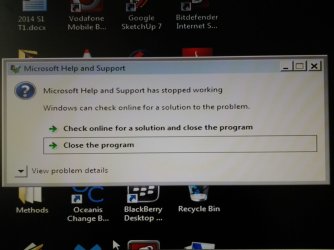
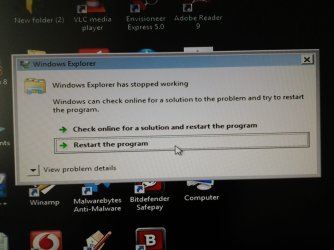
Ok so I have deleted all threats detected by MalwareBytes.

Downloaded AdwCleaner (using a different device as my browsers aren't working)

Followed instructions to power drain.
Logged on with 'safe mode with networking'
Began scan with AdwCleaner.
Received 3 pop-up messages (see uploaded images)
 

Attachments

  • 20140923_153732.jpg
    20140923_153732.jpg
    148.8 KB · Views: 0
  • 20140923_153636.jpg
    20140923_153636.jpg
    183.3 KB · Views: 0
  • 20140923_150545.jpg
    20140923_150545.jpg
    171.1 KB · Views: 0

My Computer

Computer type
PC/Desktop
OS
windows 7 ultimate 32bit
Hi,
Very weird,
Restart normally then run the scanners,
The View problem details might shed some light but I doubt it they usually contain the obvious exe file crash :/

My first thought would be to uninstall BitDefender ?
What antivirus and or security suite was installed before all of this started ?
 

My Computer

Computer type
PC/Desktop
Computer Manufacturer/Model Number
Custom assembled by me :}
OS
Win-7-Pro64bit 7-H-Prem-64bit
CPU
i7-5930K 2nd i9-9940x both water blocked VRM's too
Motherboard
ASUS SABERTOOTH X99 2nd ASUS x299 Apex
Memory
Trident-z 3200C14 2nd Trident-z 3600C16
Graphics Card(s)
EVGA 1080ti ftw3 2nd Titan Xp both water blocked
Sound Card
Built-in Realtek
Monitor(s) Displays
1-AOC G2460PG 24"G-Sync 144Hz/ 2nd 1-ASUS VG248QE 24" 144Hz
Screen Resolution
1920 x 1080 144Hz
Hard Drives
2-Samsung M.2 Evo & Evo Plus
2-Samsung 850 EVO 500GB SSD's/ 3-2.5 W.D. Black 1tb-&3-1tb/3-3.5 WD Black 1tb hdd's
PSU
EVGA SuperNOVA 1000-P2 2nd 1200-P2
Case
2-Corsair Obsidian Series 450D Black ATX Mid Tower
Cooling
Custom water loops
Keyboard
Logitech G710+/ 2nd Logitech G910
Mouse
2-RedDragon M901 Perdition 16400 dpi Gaming mouse = wired
Internet Speed
Comcast Ping 19ms 89.31mbps download speed 6.12mbps upload
Antivirus
Malwarebytes Pro/ Superantispyware Pro
Browser
FireFox & Pale moon
Other Info
2nd ASUS X299 Apex/Intel i9-9940x with Custom water loop/7H-Prem-x64/Corsair 450D case/Ram Trident-z 3600C16 4x8gb / Samsung970Evo plus 500gb SSD/Dual ssd EZ swap evo/PSU EVGA SuperNova 1200w-P2 80+Platinum/GPU Titan Xp /8-ML-140 on push-pull on 2-280GTX rads
@ThrashZone From a previous post:

"The only antivirus I had prior to being infected was AVG. Afterwards I used Kaspersky rescue disc to scan and remove threats. Then bought BitDefender, installed, scanned and removed 4 viruses. My usb's are no longer affected."
 

My Computer

Computer type
Laptop
Computer Manufacturer/Model Number
HP Elitebook 8540p
OS
Windows 7 Pro 32
CPU
Intel(R) Core(TM) i5 CPU M 540 @ 2.53GHz
Motherboard
Hewlett-Packard 1521
Memory
4,00 GB (Usable 2,98)
Graphics Card(s)
NVIDIA NVS 5100M
Sound Card
NVIDIA High Definition Audio
Screen Resolution
1600x900
Hard Drives
INTEL SSDSA2CW120G3
Antivirus
F-Secure Internet Security
Browser
IE, Firefox, Opera
Other Info
Sandboxie,
SRP (Software Restriction Policy),
EMET (Enhanced Mitigation Experience Toolkit),
WFC (Windows Firewall Control by BiniSoft),
Malwarebytes Premium

My Computer

Computer type
PC/Desktop
Computer Manufacturer/Model Number
Custom assembled by me :}
OS
Win-7-Pro64bit 7-H-Prem-64bit
CPU
i7-5930K 2nd i9-9940x both water blocked VRM's too
Motherboard
ASUS SABERTOOTH X99 2nd ASUS x299 Apex
Memory
Trident-z 3200C14 2nd Trident-z 3600C16
Graphics Card(s)
EVGA 1080ti ftw3 2nd Titan Xp both water blocked
Sound Card
Built-in Realtek
Monitor(s) Displays
1-AOC G2460PG 24"G-Sync 144Hz/ 2nd 1-ASUS VG248QE 24" 144Hz
Screen Resolution
1920 x 1080 144Hz
Hard Drives
2-Samsung M.2 Evo & Evo Plus
2-Samsung 850 EVO 500GB SSD's/ 3-2.5 W.D. Black 1tb-&3-1tb/3-3.5 WD Black 1tb hdd's
PSU
EVGA SuperNOVA 1000-P2 2nd 1200-P2
Case
2-Corsair Obsidian Series 450D Black ATX Mid Tower
Cooling
Custom water loops
Keyboard
Logitech G710+/ 2nd Logitech G910
Mouse
2-RedDragon M901 Perdition 16400 dpi Gaming mouse = wired
Internet Speed
Comcast Ping 19ms 89.31mbps download speed 6.12mbps upload
Antivirus
Malwarebytes Pro/ Superantispyware Pro
Browser
FireFox & Pale moon
Other Info
2nd ASUS X299 Apex/Intel i9-9940x with Custom water loop/7H-Prem-x64/Corsair 450D case/Ram Trident-z 3600C16 4x8gb / Samsung970Evo plus 500gb SSD/Dual ssd EZ swap evo/PSU EVGA SuperNova 1200w-P2 80+Platinum/GPU Titan Xp /8-ML-140 on push-pull on 2-280GTX rads
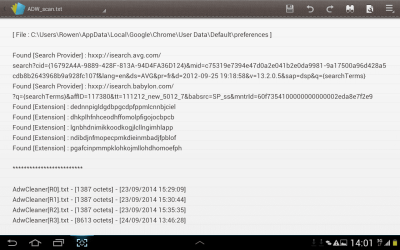
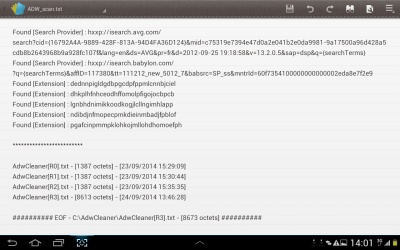
Hi. Yes AVG was successfully uninstalled prior to installation of bitdefender.
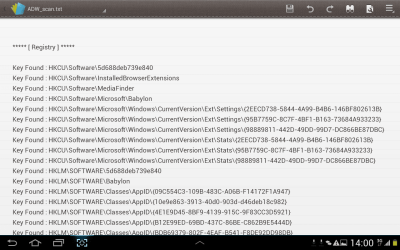
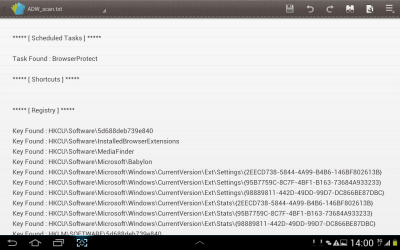
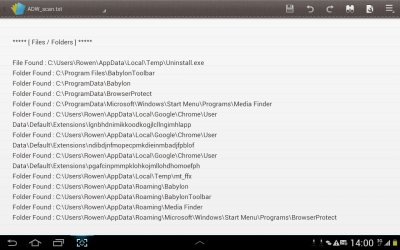
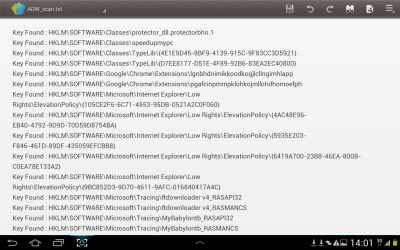
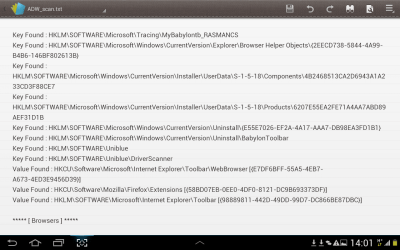
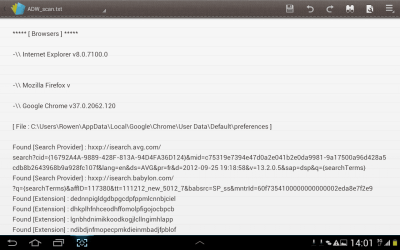
Ran a scan with ADW cleaner in normal mode.
 

Attachments

  • Screenshot_2014-09-24-14-00-56.png
    Screenshot_2014-09-24-14-00-56.png
    102.5 KB · Views: 0
  • Screenshot_2014-09-24-14-00-46.png
    Screenshot_2014-09-24-14-00-46.png
    88.3 KB · Views: 0
  • Screenshot_2014-09-24-14-00-37.png
    Screenshot_2014-09-24-14-00-37.png
    83.5 KB · Views: 0
  • Screenshot_2014-09-24-14-00-28.png
    Screenshot_2014-09-24-14-00-28.png
    61.3 KB · Views: 0
  • Screenshot_2014-09-24-14-00-17.png
    Screenshot_2014-09-24-14-00-17.png
    57.8 KB · Views: 0
  • Screenshot_2014-09-24-14-01-03.png
    Screenshot_2014-09-24-14-01-03.png
    89.8 KB · Views: 0
  • Screenshot_2014-09-24-14-01-12.png
    Screenshot_2014-09-24-14-01-12.png
    70.9 KB · Views: 0
  • Screenshot_2014-09-24-14-01-30.png
    Screenshot_2014-09-24-14-01-30.png
    52.2 KB · Views: 0
  • Screenshot_2014-09-24-14-01-43.png
    Screenshot_2014-09-24-14-01-43.png
    67.7 KB · Views: 0
  • Screenshot_2014-09-24-14-02-01.png
    Screenshot_2014-09-24-14-02-01.png
    62.2 KB · Views: 1

My Computer

Computer type
PC/Desktop
OS
windows 7 ultimate 32bit
Once someone helped you remove any threats, you may also want to see if any Windows system files were corrupted and require repair using the steps below. Leave till you have the other stuff sorted out.

1. Click Start
orb.png

2. In the search box, type cmd
3. In the list that appears, right-click on cmd.exe and choose Run as administrator
4. In the command window that opens, type sfc /scannow and hit enter.

Report the output from the command window once it finishes.
 

My Computer

Computer type
PC/Desktop
Computer Manufacturer/Model Number
Golden Mk. I.4
OS
Windows 10 Pro x64 ; Xubuntu x64
CPU
Intel i7 860 @ 2.80 GHz O/C'ed to 4.0GHz
Motherboard
Gigabyte P55A-UD3R Rev.1. Award BIOS F13
Memory
16GB Corsair Vengance DDR3 @ 661 MHz Dual Channel (9-9-9-24)
Graphics Card(s)
EVGA NVidia GTX 560 1024MB
Sound Card
Realtek Integrated
Monitor(s) Displays
Dual Samsung SyncMaster 2494HS
Screen Resolution
1920*1080 and 1920*1080
Hard Drives
1*Samsung 840 EVO 120GB SSD;
1*OCZ Vertex 2 60GB SSD;
2*Samsung F3 SpinPoint 1TB in RAID0;
1*Samsung F1 SpinPoint 1TB;
2*Western Digital 1TB External USB 3.0
1*Western Digital 500GB External USB 3.0
1*Seagate 500GB External USB 2.0
PSU
Thermaltake ToughPower QFan 750W
Case
Thermaltake Element S VK60001W2Z
Cooling
Corsair H60 Water Cooling, 2*230mm and 2*80mm case fans
Keyboard
Logitech G110
Mouse
Logitech MX518
Hi guys. Still waiting for assistance on this matter

Thanks.
 

My Computer

Computer type
PC/Desktop
OS
windows 7 ultimate 32bit
Parts of AVG are still present - you need to run the AVG Remover tool(s) on the link that ThrashZone pointed you at...
http://www.avg.com/us-en/utilities

Once you've done that you may need to uninstall and reinstall BitDefender, as residuals from previous AVs often interfere with the proper install of a new one.

Then, as Golden said, running SFC and posting the results would be a good idea...

SFC -System File Checker - Instructions
Click on Start > All Programs > Accessories
Right-click on the Command Prompt entry
Select Run as Administrator and accept the UAC prompt - the Elevated Command Prompt window should pop up.
At the Command prompt, type
SFC /SCANNOW
and hit the Enter key
Wait for the scan to finish - make a note of any error messages - and then reboot.

Upload the C:\Windows\Logs\CBS\CBS.log file to your reply (you'll have to copy it to the desktop first, then compress it for upload)
 

My Computer

Computer type
Laptop
Computer Manufacturer/Model Number
Asus K52F or Lenovo B51-80
OS
Win 7 x64 Home Premium (and x86 VirtualBox VM)/Win10
CPU
i3 370M/i7 6500U
Motherboard
Asus/Lenovo
Memory
8GB - finally :)/8GB
Graphics Card(s)
it's an i3, dude!/dual Intel&nVidia
Sound Card
onboard
Monitor(s) Displays
15.6" built-in
Screen Resolution
1366x768/1920x1080
Hard Drives
750GB Seagate internal
Sundry external drives attached to other computers on the local network
1TB SSD on the Lenovo
PSU
n/a
Internet Speed
as much as I can get - usually on a dongle/phone, so <1MB/s
Antivirus
MSE/Defender
Browser
IE11/12/Edge/Chrome/FF(if I must)
Back
Top