Browser not working, litterally tried everything!!!

neha

New member
Local time
6:05 PM
Messages
3
i have a Sony Vaio laptop with Window 7 home premium. ive had this laptop for years and this problem has never came up, yesterday the internet was working fine and the out of nowhere the webpages stopped loading, nothing would work, there was just a white screen and the loading sign going anti-clockwise. i tried system restore to a couple of days back but that didnt fix it, i also ran the following through the command prompt pconfig /flushdns, ipconfig /release, ipconfig /renew, netsh winsock reset, netsh int ip reset but that didnt work either, i have unplugged and reconnected cable modem and wireless router numerous times. i turned off windows firewall and disabled norton and mcfee to see if that had any affect but it didn't fix the problem either. in the end i decided to do the full recovery of the laptop back to factory settings which would get rid of any viruses, after the recovery the problem was still there n the browser i was using (firefox) got deleted and google chrome was automatically downloaded due to the recovery process. the only site that seems to be working is sevenforums, ive tried pinging websites too and using proxies but nothing will load, also i cant download anything whether its my old browser or antivirus programmes. i checked the internet connection and it was completely normal so i thought it might be a temporary issue therefore i left it over night but it didnt go away, another thing that isnt working is skype, every time i try to sign in, it takes forever to load and then in the end just says "skype can't connect", all the other devices such as my ipad, phone even the internet on the xbox seem to be working fine, its just the laptop. please help!!! thanx :cry:
 

My Computer My Computer

Computer type
PC/Desktop
Computer Manufacturer/Model Number
Vaio
OS
Window 7 Home Premium
Browser
Google Chrome
> disabled norton and mcfee
You should not use more than one active antivirus app at a time. In my opinion, you should not use either of those. Hopefully, you can access another computer to download, transfer and install Microsoft Security Essentials while we troubleshoot your problem. You can change to whatever antivirus app that you like after we solve this issue.

> full recovery of the laptop back to factory settings which would get rid of any viruses
That probably would not get rid of rootkits that create their own tiny partition on the hard drive. I would suggest scanning with WDO. What is Windows Defender Offline? - Windows Help
 

My Computer My Computer

Computer type
Laptop
Computer Manufacturer/Model Number
Employer provided Dell Latitude
OS
W7 Pro SP1 64bit
CPU
i7
Memory
8GB
Graphics Card(s)
Intel HD Graphics
Hard Drives
crappy SSD
Antivirus
Employer mandated Symantec Endpoint Protection
Browser
Pale Moon 64bit, IE11 64bit & Chrome 64bit
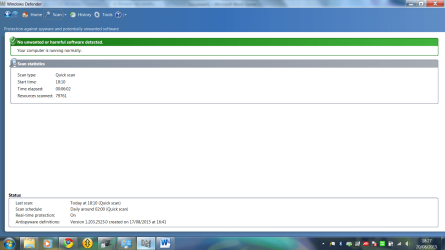
the links u sent wont load and ive tried to download an antivirus app too, i dont have another computer to install microsoft security essentials with and i tried the windows defender and it said the computer has no harmful software (see attachment)
 

Attachments

  • screen shot.png
    screen shot.png
    80.5 KB · Views: 1

My Computer My Computer

Computer type
PC/Desktop
Computer Manufacturer/Model Number
Vaio
OS
Window 7 Home Premium
Browser
Google Chrome
When you did your factory reset,
one of the programmes restored shoud have been Either McAfee or Norton.
Most laptops come with one, for a trial period
Please run a FULL scan using whichever it was, even if you cant update it .
In the event that neither is present, see if you can go to Majorgeeks select AV's and try and download one from there, use thier link not authors site might be more successfull
 

My Computer My Computer

Computer type
PC/Desktop
Computer Manufacturer/Model Number
medionl/Aspire 6930G/acer x55a
OS
W7 home premium 32bit/W7HP 64bit/w10 tp insider ring
CPU
E5300 dual core
Motherboard
medion MS7366
Memory
3gb
Graphics Card(s)
Nvidia Geforce 7100 Nforce 630i
Monitor(s) Displays
avixc
Internet Speed
n (isp resticted to 72)
Antivirus
mse/pands
Browser
palemoon
Other Info
Belkin Fd7050 n USB using Railink RT2870 drivers, more upto date
Norton was restored but its norton backup, it asks for a trial for the back up not an antivirus programme, i deleted mcfee and i tried to go on majorgeeks but it wont load :(
 

My Computer My Computer

Computer type
PC/Desktop
Computer Manufacturer/Model Number
Vaio
OS
Window 7 Home Premium
Browser
Google Chrome
Hi Neha,

Sorry about that. Can you please check if you have Norton Online backup on the Installed program list?

Praveen
Norton Support.
 

My Computer My Computer

Computer type
PC/Desktop
OS
Windows 7 Ultimate x64
Back
Top