Cannot get past login screen - have tried everything

benmillerfilm

New member
Local time
4:37 PM
Messages
6
Location
Los Angeles, California
Hi all,

So, the day before I left for the holidays, my Windows 7 auto-updated and I was unable to boot it at all. I returned three days ago, and have spent every single one of these days trying everything I could to fix it. All for naught.

It all seemed to go wrong since an update on December 19th. Since then, when I attempt to log in after startup, I typically get the error message "Could not connect to System Event Notification Service", followed by a black screen.
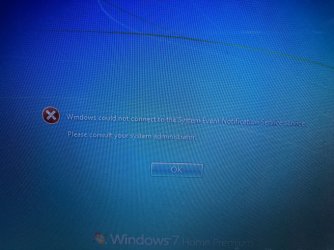
IMG_2226.jpg

Occasionally I will get a different message stating: "The application was unable to start correctly (0xc0000022)"
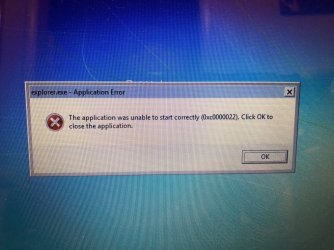
IMG_2227.jpg

I've done multiple startup repairs, disk checks, yada yada. Initially some errors were found and deleted/fixed. Now no errors can be found.
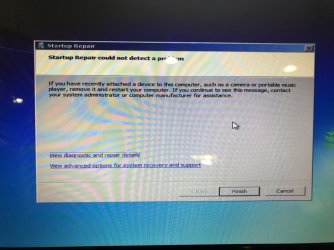
IMG_2235.jpg

Yet when I try to a system restore (to the state prior to Dec. 19th) I am told I cannot do a system restore because there are disk errors.
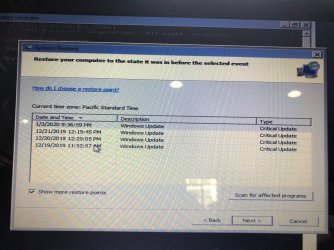
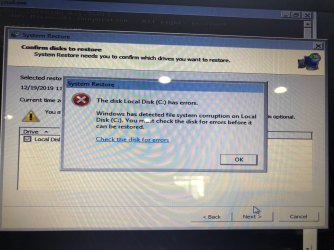
IMG_2236.jpg
IMG_2237.jpg
IMG_2238.jpg

At this point I feel that I have tried just about everything and am now caught in an endless loop of catch 22s about which I can do nothing.

Can anyone suggest a way out of this quagmire so that I can use my computer again? I am posting snapshots of what I have described above for reference. Thank you all in advance!
 

My Computer My Computer

Computer type
PC/Desktop
Computer Manufacturer/Model Number
Lenovo
OS
Windows 7 -64 bit
CPU
Intel core i5
Browser
Chrome
Did you let it do a disk check on reboot? Can you start in safe mode and get to a cmd prompt to do the disk check or failing that if you have an install disk boot that and run a disk check
 

My Computer My Computer

Computer type
PC/Desktop
OS
win 8 32 bit
Already done multiple disk checks on reboot. Unfortunately I don’t have an install disk...I don’t recall one coming with the computer when I bought it 8 years ago.
 

My Computer My Computer

Computer type
PC/Desktop
Computer Manufacturer/Model Number
Lenovo
OS
Windows 7 -64 bit
CPU
Intel core i5
Browser
Chrome

My Computer My Computer

Computer type
PC/Desktop
Computer Manufacturer/Model Number
HP Desktop & Compaq Laptop
OS
Win 10 x64, Linux Lite, Win 7 x64, BlackArch, & Kali
Hard Drives
Samsung 850 Pro 256Gb,
Hitachi HDD 1Tb,
Crucial MX SSD 250Gb
Segate 3Tb USB 3.0 Ext. Backup HDD
Internet Speed
150Mbps dn, 20Mbps up
Antivirus
Avast Free, Malwarebytes Anti-Exploit & Anti-Ransomware
Browser
Firefox, Chrome, Opera, & VPN
This is specifically for Vista but it works for 7 as well. Repair Vista Options - Preferred Sequence | Vista Forums I suspect that your hard drive is failing. You should determine which brand of hard drive your have and download the diagnostic tools for your hard drive. Once you burn the diagnostic tools to a disk you will boot into the disk and run all the scans, especially the comprehensive. If it tells you that there are issues work with the vendor to determine if your drive is under warranty and if so replace it. You might also do a back up of all your data to an external drive if you don't have an image. You can use a linux bootable disk such as knoppix or ubuntu to attempt to back up your data.
 

My Computers My Computers

System One System Two

Windows Vista/ 7/8/8.1 keep a regular backup of the registry handy in case you need to overwrite a corrupted registry. By default, the RegIdleBackup task runs every 10 days, so that’s as far back as you would lose if you replaced the current registry with the automatically backed-up files. You can find the backed-up registry files in \Windows\System32\config\RegBack folder.


Please boot your computer with Windows Setup Media and from Windows Recovery Environment start the Command Prompt.

Please type below command into Command Prompt and press Enter key.

Code:
 Dir C:\Windows\System32\config\RegBack


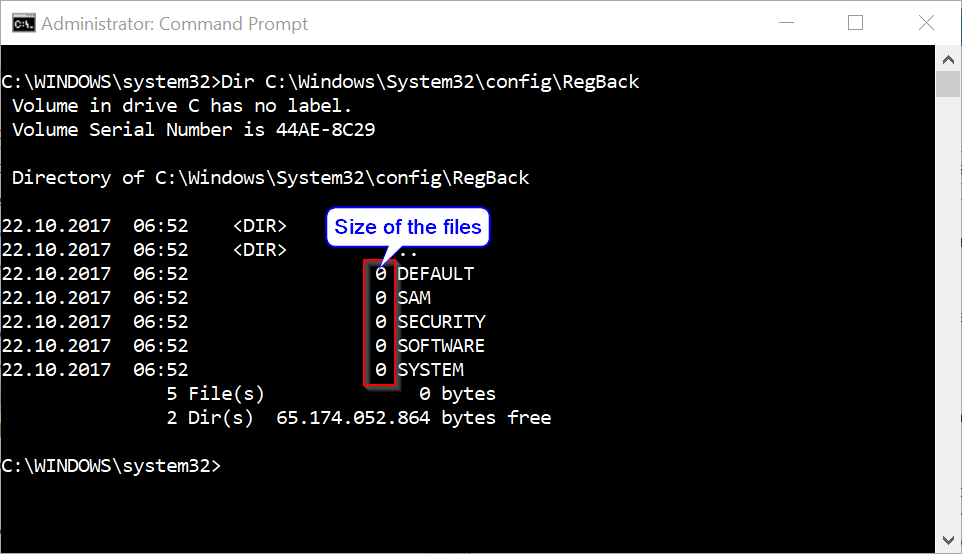
Above command will list files stored within RegBack folder and there file size, make sure files are not zero size if they are do not follow below instructions.

akBT8zC.png


Please replace partition letter C: with Windows installed partition letter. When computer boots into Windows Recovery Environment (WinRE) environment the drive letter assign to Windows partition may not be C: drive letter because Windows 7, 8 , 8.1 and 10 creates a separate system partition when it's installed from scratch. The system partition contains boot files WinRE assigns the system partition the C: drive letter and the Windows installed partition will be assign any other drive letter usually D: drive letter is assign to Windows installed partition. The Bcdedit /enum | find "osdevice" command can be use to find out the drive letter of the Windows installed partition the output of the Bcdedit command is similar to this osdevice partition=D:. The drive letter after partition= is the drive letter of the Windows partition.

Please type below commands into Command Prompt and for each command you have typed press Enter key.


Code:
Replace C:\Windows\System32\Config\RegBack\*     C:\Windows\System32\Config

As files are replaced, the Command Prompt displays their filenames on the screen.

This procedure assumes that Windows Vista/7/8/8.1 is installed to the C:\ partition. Make sure to replace C:\ drive letter to the appropriate Windows OS installed partition drive letter if it is a different location.


Above commands renames the registry files at their existing location, and then copies the registry files from the RegBack folder to the C:\Windows\System32\Config folder.
 

My Computer My Computer

Computer type
PC/Desktop
Computer Manufacturer/Model Number
Custom Build
OS
Windows 10 Pro x64
CPU
Intel Core i5 6600
Motherboard
Gigabyte Technology Z170M-D3H-CF (U3E1)
Memory
Corsair Vengeance LPX 16GB 2666MHz DDR4
Graphics Card(s)
AMD Radeon R9 380 Series
Hard Drives
SSD
HDD
Antivirus
Eset Smart Security
Browser
Mozila Firefox
Hi Snick / Bill,

Thanks for the response! Unfortunately I ready tried those solutions multiple times with no changes...

Onto to next solutions... Thanks to all who posted and I will let you know what happens.

Ben
 

My Computer My Computer

Computer type
PC/Desktop
Computer Manufacturer/Model Number
Lenovo
OS
Windows 7 -64 bit
CPU
Intel core i5
Browser
Chrome
Hi townsbg,

Thanks for your reply. I should be clear that I can't access any sort of desktop or startup screen--even in "safe mode" I just end up with a black screen. The best I can do right now is get to the "Command Prompt" screen and type commands. Some of those solutions seem to presume otherwise. I have run multiple disk checks at this point, with no apparent effect on startup.

Hi Freebooter,

Thanks for your response, I am going to try that now from the Command Prompt screen.
 

My Computer My Computer

Computer type
PC/Desktop
Computer Manufacturer/Model Number
Lenovo
OS
Windows 7 -64 bit
CPU
Intel core i5
Browser
Chrome
Hi Freebooter,

Tried all of that but no change. The initial \regback did something (tried to post a screen shot, but image attachments are not working on SevenForums right now for some reason). The other commands I'm not sure did anything.

Followed it with another check disk, which did find errors and fixed them.

However, upon rebooting, I still get the same error message when trying to login.

Tried to do another system restore, but I still get the same error message (shown in a previous screen shot) telling me it can't do a system restore because there are errors that need to be fixed.

Any other suggestions guys? Is this the end of the line?

Ben
 

My Computer My Computer

Computer type
PC/Desktop
Computer Manufacturer/Model Number
Lenovo
OS
Windows 7 -64 bit
CPU
Intel core i5
Browser
Chrome
You need to back up your data and test the hard drive with the manufacturer's tools.
 

My Computers My Computers

System One System Two

You might have to bite a money bullet and purchase a trueblue MS or OEM Windows 7 or 10 install DVD -- if push comes to shove. If you find out that the hardware, i.e. the HD, is aok, then the Windows has suffered an almost impossible to fix failure. A MS or OEM install DVD will give you a fresh install, a start over from scratch install. You might be able, using another pc, to download an ISO that matches your present Windows edition and go from there.
 

My Computer My Computer

Computer type
PC/Desktop
Computer Manufacturer/Model Number
Antec desktop; Acer Aspire laptops
OS
Windows 7 Professional 64-bit
CPU
Desktop i5; Acers i5 & i7
Memory
desktop 16GB; 1 Acer 8GB & 1 Acer 16GB
Hard Drives
1TB split into 2 equal partitions [OS and data] usable by RJS
Internet Speed
AT&T DSL
Browser
FF, GChrome, msIE
Other Info
Windows 7 Firewall, Emsisoft AM/AV, MSE [scan-only], SpywareBlaster, Ruiware/BillP combine
Did you run system file checker from cmd?
sfc /scannow
Did you try resetting Winsock?
CMD open as admin
type
netsh winsock reset
restart computer
 

My Computer My Computer

Computer type
PC/Desktop
Computer Manufacturer/Model Number
HP Desktop & Compaq Laptop
OS
Win 10 x64, Linux Lite, Win 7 x64, BlackArch, & Kali
Hard Drives
Samsung 850 Pro 256Gb,
Hitachi HDD 1Tb,
Crucial MX SSD 250Gb
Segate 3Tb USB 3.0 Ext. Backup HDD
Internet Speed
150Mbps dn, 20Mbps up
Antivirus
Avast Free, Malwarebytes Anti-Exploit & Anti-Ransomware
Browser
Firefox, Chrome, Opera, & VPN
Thanks for those suggestions, Snick! Just did them both.

Unfortunately, I still get the "Could not connect to System Event Notification Service", followed by a black screen, when trying to log in after startup.

When I try to do another system restore (to regress the system to its pre Dec 19th state), I get that same error message: "Windows has detected file corruption on local Disk C. You must check the disk for errors before it can be restored." (This despite countless disk checks!)

The annoying thing is that the system appeared to work fine (and was at least fully useable) until Windows forced that auto-update on December 19th!
 

My Computer My Computer

Computer type
PC/Desktop
Computer Manufacturer/Model Number
Lenovo
OS
Windows 7 -64 bit
CPU
Intel core i5
Browser
Chrome
Back
Top