- Local time
- 1:04 PM
- Messages
- 269
So I was at my friends house and he told me of a problem which I looked in to. Really weird, never seen this. The issue is he had mentioned his system has been really slow when opening browsers. He demo'd and I saw it too. He uses IE9 and Firefox. Both were really slow. So I poked around;
* Hard drive - not full, only about 50%
* Did A/V scans; Norton, TDSS Killer, Malwarebytes, Malwarebytes Anti - Rootkit , Hitman Pro, Kaspersky Boot (nothing shows up)
* Cleared out IE9 temp files
* Start folder had nothing, nor nothing in msconfig
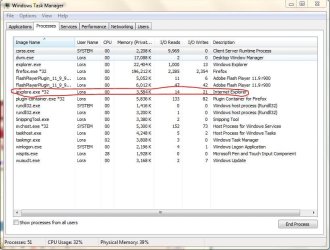
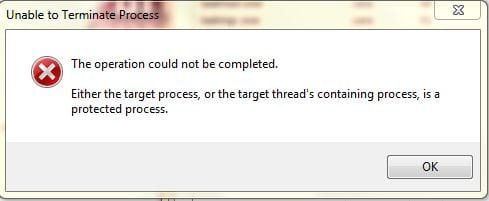
Then I opened the taskmanager and this is what I saw; 3 instances of IE9 open. So I closed IE9 and then two went away; however one stayed. Could not shutdown that task, said something about the threads. So I copied his Favorites and uninstalled IE9. So now he had Firefox only. Rebooted and guess what, even before we touched the system after boot, I ran taskmanager again and it showed Firefox running.
If I launched Firefox a second item would show up and after about 2-3 minutes Firefox would just freeze.
So anyone here ever seen this and know what's going on? What I may do to help out? I do not see him that often so if I someone has a suggestion I may have to respond in a couple of days.
As always, I am hopeful someone in here has seen this and can resolve it. His system is Windows 7 Home Edition. Thanks
* Hard drive - not full, only about 50%
* Did A/V scans; Norton, TDSS Killer, Malwarebytes, Malwarebytes Anti - Rootkit , Hitman Pro, Kaspersky Boot (nothing shows up)
* Cleared out IE9 temp files
* Start folder had nothing, nor nothing in msconfig
Then I opened the taskmanager and this is what I saw; 3 instances of IE9 open. So I closed IE9 and then two went away; however one stayed. Could not shutdown that task, said something about the threads. So I copied his Favorites and uninstalled IE9. So now he had Firefox only. Rebooted and guess what, even before we touched the system after boot, I ran taskmanager again and it showed Firefox running.
If I launched Firefox a second item would show up and after about 2-3 minutes Firefox would just freeze.
So anyone here ever seen this and know what's going on? What I may do to help out? I do not see him that often so if I someone has a suggestion I may have to respond in a couple of days.
As always, I am hopeful someone in here has seen this and can resolve it. His system is Windows 7 Home Edition. Thanks
My Computer
- Computer type
- PC/Desktop
- Computer Manufacturer/Model Number
- Home Built
- OS
- Windows 10 Pro 64-bit
- CPU
- Core I7-6700
- Motherboard
- Asus Maximus VIII Hero
- Memory
- 8GB Corsair Dominator
- Graphics Card(s)
- Asus STRIX GTX 980Ti
- Monitor(s) Displays
- Asus PG278Q, Dell U2410
- Screen Resolution
- 2560 x 1440, 1920 x 1200
- Hard Drives
- 1 x Samsung 950 Pro 512GB
1 x 1TB HGST
- PSU
- 750W Seasonic
- Case
- Antec 900 v3
- Cooling
- Stock
- Internet Speed
- Cable Internet