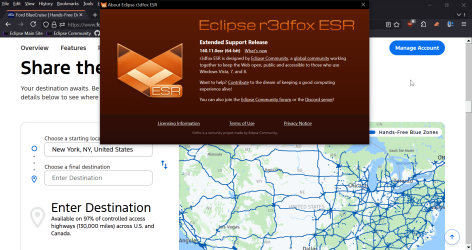
Browsers working on Win 7:

If you overlap the browsers there's a significant difference of about a full like and I did try a new profile. It's fine and I get a larger viewing window. I'll leave it be. Oh it's up to version 151.0.2 now. R3dfox doesn't update itself.
 

My Computers

System One System Two

I've been using r3dfoxESR (140.10.1 right now) and occasionally run into some webpages that don't work, and I try instead Firefox (my old 115.33.0esr) and it DOES work.

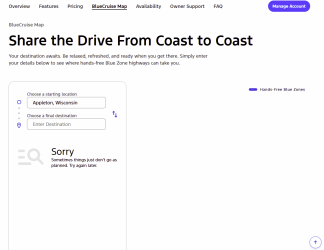
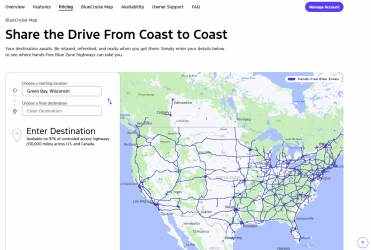
Here's an example where the BlueCruise USA map appears in Firefox but not in r3dfox. Can anyone here suggest a reason why r3dfox doesn't work, or how I might go about troubleshooting this? It feels like just a setting somewhere in the prefs.js, right?

https://www.ford.com/technology/bluecruise/bluecruise-map/

r3dfox:
image.png

Firefox:
image.png
 

My Computer

Computer type
Laptop
Computer Manufacturer/Model Number
Dell Latitude E6540 Laptop
OS
Windows 7 Professional 64bit
CPU
Intel Core i7 4600M @ 2.90GHz
Motherboard
Dell Inc. 0CYT5F (SOCKET 0)
Memory
16.0GB Dual-Channel DDR3 @ 797MHz (11-11-11-28)
Graphics Card(s)
Intel HD Graphics 4600 (Dell) 2048MB ATI AMD Radeon HD 8790M
Sound Card
Realtek High Definition Audio
Monitor(s) Displays
HP ZR30w (2560x1600@60Hz)
Hard Drives
256GB LITEONIT LMT-256M6M-41 mm SATA (SSD)
1TB Samsung SSD 860 EVO mSATA SATA (SSD)
2TB USB 3.0 USB Device
115GB SanDisk Ultra Fit USB
Other Info
Multiple Dell E-Port Plus II Port Replicator/Docking Stations 0Y72NH USB 3.0 + 130W AC Adapters
I don't know but it didn't work for me either on version 151. The site might not be designed for some subtle differences between the two. I found some access denied errors in the debugging console. Frankly I don't know enough about it and we can't know how the webpage is designed. You might try reporting it on the R3dfox git page for investigation and see if you can contact that website's support.
 

My Computers

System One System Two

You need to access the site's permissions and allow WebGL (the little icon to the left of the URL):

Permissions.png
 

Attachments

  • Bluecruise.png
    Bluecruise.png
    511.3 KB · Views: 0

My Computer

Computer type
PC/Desktop
OS
Windows 7 Pro x64
You need to access the site's permissions and allow WebGL (the little icon to the left of the URL)
Wowza Y how have I never noticed that icon before??? I have puzzled over WebGL in the past and never gotten it to work, and thought I had inadequate drivers or hardware or something. Your tip worked straight-away.

MANY THANKS!!!
 

My Computer

Computer type
Laptop
Computer Manufacturer/Model Number
Dell Latitude E6540 Laptop
OS
Windows 7 Professional 64bit
CPU
Intel Core i7 4600M @ 2.90GHz
Motherboard
Dell Inc. 0CYT5F (SOCKET 0)
Memory
16.0GB Dual-Channel DDR3 @ 797MHz (11-11-11-28)
Graphics Card(s)
Intel HD Graphics 4600 (Dell) 2048MB ATI AMD Radeon HD 8790M
Sound Card
Realtek High Definition Audio
Monitor(s) Displays
HP ZR30w (2560x1600@60Hz)
Hard Drives
256GB LITEONIT LMT-256M6M-41 mm SATA (SSD)
1TB Samsung SSD 860 EVO mSATA SATA (SSD)
2TB USB 3.0 USB Device
115GB SanDisk Ultra Fit USB
Other Info
Multiple Dell E-Port Plus II Port Replicator/Docking Stations 0Y72NH USB 3.0 + 130W AC Adapters
That worked for me. If only I knew what that website is for.:sarc:
 

My Computers

System One System Two

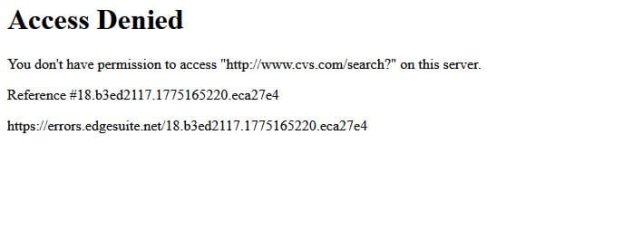
My browser Firefox 115.36.0ESR is working fine and being updated regularly but that and Chrome 109.0.5414.120 now are starting to run into Access Denied errors only as of this year (2026) on many websites including Edmunds.com and Homedepot. I am not sure if Cloudflare or what is purposely blocking FF115 but it sure seems like it. I've been practicing some whackamole by contacting them individually but I think if more people complain and ask what in the actual heck they are blocking customers for then maybe they will knock it off. I have R3dfox but it needs configuring properly as right click menus aren't working right.BN Access.JPGcvs ACCESS DENIED.JPG
 

My Computer

Computer type
PC/Desktop
OS
Windows 7 Home Premium 64bit
...I think if more people complain and ask what in the actual heck they are blocking customers for then maybe they will knock it off.
Customer Service people will not have a clue what you are calling them about but if you scream and holler they might say something like "I'll pass your concern along to the web people" and then of course not do anything of the sort after you hang up.

I do see similar "Access Denied!" pages as you from time to time. Some day the interwebz are going to completely fail and no one will have any idea how to fix it.
 

My Computer

Computer type
Laptop
Computer Manufacturer/Model Number
Dell Latitude E6540 Laptop
OS
Windows 7 Professional 64bit
CPU
Intel Core i7 4600M @ 2.90GHz
Motherboard
Dell Inc. 0CYT5F (SOCKET 0)
Memory
16.0GB Dual-Channel DDR3 @ 797MHz (11-11-11-28)
Graphics Card(s)
Intel HD Graphics 4600 (Dell) 2048MB ATI AMD Radeon HD 8790M
Sound Card
Realtek High Definition Audio
Monitor(s) Displays
HP ZR30w (2560x1600@60Hz)
Hard Drives
256GB LITEONIT LMT-256M6M-41 mm SATA (SSD)
1TB Samsung SSD 860 EVO mSATA SATA (SSD)
2TB USB 3.0 USB Device
115GB SanDisk Ultra Fit USB
Other Info
Multiple Dell E-Port Plus II Port Replicator/Docking Stations 0Y72NH USB 3.0 + 130W AC Adapters
Back
Top