BSoD 116 when using GPU - GeForce GTX 670

Soulstryfe

New member
Local time
1:01 PM
Messages
7
Hello, a couple days ago I was playing Skyrim and the game crashed. When I went to reboot my computer it would load to the windows logo and restart again.
GeForce 320.49 Driver

Version 320.49 - WHQL
Problem signature:
Problem Event Name: BlueScreen
OS Version: 6.1.7601.2.1.0.768.3
Locale ID: 1033

Additional information about the problem:
BCCode: 116
BCP1: FFFFFA801233E010
BCP2: FFFFF88005BC8E30
BCP3: 0000000000000000
BCP4: 0000000000000002
OS Version: 6_1_7601
Service Pack: 1_0

I've tried a couple things. I've uninstalled the drivers for the gpu and it would work (but I couldn't play any games) but when I would clean install the drivers, it would do the boot loop again.

I've added the files from the Sevenforums diagnostic tool in a zip.
 

My Computer My Computer

Computer type
PC/Desktop
Computer Manufacturer/Model Number
Custom
OS
Windows 7 professional 64 Bit
CPU
Intel Core i7-3770K 3.50 GHz Quad Core
Motherboard
ASUS P8Z77-V LX Intel 7 Series Motherboard
Memory
Kingston HyperX Black KHX16C10B1BK2/16 16GB Desktop Memory
Graphics Card(s)
GeForce GTX 670 2GB Video Card - 2GB, GDDR5
Hard Drives
Samsung 840 Series MZ-7TD120BW 120GB Solid State Drive
Seagate ST3000DM001 Barracuda 7200.14 Hard Drive - 3TB
PSU
Ultra LSP750 750-Watt Power Supply
Case
OEM Elite 310 Mid-Tower Gaming Case
Internet Speed
25 mbps
Browser
Firefox
Hi Soulstryfe.

A stop 0x116 is a display/graphics related BSOD, And from what you have stated, it appears to be a failing GPU. but before being sure, we need to try some other steps.

The 320.49 WHQL driver is known to be buggy in some cases. Try another version which works good there, say 314.22 WHQL.

  • Uninstall All nvidia items in Control Panel > Programs and features
    • 3D Vision Control Driver
    • 3D Vision Driver
    • Graphics Driver
    • HD Audio Driver
    • PhysX
    • nvidia Update
    (Are you using nvidia chipset drivers? If so, dont uninstall anything other than those are listed).
  • Now follow Drivers - Clean Left over Files after Uninstalling
  • Boot normally now. Go to Drivers - Download NVIDIA Drivers, Download 314.22 WHQL. While installing, Select Custom (Advanced) install. In the next page, follow this settings:

Is it causing the same issue with 314.22 WHQL, too? If so, skip the further steps and report us back.

Stress test the Graphics Card using Furmark.
Video Card - Stress Test with Furmark

Is the computer hot? Report us the heat of the computer after a couple of hours of your normal usage. Upload a screenshot of the summery tab of Speccy.

Check if the Power Supply Unit (PSU) supplying adequate power to the computer or not.
eXtreme Power Supply Calculator
Also let us know the wattage of the PSU.

Let us know the results.
_______________________________________________________________________________
BSOD ANALYSIS:
Code:
*******************************************************************************
*                                                                             *
*                        Bugcheck Analysis                                    *
*                                                                             *
*******************************************************************************

Use !analyze -v to get detailed debugging information.

BugCheck 116, {fffffa80123ea010, fffff88005c0ee30, 0, 2}

Unable to load image nvlddmkm.sys, Win32 error 0n2
*** WARNING: Unable to verify timestamp for nvlddmkm.sys
*** ERROR: Module load completed but symbols could not be loaded for nvlddmkm.sys
Probably caused by : nvlddmkm.sys ( nvlddmkm+13be30 )

Followup: MachineOwner
---------

7: kd> !analyze -v
*******************************************************************************
*                                                                             *
*                        Bugcheck Analysis                                    *
*                                                                             *
*******************************************************************************

VIDEO_TDR_FAILURE (116)
Attempt to reset the display driver and recover from timeout failed.
Arguments:
Arg1: fffffa80123ea010, Optional pointer to internal TDR recovery context (TDR_RECOVERY_CONTEXT).
Arg2: fffff88005c0ee30, The pointer into responsible device driver module (e.g. owner tag).
Arg3: 0000000000000000, Optional error code (NTSTATUS) of the last failed operation.
Arg4: 0000000000000002, Optional internal context dependent data.

Debugging Details:
------------------


FAULTING_IP: 
nvlddmkm+13be30
fffff880`05c0ee30 4055            push    rbp

DEFAULT_BUCKET_ID:  GRAPHICS_DRIVER_TDR_FAULT

CUSTOMER_CRASH_COUNT:  1

BUGCHECK_STR:  0x116

PROCESS_NAME:  System

CURRENT_IRQL:  0

STACK_TEXT:  
fffff880`069d3888 fffff880`04f5a054 : 00000000`00000116 fffffa80`123ea010 fffff880`05c0ee30 00000000`00000000 : nt!KeBugCheckEx
fffff880`069d3890 fffff880`04f59d5e : fffff880`05c0ee30 fffffa80`123ea010 fffffa80`11f33400 fffffa80`11f0e010 : dxgkrnl!TdrBugcheckOnTimeout+0xec
fffff880`069d38d0 fffff880`04e0ff13 : fffffa80`123ea010 00000000`00000000 fffffa80`11f33400 fffffa80`11f0e010 : dxgkrnl!TdrIsRecoveryRequired+0x1a2
fffff880`069d3900 fffff880`04e39cf1 : 00000000`ffffffff 00000000`0000037c 00000000`00000000 00000000`00000002 : dxgmms1!VidSchiReportHwHang+0x40b
fffff880`069d39e0 fffff880`04e38437 : 00000000`00000102 00000000`00000006 00000000`0000037c 00000000`00000000 : dxgmms1!VidSchiCheckHwProgress+0x71
fffff880`069d3a10 fffff880`04e0b2d2 : ffffffff`ff676980 fffffa80`11f0e010 00000000`00000000 00000000`00000000 : dxgmms1!VidSchiWaitForSchedulerEvents+0x1fb
fffff880`069d3ab0 fffff880`04e37ff6 : 00000000`00000000 00000000`0000000f 00000000`00000080 fffffa80`108d8c58 : dxgmms1!VidSchiScheduleCommandToRun+0x1da
fffff880`069d3bc0 fffff800`0396fede : 00000000`02514069 fffffa80`11f358b0 fffffa80`0c6e1890 fffffa80`11f358b0 : dxgmms1!VidSchiWorkerThread+0xba
fffff880`069d3c00 fffff800`036c2906 : fffff800`0384ce80 fffffa80`11f358b0 fffff800`0385acc0 fffff8a0`00a9ebc0 : nt!PspSystemThreadStartup+0x5a
fffff880`069d3c40 00000000`00000000 : fffff880`069d4000 fffff880`069ce000 fffff880`041d8d70 00000000`00000000 : nt!KiStartSystemThread+0x16


STACK_COMMAND:  .bugcheck ; kb

FOLLOWUP_IP: 
nvlddmkm+13be30
fffff880`05c0ee30 4055            push    rbp

SYMBOL_NAME:  nvlddmkm+13be30

FOLLOWUP_NAME:  MachineOwner

MODULE_NAME: nvlddmkm

IMAGE_NAME:  nvlddmkm.sys

DEBUG_FLR_IMAGE_TIMESTAMP:  51c41788

FAILURE_BUCKET_ID:  X64_0x116_IMAGE_nvlddmkm.sys

BUCKET_ID:  X64_0x116_IMAGE_nvlddmkm.sys

Followup: MachineOwner
---------

7: kd> lmvm nvlddmkm
start             end                 module name
fffff880`05ad3000 fffff880`065b8000   nvlddmkm T (no symbols)           
    Loaded symbol image file: nvlddmkm.sys
    Image path: nvlddmkm.sys
    Image name: nvlddmkm.sys
    Timestamp:        Fri Jun 21 14:36:16 2013 (51C41788)
    CheckSum:         00AB87FF
    ImageSize:        00AE5000
    Translations:     0000.04b0 0000.04e4 0409.04b0 0409.04e4
 

My Computer My Computer

Computer type
PC/Desktop
Computer Manufacturer/Model Number
Self Assembled
OS
Microsoft Windows 10 Pro Insider Preview 64-bit
CPU
Intel(R) Core(TM) i3-4130 CPU @ 3.40GHz
Motherboard
Gigabyte Technology Co., Ltd. B85M-D3H
Memory
Corsair Vengence 4GB x2 (8.00GB Dual-Channel DDR3 @ 798MHz)
Graphics Card(s)
2047MB GeForce GTS 450 (ZOTAC International)
Sound Card
Onboard (Realtek High Definition Audio)
Monitor(s) Displays
LG Flatron E2040T
Screen Resolution
1600x900
Hard Drives
Western Digital 1 TB
Seagate 500 GB
PSU
Corsair VS550
Case
Cooler Master K380
Cooling
Cooler Master Seidon 120V Plus
Keyboard
Logitech MK260r
Mouse
Logitech MK260r
Internet Speed
PMPL Broadband
Antivirus
Windows Defender + MBAM
Browser
Firefox
Other Info
Dell Studio 15" Laptop
When Im doing the driver sweeper, should I sweep all the files or just the Nvidia options?
 

My Computer My Computer

Computer type
PC/Desktop
Computer Manufacturer/Model Number
Custom
OS
Windows 7 professional 64 Bit
CPU
Intel Core i7-3770K 3.50 GHz Quad Core
Motherboard
ASUS P8Z77-V LX Intel 7 Series Motherboard
Memory
Kingston HyperX Black KHX16C10B1BK2/16 16GB Desktop Memory
Graphics Card(s)
GeForce GTX 670 2GB Video Card - 2GB, GDDR5
Hard Drives
Samsung 840 Series MZ-7TD120BW 120GB Solid State Drive
Seagate ST3000DM001 Barracuda 7200.14 Hard Drive - 3TB
PSU
Ultra LSP750 750-Watt Power Supply
Case
OEM Elite 310 Mid-Tower Gaming Case
Internet Speed
25 mbps
Browser
Firefox
When Im doing the driver sweeper, should I sweep all the files or just the Nvidia options?
dsweepersfourm2.png


Click on the checkboxes in front of nvidia-Display and nvidia-PhysX, and proceed. Dont select anything more. Even not nvidia-chipset.
 

My Computer My Computer

Computer type
PC/Desktop
Computer Manufacturer/Model Number
Self Assembled
OS
Microsoft Windows 10 Pro Insider Preview 64-bit
CPU
Intel(R) Core(TM) i3-4130 CPU @ 3.40GHz
Motherboard
Gigabyte Technology Co., Ltd. B85M-D3H
Memory
Corsair Vengence 4GB x2 (8.00GB Dual-Channel DDR3 @ 798MHz)
Graphics Card(s)
2047MB GeForce GTS 450 (ZOTAC International)
Sound Card
Onboard (Realtek High Definition Audio)
Monitor(s) Displays
LG Flatron E2040T
Screen Resolution
1600x900
Hard Drives
Western Digital 1 TB
Seagate 500 GB
PSU
Corsair VS550
Case
Cooler Master K380
Cooling
Cooler Master Seidon 120V Plus
Keyboard
Logitech MK260r
Mouse
Logitech MK260r
Internet Speed
PMPL Broadband
Antivirus
Windows Defender + MBAM
Browser
Firefox
Other Info
Dell Studio 15" Laptop
After I installed it I got another blue screen.

Problem Event Name: BlueScreen
OS Version: 6.1.7601.2.1.0.256.48
Locale ID: 1033

Additional information about the problem:
BCCode: 116
BCP1: FFFFFA8010EB8260
BCP2: FFFFF88005BB22B0
BCP3: 0000000000000000
BCP4: 0000000000000002
OS Version: 6_1_7601
Service Pack: 1_0
Product: 256_1

Files that help describe the problem:
C:\Windows\Minidump\080513-7722-01.dmp
.....\AppData\Local\Temp\WER-9500-0.sysdata.xml
 

My Computer My Computer

Computer type
PC/Desktop
Computer Manufacturer/Model Number
Custom
OS
Windows 7 professional 64 Bit
CPU
Intel Core i7-3770K 3.50 GHz Quad Core
Motherboard
ASUS P8Z77-V LX Intel 7 Series Motherboard
Memory
Kingston HyperX Black KHX16C10B1BK2/16 16GB Desktop Memory
Graphics Card(s)
GeForce GTX 670 2GB Video Card - 2GB, GDDR5
Hard Drives
Samsung 840 Series MZ-7TD120BW 120GB Solid State Drive
Seagate ST3000DM001 Barracuda 7200.14 Hard Drive - 3TB
PSU
Ultra LSP750 750-Watt Power Supply
Case
OEM Elite 310 Mid-Tower Gaming Case
Internet Speed
25 mbps
Browser
Firefox
Can you use the on-board graphics? If so, use it and let us know about these two ...
Is the computer hot? Report us the heat of the computer after a couple of hours of your normal usage. Upload a screenshot of the summery tab of Speccy.

Check if the Power Supply Unit (PSU) supplying adequate power to the computer or not.
eXtreme Power Supply Calculator
Also let us know the wattage of the PSU.
 

My Computer My Computer

Computer type
PC/Desktop
Computer Manufacturer/Model Number
Self Assembled
OS
Microsoft Windows 10 Pro Insider Preview 64-bit
CPU
Intel(R) Core(TM) i3-4130 CPU @ 3.40GHz
Motherboard
Gigabyte Technology Co., Ltd. B85M-D3H
Memory
Corsair Vengence 4GB x2 (8.00GB Dual-Channel DDR3 @ 798MHz)
Graphics Card(s)
2047MB GeForce GTS 450 (ZOTAC International)
Sound Card
Onboard (Realtek High Definition Audio)
Monitor(s) Displays
LG Flatron E2040T
Screen Resolution
1600x900
Hard Drives
Western Digital 1 TB
Seagate 500 GB
PSU
Corsair VS550
Case
Cooler Master K380
Cooling
Cooler Master Seidon 120V Plus
Keyboard
Logitech MK260r
Mouse
Logitech MK260r
Internet Speed
PMPL Broadband
Antivirus
Windows Defender + MBAM
Browser
Firefox
Other Info
Dell Studio 15" Laptop
Do I need to have the graphics card in the computer? Im not sure how to run it other than by uninstalling the graphics drives.
 

My Computer My Computer

Computer type
PC/Desktop
Computer Manufacturer/Model Number
Custom
OS
Windows 7 professional 64 Bit
CPU
Intel Core i7-3770K 3.50 GHz Quad Core
Motherboard
ASUS P8Z77-V LX Intel 7 Series Motherboard
Memory
Kingston HyperX Black KHX16C10B1BK2/16 16GB Desktop Memory
Graphics Card(s)
GeForce GTX 670 2GB Video Card - 2GB, GDDR5
Hard Drives
Samsung 840 Series MZ-7TD120BW 120GB Solid State Drive
Seagate ST3000DM001 Barracuda 7200.14 Hard Drive - 3TB
PSU
Ultra LSP750 750-Watt Power Supply
Case
OEM Elite 310 Mid-Tower Gaming Case
Internet Speed
25 mbps
Browser
Firefox
System Type:
1 physical CPU
Motherboard:
Regular - Desktop
CPU Socket:
Socket LGA 1155
CPU:
Intel Core i7-3770K 3500 MHz Ivy Bridge
CPU Utilization (TDP):
90% TDP
RAM:
2 Sticks DDR3 SDRAM
Video Card 1:
NVIDIA GeForce GTX 670

Regular SATA:
1 HDD
Flash SSD:
1 Drive
Blu Ray BD-RE/DVD/CD:
1 Drive
Fans
Regular:
1 Fan 80mm;
LED:
1 Fan 80mm;
Keyboard and mouse:
Yes
System Load:
90 %

Minimum PSU Wattage:
290 Watts
Recommended Wattage:
340 Watts

My power supply should be giving me plenty.
Ultra LSP750 750-Watt Power Supply - ATX
Ultra LSP750 750-Watt Power Supply - ATX, SATA-Ready, SLI-Ready, 135mm Fan, Sleeved Cables, Matte Finish, 3-Year Warranty at TigerDirect.com

My temps right now are for the cpu 32°c, motherboard 25 °C, my hard drives are 35 °C and 31 °C

I'll let it run for a little longer to see if the temps change.
 

My Computer My Computer

Computer type
PC/Desktop
Computer Manufacturer/Model Number
Custom
OS
Windows 7 professional 64 Bit
CPU
Intel Core i7-3770K 3.50 GHz Quad Core
Motherboard
ASUS P8Z77-V LX Intel 7 Series Motherboard
Memory
Kingston HyperX Black KHX16C10B1BK2/16 16GB Desktop Memory
Graphics Card(s)
GeForce GTX 670 2GB Video Card - 2GB, GDDR5
Hard Drives
Samsung 840 Series MZ-7TD120BW 120GB Solid State Drive
Seagate ST3000DM001 Barracuda 7200.14 Hard Drive - 3TB
PSU
Ultra LSP750 750-Watt Power Supply
Case
OEM Elite 310 Mid-Tower Gaming Case
Internet Speed
25 mbps
Browser
Firefox
An Hour later, the temps are still the same.
 

My Computer My Computer

Computer type
PC/Desktop
Computer Manufacturer/Model Number
Custom
OS
Windows 7 professional 64 Bit
CPU
Intel Core i7-3770K 3.50 GHz Quad Core
Motherboard
ASUS P8Z77-V LX Intel 7 Series Motherboard
Memory
Kingston HyperX Black KHX16C10B1BK2/16 16GB Desktop Memory
Graphics Card(s)
GeForce GTX 670 2GB Video Card - 2GB, GDDR5
Hard Drives
Samsung 840 Series MZ-7TD120BW 120GB Solid State Drive
Seagate ST3000DM001 Barracuda 7200.14 Hard Drive - 3TB
PSU
Ultra LSP750 750-Watt Power Supply
Case
OEM Elite 310 Mid-Tower Gaming Case
Internet Speed
25 mbps
Browser
Firefox
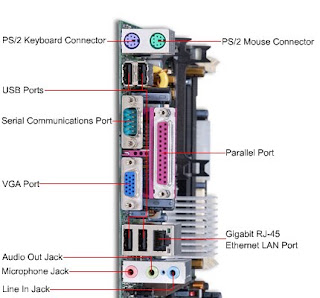
To use the onboard graphics, you need to connect the VGA/DVI cable to the motherboard's end rather than the GPU's end. This area ....
Motherboard2.jpg


Just to check that if it is BSODing in the same way or not.
 

My Computer My Computer

Computer type
PC/Desktop
Computer Manufacturer/Model Number
Self Assembled
OS
Microsoft Windows 10 Pro Insider Preview 64-bit
CPU
Intel(R) Core(TM) i3-4130 CPU @ 3.40GHz
Motherboard
Gigabyte Technology Co., Ltd. B85M-D3H
Memory
Corsair Vengence 4GB x2 (8.00GB Dual-Channel DDR3 @ 798MHz)
Graphics Card(s)
2047MB GeForce GTS 450 (ZOTAC International)
Sound Card
Onboard (Realtek High Definition Audio)
Monitor(s) Displays
LG Flatron E2040T
Screen Resolution
1600x900
Hard Drives
Western Digital 1 TB
Seagate 500 GB
PSU
Corsair VS550
Case
Cooler Master K380
Cooling
Cooler Master Seidon 120V Plus
Keyboard
Logitech MK260r
Mouse
Logitech MK260r
Internet Speed
PMPL Broadband
Antivirus
Windows Defender + MBAM
Browser
Firefox
Other Info
Dell Studio 15" Laptop
Yes Im doing that, and its not BSODing
 

My Computer My Computer

Computer type
PC/Desktop
Computer Manufacturer/Model Number
Custom
OS
Windows 7 professional 64 Bit
CPU
Intel Core i7-3770K 3.50 GHz Quad Core
Motherboard
ASUS P8Z77-V LX Intel 7 Series Motherboard
Memory
Kingston HyperX Black KHX16C10B1BK2/16 16GB Desktop Memory
Graphics Card(s)
GeForce GTX 670 2GB Video Card - 2GB, GDDR5
Hard Drives
Samsung 840 Series MZ-7TD120BW 120GB Solid State Drive
Seagate ST3000DM001 Barracuda 7200.14 Hard Drive - 3TB
PSU
Ultra LSP750 750-Watt Power Supply
Case
OEM Elite 310 Mid-Tower Gaming Case
Internet Speed
25 mbps
Browser
Firefox
If you are sure about what you are saying, and with reference to the earlier information supplied by you, it may be concluded that your GPU itself is failing and causing those BSODs.

I would suggest you to change the GPU.
 

My Computer My Computer

Computer type
PC/Desktop
Computer Manufacturer/Model Number
Self Assembled
OS
Microsoft Windows 10 Pro Insider Preview 64-bit
CPU
Intel(R) Core(TM) i3-4130 CPU @ 3.40GHz
Motherboard
Gigabyte Technology Co., Ltd. B85M-D3H
Memory
Corsair Vengence 4GB x2 (8.00GB Dual-Channel DDR3 @ 798MHz)
Graphics Card(s)
2047MB GeForce GTS 450 (ZOTAC International)
Sound Card
Onboard (Realtek High Definition Audio)
Monitor(s) Displays
LG Flatron E2040T
Screen Resolution
1600x900
Hard Drives
Western Digital 1 TB
Seagate 500 GB
PSU
Corsair VS550
Case
Cooler Master K380
Cooling
Cooler Master Seidon 120V Plus
Keyboard
Logitech MK260r
Mouse
Logitech MK260r
Internet Speed
PMPL Broadband
Antivirus
Windows Defender + MBAM
Browser
Firefox
Other Info
Dell Studio 15" Laptop
Back
Top