BSOD after Reinstall on idle

terribunch

New member
Local time
6:16 PM
Messages
7
I have HP G61 that was working fine until around Christmas. Then I got BSOD on wake-up after idle. I did start-up repair, it ran fine. I thought it was fixed. It worked all day. I shut it off and restarted it many times, closed it down for the day. The next morning, same story. It acts like it is going to come up, starts the swirl of colored dots, then BSOD. I did chkdsk/r, clean. I updated everything I could through Windows. I was running Norton, but now I don't have anything. I have to keep reinstalling it every time I do a clean reinstall. The last reinstall was on the 21st. It is running 64-bit Win 7, oem. I believe I have attached the requested reports, but I don't know how to read them! Any help would be appreciated.
 

My Computer My Computer

At a glance

Win 7 64-bit
OS
Win 7 64-bit
No memory dumps included in the uploaded reports. Please do the following:
Upload Dump Files:
NOTE: If using a disk cleaning utility, please stop using it while we are troubleshooting your issues.
Please go to C:\Windows\Minidump and zip up the contents of the folder. Then upload/attach the .zip file with your next post.
Left click on the first minidump file.
Hold down the "Shift" key and left click on the last minidump file.
Right click on the blue highlighted area and select "Send to"
Select "Compressed (zipped) folder" and note where the folder is saved.
Upload that .zip file with your next post.

If you have issues with "Access Denied" errors, try copying the files to your desktop and zipping them up from there. If it still won't let you zip them up, post back for further advice.

If you don't have anything in that folder, please check in C:\Windows for a file named MEMORY.DMP. If you find it, zip it up and upload it to a free file hosting service . I recommend Windows Live SkyDrive - http://skydrive.live.com or another free, file-hosting service. Then post the link to it in your topic so that we can download it.

Then, follow the directions here to set your system for Minidumps (much smaller than the MEMORY.DMP file): Set MiniDump

SP1 isn't installed, please do the following:
Installing Windows 7 Service Pack 1
1. Visit the PC manufacturer's website and update ALL drivers. DO NOT use Windows Update or the "Update drivers" function of Device Manager.
2. Check Device Manager for any unknown/disabled devices - if there are unknown/disabled devices, fix them with the latest drivers from the device manufacturer's website (not the PC Manufacturer)
3. Visit Windows Update and get all updates
4. Visit Windows Update and get Service Pack 1 (usually under Important Updates). Read these notes for installing SP1: Steps to follow before you install Windows 7 SP1 and Windows Server 2008 R2 SP1 from the Microsoft Download Center
5. Visit Windows Update and get any other available updates

No significant findings in the uploads. You'll have to make sure we get a copy of the memory dump in order to proceed from here. SP1 is the most important thing, so make sure it's installed by following the directions above.

Good luck!
 

My Computer My Computer

At a glance

Win7 x64 + x86Intel i7 920, other Intel chips, and the Atom...12 gB; 4 gB Lenovo; 1 gB Samsung netbookATI 4870
Computer Manufacturer/Model Number
Home built (x64), Lenovo x61s Tablet, Samsung Netbook
OS
Win7 x64 + x86
CPU
Intel i7 920, other Intel chips, and the Atom in the netbook
Motherboard
Asus P6T Deluxe
Memory
12 gB; 4 gB Lenovo; 1 gB Samsung netbook
Graphics Card(s)
ATI 4870
Sound Card
Yes, I have one of these
Monitor(s) Displays
32" Sharp Aquos TV
Screen Resolution
800x600 - I have vision issues
Hard Drives
4 - 150 gB Velociraptors in RAID 5
Promise controller
PSU
1000 watt (can't recall the brand)
Case
Antec 300
Cooling
Big honking cooler that was rated highly at Toms Hardware
Keyboard
Microsoft Natural
Mouse
Logitech Trackman
Internet Speed
Cable
Other Info
GeekSquad UPS
CyberPower UPS
DLink DNS-323 NAS (2 tB)
Netgear wireless router as an access point
Netgear wired router FSV-318
Home network consists of
4 desktop computers (2 Vista, 2 Win7)
1 netbook (Win7)
4 laptop computers (XP, 2-Vista, Win7)
Wii and XBox 360
Installing updates for drivers, now. I can't find the memdump files. Went to Computer, C, Windows, no minidump, no memorydump. I have a partition called hp utilities, but no memorydump or minidump. I found an update to the BIOS, and ran it. I am installing SP1 now.
 

My Computer My Computer

At a glance

Win 7 64-bit
OS
Win 7 64-bit
There are several different reasons for why you might not have dump files.
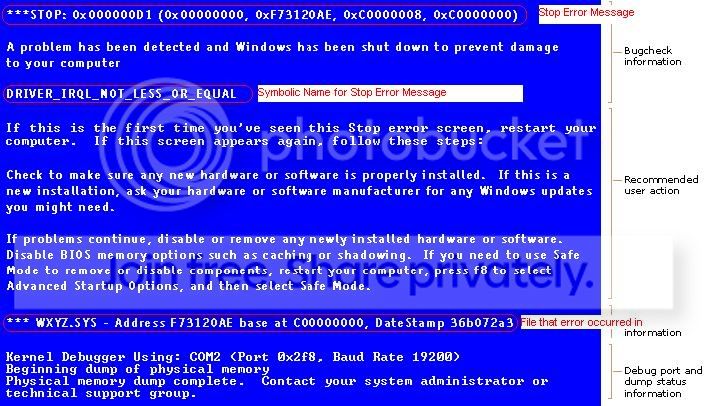
Please get this info from the next BSOD (it's the stuff in RED):
BSOD.jpg
 

My Computer My Computer

At a glance

Win7 x64 + x86Intel i7 920, other Intel chips, and the Atom...12 gB; 4 gB Lenovo; 1 gB Samsung netbookATI 4870
Computer Manufacturer/Model Number
Home built (x64), Lenovo x61s Tablet, Samsung Netbook
OS
Win7 x64 + x86
CPU
Intel i7 920, other Intel chips, and the Atom in the netbook
Motherboard
Asus P6T Deluxe
Memory
12 gB; 4 gB Lenovo; 1 gB Samsung netbook
Graphics Card(s)
ATI 4870
Sound Card
Yes, I have one of these
Monitor(s) Displays
32" Sharp Aquos TV
Screen Resolution
800x600 - I have vision issues
Hard Drives
4 - 150 gB Velociraptors in RAID 5
Promise controller
PSU
1000 watt (can't recall the brand)
Case
Antec 300
Cooling
Big honking cooler that was rated highly at Toms Hardware
Keyboard
Microsoft Natural
Mouse
Logitech Trackman
Internet Speed
Cable
Other Info
GeekSquad UPS
CyberPower UPS
DLink DNS-323 NAS (2 tB)
Netgear wireless router as an access point
Netgear wired router FSV-318
Home network consists of
4 desktop computers (2 Vista, 2 Win7)
1 netbook (Win7)
4 laptop computers (XP, 2-Vista, Win7)
Wii and XBox 360
I will. I don't get that window very often. Usually just black, with non-responsiveness. The blue wireless assist light stays on, though, just no interaction. I left it in sleep last night, and it came back up this morning, but I restarted it, and got the same black screen after the windows logo. I am running Startup Repair now so I can get back in.
 

My Computer My Computer

At a glance

Win 7 64-bit
OS
Win 7 64-bit
Back
Top