Solved BSOD After Sleep Mode 0x000000F4

Dark7

New member
Local time
2:31 PM
Messages
8
After I wake my PC from sleep mode I get BSOD with 0x000000F4
I thought it was due to the large HDDs I have. I unplugged them and still the same issue.
I have the latest drivers for SSD, BIOS, Audio, Video.
It is a new build.
 

My Computer

Computer type
PC/Desktop
Computer Manufacturer/Model Number
Custom Build
OS
Windows 7 Pro 64bit
CPU
AMD FX6-6300
Motherboard
MSI 760GA-PF3
Memory
2x4GB Kingston HyperX
Graphics Card(s)
GTS8800 512MB
Hard Drives
64GB Sandisk SDSSDP064G
1TB Samsung HD103SJ
3TB Seagate ST3000DM001
Antivirus
Avast Latest
Browser
Chrome Latest
Hello Dark 7, and welcome to Seven Forums.

Please read the instructions here: Blue Screen of Death (BSOD) Posting Instructions if able, and post back with the needed information. One of our BSOD experts should be by afterwards to further help. :)
 

My Computer

Computer type
PC/Desktop
Computer Manufacturer/Model Number
Self built custom
OS
64-bit Windows 11 Pro for Workstations
CPU
Intel i7-8700K OC'd to 5 GHz
Motherboard
ASUS ROG Maximus XI Formula Z390
Memory
64 GB (4x16GB) G.SKILL TridentZ RGB DDR4 3600 MHz
Graphics Card(s)
ASUS ROG-STRIX-GTX1080TI-O11G-GAMING
Sound Card
Integrated
Monitor(s) Displays
2 x Samsung Odyssey G7 27"
Screen Resolution
2560x1440
Hard Drives
1TB Samsung 990 PRO M.2,
4TB Samsung 990 PRO PRO M.2,
TerraMaster F8 SSD Plus NAS
PSU
Seasonic Prime Titanium 850W
Case
Thermaltake Core P3
Cooling
Corsair Hydro H115i
Keyboard
Logitech wireless K800
Mouse
Logitech MX Master 4
Internet Speed
2 Gb/s Download and 100 Mb/s Upload
Antivirus
Malwarebyte Anti-Malware Premium
Browser
Google Chrome
Other Info
Logitech Z625 speaker system,
Logitech BRIO 4K Pro webcam,
HP Color LaserJet Pro MFP M477fdn,
APC SMART-UPS RT 1000 XL - SURT1000XLI,
Galaxy S23 Plus phone
Sorry.

I have attached it now.

The issue happened every time my machine awakes from sleep mode.
 

My Computer

Computer type
PC/Desktop
Computer Manufacturer/Model Number
Custom Build
OS
Windows 7 Pro 64bit
CPU
AMD FX6-6300
Motherboard
MSI 760GA-PF3
Memory
2x4GB Kingston HyperX
Graphics Card(s)
GTS8800 512MB
Hard Drives
64GB Sandisk SDSSDP064G
1TB Samsung HD103SJ
3TB Seagate ST3000DM001
Antivirus
Avast Latest
Browser
Chrome Latest
I set the ACPI Standby State to S3 (it was S1) and coming out of sleep did not BSOD my PC. Problem with S3 is the LED lights on the fans are on and so are the fans as well.
 

My Computer

Computer type
PC/Desktop
Computer Manufacturer/Model Number
Custom Build
OS
Windows 7 Pro 64bit
CPU
AMD FX6-6300
Motherboard
MSI 760GA-PF3
Memory
2x4GB Kingston HyperX
Graphics Card(s)
GTS8800 512MB
Hard Drives
64GB Sandisk SDSSDP064G
1TB Samsung HD103SJ
3TB Seagate ST3000DM001
Antivirus
Avast Latest
Browser
Chrome Latest
Hi Dark7 :) .

The dump file uploaded is a 0x124, that is the only one logged in the system event log.

Code:
Error Type    : BUS error
Operation     : Generic
===============================================================================
Section 2     : x86/x64 MCA
-------------------------------------------------------------------------------
Descriptor    @ fffffa8007f1c8b8
Section       @ fffffa8007f1ca40
Offset        : 664
Length        : 264
Flags         : 0x00000000
Severity      : Fatal

Error         : BUSLG_GENERIC_ERR_*_TIMEOUT_ERR (Proc 0 Bank 4)
  Status      : 0xfe00000000070f0f
  Address     : 0x00000000fd000000
  Misc.       : 0xc00a0fff01000000
Code:
Event[3879]:
  Log Name: System
  Source: Microsoft-Windows-WHEA-Logger
  Date: 2013-12-07T16:32:57.690
  Event ID: 20
  Task: N/A
  Level: Error
  Opcode: Info
  Keyword: N/A
  User: S-1-5-19
  User Name: NT AUTHORITY\LOCAL SERVICE
  Computer: Desktop
  Description: 
A fatal hardware error has occurred.

Component: AMD Northbridge
Error Source: Machine Check Exception
Error Type: HyperTransport Watchdog Timeout Error
Processor ID: 0
What is the make, model and age of your PSU?
Fill out this form and post back the result:

Good practice, open up the case and re-seat all types of connection.

  • SATA Cables (HDD/SSD/ODD).
  • SATA-Power.
  • Motherboard 24-pin.
  • Motherboard 4/8-pin (CPU).
  • Re-seat the RAM.
  • Re-seat the GPU.
If you're interested, All about System Power States (S0-S5) | Intel® Developer Zone.


Code:
Page File Space    [COLOR=Red][U]0 bytes[/U][/COLOR]
Code:
Event[6287]:
  Log Name: System
  Source: volmgr
  Date: 2013-12-08T21:06:45.507
  Event ID: 46
  Task: N/A
  Level: Error
  Opcode: N/A
  Keyword: Classic
  User: N/A
  User Name: N/A
  Computer: Desktop
  Description: 
[COLOR=Red][U]Crash dump initialization failed![/U][/COLOR]
:ar: Reset your Page File:

1. :orb:Start Menu> Run >type control.exe system
and press the Enter key.
A windows will open and on the Left hand side you will see Advanced system settings, click it.
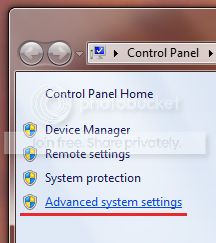


2.
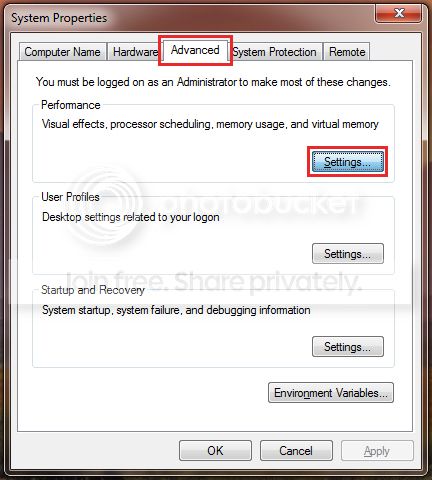
Next click on the Advanced tab and Settings which correspond to the Performance section;


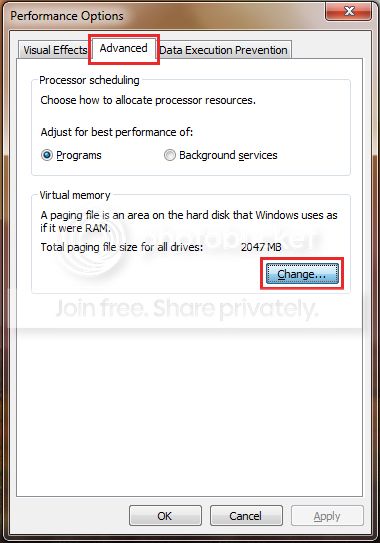
3. Then the Advanced tab once more and click on the Change button;


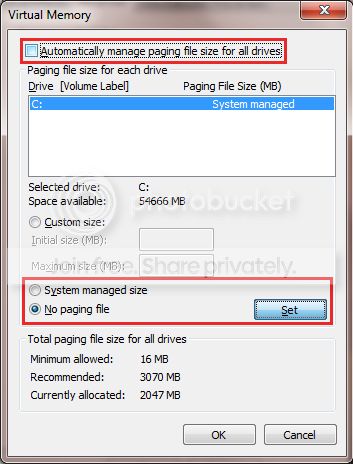
4. Untick the checkbox next to Automatically manage paging file size for all drives;

Select No paging file and Click on the Set button;

5. Confirm all the windows.

6.
Restart the PC.

7. Reverse the procedure, by following steps 1-3, only this time select System managed size
and click the Set button;
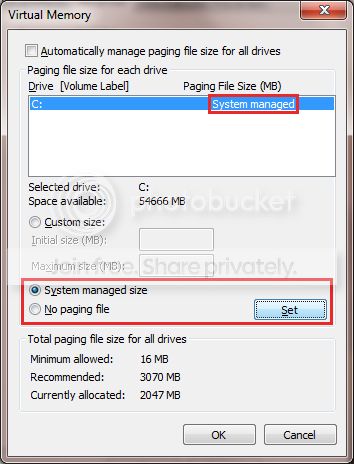


8. Recheck the box next to Automatically manage paging file size for all drives
and exit the windows by clicking the OK button;
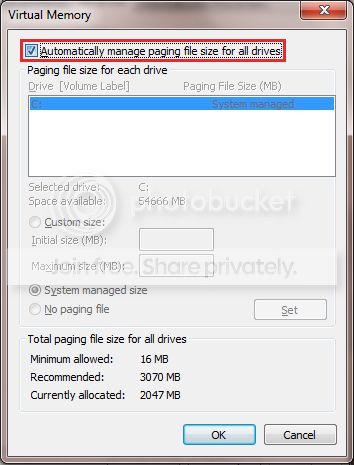


9. Confirm all of the remaining windows by click the OK button
and restart the PC once again to take affect.

Other storage related report
Code:
Event[5145]:
  Log Name: System
  Source: Ntfs
  Date: 2013-12-08T19:39:22.817
  Event ID: 55
  Task: N/A
  Level: Error
  Opcode: N/A
  Keyword: Classic
  User: N/A
  User Name: N/A
  Computer: Desktop
  Description: 
The file system structure on the disk is corrupt and unusable.
Restore the setting back to S3, test and report back.

 

My Computer

Computer type
PC/Desktop
OS
Windows 10
CPU
Intel Core i5 3570K
Motherboard
Asus P8Z77V-PRO
Memory
16GB 1600Mhz G.Skill
Graphics Card(s)
Gigabyte GTX 970 G1-Gaming
PSU
Seasonic 1000W Platinum
Case
Fractal Design Define R4
Cooling
Noctua NH-D14
Hi,

The PSU is a Hiper 630W Type-M. It is about 6 years old.
The website said I needed 350w recommended.
I have reseated all the cables.
I set my E:\ HDD with a paging file since my C:\ is a SSD.

This is a new install of Windows. It has all the latest drivers for the motherboard and I have already tried the SanDisk SSD ToolKit.
Did the Clean Startup (had to uninstall Avast) same thing.
Also removed all the extra Nvidia programs left only the driver and same thing.
 

My Computer

Computer type
PC/Desktop
Computer Manufacturer/Model Number
Custom Build
OS
Windows 7 Pro 64bit
CPU
AMD FX6-6300
Motherboard
MSI 760GA-PF3
Memory
2x4GB Kingston HyperX
Graphics Card(s)
GTS8800 512MB
Hard Drives
64GB Sandisk SDSSDP064G
1TB Samsung HD103SJ
3TB Seagate ST3000DM001
Antivirus
Avast Latest
Browser
Chrome Latest
The PSU is a Hiper 630W Type-M. It is about 6 years old.
Well it is pretty old now, do you have a known good spare?

I set my E:\ HDD with a paging file since my C:\ is a SSD.
That won't work to generate dump files.

This is a new install of Windows. It has all the latest drivers for the motherboard and I have already tried the SanDisk SSD ToolKit.
And? is it the latest?
 

My Computer

Computer type
PC/Desktop
OS
Windows 10
CPU
Intel Core i5 3570K
Motherboard
Asus P8Z77V-PRO
Memory
16GB 1600Mhz G.Skill
Graphics Card(s)
Gigabyte GTX 970 G1-Gaming
PSU
Seasonic 1000W Platinum
Case
Fractal Design Define R4
Cooling
Noctua NH-D14
The PSU is a Hiper 630W Type-M. It is about 6 years old.
Well it is pretty old now, do you have a known good spare?
Unfortunately I do not have a spare PSU to test with.

I set my E:\ HDD with a paging file since my C:\ is a SSD.
That won't work to generate dump files.
I did set it to C:\ and when it BSODed it did not generate a DMP.

This is a new install of Windows. It has all the latest drivers for the motherboard and I have already tried the SanDisk SSD ToolKit.
And? is it the latest?
It was the latest.


I am thinking it may be due to the SSD as I have read on some forums that it has caused similar issues for people.
 
Last edited:

My Computer

Computer type
PC/Desktop
Computer Manufacturer/Model Number
Custom Build
OS
Windows 7 Pro 64bit
CPU
AMD FX6-6300
Motherboard
MSI 760GA-PF3
Memory
2x4GB Kingston HyperX
Graphics Card(s)
GTS8800 512MB
Hard Drives
64GB Sandisk SDSSDP064G
1TB Samsung HD103SJ
3TB Seagate ST3000DM001
Antivirus
Avast Latest
Browser
Chrome Latest
Unfortunately I do not have a spare PSU to test with.
In that case please post a screenshot of the 3.3v, 5v & 12v values using HWinfo.


I did set it to C:\ and when it BSODed it did not generate a DMP.
I am thinking it may be due to the SSD as I have read on some forums that it has caused similar issues for people.
That wouldn't be too far off as 0xF4 are usually attributed to storage issues.
Did you try swapping SATA Data/Power and using a different SATA port on the motherboard?
 

My Computer

Computer type
PC/Desktop
OS
Windows 10
CPU
Intel Core i5 3570K
Motherboard
Asus P8Z77V-PRO
Memory
16GB 1600Mhz G.Skill
Graphics Card(s)
Gigabyte GTX 970 G1-Gaming
PSU
Seasonic 1000W Platinum
Case
Fractal Design Define R4
Cooling
Noctua NH-D14
It has been solved.

The issue was with the 6Gbit/s SATA port.
I have 8 ports. 1-6 are 3Gbit/s and 7-8 are 6Gbit/s.
My SSD (with Windows installed) was in port 7 (Its a 6GBit/s SSD). I tried port 8 and same issue.
Something funny I noticed, the BIOS only sees ports 1-6.
I tried it with the SSD in port 1 and it sees it in the BIOS and it now can go into and out of sleep mode without any issues.
It seems when you come out of sleep mode, because the BIOS cannot see port 7/8 Windows thinks the SSD is unplugged.

It is really annoying since I made sure I got SATA 3 motherboard and SSD for the speed.

I guess I need to contact MSI.

Thank you for your help.
Now to try and fix the issue with the USB 3.

In case any one else has this issue, I have posted this on the MSI Forum https://forum-en.msi.com/index.php?topic=175594.0

EDIT: I just noticed that my 2nd HDD (it's on port 8) gets disconnected after sleep mode. This is why it BSODed because the SSD was on port 7 and I guess the same thing happened to it as well.
 
Last edited:

My Computer

Computer type
PC/Desktop
Computer Manufacturer/Model Number
Custom Build
OS
Windows 7 Pro 64bit
CPU
AMD FX6-6300
Motherboard
MSI 760GA-PF3
Memory
2x4GB Kingston HyperX
Graphics Card(s)
GTS8800 512MB
Hard Drives
64GB Sandisk SDSSDP064G
1TB Samsung HD103SJ
3TB Seagate ST3000DM001
Antivirus
Avast Latest
Browser
Chrome Latest
Glad to hear we have it resolved, and thank you for reporting back :) .
Ports 7&8 are controlled by the Asmedia chip, while the rest are a part of AMD's Chipset.
Bult_ar_org.gif
[FONT=Arial, Helvetica, sans-serif]On-Board SATA[/FONT]


• 6 SATAII (SATA1~6) ports by AMD® SB710
- Supports storage and data transfers at up to 3Gb/s
• 2 SATAIII (SATA7~8) ports by Asmedia® ASM1061
- Supports storage and data transfers at up to 6Gb/s
What issue with the USB3.0?
 

My Computer

Computer type
PC/Desktop
OS
Windows 10
CPU
Intel Core i5 3570K
Motherboard
Asus P8Z77V-PRO
Memory
16GB 1600Mhz G.Skill
Graphics Card(s)
Gigabyte GTX 970 G1-Gaming
PSU
Seasonic 1000W Platinum
Case
Fractal Design Define R4
Cooling
Noctua NH-D14
I thought I better report back in case anyone else has the issue.
That would explain why Windows doesn't see it after sleep mode. I wonder if MSI will ever fix it.

I connect my Samsung phone to the USB 3.0 port at the back and it says:
View attachment 296912
It is in the USB 3 port and I am using the cable that came with it.
The drivers have been installed.
I don't want to make a new post until I have tried other USB 3.0 devices to rule out the port or the phone.

EDIT:
Ignore my USB 3.0 issue. It seems that the Note 3 USB 3.0 is not enabled by default.
I need to enable it every time I connect it.
http://www.youtube.com/watch?v=34p3YYeWwes explains it all.
 
Last edited:

My Computer

Computer type
PC/Desktop
Computer Manufacturer/Model Number
Custom Build
OS
Windows 7 Pro 64bit
CPU
AMD FX6-6300
Motherboard
MSI 760GA-PF3
Memory
2x4GB Kingston HyperX
Graphics Card(s)
GTS8800 512MB
Hard Drives
64GB Sandisk SDSSDP064G
1TB Samsung HD103SJ
3TB Seagate ST3000DM001
Antivirus
Avast Latest
Browser
Chrome Latest
I just found out that Drivers & Downloads has newer version of the Asmedia SATA drivers. So now if you come out of sleep mode, it will connect the hard drive back. Unfortunately if it's your C:\ drive, it doesn't connect it fast enough and it still bluescreen but any other drives comes back within 10 seconds or so.
 

My Computer

Computer type
PC/Desktop
Computer Manufacturer/Model Number
Custom Build
OS
Windows 7 Pro 64bit
CPU
AMD FX6-6300
Motherboard
MSI 760GA-PF3
Memory
2x4GB Kingston HyperX
Graphics Card(s)
GTS8800 512MB
Hard Drives
64GB Sandisk SDSSDP064G
1TB Samsung HD103SJ
3TB Seagate ST3000DM001
Antivirus
Avast Latest
Browser
Chrome Latest
I also looked for a newer version of ASM1061 and couldn't find any :\ .
I don't much you can do at the moment other than using the other ports, I'm not it
is qualifying for an RMA. Did you contact MSI?
 

My Computer

Computer type
PC/Desktop
OS
Windows 10
CPU
Intel Core i5 3570K
Motherboard
Asus P8Z77V-PRO
Memory
16GB 1600Mhz G.Skill
Graphics Card(s)
Gigabyte GTX 970 G1-Gaming
PSU
Seasonic 1000W Platinum
Case
Fractal Design Define R4
Cooling
Noctua NH-D14
Back
Top