BSOD after standby, error 0xF4 (0x3, 0xFFFFFA800BCF3600...)

bjarne

New member
Local time
12:23 AM
Messages
16
Background: I used to get BSODs when playing games, I would get a message in the systray that my video card driver has failed then a BSOD. I managed to fix this issue by reflashing my bios. However, now when my computer wakes up from standby, I get a BSOD.

Things I've tried:

  • Memtest ( 8 passes, no errors)
  • Cleaning the inside of the computer, removing dust with compressed air
  • Updating graphics card drivers (currently at the latest version)
  • Video memory stress test (passed)
Attached is a DM log and a screenshot of a minidump analysis from WhoCrashed.
 
Last edited:

My Computer My Computer

At a glance

Windows 7 Ultimate x64Intel i7 3.05Ghz12 GB CrosshairGeForce GTX 470
Computer type
PC/Desktop
Computer Manufacturer/Model Number
custom build
OS
Windows 7 Ultimate x64
CPU
Intel i7 3.05Ghz
Motherboard
Gigabyte x58a ud3r 2
Memory
12 GB Crosshair
Graphics Card(s)
GeForce GTX 470
bump
 

My Computer My Computer

At a glance

Windows 7 Ultimate x64Intel i7 3.05Ghz12 GB CrosshairGeForce GTX 470
Computer type
PC/Desktop
Computer Manufacturer/Model Number
custom build
OS
Windows 7 Ultimate x64
CPU
Intel i7 3.05Ghz
Motherboard
Gigabyte x58a ud3r 2
Memory
12 GB Crosshair
Graphics Card(s)
GeForce GTX 470

My Computer My Computer

At a glance

Microsoft Windows 10 Pro Insider Preview 64-bitIntel(R) Core(TM) i3-4130 CPU @ 3.40GHzCorsair Vengence 4GB x2 (8.00GB Dual-Channel ...2047MB GeForce GTS 450 (ZOTAC International)
Computer type
PC/Desktop
Computer Manufacturer/Model Number
Self Assembled
OS
Microsoft Windows 10 Pro Insider Preview 64-bit
CPU
Intel(R) Core(TM) i3-4130 CPU @ 3.40GHz
Motherboard
Gigabyte Technology Co., Ltd. B85M-D3H
Memory
Corsair Vengence 4GB x2 (8.00GB Dual-Channel DDR3 @ 798MHz)
Graphics Card(s)
2047MB GeForce GTS 450 (ZOTAC International)
Sound Card
Onboard (Realtek High Definition Audio)
Monitor(s) Displays
LG Flatron E2040T
Screen Resolution
1600x900
Hard Drives
Western Digital 1 TB
Seagate 500 GB
PSU
Corsair VS550
Case
Cooler Master K380
Cooling
Cooler Master Seidon 120V Plus
Keyboard
Logitech MK260r
Mouse
Logitech MK260r
Internet Speed
PMPL Broadband
Antivirus
Windows Defender + MBAM
Browser
Firefox
Other Info
Dell Studio 15" Laptop
Hi bjarne.

Test your HDD using Data Lifeguard Diagnostic for Windows. Take both the short and the extended test.

Let us know the result.

Passed both tests.

Attached screenshot of crystaldisk too.

I've repaired my windows install but this problem still happens. It does not happen under Linux.

I have also attached another error message I got just before the BSOD.
 

My Computer My Computer

At a glance

Windows 7 Ultimate x64Intel i7 3.05Ghz12 GB CrosshairGeForce GTX 470
Computer type
PC/Desktop
Computer Manufacturer/Model Number
custom build
OS
Windows 7 Ultimate x64
CPU
Intel i7 3.05Ghz
Motherboard
Gigabyte x58a ud3r 2
Memory
12 GB Crosshair
Graphics Card(s)
GeForce GTX 470

My Computer My Computer

At a glance

Microsoft Windows 10 Pro Insider Preview 64-bitIntel(R) Core(TM) i3-4130 CPU @ 3.40GHzCorsair Vengence 4GB x2 (8.00GB Dual-Channel ...2047MB GeForce GTS 450 (ZOTAC International)
Computer type
PC/Desktop
Computer Manufacturer/Model Number
Self Assembled
OS
Microsoft Windows 10 Pro Insider Preview 64-bit
CPU
Intel(R) Core(TM) i3-4130 CPU @ 3.40GHz
Motherboard
Gigabyte Technology Co., Ltd. B85M-D3H
Memory
Corsair Vengence 4GB x2 (8.00GB Dual-Channel DDR3 @ 798MHz)
Graphics Card(s)
2047MB GeForce GTS 450 (ZOTAC International)
Sound Card
Onboard (Realtek High Definition Audio)
Monitor(s) Displays
LG Flatron E2040T
Screen Resolution
1600x900
Hard Drives
Western Digital 1 TB
Seagate 500 GB
PSU
Corsair VS550
Case
Cooler Master K380
Cooling
Cooler Master Seidon 120V Plus
Keyboard
Logitech MK260r
Mouse
Logitech MK260r
Internet Speed
PMPL Broadband
Antivirus
Windows Defender + MBAM
Browser
Firefox
Other Info
Dell Studio 15" Laptop
Yes. I dual boot Windows and Linux on the same HDD.
 

My Computer My Computer

At a glance

Windows 7 Ultimate x64Intel i7 3.05Ghz12 GB CrosshairGeForce GTX 470
Computer type
PC/Desktop
Computer Manufacturer/Model Number
custom build
OS
Windows 7 Ultimate x64
CPU
Intel i7 3.05Ghz
Motherboard
Gigabyte x58a ud3r 2
Memory
12 GB Crosshair
Graphics Card(s)
GeForce GTX 470

My Computer My Computer

At a glance

Microsoft Windows 10 Pro Insider Preview 64-bitIntel(R) Core(TM) i3-4130 CPU @ 3.40GHzCorsair Vengence 4GB x2 (8.00GB Dual-Channel ...2047MB GeForce GTS 450 (ZOTAC International)
Computer type
PC/Desktop
Computer Manufacturer/Model Number
Self Assembled
OS
Microsoft Windows 10 Pro Insider Preview 64-bit
CPU
Intel(R) Core(TM) i3-4130 CPU @ 3.40GHz
Motherboard
Gigabyte Technology Co., Ltd. B85M-D3H
Memory
Corsair Vengence 4GB x2 (8.00GB Dual-Channel DDR3 @ 798MHz)
Graphics Card(s)
2047MB GeForce GTS 450 (ZOTAC International)
Sound Card
Onboard (Realtek High Definition Audio)
Monitor(s) Displays
LG Flatron E2040T
Screen Resolution
1600x900
Hard Drives
Western Digital 1 TB
Seagate 500 GB
PSU
Corsair VS550
Case
Cooler Master K380
Cooling
Cooler Master Seidon 120V Plus
Keyboard
Logitech MK260r
Mouse
Logitech MK260r
Internet Speed
PMPL Broadband
Antivirus
Windows Defender + MBAM
Browser
Firefox
Other Info
Dell Studio 15" Laptop
Nice dual OS install. Most of the people cannot manage to install Linux in Dual boot so nicely.

Follow http://www.sevenforums.com/tutorials/778-power-plan-settings-change.html . When you are on Step 5. B, do it:
Hard disk
Turn off Hard Disk After
Settings: 0 Minutes​
Then see how it goes. Let us know the result.

I didn't have a "0 Minutes" option so I changed it to "Never".

This worked once but on the second time I came out of sleep, it worked for 5 minutes then I got the same BSOD.
 

My Computer My Computer

At a glance

Windows 7 Ultimate x64Intel i7 3.05Ghz12 GB CrosshairGeForce GTX 470
Computer type
PC/Desktop
Computer Manufacturer/Model Number
custom build
OS
Windows 7 Ultimate x64
CPU
Intel i7 3.05Ghz
Motherboard
Gigabyte x58a ud3r 2
Memory
12 GB Crosshair
Graphics Card(s)
GeForce GTX 470
This worked once but on the second time I came out of sleep, it worked for 5 minutes then I got the same BSOD.
What was the bugcheck code?
 

My Computer My Computer

At a glance

Microsoft Windows 10 Pro Insider Preview 64-bitIntel(R) Core(TM) i3-4130 CPU @ 3.40GHzCorsair Vengence 4GB x2 (8.00GB Dual-Channel ...2047MB GeForce GTS 450 (ZOTAC International)
Computer type
PC/Desktop
Computer Manufacturer/Model Number
Self Assembled
OS
Microsoft Windows 10 Pro Insider Preview 64-bit
CPU
Intel(R) Core(TM) i3-4130 CPU @ 3.40GHz
Motherboard
Gigabyte Technology Co., Ltd. B85M-D3H
Memory
Corsair Vengence 4GB x2 (8.00GB Dual-Channel DDR3 @ 798MHz)
Graphics Card(s)
2047MB GeForce GTS 450 (ZOTAC International)
Sound Card
Onboard (Realtek High Definition Audio)
Monitor(s) Displays
LG Flatron E2040T
Screen Resolution
1600x900
Hard Drives
Western Digital 1 TB
Seagate 500 GB
PSU
Corsair VS550
Case
Cooler Master K380
Cooling
Cooler Master Seidon 120V Plus
Keyboard
Logitech MK260r
Mouse
Logitech MK260r
Internet Speed
PMPL Broadband
Antivirus
Windows Defender + MBAM
Browser
Firefox
Other Info
Dell Studio 15" Laptop
Code:
Bugcheck code: 0xF4 (0x3, 0xFFFFFA800BB2A910, 0xFFFFFA800BB2ABF0,  0xFFFFF800037DC270)
Error: [FONT=Segoe UI,  Arial][SIZE=2][COLOR=#000000][URL="http://www.google.com/search?q=MSDN+bugcheck+CRITICAL_OBJECT_TERMINATION"]CRITICAL_OBJECT_TERMINATION[/URL][/COLOR][/SIZE][/FONT]
 

My Computer My Computer

At a glance

Windows 7 Ultimate x64Intel i7 3.05Ghz12 GB CrosshairGeForce GTX 470
Computer type
PC/Desktop
Computer Manufacturer/Model Number
custom build
OS
Windows 7 Ultimate x64
CPU
Intel i7 3.05Ghz
Motherboard
Gigabyte x58a ud3r 2
Memory
12 GB Crosshair
Graphics Card(s)
GeForce GTX 470
A stop oxF4 is usually associated with the storage environment. But the HDD tests are passed. The SMART data also looks good.

Now, uninstall MadicISO. The SCSI installed by it (mcdbus.sys) may cause it.

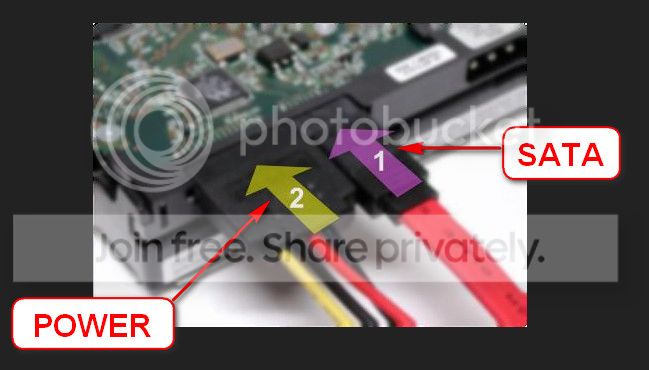
Also re-seat the sata and power cables. Make it sure that all the cables are properly seated, and the HDD is properly hold with the stand, all teh screws are properly tightened.

  1. 72974453_zps85c47d93.jpg
If possible, use a different SATA cable, and apply it to a different unused SATA port on the motherboard.


On a different thought, test your RAM modules for possible errors; because failing memory may cause any sort of issues.
How to Test and Diagnose RAM Issues with Memtest86+
Run memtest86+ for at least 8 consecutive passes.

If it start showing errors/red lines, stop testing. A single error is enough to determine that something is going bad there.


Let us know the results.
 

My Computer My Computer

At a glance

Microsoft Windows 10 Pro Insider Preview 64-bitIntel(R) Core(TM) i3-4130 CPU @ 3.40GHzCorsair Vengence 4GB x2 (8.00GB Dual-Channel ...2047MB GeForce GTS 450 (ZOTAC International)
Computer type
PC/Desktop
Computer Manufacturer/Model Number
Self Assembled
OS
Microsoft Windows 10 Pro Insider Preview 64-bit
CPU
Intel(R) Core(TM) i3-4130 CPU @ 3.40GHz
Motherboard
Gigabyte Technology Co., Ltd. B85M-D3H
Memory
Corsair Vengence 4GB x2 (8.00GB Dual-Channel DDR3 @ 798MHz)
Graphics Card(s)
2047MB GeForce GTS 450 (ZOTAC International)
Sound Card
Onboard (Realtek High Definition Audio)
Monitor(s) Displays
LG Flatron E2040T
Screen Resolution
1600x900
Hard Drives
Western Digital 1 TB
Seagate 500 GB
PSU
Corsair VS550
Case
Cooler Master K380
Cooling
Cooler Master Seidon 120V Plus
Keyboard
Logitech MK260r
Mouse
Logitech MK260r
Internet Speed
PMPL Broadband
Antivirus
Windows Defender + MBAM
Browser
Firefox
Other Info
Dell Studio 15" Laptop
I didn't quite do all you asked of me, but I removed the graphics card and cleaned it thoroughly. Now when I put the computer to sleep it does not show me the blue screen, but instead wakes up from sleep immediately.
 

My Computer My Computer

At a glance

Windows 7 Ultimate x64Intel i7 3.05Ghz12 GB CrosshairGeForce GTX 470
Computer type
PC/Desktop
Computer Manufacturer/Model Number
custom build
OS
Windows 7 Ultimate x64
CPU
Intel i7 3.05Ghz
Motherboard
Gigabyte x58a ud3r 2
Memory
12 GB Crosshair
Graphics Card(s)
GeForce GTX 470
What leaded you to the graphics card?
 

My Computer My Computer

At a glance

Microsoft Windows 10 Pro Insider Preview 64-bitIntel(R) Core(TM) i3-4130 CPU @ 3.40GHzCorsair Vengence 4GB x2 (8.00GB Dual-Channel ...2047MB GeForce GTS 450 (ZOTAC International)
Computer type
PC/Desktop
Computer Manufacturer/Model Number
Self Assembled
OS
Microsoft Windows 10 Pro Insider Preview 64-bit
CPU
Intel(R) Core(TM) i3-4130 CPU @ 3.40GHz
Motherboard
Gigabyte Technology Co., Ltd. B85M-D3H
Memory
Corsair Vengence 4GB x2 (8.00GB Dual-Channel DDR3 @ 798MHz)
Graphics Card(s)
2047MB GeForce GTS 450 (ZOTAC International)
Sound Card
Onboard (Realtek High Definition Audio)
Monitor(s) Displays
LG Flatron E2040T
Screen Resolution
1600x900
Hard Drives
Western Digital 1 TB
Seagate 500 GB
PSU
Corsair VS550
Case
Cooler Master K380
Cooling
Cooler Master Seidon 120V Plus
Keyboard
Logitech MK260r
Mouse
Logitech MK260r
Internet Speed
PMPL Broadband
Antivirus
Windows Defender + MBAM
Browser
Firefox
Other Info
Dell Studio 15" Laptop
The monitor kept blacking out during flash video/games and an error message would say that the display adpater has failed. Updating GPU drivers did not help.

I've actually managed to put the computer to sleep now. Once I turned off hybrid sleep it works again!

However, if I select the hibernate option it wakes up from hibernation immediately, though this isn't a big deal. Essentially, the same problem as this user here: http://www.sevenforums.com/performa...es-up-immediately-after-sleep.html#post715382
 

My Computer My Computer

At a glance

Windows 7 Ultimate x64Intel i7 3.05Ghz12 GB CrosshairGeForce GTX 470
Computer type
PC/Desktop
Computer Manufacturer/Model Number
custom build
OS
Windows 7 Ultimate x64
CPU
Intel i7 3.05Ghz
Motherboard
Gigabyte x58a ud3r 2
Memory
12 GB Crosshair
Graphics Card(s)
GeForce GTX 470
Hibernation is not a big deal for a desktop computer.

If the computer runs fine without it, let it run like this.
 

My Computer My Computer

At a glance

Microsoft Windows 10 Pro Insider Preview 64-bitIntel(R) Core(TM) i3-4130 CPU @ 3.40GHzCorsair Vengence 4GB x2 (8.00GB Dual-Channel ...2047MB GeForce GTS 450 (ZOTAC International)
Computer type
PC/Desktop
Computer Manufacturer/Model Number
Self Assembled
OS
Microsoft Windows 10 Pro Insider Preview 64-bit
CPU
Intel(R) Core(TM) i3-4130 CPU @ 3.40GHz
Motherboard
Gigabyte Technology Co., Ltd. B85M-D3H
Memory
Corsair Vengence 4GB x2 (8.00GB Dual-Channel DDR3 @ 798MHz)
Graphics Card(s)
2047MB GeForce GTS 450 (ZOTAC International)
Sound Card
Onboard (Realtek High Definition Audio)
Monitor(s) Displays
LG Flatron E2040T
Screen Resolution
1600x900
Hard Drives
Western Digital 1 TB
Seagate 500 GB
PSU
Corsair VS550
Case
Cooler Master K380
Cooling
Cooler Master Seidon 120V Plus
Keyboard
Logitech MK260r
Mouse
Logitech MK260r
Internet Speed
PMPL Broadband
Antivirus
Windows Defender + MBAM
Browser
Firefox
Other Info
Dell Studio 15" Laptop
Back
Top