Solved BSOD at different times, usually when playing Smite

spacelord

New member
Local time
1:55 AM
Messages
31
Location
Missouri
I have been having BSOD, usually when I am playing smite, but sometimes when I am just checking my email. I have re-installed windows and updated drivers, but I am still getting the errors. I have attached the dump files.
 

My Computer My Computer

At a glance

Windows 7x64Pentium Dual-Core E6300 @ 2.8GHzG.SKILL 4GB 240-Pin DDR2 SDRAM 1066 (PC2 8500)NVIDIA GeForce GTS 250
Computer Manufacturer/Model Number
Home Build
OS
Windows 7x64
CPU
Pentium Dual-Core E6300 @ 2.8GHz
Motherboard
EP45-UD3R
Memory
G.SKILL 4GB 240-Pin DDR2 SDRAM 1066 (PC2 8500)
Graphics Card(s)
NVIDIA GeForce GTS 250
Sound Card
Realtek High Definition Audio (on board)
Monitor(s) Displays
Acer
Hard Drives
280GB SATA
160GB IDE
PSU
Antec EarthWatts EA650 650W Continuous Power ATX12V Ver.2.2
Antivirus
MSE
Browser
Firefox
Code:
fffff880`03139658  fffff880`0f12c56aUnable to load image \SystemRoot\system32\DRIVERS\nvlddmkm.sys, Win32 error 0n2
*** WARNING: Unable to verify timestamp for [COLOR="Red"][B]nvlddmkm.sys[/B][/COLOR]
*** ERROR: Module load completed but symbols could not be loaded for nvlddmkm.sys
 nvlddmkm+0xc856a
Code:
0: kd> lmvm dxgmms1
start             end                 module name
fffff880`0fd44000 fffff880`0fd8a000   dxgmms1    (pdb symbols)          c:\symbols\dxgmms1.pdb\93AB163000A844D5BF442A979FB6FF991\dxgmms1.pdb
    Loaded symbol image file: dxgmms1.sys
    Mapped memory image file: c:\symbols\dxgmms1.sys\5164DC1346000\dxgmms1.sys
    Image path: \SystemRoot\System32\drivers\dxgmms1.sys
    Image name:[B][COLOR="Red"] dxgmms1.sys[/COLOR][/B]
    Timestamp:        Wed Apr 10 12:57:15 2013 (5164DC13)
    CheckSum:         00043C9B
    ImageSize:        00046000
    File version:     6.1.7601.18126
    Product version:  6.1.7601.18126
    File flags:       0 (Mask 3F)
    File OS:          40004 NT Win32
    File type:        3.7 Driver
    File date:        00000000.00000000
    Translations:     0409.04b0
    CompanyName:      Microsoft Corporation
    ProductName:      Microsoft® Windows® Operating System
    InternalName:     dxgmms1.sys
    OriginalFilename: dxgmms1.sys
    ProductVersion:   6.1.7601.18126
    FileVersion:      6.1.7601.18126 (win7sp1_gdr.130409-1534)
    FileDescription:  DirectX Graphics MMS
    LegalCopyright:   © Microsoft Corporation. All rights reserved.

Download and install an updated GTS250 display driver from this site:
Drivers | GeForce
 

My Computer My Computer

At a glance

Windows 10 Pro x64 ; Xubuntu x64Intel i7 860 @ 2.80 GHz O/C'ed to 4.0GHz16GB Corsair Vengance DDR3 @ 661 MHz Dual Cha...EVGA NVidia GTX 560 1024MB
Computer type
PC/Desktop
Computer Manufacturer/Model Number
Golden Mk. I.4
OS
Windows 10 Pro x64 ; Xubuntu x64
CPU
Intel i7 860 @ 2.80 GHz O/C'ed to 4.0GHz
Motherboard
Gigabyte P55A-UD3R Rev.1. Award BIOS F13
Memory
16GB Corsair Vengance DDR3 @ 661 MHz Dual Channel (9-9-9-24)
Graphics Card(s)
EVGA NVidia GTX 560 1024MB
Sound Card
Realtek Integrated
Monitor(s) Displays
Dual Samsung SyncMaster 2494HS
Screen Resolution
1920*1080 and 1920*1080
Hard Drives
1*Samsung 840 EVO 120GB SSD;
1*OCZ Vertex 2 60GB SSD;
2*Samsung F3 SpinPoint 1TB in RAID0;
1*Samsung F1 SpinPoint 1TB;
2*Western Digital 1TB External USB 3.0
1*Western Digital 500GB External USB 3.0
1*Seagate 500GB External USB 2.0
PSU
Thermaltake ToughPower QFan 750W
Case
Thermaltake Element S VK60001W2Z
Cooling
Corsair H60 Water Cooling, 2*230mm and 2*80mm case fans
Keyboard
Logitech G110
Mouse
Logitech MX518
Updated the Nvidia driver. Played some games today. CTD with Smite and another with Path of Exile. Then I got a blue screen with Path of Exile. Bug report attached.

Thanks for any help.
 

My Computer My Computer

At a glance

Windows 7x64Pentium Dual-Core E6300 @ 2.8GHzG.SKILL 4GB 240-Pin DDR2 SDRAM 1066 (PC2 8500)NVIDIA GeForce GTS 250
Computer Manufacturer/Model Number
Home Build
OS
Windows 7x64
CPU
Pentium Dual-Core E6300 @ 2.8GHz
Motherboard
EP45-UD3R
Memory
G.SKILL 4GB 240-Pin DDR2 SDRAM 1066 (PC2 8500)
Graphics Card(s)
NVIDIA GeForce GTS 250
Sound Card
Realtek High Definition Audio (on board)
Monitor(s) Displays
Acer
Hard Drives
280GB SATA
160GB IDE
PSU
Antec EarthWatts EA650 650W Continuous Power ATX12V Ver.2.2
Antivirus
MSE
Browser
Firefox
Code:
0: kd> lmvm dxgmms1
start             end                 module name
fffff880`0f000000 fffff880`0f046000   dxgmms1    (pdb symbols)          c:\symbols\dxgmms1.pdb\93AB163000A844D5BF442A979FB6FF991\dxgmms1.pdb
    Loaded symbol image file: dxgmms1.sys
    Mapped memory image file: c:\symbols\dxgmms1.sys\5164DC1346000\dxgmms1.sys
    Image path: \SystemRoot\System32\drivers\dxgmms1.sys
    Image name: dxgmms1.sys
    [COLOR="Red"][B]Timestamp:        Wed Apr 10 12:57:15 2013[/B][/COLOR] (5164DC13)
    CheckSum:         00043C9B
    ImageSize:        00046000
    File version:     6.1.7601.18126
    Product version:  6.1.7601.18126
    File flags:       0 (Mask 3F)
    File OS:          40004 NT Win32
    File type:        3.7 Driver
    File date:        00000000.00000000
    Translations:     0409.04b0
    CompanyName:      Microsoft Corporation
    ProductName:      Microsoft® Windows® Operating System
    InternalName:     dxgmms1.sys
    OriginalFilename: dxgmms1.sys
    ProductVersion:   6.1.7601.18126
    [COLOR="red"][B]FileVersion:      6.1.7601.18126 (win7sp1_gdr.130409-1534)[/B][/COLOR]
    FileDescription:  DirectX Graphics MMS
    LegalCopyright:   © Microsoft Corporation. All rights reserved.
WinDBG shows that driver has not been updated - information same as first analysis in post #2.
 

My Computer My Computer

At a glance

Windows 10 Pro x64 ; Xubuntu x64Intel i7 860 @ 2.80 GHz O/C'ed to 4.0GHz16GB Corsair Vengance DDR3 @ 661 MHz Dual Cha...EVGA NVidia GTX 560 1024MB
Computer type
PC/Desktop
Computer Manufacturer/Model Number
Golden Mk. I.4
OS
Windows 10 Pro x64 ; Xubuntu x64
CPU
Intel i7 860 @ 2.80 GHz O/C'ed to 4.0GHz
Motherboard
Gigabyte P55A-UD3R Rev.1. Award BIOS F13
Memory
16GB Corsair Vengance DDR3 @ 661 MHz Dual Channel (9-9-9-24)
Graphics Card(s)
EVGA NVidia GTX 560 1024MB
Sound Card
Realtek Integrated
Monitor(s) Displays
Dual Samsung SyncMaster 2494HS
Screen Resolution
1920*1080 and 1920*1080
Hard Drives
1*Samsung 840 EVO 120GB SSD;
1*OCZ Vertex 2 60GB SSD;
2*Samsung F3 SpinPoint 1TB in RAID0;
1*Samsung F1 SpinPoint 1TB;
2*Western Digital 1TB External USB 3.0
1*Western Digital 500GB External USB 3.0
1*Seagate 500GB External USB 2.0
PSU
Thermaltake ToughPower QFan 750W
Case
Thermaltake Element S VK60001W2Z
Cooling
Corsair H60 Water Cooling, 2*230mm and 2*80mm case fans
Keyboard
Logitech G110
Mouse
Logitech MX518
Installed the new driver again, this time I removed all earlier drivers and verified with the Nvidia utility that it was the most updated driver. Still getting blue screens, and it looks like it is still Nvidia drivers that are crashing. Seems like their drivers are always unstable for some reason.

After reading this article on the instability of recent Nvidia drivers, I decided to try this guy's advice and roll back to the March 2013 drivers to see if they are more stable.
 
Last edited:

My Computer My Computer

At a glance

Windows 7x64Pentium Dual-Core E6300 @ 2.8GHzG.SKILL 4GB 240-Pin DDR2 SDRAM 1066 (PC2 8500)NVIDIA GeForce GTS 250
Computer Manufacturer/Model Number
Home Build
OS
Windows 7x64
CPU
Pentium Dual-Core E6300 @ 2.8GHz
Motherboard
EP45-UD3R
Memory
G.SKILL 4GB 240-Pin DDR2 SDRAM 1066 (PC2 8500)
Graphics Card(s)
NVIDIA GeForce GTS 250
Sound Card
Realtek High Definition Audio (on board)
Monitor(s) Displays
Acer
Hard Drives
280GB SATA
160GB IDE
PSU
Antec EarthWatts EA650 650W Continuous Power ATX12V Ver.2.2
Antivirus
MSE
Browser
Firefox
Code:
1: kd> lmvm dxgmms1
start             end                 module name
fffff880`0f000000 fffff880`0f046000   dxgmms1    (pdb symbols)          c:\symbols\dxgmms1.pdb\93AB163000A844D5BF442A979FB6FF991\dxgmms1.pdb
    Loaded symbol image file: dxgmms1.sys
    Mapped memory image file: c:\symbols\dxgmms1.sys\5164DC1346000\dxgmms1.sys
    Image path: \SystemRoot\System32\drivers\dxgmms1.sys
    Image name: dxgmms1.sys
    [COLOR="Red"][B]Timestamp:        Wed Apr 10 12:57:15 2013 (5164DC13)[/B][/COLOR]
    CheckSum:         00043C9B
    ImageSize:        00046000
    File version:     6.1.7601.18126
    Product version:  6.1.7601.18126
    File flags:       0 (Mask 3F)
    File OS:          40004 NT Win32
    File type:        3.7 Driver
    File date:        00000000.00000000
    Translations:     0409.04b0
    CompanyName:      Microsoft Corporation
    ProductName:      Microsoft® Windows® Operating System
    InternalName:     dxgmms1.sys
    OriginalFilename: dxgmms1.sys
    ProductVersion:   6.1.7601.18126
   [COLOR="red"][B] FileVersion:      6.1.7601.18126 (win7sp1_gdr.130409-1534)[/B][/COLOR]
    FileDescription:  DirectX Graphics MMS
    LegalCopyright:   © Microsoft Corporation. All rights reserved.
You appear to still have the same driver. See red text in previous analysis code.

Try this:
Uninstall the following Nvidia items in Control Panel > Programs and Features:

- 3D Vision Control Driver
- 3D Vision Driver
- Graphics Driver
- HD Audio Driver
- PhysX
- Nvidia Update

Now follow Drivers - Clean Left over Files after Uninstalling
Reboot. Go to Drivers - Download NVIDIA Drivers, Download 314.22 WHQL. While installing, Select Custom (Advanced) install. In the next page, follow this settings:

View attachment 301351

Reboot.
 

My Computer My Computer

At a glance

Windows 10 Pro x64 ; Xubuntu x64Intel i7 860 @ 2.80 GHz O/C'ed to 4.0GHz16GB Corsair Vengance DDR3 @ 661 MHz Dual Cha...EVGA NVidia GTX 560 1024MB
Computer type
PC/Desktop
Computer Manufacturer/Model Number
Golden Mk. I.4
OS
Windows 10 Pro x64 ; Xubuntu x64
CPU
Intel i7 860 @ 2.80 GHz O/C'ed to 4.0GHz
Motherboard
Gigabyte P55A-UD3R Rev.1. Award BIOS F13
Memory
16GB Corsair Vengance DDR3 @ 661 MHz Dual Channel (9-9-9-24)
Graphics Card(s)
EVGA NVidia GTX 560 1024MB
Sound Card
Realtek Integrated
Monitor(s) Displays
Dual Samsung SyncMaster 2494HS
Screen Resolution
1920*1080 and 1920*1080
Hard Drives
1*Samsung 840 EVO 120GB SSD;
1*OCZ Vertex 2 60GB SSD;
2*Samsung F3 SpinPoint 1TB in RAID0;
1*Samsung F1 SpinPoint 1TB;
2*Western Digital 1TB External USB 3.0
1*Western Digital 500GB External USB 3.0
1*Seagate 500GB External USB 2.0
PSU
Thermaltake ToughPower QFan 750W
Case
Thermaltake Element S VK60001W2Z
Cooling
Corsair H60 Water Cooling, 2*230mm and 2*80mm case fans
Keyboard
Logitech G110
Mouse
Logitech MX518
Okay, so today I am running the 3.14.22 drivers and I tried to play a couple different games. I have gotten a lot of crash to desktop happening and two blue screens.
 
Last edited:

My Computer My Computer

At a glance

Windows 7x64Pentium Dual-Core E6300 @ 2.8GHzG.SKILL 4GB 240-Pin DDR2 SDRAM 1066 (PC2 8500)NVIDIA GeForce GTS 250
Computer Manufacturer/Model Number
Home Build
OS
Windows 7x64
CPU
Pentium Dual-Core E6300 @ 2.8GHz
Motherboard
EP45-UD3R
Memory
G.SKILL 4GB 240-Pin DDR2 SDRAM 1066 (PC2 8500)
Graphics Card(s)
NVIDIA GeForce GTS 250
Sound Card
Realtek High Definition Audio (on board)
Monitor(s) Displays
Acer
Hard Drives
280GB SATA
160GB IDE
PSU
Antec EarthWatts EA650 650W Continuous Power ATX12V Ver.2.2
Antivirus
MSE
Browser
Firefox

My Computer My Computer

At a glance

Windows 10 Pro x64 ; Xubuntu x64Intel i7 860 @ 2.80 GHz O/C'ed to 4.0GHz16GB Corsair Vengance DDR3 @ 661 MHz Dual Cha...EVGA NVidia GTX 560 1024MB
Computer type
PC/Desktop
Computer Manufacturer/Model Number
Golden Mk. I.4
OS
Windows 10 Pro x64 ; Xubuntu x64
CPU
Intel i7 860 @ 2.80 GHz O/C'ed to 4.0GHz
Motherboard
Gigabyte P55A-UD3R Rev.1. Award BIOS F13
Memory
16GB Corsair Vengance DDR3 @ 661 MHz Dual Channel (9-9-9-24)
Graphics Card(s)
EVGA NVidia GTX 560 1024MB
Sound Card
Realtek Integrated
Monitor(s) Displays
Dual Samsung SyncMaster 2494HS
Screen Resolution
1920*1080 and 1920*1080
Hard Drives
1*Samsung 840 EVO 120GB SSD;
1*OCZ Vertex 2 60GB SSD;
2*Samsung F3 SpinPoint 1TB in RAID0;
1*Samsung F1 SpinPoint 1TB;
2*Western Digital 1TB External USB 3.0
1*Western Digital 500GB External USB 3.0
1*Seagate 500GB External USB 2.0
PSU
Thermaltake ToughPower QFan 750W
Case
Thermaltake Element S VK60001W2Z
Cooling
Corsair H60 Water Cooling, 2*230mm and 2*80mm case fans
Keyboard
Logitech G110
Mouse
Logitech MX518
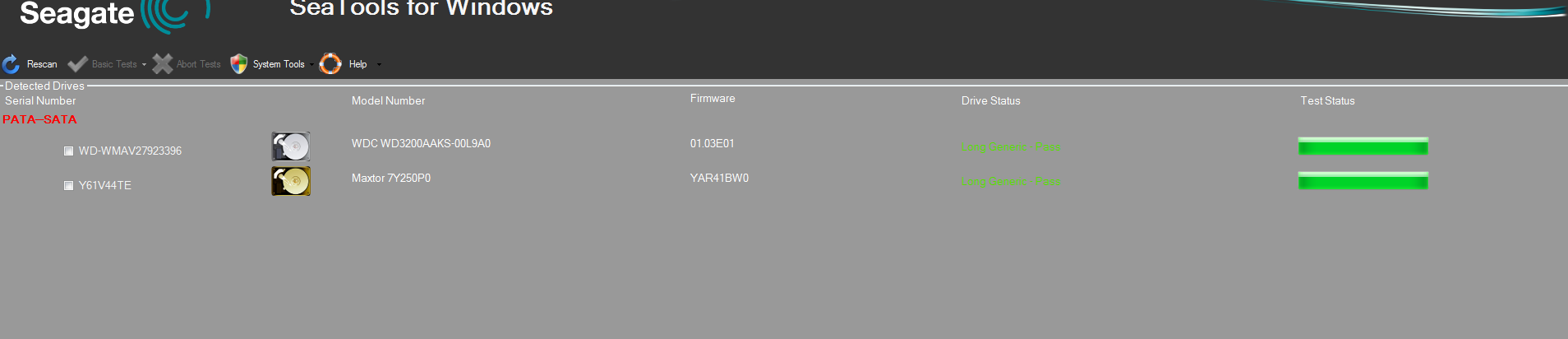
Ran the long test on both my main drive and my backup drive. Everything seems okay.

WBXm6oq.png
 

My Computer My Computer

At a glance

Windows 7x64Pentium Dual-Core E6300 @ 2.8GHzG.SKILL 4GB 240-Pin DDR2 SDRAM 1066 (PC2 8500)NVIDIA GeForce GTS 250
Computer Manufacturer/Model Number
Home Build
OS
Windows 7x64
CPU
Pentium Dual-Core E6300 @ 2.8GHz
Motherboard
EP45-UD3R
Memory
G.SKILL 4GB 240-Pin DDR2 SDRAM 1066 (PC2 8500)
Graphics Card(s)
NVIDIA GeForce GTS 250
Sound Card
Realtek High Definition Audio (on board)
Monitor(s) Displays
Acer
Hard Drives
280GB SATA
160GB IDE
PSU
Antec EarthWatts EA650 650W Continuous Power ATX12V Ver.2.2
Antivirus
MSE
Browser
Firefox
Since no one has replied yet, I thought I might check out my cpu temp while playing Smite. I did notice that it was often at or near 100% load while playing. My two cores got to 72c and 69c while playing. I then ran Prime95 but shut it off as my temp got up to 96c.

I think this might be the problem.

tKZHKMF
 
Last edited:

My Computer My Computer

At a glance

Windows 7x64Pentium Dual-Core E6300 @ 2.8GHzG.SKILL 4GB 240-Pin DDR2 SDRAM 1066 (PC2 8500)NVIDIA GeForce GTS 250
Computer Manufacturer/Model Number
Home Build
OS
Windows 7x64
CPU
Pentium Dual-Core E6300 @ 2.8GHz
Motherboard
EP45-UD3R
Memory
G.SKILL 4GB 240-Pin DDR2 SDRAM 1066 (PC2 8500)
Graphics Card(s)
NVIDIA GeForce GTS 250
Sound Card
Realtek High Definition Audio (on board)
Monitor(s) Displays
Acer
Hard Drives
280GB SATA
160GB IDE
PSU
Antec EarthWatts EA650 650W Continuous Power ATX12V Ver.2.2
Antivirus
MSE
Browser
Firefox
Yes, sounds like the CPU is overheating. Can you check the thermal paste between cooler and CPU? Reapply if neccessary......in fact, just reapply it.
 

My Computer My Computer

At a glance

Windows 10 Pro x64 ; Xubuntu x64Intel i7 860 @ 2.80 GHz O/C'ed to 4.0GHz16GB Corsair Vengance DDR3 @ 661 MHz Dual Cha...EVGA NVidia GTX 560 1024MB
Computer type
PC/Desktop
Computer Manufacturer/Model Number
Golden Mk. I.4
OS
Windows 10 Pro x64 ; Xubuntu x64
CPU
Intel i7 860 @ 2.80 GHz O/C'ed to 4.0GHz
Motherboard
Gigabyte P55A-UD3R Rev.1. Award BIOS F13
Memory
16GB Corsair Vengance DDR3 @ 661 MHz Dual Channel (9-9-9-24)
Graphics Card(s)
EVGA NVidia GTX 560 1024MB
Sound Card
Realtek Integrated
Monitor(s) Displays
Dual Samsung SyncMaster 2494HS
Screen Resolution
1920*1080 and 1920*1080
Hard Drives
1*Samsung 840 EVO 120GB SSD;
1*OCZ Vertex 2 60GB SSD;
2*Samsung F3 SpinPoint 1TB in RAID0;
1*Samsung F1 SpinPoint 1TB;
2*Western Digital 1TB External USB 3.0
1*Western Digital 500GB External USB 3.0
1*Seagate 500GB External USB 2.0
PSU
Thermaltake ToughPower QFan 750W
Case
Thermaltake Element S VK60001W2Z
Cooling
Corsair H60 Water Cooling, 2*230mm and 2*80mm case fans
Keyboard
Logitech G110
Mouse
Logitech MX518
I cleaned all the dust out of the computer (esp the CPU) and all the errors and overheating stopped. I feel silly having posted when that was what was wrong, but thanks for the help!
 

My Computer My Computer

At a glance

Windows 7x64Pentium Dual-Core E6300 @ 2.8GHzG.SKILL 4GB 240-Pin DDR2 SDRAM 1066 (PC2 8500)NVIDIA GeForce GTS 250
Computer Manufacturer/Model Number
Home Build
OS
Windows 7x64
CPU
Pentium Dual-Core E6300 @ 2.8GHz
Motherboard
EP45-UD3R
Memory
G.SKILL 4GB 240-Pin DDR2 SDRAM 1066 (PC2 8500)
Graphics Card(s)
NVIDIA GeForce GTS 250
Sound Card
Realtek High Definition Audio (on board)
Monitor(s) Displays
Acer
Hard Drives
280GB SATA
160GB IDE
PSU
Antec EarthWatts EA650 650W Continuous Power ATX12V Ver.2.2
Antivirus
MSE
Browser
Firefox
:thumbsup:
 

My Computer My Computer

At a glance

Windows 10 Pro x64 ; Xubuntu x64Intel i7 860 @ 2.80 GHz O/C'ed to 4.0GHz16GB Corsair Vengance DDR3 @ 661 MHz Dual Cha...EVGA NVidia GTX 560 1024MB
Computer type
PC/Desktop
Computer Manufacturer/Model Number
Golden Mk. I.4
OS
Windows 10 Pro x64 ; Xubuntu x64
CPU
Intel i7 860 @ 2.80 GHz O/C'ed to 4.0GHz
Motherboard
Gigabyte P55A-UD3R Rev.1. Award BIOS F13
Memory
16GB Corsair Vengance DDR3 @ 661 MHz Dual Channel (9-9-9-24)
Graphics Card(s)
EVGA NVidia GTX 560 1024MB
Sound Card
Realtek Integrated
Monitor(s) Displays
Dual Samsung SyncMaster 2494HS
Screen Resolution
1920*1080 and 1920*1080
Hard Drives
1*Samsung 840 EVO 120GB SSD;
1*OCZ Vertex 2 60GB SSD;
2*Samsung F3 SpinPoint 1TB in RAID0;
1*Samsung F1 SpinPoint 1TB;
2*Western Digital 1TB External USB 3.0
1*Western Digital 500GB External USB 3.0
1*Seagate 500GB External USB 2.0
PSU
Thermaltake ToughPower QFan 750W
Case
Thermaltake Element S VK60001W2Z
Cooling
Corsair H60 Water Cooling, 2*230mm and 2*80mm case fans
Keyboard
Logitech G110
Mouse
Logitech MX518
Back
Top