BSOD- bugcheck Win7/64

speedlever

New member
Member
VIP
Local time
6:58 PM
Messages
128
Bugcheck - BSOD
Asus P5Be
E6600 cpu
2x1 GB Corsair twin2x PC2-6400C4
2x2 GB Adata DQVE1B16 PC2-6400
5-5-5-18
FSB266
DDR2-800
voltages set to auto
PCI Express freq locked at 100
PCI clock sync mode at 33.33MHz.
Retail copy of Win7/64 Home premium upgrade
I built this system almost 4 years ago and originally installed Vista/64 Ultimate on it. A HD crash in January 2010 led me to install Win7/64 on the warranty replacement HD. The recent HD crash of the warranty drive led me to reinstall Win7/64 on a SSD (Intel X25-M 80 GB).

Sometimes I just hate upgrading the system. After a HD crash necessitating a new HD, I elected to install a SSD for my OS/programs drive. Of course I had to reinstall Win7/64 and I decided to update the BIOS and chipset too.

Now I'm experiencing random BSODs due to bugcheck errors.

Where should I start to troubleshoot this?
Revert the BIOS to the earlier version? (can I go back on the BIOS version with Asus's <alt>F2 easyflash?)

For the chipset update, I went to Intel's site and got the latest for the P965 chipset (for Win7/64). 9.1.1.1025
On the Asus P5B-E site, the chipset was still an earlier version, 9.1.1.1019 for Vista/64 (my old chipset version).

Could either the BIOS or the chipset update be causing my bugcheck error?

I'm not sure what to try first to debug this. The BSODs can happen anywhere from a few minutes apart to hours apart. No pattern that I can tell.
 
Last edited:

My Computer

OS
Windows 7 x64 home premium
CPU
Intel core i5-2500k
Motherboard
Asus P8Z68-V Pro
Memory
2x4GB G.Skill DDR3-1333, 2x2GB AData DDR3-1333
Graphics Card(s)
HD3000 graphics
Sound Card
on board
Monitor(s) Displays
Samsung 19" syncmaster
Screen Resolution
1280x1024
Hard Drives
Intel 80 GB X25-M SSD
Samsung HD321KJ 320 GB SATA
Samsung HD204UI 2.0 TB SATA
WD 1.5 TB Green eSATA in an external NexStar enclosure
PSU
Corsair HX520W
Case
Antec Solo
Cooling
CoolerMaster Hyper 212+ with dual fans
Keyboard
MS Natural Ergonomic 4000
Mouse
Logitech
Internet Speed
RoadRunner

My Computer

Computer type
PC/Desktop
Computer Manufacturer/Model Number
LENOVO K450 @3.0GHZ
OS
64-bit Windows 8.1 Pro
CPU
Core(TM) i5 CPU 4330 Haswell @ 3.20GHz
Motherboard
LENOVO
Memory
12.00 GB
Graphics Card(s)
Intel(R) HD Graphics
Sound Card
Intel HD integtrated
Monitor(s) Displays
HP 25' ISP Monitor
Screen Resolution
1900/1020
Hard Drives
(1) ST1000DM003-1CH162 (2) Generic STORAGE DEVICE USB Device (3) Generic STORAGE DEVICE USB Device
Internet Speed
100mb down/10mb up
Ok. Here is the zip file of the BSOD protocol.

I hope this will be useful information.

Thanks.
 

My Computer

OS
Windows 7 x64 home premium
CPU
Intel core i5-2500k
Motherboard
Asus P8Z68-V Pro
Memory
2x4GB G.Skill DDR3-1333, 2x2GB AData DDR3-1333
Graphics Card(s)
HD3000 graphics
Sound Card
on board
Monitor(s) Displays
Samsung 19" syncmaster
Screen Resolution
1280x1024
Hard Drives
Intel 80 GB X25-M SSD
Samsung HD321KJ 320 GB SATA
Samsung HD204UI 2.0 TB SATA
WD 1.5 TB Green eSATA in an external NexStar enclosure
PSU
Corsair HX520W
Case
Antec Solo
Cooling
CoolerMaster Hyper 212+ with dual fans
Keyboard
MS Natural Ergonomic 4000
Mouse
Logitech
Internet Speed
RoadRunner
I'm happy to report that I've not had any additional bugcheck BSODs (or any BSODs for that matter) for 48+ hours now.

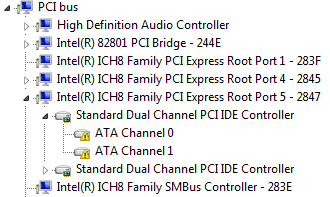
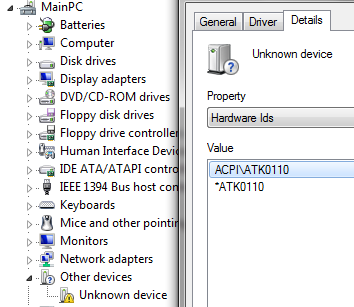
The last BSOD happened before device manager found drivers for a couple of yellow alerts that somehow didn't get updated during the chipset update (assumption).

Could either of these have possibly caused my bugcheck/BSOD issue? The ATA channel issues prevented my external esata drive from being seen. After the missing driver was installed, the external esata drive is recognized and is visible from Windows Explorer.

0JsM9.png


f5Npl.png
 

My Computer

OS
Windows 7 x64 home premium
CPU
Intel core i5-2500k
Motherboard
Asus P8Z68-V Pro
Memory
2x4GB G.Skill DDR3-1333, 2x2GB AData DDR3-1333
Graphics Card(s)
HD3000 graphics
Sound Card
on board
Monitor(s) Displays
Samsung 19" syncmaster
Screen Resolution
1280x1024
Hard Drives
Intel 80 GB X25-M SSD
Samsung HD321KJ 320 GB SATA
Samsung HD204UI 2.0 TB SATA
WD 1.5 TB Green eSATA in an external NexStar enclosure
PSU
Corsair HX520W
Case
Antec Solo
Cooling
CoolerMaster Hyper 212+ with dual fans
Keyboard
MS Natural Ergonomic 4000
Mouse
Logitech
Internet Speed
RoadRunner
-> Of course update those devices that are marked yellow!

If you get more crashes, then:

Uninstall Avira, install MSE:

http://www.microsoft.com/security_essentials/


Check for updates for Atheros L1 Gigabit Ethernet 10/100/1000Base-T Adapter:

l160x64.sys Fri Jun 19 09:15:45 2009
 

My Computer

Computer Manufacturer/Model Number
ASUS
OS
Windows 7 x64
CPU
Core2Quad Q9400
Motherboard
ASUS P5Q EM Do
Memory
Corsair 8 Gb
Graphics Card(s)
EAH ATI 5870 1 Gb
Sound Card
Realtek HD 7.1
Monitor(s) Displays
ASUS 27"
Screen Resolution
1280 x 720
Hard Drives
Maxtor 320 x 2 RAID 0
PSU
650 W
Cooling
Zalman
Keyboard
Sweex Multimedia
Mouse
A4 Tech 2 wheels 5 buttons
Other Info
http://www.youtube.com/watch?v=nvJXlBH6yJI
Thanks cybercore. DMgr found drivers for the yellow alerts and those no longer show up in DM. I'll see what I can find for the Atheros ethernet adapter.

Are your suggestions based on the contents of the zip file or the post with the yellow alert pics?
 

My Computer

OS
Windows 7 x64 home premium
CPU
Intel core i5-2500k
Motherboard
Asus P8Z68-V Pro
Memory
2x4GB G.Skill DDR3-1333, 2x2GB AData DDR3-1333
Graphics Card(s)
HD3000 graphics
Sound Card
on board
Monitor(s) Displays
Samsung 19" syncmaster
Screen Resolution
1280x1024
Hard Drives
Intel 80 GB X25-M SSD
Samsung HD321KJ 320 GB SATA
Samsung HD204UI 2.0 TB SATA
WD 1.5 TB Green eSATA in an external NexStar enclosure
PSU
Corsair HX520W
Case
Antec Solo
Cooling
CoolerMaster Hyper 212+ with dual fans
Keyboard
MS Natural Ergonomic 4000
Mouse
Logitech
Internet Speed
RoadRunner
Thanks cybercore. DMgr found drivers for the yellow alerts and those no longer show up in DM. I'll see what I can find for the Atheros ethernet adapter.

Are your suggestions based on the contents of the zip file or the post with the yellow alert pics?

What do you think they are based on? -> Exactly on what I saw in your latest crash dump and saw in your pictures!

(Like how did I know about your Atheros and Avira, right? ;))
 

My Computer

Computer Manufacturer/Model Number
ASUS
OS
Windows 7 x64
CPU
Core2Quad Q9400
Motherboard
ASUS P5Q EM Do
Memory
Corsair 8 Gb
Graphics Card(s)
EAH ATI 5870 1 Gb
Sound Card
Realtek HD 7.1
Monitor(s) Displays
ASUS 27"
Screen Resolution
1280 x 720
Hard Drives
Maxtor 320 x 2 RAID 0
PSU
650 W
Cooling
Zalman
Keyboard
Sweex Multimedia
Mouse
A4 Tech 2 wheels 5 buttons
Other Info
http://www.youtube.com/watch?v=nvJXlBH6yJI
OK, thanks.

Empirical evidence makes me think my BSODs were caused by those missing drivers. It certainly has been solid ever since I cleared the alerts.

IAC, I'll check into that Atheros update.

Regarding Avira, I've run that on a number of systems and have never experienced any BSODs... until this event. Have you experienced issues with Avira in this regard?

Edit: Atheros update snagged by IE/updates and installed. Thanks!
 
Last edited:

My Computer

OS
Windows 7 x64 home premium
CPU
Intel core i5-2500k
Motherboard
Asus P8Z68-V Pro
Memory
2x4GB G.Skill DDR3-1333, 2x2GB AData DDR3-1333
Graphics Card(s)
HD3000 graphics
Sound Card
on board
Monitor(s) Displays
Samsung 19" syncmaster
Screen Resolution
1280x1024
Hard Drives
Intel 80 GB X25-M SSD
Samsung HD321KJ 320 GB SATA
Samsung HD204UI 2.0 TB SATA
WD 1.5 TB Green eSATA in an external NexStar enclosure
PSU
Corsair HX520W
Case
Antec Solo
Cooling
CoolerMaster Hyper 212+ with dual fans
Keyboard
MS Natural Ergonomic 4000
Mouse
Logitech
Internet Speed
RoadRunner
Regarding Avira, I've run that on a number of systems and have never experienced any BSODs... until this event. Have you experienced issues with Avira in this regard?

The common issue is that AV's like AVG, Avast, Avira, etc. do not get along well with outdated drivers, so whenever someone is sufferring from BSOD's it's a must to replace his AV with MSE for 2 simple reasons:

1) MSE does not invoke BSOD crashes, almost never unless it is actually a hardware's fault
2) AV must be removed so one can update his drivers and do the necessary fixes without the frequently occurring BSOD's provoked by a notorious antivirus


So if your crashes are gone and you're reluctant to get rid of Avira, keep it. But if BSODs reoccur then remove and install MSE.
 

My Computer

Computer Manufacturer/Model Number
ASUS
OS
Windows 7 x64
CPU
Core2Quad Q9400
Motherboard
ASUS P5Q EM Do
Memory
Corsair 8 Gb
Graphics Card(s)
EAH ATI 5870 1 Gb
Sound Card
Realtek HD 7.1
Monitor(s) Displays
ASUS 27"
Screen Resolution
1280 x 720
Hard Drives
Maxtor 320 x 2 RAID 0
PSU
650 W
Cooling
Zalman
Keyboard
Sweex Multimedia
Mouse
A4 Tech 2 wheels 5 buttons
Other Info
http://www.youtube.com/watch?v=nvJXlBH6yJI
Thanks for that additional info. Very helpful.

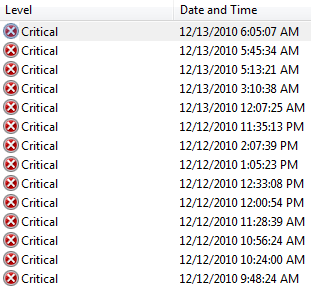
Now 72 hours without another BSOD. I'm beginning to feel comfy in that the driver issue was the culprit behind my BSOD/bugcheck problem. It seemed to begin shortly after I updated both the BIOS and the chipset and ended after finding and installing the PCI controller drivers that were missing.

pXSD7.png
 

My Computer

OS
Windows 7 x64 home premium
CPU
Intel core i5-2500k
Motherboard
Asus P8Z68-V Pro
Memory
2x4GB G.Skill DDR3-1333, 2x2GB AData DDR3-1333
Graphics Card(s)
HD3000 graphics
Sound Card
on board
Monitor(s) Displays
Samsung 19" syncmaster
Screen Resolution
1280x1024
Hard Drives
Intel 80 GB X25-M SSD
Samsung HD321KJ 320 GB SATA
Samsung HD204UI 2.0 TB SATA
WD 1.5 TB Green eSATA in an external NexStar enclosure
PSU
Corsair HX520W
Case
Antec Solo
Cooling
CoolerMaster Hyper 212+ with dual fans
Keyboard
MS Natural Ergonomic 4000
Mouse
Logitech
Internet Speed
RoadRunner

My Computer

Computer Manufacturer/Model Number
ASUS
OS
Windows 7 x64
CPU
Core2Quad Q9400
Motherboard
ASUS P5Q EM Do
Memory
Corsair 8 Gb
Graphics Card(s)
EAH ATI 5870 1 Gb
Sound Card
Realtek HD 7.1
Monitor(s) Displays
ASUS 27"
Screen Resolution
1280 x 720
Hard Drives
Maxtor 320 x 2 RAID 0
PSU
650 W
Cooling
Zalman
Keyboard
Sweex Multimedia
Mouse
A4 Tech 2 wheels 5 buttons
Other Info
http://www.youtube.com/watch?v=nvJXlBH6yJI
Do you mean the BSOD Dump & System File Collection app?

If so, that should have been in the zip file I posted earlier. Was it not?


My Computer

OS
Windows 7 x64 home premium
CPU
Intel core i5-2500k
Motherboard
Asus P8Z68-V Pro
Memory
2x4GB G.Skill DDR3-1333, 2x2GB AData DDR3-1333
Graphics Card(s)
HD3000 graphics
Sound Card
on board
Monitor(s) Displays
Samsung 19" syncmaster
Screen Resolution
1280x1024
Hard Drives
Intel 80 GB X25-M SSD
Samsung HD321KJ 320 GB SATA
Samsung HD204UI 2.0 TB SATA
WD 1.5 TB Green eSATA in an external NexStar enclosure
PSU
Corsair HX520W
Case
Antec Solo
Cooling
CoolerMaster Hyper 212+ with dual fans
Keyboard
MS Natural Ergonomic 4000
Mouse
Logitech
Internet Speed
RoadRunner
Back
Top