Hi punkiemi.
How many days ago you installed Service Pack 1? Very recently it seems?
The zip contains two crash dumps. One, the older one is related to games. And, this time the PC was not SP1 installed.
Code:
[COLOR=Red]BugCheck 116[/COLOR], {fffffa80066fb010, fffff8800517e664, ffffffffc000000d, 3}

Unable to load image \SystemRoot\system32\DRIVERS\nvlddmkm.sys, Win32 error 0n2
*** WARNING: Unable to verify timestamp for nvlddmkm.sys
*** ERROR: Module load completed but symbols could not be loaded for nvlddmkm.sys
[COLOR=Red]Probably caused by : nvlddmkm.sys[/COLOR] ( nvlddmkm+97e664 )

Followup: MachineOwner
---------
Taking the age of your PC into consideration, stop 0x116 BSODs may occur under certain conditions.
Is the computer hot? Report us the heat of the computer after a couple of hours of your normal usage. Upload a screenshot of the summery tab of
Speccy. Alternatively, you can publish a Speccy snapshot too:
http://www.sevenforums.com/tutorials/311593-speccy-publish-snapshot-your-system-specs.html .
The PC seems to be overclocked.
Code:
  Max Speed                     2300MHz
[COLOR=Red]  Current Speed                 2310MHz[/COLOR]
As you are getting BSODs, you should stop overclocking and run all the hardware components like CPU, GPU and RAM to their default settings.
Check if the Power Supply Unit (PSU) supplying adequate power to the computer or not.
eXtreme Power Supply Calculator
Also let us know the the wattage of the PSU.
Stress test the Graphics Card using Furmark.
Video Card - Stress Test with Furmark
Install the
NVIDIA DRIVERS 314.22WHQL only.
- Uninstall All nvidia items in Control Panel > Programs and features
- 3D Vision Control Driver
- 3D Vision Driver
- Graphics Driver
- HD Audio Driver
- PhysX
- nvidia Update
(Are you using nvidia chipset drivers? If so, dont uninstall anything other than those are listed).
- Now follow Drivers - Clean Left over Files after Uninstalling
- Download 314.22 WHQL. While installing, Select Custom (Advanced) install. In the next page, follow this settings:
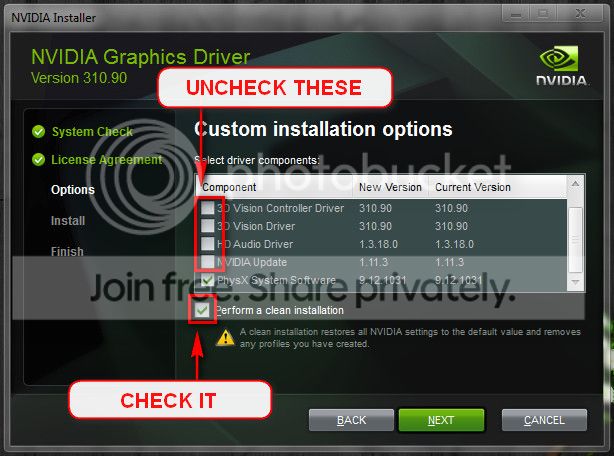
But the other BSOD, the latest one, is a different issue.
Code:
[COLOR=Red]BugCheck 9F[/COLOR], {3, fffffa80052de050, fffff80000b9c518, fffffa800464a610}

Probably caused by : sbp2port.sys

Followup: MachineOwner
---------
Some discs are failing the power state during sleep/hibernate power transition. As yours is a desktop, better you disable sleep. Hopefully this issue will be over by doing it.
Let us know the situation after applying the suggestions, and let us know the results of the tests.
http://pcsupport.about.com/od/fixtheproblem/tp/clearcmos.htm


