BSOD during Windows Boot, I/O error 0xc00000e9?

Simplycoco

New member
Local time
6:40 AM
Messages
4
Gateway laptop
model number MS2285
Windows 7​


Hello my name is John and my friend asked me to fix her laptop since her windows wasn't starting up. Long story short, I tried to reformat her hdd with my windows 7 dvd (which is my answer for almost everything) and the screen right after you select languages and the "Install now" button the screen stays on "Setup is starting..." but it doesnt freeze, it just stays there for hours. Every time you try to start Windows normally it would restart during the "Starting Windows" screen but before it restarts it rapidly flashes what resembles a bsod and restarts it self. You can't boot from last known configuration, boot in safe mood, or pretty much any of the options when I hold down F8. Here's the kick, it gives me a page error which says this


"Windows has encountered a problem communication with a device connected to your computer.
This error can be caused by unplugging a removable storage device such as an external usb drive while the device is in use, or by faulty hardware such as a hard drive or cd-rom drive that is failing. Make sure any removable storage is properly connected and then restart your computer.
If you continue to receive this error message, contact the hardware manufacturer.
Status: 0xc00000e9
Info: An Unexpected I/O error has occured."​


So most likely it would be the Hard drive right? no, I had a spare SSD laying around and I plugged it in and I got the the same results as the hdd, only at a faster pace ;). I want to say it's something like my motherboard or something but you guys here are the experts.
 

My Computer My Computer

At a glance

Windows 7 Ultimate x64
OS
Windows 7 Ultimate x64
Hi,

When you attempt the installation, are all other removable USB devices unplugged? Are you installing from a DVD? Is the mouse a wired mouse, or wirless with a USB receiver?

Regards,
Golden
 

My Computer My Computer

At a glance

Windows 10 Pro x64 ; Xubuntu x64Intel i7 860 @ 2.80 GHz O/C'ed to 4.0GHz16GB Corsair Vengance DDR3 @ 661 MHz Dual Cha...EVGA NVidia GTX 560 1024MB
Computer type
PC/Desktop
Computer Manufacturer/Model Number
Golden Mk. I.4
OS
Windows 10 Pro x64 ; Xubuntu x64
CPU
Intel i7 860 @ 2.80 GHz O/C'ed to 4.0GHz
Motherboard
Gigabyte P55A-UD3R Rev.1. Award BIOS F13
Memory
16GB Corsair Vengance DDR3 @ 661 MHz Dual Channel (9-9-9-24)
Graphics Card(s)
EVGA NVidia GTX 560 1024MB
Sound Card
Realtek Integrated
Monitor(s) Displays
Dual Samsung SyncMaster 2494HS
Screen Resolution
1920*1080 and 1920*1080
Hard Drives
1*Samsung 840 EVO 120GB SSD;
1*OCZ Vertex 2 60GB SSD;
2*Samsung F3 SpinPoint 1TB in RAID0;
1*Samsung F1 SpinPoint 1TB;
2*Western Digital 1TB External USB 3.0
1*Western Digital 500GB External USB 3.0
1*Seagate 500GB External USB 2.0
PSU
Thermaltake ToughPower QFan 750W
Case
Thermaltake Element S VK60001W2Z
Cooling
Corsair H60 Water Cooling, 2*230mm and 2*80mm case fans
Keyboard
Logitech G110
Mouse
Logitech MX518
The only thing plugged in is the laptop charger and I am installing from Dvd with no mouse, just the trackpad.
 

My Computer My Computer

At a glance

Windows 7 Ultimate x64
OS
Windows 7 Ultimate x64
Mmm. OK then, the probability is ever increasing that its an HDD issue. But one more hunch : can you see if there is a setting to disable the sound card temporarily? If so, do that and then try the installation again.

To access BIOS, press DEL key continuously during bootup.

Regards,
Golden
 

My Computer My Computer

At a glance

Windows 10 Pro x64 ; Xubuntu x64Intel i7 860 @ 2.80 GHz O/C'ed to 4.0GHz16GB Corsair Vengance DDR3 @ 661 MHz Dual Cha...EVGA NVidia GTX 560 1024MB
Computer type
PC/Desktop
Computer Manufacturer/Model Number
Golden Mk. I.4
OS
Windows 10 Pro x64 ; Xubuntu x64
CPU
Intel i7 860 @ 2.80 GHz O/C'ed to 4.0GHz
Motherboard
Gigabyte P55A-UD3R Rev.1. Award BIOS F13
Memory
16GB Corsair Vengance DDR3 @ 661 MHz Dual Channel (9-9-9-24)
Graphics Card(s)
EVGA NVidia GTX 560 1024MB
Sound Card
Realtek Integrated
Monitor(s) Displays
Dual Samsung SyncMaster 2494HS
Screen Resolution
1920*1080 and 1920*1080
Hard Drives
1*Samsung 840 EVO 120GB SSD;
1*OCZ Vertex 2 60GB SSD;
2*Samsung F3 SpinPoint 1TB in RAID0;
1*Samsung F1 SpinPoint 1TB;
2*Western Digital 1TB External USB 3.0
1*Western Digital 500GB External USB 3.0
1*Seagate 500GB External USB 2.0
PSU
Thermaltake ToughPower QFan 750W
Case
Thermaltake Element S VK60001W2Z
Cooling
Corsair H60 Water Cooling, 2*230mm and 2*80mm case fans
Keyboard
Logitech G110
Mouse
Logitech MX518
Doesn't seem to have an option to disable the sound card anywhere on the BIOS.
 

My Computer My Computer

At a glance

Windows 7 Ultimate x64
OS
Windows 7 Ultimate x64
OK. It sounds like the HDD is buggered then.

How do you feel about using a live Linux distribution to boot the PC and run some HDD tests? If there is any user data that needs to come off that HDD, you can use Linux to do that. Its quite easy to do.

Regards,
Golden
 

My Computer My Computer

At a glance

Windows 10 Pro x64 ; Xubuntu x64Intel i7 860 @ 2.80 GHz O/C'ed to 4.0GHz16GB Corsair Vengance DDR3 @ 661 MHz Dual Cha...EVGA NVidia GTX 560 1024MB
Computer type
PC/Desktop
Computer Manufacturer/Model Number
Golden Mk. I.4
OS
Windows 10 Pro x64 ; Xubuntu x64
CPU
Intel i7 860 @ 2.80 GHz O/C'ed to 4.0GHz
Motherboard
Gigabyte P55A-UD3R Rev.1. Award BIOS F13
Memory
16GB Corsair Vengance DDR3 @ 661 MHz Dual Channel (9-9-9-24)
Graphics Card(s)
EVGA NVidia GTX 560 1024MB
Sound Card
Realtek Integrated
Monitor(s) Displays
Dual Samsung SyncMaster 2494HS
Screen Resolution
1920*1080 and 1920*1080
Hard Drives
1*Samsung 840 EVO 120GB SSD;
1*OCZ Vertex 2 60GB SSD;
2*Samsung F3 SpinPoint 1TB in RAID0;
1*Samsung F1 SpinPoint 1TB;
2*Western Digital 1TB External USB 3.0
1*Western Digital 500GB External USB 3.0
1*Seagate 500GB External USB 2.0
PSU
Thermaltake ToughPower QFan 750W
Case
Thermaltake Element S VK60001W2Z
Cooling
Corsair H60 Water Cooling, 2*230mm and 2*80mm case fans
Keyboard
Logitech G110
Mouse
Logitech MX518
I was actually thinking about using Ubunto to see if I can get something on it but sure I would like to do that. Would rather just follow your instructions :). But I will be away from computer in about 10 minutes or so.
 

My Computer My Computer

At a glance

Windows 7 Ultimate x64
OS
Windows 7 Ultimate x64
That's fine, I need some breakfast too. I'll post back some instructions here in a bit, and then you can follow them at your leisure.

Ubuntu would also do the trick BTW, its just I'm more familiar with Debian 6 for this sort of work.

regards,
Golden
 

My Computer My Computer

At a glance

Windows 10 Pro x64 ; Xubuntu x64Intel i7 860 @ 2.80 GHz O/C'ed to 4.0GHz16GB Corsair Vengance DDR3 @ 661 MHz Dual Cha...EVGA NVidia GTX 560 1024MB
Computer type
PC/Desktop
Computer Manufacturer/Model Number
Golden Mk. I.4
OS
Windows 10 Pro x64 ; Xubuntu x64
CPU
Intel i7 860 @ 2.80 GHz O/C'ed to 4.0GHz
Motherboard
Gigabyte P55A-UD3R Rev.1. Award BIOS F13
Memory
16GB Corsair Vengance DDR3 @ 661 MHz Dual Channel (9-9-9-24)
Graphics Card(s)
EVGA NVidia GTX 560 1024MB
Sound Card
Realtek Integrated
Monitor(s) Displays
Dual Samsung SyncMaster 2494HS
Screen Resolution
1920*1080 and 1920*1080
Hard Drives
1*Samsung 840 EVO 120GB SSD;
1*OCZ Vertex 2 60GB SSD;
2*Samsung F3 SpinPoint 1TB in RAID0;
1*Samsung F1 SpinPoint 1TB;
2*Western Digital 1TB External USB 3.0
1*Western Digital 500GB External USB 3.0
1*Seagate 500GB External USB 2.0
PSU
Thermaltake ToughPower QFan 750W
Case
Thermaltake Element S VK60001W2Z
Cooling
Corsair H60 Water Cooling, 2*230mm and 2*80mm case fans
Keyboard
Logitech G110
Mouse
Logitech MX518
OK. Please follow these steps:

1. Download YUMI from this site:
YUMI - Multiboot USB Creator (Windows) | USB Pen Drive Linux

2. Run the Yumi exe. Now select your USB drive in step 1, and from the list pick Debian 6 in step 2. Use the 'Download the iso' option to download Debian 6, and then select it in step 3. See image below.

00.JPG

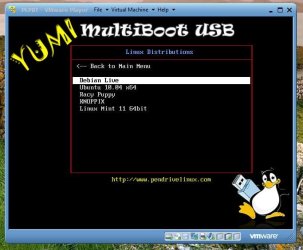
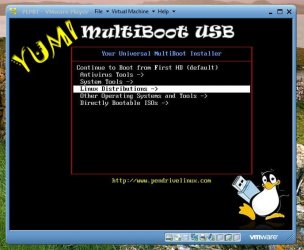
3. Once the bootable Debian 6 USB has been created, in the BIOS of the faulty computer, select to boot from USB, insert the USB and boot the PC. You should see this.

aa.JPG

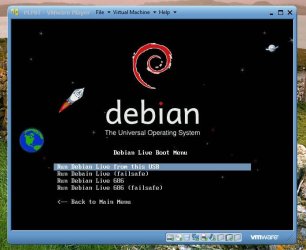
Select the Linux distributions, and the select Debian Live

bb.JPG

4. Debian will now boot and you should see this screen. Select the option shown below.

cc.JPG

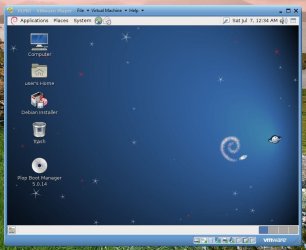
Debian will boot to the desktop and you should see this:

dd.JPG

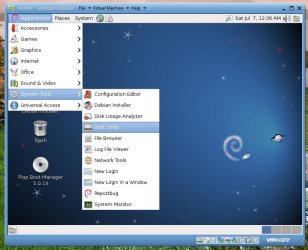
Select the options as shown below:

ee.JPG

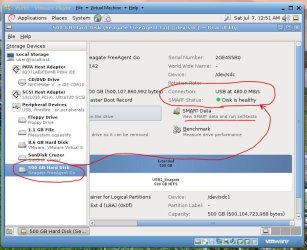
You should now see this screen. Select your disk and examine the SMART data.

ff.JPG

If you select 'View SMART data" you should see more detail, and an option to run some selftests.

gg.JPG

Do that to see if it picks-up anything.

If there is any data on this HDD that needs to be backed-up (unlikely since you already tried to install and would have formatted the disk prior to doing that), use the Debian file browser to do that (since you sound familiar with Ubuntu I havent given any detailed steps).

Let us know what you find.

Regards,
Golden
 

My Computer My Computer

At a glance

Windows 10 Pro x64 ; Xubuntu x64Intel i7 860 @ 2.80 GHz O/C'ed to 4.0GHz16GB Corsair Vengance DDR3 @ 661 MHz Dual Cha...EVGA NVidia GTX 560 1024MB
Computer type
PC/Desktop
Computer Manufacturer/Model Number
Golden Mk. I.4
OS
Windows 10 Pro x64 ; Xubuntu x64
CPU
Intel i7 860 @ 2.80 GHz O/C'ed to 4.0GHz
Motherboard
Gigabyte P55A-UD3R Rev.1. Award BIOS F13
Memory
16GB Corsair Vengance DDR3 @ 661 MHz Dual Channel (9-9-9-24)
Graphics Card(s)
EVGA NVidia GTX 560 1024MB
Sound Card
Realtek Integrated
Monitor(s) Displays
Dual Samsung SyncMaster 2494HS
Screen Resolution
1920*1080 and 1920*1080
Hard Drives
1*Samsung 840 EVO 120GB SSD;
1*OCZ Vertex 2 60GB SSD;
2*Samsung F3 SpinPoint 1TB in RAID0;
1*Samsung F1 SpinPoint 1TB;
2*Western Digital 1TB External USB 3.0
1*Western Digital 500GB External USB 3.0
1*Seagate 500GB External USB 2.0
PSU
Thermaltake ToughPower QFan 750W
Case
Thermaltake Element S VK60001W2Z
Cooling
Corsair H60 Water Cooling, 2*230mm and 2*80mm case fans
Keyboard
Logitech G110
Mouse
Logitech MX518
i dont know if you will see this golden, however i was having the same issue and tried to follow youre steps here, but debian will not open any of my drives. :( do you know how i could fix this?
it states it is *refusing to mount device* and states this for all of my HD not just what i presume to be dead boot drive.
 
Last edited:

My Computer My Computer

At a glance

Windows 7 Ultimate x64Intel I5-750 2.66GHz Quad CoreG. Skill 4gb(2x2) & G. Skill 8gb(2X4gb)PowerColor Go! Green AX5750 1GB
OS
Windows 7 Ultimate x64
CPU
Intel I5-750 2.66GHz Quad Core
Motherboard
Asus P7P55D-E Pro LGA 1156 Intel P55
Memory
G. Skill 4gb(2x2) & G. Skill 8gb(2X4gb)
Graphics Card(s)
PowerColor Go! Green AX5750 1GB
Monitor(s) Displays
Samsung
Hard Drives
OCZ Vertex 3 120gb SSD
western digital 2tb
western digital 1.5tb
western digital 1tb
Case
GIGABYTE Setto
Keyboard
Logitech g15
Mouse
Logitech G5
Back
Top