BSOD error 0x000000E1

yogareksodirdjo

New member
Local time
3:10 AM
Messages
11
Location
Magelang, Indonesia
please help me to fix this, and here my attachment
 
Last edited:

My Computer

Computer type
PC/Desktop
Computer Manufacturer/Model Number
Custom Build
OS
Windows 7 Ultimate SP1 x64
CPU
AMD VISHERA FX6300
Motherboard
MSI 970A-G43
Memory
Gskill 2x2GB, Corsair 2x4GB
Graphics Card(s)
MSI ATI RADEON HD5670 1GB DDR5 128-bit
Hard Drives
WDC Blue 500GB
Antivirus
AVAST Premier
Browser
Chrome, Firefox
The zip you uploaded does not contain any crash dump.

Follow it: http://www.sevenforums.com/tutorials/174459-dump-files-configure-windows-create-bsod.html
Go to Option Two, Point 2. Download the .reg file and merge it in registry by double clicking it.

Now wait for another BSOD. When it occurred, search the .dmp files manually in the default path: C:\Windows\Minidump or %SystemRoot%\Minidump. See if the crash dump is recorded or not (hopefully it will be recorded).Post it following the Blue Screen of Death (BSOD) Posting Instructions.

Dont run any disc cleanup tool before you upload another zip.
 

My Computer

Computer type
PC/Desktop
Computer Manufacturer/Model Number
Self Assembled
OS
Microsoft Windows 10 Pro Insider Preview 64-bit
CPU
Intel(R) Core(TM) i3-4130 CPU @ 3.40GHz
Motherboard
Gigabyte Technology Co., Ltd. B85M-D3H
Memory
Corsair Vengence 4GB x2 (8.00GB Dual-Channel DDR3 @ 798MHz)
Graphics Card(s)
2047MB GeForce GTS 450 (ZOTAC International)
Sound Card
Onboard (Realtek High Definition Audio)
Monitor(s) Displays
LG Flatron E2040T
Screen Resolution
1600x900
Hard Drives
Western Digital 1 TB
Seagate 500 GB
PSU
Corsair VS550
Case
Cooler Master K380
Cooling
Cooler Master Seidon 120V Plus
Keyboard
Logitech MK260r
Mouse
Logitech MK260r
Internet Speed
PMPL Broadband
Antivirus
Windows Defender + MBAM
Browser
Firefox
Other Info
Dell Studio 15" Laptop
The zip you uploaded does not contain any crash dump.

Follow it: http://www.sevenforums.com/tutorials/174459-dump-files-configure-windows-create-bsod.html
Go to Option Two, Point 2. Download the .reg file and merge it in registry by double clicking it.

Now wait for another BSOD. When it occurred, search the .dmp files manually in the default path: C:\Windows\Minidump or %SystemRoot%\Minidump. See if the crash dump is recorded or not (hopefully it will be recorded).Post it following the Blue Screen of Death (BSOD) Posting Instructions.

Dont run any disc cleanup tool before you upload another zip.

iam already BSOD again, but the dumpfile cant recorded? i already follow your advice for download .reg, what must i do?:(:(
 

My Computer

Computer type
PC/Desktop
Computer Manufacturer/Model Number
Custom Build
OS
Windows 7 Ultimate SP1 x64
CPU
AMD VISHERA FX6300
Motherboard
MSI 970A-G43
Memory
Gskill 2x2GB, Corsair 2x4GB
Graphics Card(s)
MSI ATI RADEON HD5670 1GB DDR5 128-bit
Hard Drives
WDC Blue 500GB
Antivirus
AVAST Premier
Browser
Chrome, Firefox
View attachment 351825
The zip you uploaded does not contain any crash dump.

Follow it: http://www.sevenforums.com/tutorials/174459-dump-files-configure-windows-create-bsod.html
Go to Option Two, Point 2. Download the .reg file and merge it in registry by double clicking it.

Now wait for another BSOD. When it occurred, search the .dmp files manually in the default path: C:\Windows\Minidump or %SystemRoot%\Minidump. See if the crash dump is recorded or not (hopefully it will be recorded).Post it following the Blue Screen of Death (BSOD) Posting Instructions.

Dont run any disc cleanup tool before you upload another zip.

iam already BSOD again, but the dumpfile cant recorded? i already follow your advice for download .reg, what must i do?:(:(

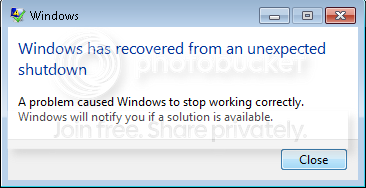
hello, iam already fix that, n i can find .dmp file on that folder, n here my new attachment. please help to translate that sir! :) and iam when iam logon this pop up appear after i overwrite registry. how to fix that?
Screenshot_47.png
 
Last edited:

My Computer

Computer type
PC/Desktop
Computer Manufacturer/Model Number
Custom Build
OS
Windows 7 Ultimate SP1 x64
CPU
AMD VISHERA FX6300
Motherboard
MSI 970A-G43
Memory
Gskill 2x2GB, Corsair 2x4GB
Graphics Card(s)
MSI ATI RADEON HD5670 1GB DDR5 128-bit
Hard Drives
WDC Blue 500GB
Antivirus
AVAST Premier
Browser
Chrome, Firefox
Uninstall Hotspot Shield.
Code:
BugCheck 1000007E, {ffffffffc0000005, fffff88006e02fbb, fffff8800b096218, fffff8800b095a70}

Probably caused by : hssdrv6.sys ( hssdrv6+2fbb )

Followup: MachineOwner
---------

0: kd> !analyze -v
*******************************************************************************
*                                                                             *
*                        Bugcheck Analysis                                    *
*                                                                             *
*******************************************************************************

SYSTEM_THREAD_EXCEPTION_NOT_HANDLED_M (1000007e)
This is a very common bugcheck.  Usually the exception address pinpoints
the driver/function that caused the problem.  Always note this address
as well as the link date of the driver/image that contains this address.
Some common problems are exception code 0x80000003.  This means a hard
coded breakpoint or assertion was hit, but this system was booted
/NODEBUG.  This is not supposed to happen as developers should never have
hardcoded breakpoints in retail code, but ...
If this happens, make sure a debugger gets connected, and the
system is booted /DEBUG.  This will let us see why this breakpoint is
happening.
Arguments:
Arg1: ffffffffc0000005, The exception code that was not handled
Arg2: fffff88006e02fbb, The address that the exception occurred at
Arg3: fffff8800b096218, Exception Record Address
Arg4: fffff8800b095a70, Context Record Address

Debugging Details:
------------------


EXCEPTION_CODE: (NTSTATUS) 0xc0000005 - The instruction at 0x%p referenced memory at 0x%p. The memory could not be %s.

FAULTING_IP: 
hssdrv6+2fbb
fffff880`06e02fbb 49894308        mov     qword ptr [r11+8],rax

EXCEPTION_RECORD:  fffff8800b096218 -- (.exr 0xfffff8800b096218)
ExceptionAddress: fffff88006e02fbb (hssdrv6+0x0000000000002fbb)
   ExceptionCode: c0000005 (Access violation)
  ExceptionFlags: 00000000
NumberParameters: 2
   Parameter[0]: 0000000000000000
   Parameter[1]: ffffffffffffffff
Attempt to read from address ffffffffffffffff

CONTEXT:  fffff8800b095a70 -- (.cxr 0xfffff8800b095a70;r)
rax=fffff88006e15a20 rbx=fffffa800b083228 rcx=fffffa800b083480
rdx=0000000000000000 rsi=fffff88006e15a20 rdi=0000000000000000
rip=fffff88006e02fbb rsp=fffff8800b096450 rbp=fffffa800b079622
 r8=0000000000000000  r9=0000000000000000 r10=0000000000000029
r11=262d4d485e2d4d38 r12=fffffa800b07965d r13=0000000000000000
r14=0000000000000000 r15=fffff8800b096540
iopl=0         nv up ei pl nz na pe nc
cs=0010  ss=0018  ds=002b  es=002b  fs=0053  gs=002b             efl=00010202
hssdrv6+0x2fbb:
fffff880`06e02fbb 49894308        mov     qword ptr [r11+8],rax ds:002b:262d4d48`5e2d4d40=????????????????
Last set context:
rax=fffff88006e15a20 rbx=fffffa800b083228 rcx=fffffa800b083480
rdx=0000000000000000 rsi=fffff88006e15a20 rdi=0000000000000000
rip=fffff88006e02fbb rsp=fffff8800b096450 rbp=fffffa800b079622
 r8=0000000000000000  r9=0000000000000000 r10=0000000000000029
r11=262d4d485e2d4d38 r12=fffffa800b07965d r13=0000000000000000
r14=0000000000000000 r15=fffff8800b096540
iopl=0         nv up ei pl nz na pe nc
cs=0010  ss=0018  ds=002b  es=002b  fs=0053  gs=002b             efl=00010202
hssdrv6+0x2fbb:
fffff880`06e02fbb 49894308        mov     qword ptr [r11+8],rax ds:002b:262d4d48`5e2d4d40=????????????????
Resetting default scope

CUSTOMER_CRASH_COUNT:  1

DEFAULT_BUCKET_ID:  WIN7_DRIVER_FAULT

PROCESS_NAME:  System

CURRENT_IRQL:  2

ERROR_CODE: (NTSTATUS) 0xc0000005 - The instruction at 0x%p referenced memory at 0x%p. The memory could not be %s.

EXCEPTION_PARAMETER1:  0000000000000000

EXCEPTION_PARAMETER2:  ffffffffffffffff

READ_ADDRESS: GetPointerFromAddress: unable to read from fffff80003b070e8
GetUlongFromAddress: unable to read from fffff80003b07198
 ffffffffffffffff 

FOLLOWUP_IP: 
hssdrv6+2fbb
fffff880`06e02fbb 49894308        mov     qword ptr [r11+8],rax

BUGCHECK_STR:  0x7E

ANALYSIS_VERSION: 6.3.9600.17237 (debuggers(dbg).140716-0327) amd64fre

LAST_CONTROL_TRANSFER:  from fffff88006e15a20 to fffff88006e02fbb

STACK_TEXT:  
fffff880`0b096450 fffff880`06e15a20 : fffffa80`0b07964d 00000000`00000000 fffffa80`0b079683 00000000`00000000 : hssdrv6+0x2fbb
fffff880`0b096458 fffffa80`0b07964d : 00000000`00000000 fffffa80`0b079683 00000000`00000000 fffff880`06e04c14 : hssdrv6+0x15a20
fffff880`0b096460 00000000`00000000 : fffffa80`0b079683 00000000`00000000 fffff880`06e04c14 fffffa80`0b079683 : 0xfffffa80`0b07964d


SYMBOL_STACK_INDEX:  0

SYMBOL_NAME:  hssdrv6+2fbb

FOLLOWUP_NAME:  MachineOwner

MODULE_NAME: hssdrv6

IMAGE_NAME:  hssdrv6.sys

DEBUG_FLR_IMAGE_TIMESTAMP:  53727853

STACK_COMMAND:  .cxr 0xfffff8800b095a70 ; kb

FAILURE_BUCKET_ID:  X64_0x7E_hssdrv6+2fbb

BUCKET_ID:  X64_0x7E_hssdrv6+2fbb

ANALYSIS_SOURCE:  KM

FAILURE_ID_HASH_STRING:  km:x64_0x7e_hssdrv6+2fbb

FAILURE_ID_HASH:  {e1fb4e7c-2039-3039-152e-3cf5bc8c8da2}

Followup: MachineOwner
---------

0: kd> lmvm hssdrv6
start             end                 module name
fffff880`06e00000 fffff880`06e1a000   hssdrv6  T (no symbols)           
    Loaded symbol image file: hssdrv6.sys
    Image path: hssdrv6.sys
    Image name: hssdrv6.sys
    Timestamp:        Wed May 14 01:23:55 2014 (53727853)
    CheckSum:         00014C7E
    ImageSize:        0001A000
    Translations:     0000.04b0 0000.04e4 0409.04b0 0409.04e4

 

My Computer

Computer type
PC/Desktop
Computer Manufacturer/Model Number
Self Assembled
OS
Microsoft Windows 10 Pro Insider Preview 64-bit
CPU
Intel(R) Core(TM) i3-4130 CPU @ 3.40GHz
Motherboard
Gigabyte Technology Co., Ltd. B85M-D3H
Memory
Corsair Vengence 4GB x2 (8.00GB Dual-Channel DDR3 @ 798MHz)
Graphics Card(s)
2047MB GeForce GTS 450 (ZOTAC International)
Sound Card
Onboard (Realtek High Definition Audio)
Monitor(s) Displays
LG Flatron E2040T
Screen Resolution
1600x900
Hard Drives
Western Digital 1 TB
Seagate 500 GB
PSU
Corsair VS550
Case
Cooler Master K380
Cooling
Cooler Master Seidon 120V Plus
Keyboard
Logitech MK260r
Mouse
Logitech MK260r
Internet Speed
PMPL Broadband
Antivirus
Windows Defender + MBAM
Browser
Firefox
Other Info
Dell Studio 15" Laptop
Uninstall Hotspot Shield.
Code:
BugCheck 1000007E, {ffffffffc0000005, fffff88006e02fbb, fffff8800b096218, fffff8800b095a70}

Probably caused by : hssdrv6.sys ( hssdrv6+2fbb )

Followup: MachineOwner
---------

0: kd> !analyze -v
*******************************************************************************
*                                                                             *
*                        Bugcheck Analysis                                    *
*                                                                             *
*******************************************************************************

SYSTEM_THREAD_EXCEPTION_NOT_HANDLED_M (1000007e)
This is a very common bugcheck.  Usually the exception address pinpoints
the driver/function that caused the problem.  Always note this address
as well as the link date of the driver/image that contains this address.
Some common problems are exception code 0x80000003.  This means a hard
coded breakpoint or assertion was hit, but this system was booted
/NODEBUG.  This is not supposed to happen as developers should never have
hardcoded breakpoints in retail code, but ...
If this happens, make sure a debugger gets connected, and the
system is booted /DEBUG.  This will let us see why this breakpoint is
happening.
Arguments:
Arg1: ffffffffc0000005, The exception code that was not handled
Arg2: fffff88006e02fbb, The address that the exception occurred at
Arg3: fffff8800b096218, Exception Record Address
Arg4: fffff8800b095a70, Context Record Address

Debugging Details:
------------------


EXCEPTION_CODE: (NTSTATUS) 0xc0000005 - The instruction at 0x%p referenced memory at 0x%p. The memory could not be %s.

FAULTING_IP: 
hssdrv6+2fbb
fffff880`06e02fbb 49894308        mov     qword ptr [r11+8],rax

EXCEPTION_RECORD:  fffff8800b096218 -- (.exr 0xfffff8800b096218)
ExceptionAddress: fffff88006e02fbb (hssdrv6+0x0000000000002fbb)
   ExceptionCode: c0000005 (Access violation)
  ExceptionFlags: 00000000
NumberParameters: 2
   Parameter[0]: 0000000000000000
   Parameter[1]: ffffffffffffffff
Attempt to read from address ffffffffffffffff

CONTEXT:  fffff8800b095a70 -- (.cxr 0xfffff8800b095a70;r)
rax=fffff88006e15a20 rbx=fffffa800b083228 rcx=fffffa800b083480
rdx=0000000000000000 rsi=fffff88006e15a20 rdi=0000000000000000
rip=fffff88006e02fbb rsp=fffff8800b096450 rbp=fffffa800b079622
 r8=0000000000000000  r9=0000000000000000 r10=0000000000000029
r11=262d4d485e2d4d38 r12=fffffa800b07965d r13=0000000000000000
r14=0000000000000000 r15=fffff8800b096540
iopl=0         nv up ei pl nz na pe nc
cs=0010  ss=0018  ds=002b  es=002b  fs=0053  gs=002b             efl=00010202
hssdrv6+0x2fbb:
fffff880`06e02fbb 49894308        mov     qword ptr [r11+8],rax ds:002b:262d4d48`5e2d4d40=????????????????
Last set context:
rax=fffff88006e15a20 rbx=fffffa800b083228 rcx=fffffa800b083480
rdx=0000000000000000 rsi=fffff88006e15a20 rdi=0000000000000000
rip=fffff88006e02fbb rsp=fffff8800b096450 rbp=fffffa800b079622
 r8=0000000000000000  r9=0000000000000000 r10=0000000000000029
r11=262d4d485e2d4d38 r12=fffffa800b07965d r13=0000000000000000
r14=0000000000000000 r15=fffff8800b096540
iopl=0         nv up ei pl nz na pe nc
cs=0010  ss=0018  ds=002b  es=002b  fs=0053  gs=002b             efl=00010202
hssdrv6+0x2fbb:
fffff880`06e02fbb 49894308        mov     qword ptr [r11+8],rax ds:002b:262d4d48`5e2d4d40=????????????????
Resetting default scope

CUSTOMER_CRASH_COUNT:  1

DEFAULT_BUCKET_ID:  WIN7_DRIVER_FAULT

PROCESS_NAME:  System

CURRENT_IRQL:  2

ERROR_CODE: (NTSTATUS) 0xc0000005 - The instruction at 0x%p referenced memory at 0x%p. The memory could not be %s.

EXCEPTION_PARAMETER1:  0000000000000000

EXCEPTION_PARAMETER2:  ffffffffffffffff

READ_ADDRESS: GetPointerFromAddress: unable to read from fffff80003b070e8
GetUlongFromAddress: unable to read from fffff80003b07198
 ffffffffffffffff 

FOLLOWUP_IP: 
hssdrv6+2fbb
fffff880`06e02fbb 49894308        mov     qword ptr [r11+8],rax

BUGCHECK_STR:  0x7E

ANALYSIS_VERSION: 6.3.9600.17237 (debuggers(dbg).140716-0327) amd64fre

LAST_CONTROL_TRANSFER:  from fffff88006e15a20 to fffff88006e02fbb

STACK_TEXT:  
fffff880`0b096450 fffff880`06e15a20 : fffffa80`0b07964d 00000000`00000000 fffffa80`0b079683 00000000`00000000 : hssdrv6+0x2fbb
fffff880`0b096458 fffffa80`0b07964d : 00000000`00000000 fffffa80`0b079683 00000000`00000000 fffff880`06e04c14 : hssdrv6+0x15a20
fffff880`0b096460 00000000`00000000 : fffffa80`0b079683 00000000`00000000 fffff880`06e04c14 fffffa80`0b079683 : 0xfffffa80`0b07964d


SYMBOL_STACK_INDEX:  0

SYMBOL_NAME:  hssdrv6+2fbb

FOLLOWUP_NAME:  MachineOwner

MODULE_NAME: hssdrv6

IMAGE_NAME:  hssdrv6.sys

DEBUG_FLR_IMAGE_TIMESTAMP:  53727853

STACK_COMMAND:  .cxr 0xfffff8800b095a70 ; kb

FAILURE_BUCKET_ID:  X64_0x7E_hssdrv6+2fbb

BUCKET_ID:  X64_0x7E_hssdrv6+2fbb

ANALYSIS_SOURCE:  KM

FAILURE_ID_HASH_STRING:  km:x64_0x7e_hssdrv6+2fbb

FAILURE_ID_HASH:  {e1fb4e7c-2039-3039-152e-3cf5bc8c8da2}

Followup: MachineOwner
---------

0: kd> lmvm hssdrv6
start             end                 module name
fffff880`06e00000 fffff880`06e1a000   hssdrv6  T (no symbols)           
    Loaded symbol image file: hssdrv6.sys
    Image path: hssdrv6.sys
    Image name: hssdrv6.sys
    Timestamp:        Wed May 14 01:23:55 2014 (53727853)
    CheckSum:         00014C7E
    ImageSize:        0001A000
    Translations:     0000.04b0 0000.04e4 0409.04b0 0409.04e4

Thank you for help, i will uninstall Hotspot Shield.
and how to fix that pop up?
 

My Computer

Computer type
PC/Desktop
Computer Manufacturer/Model Number
Custom Build
OS
Windows 7 Ultimate SP1 x64
CPU
AMD VISHERA FX6300
Motherboard
MSI 970A-G43
Memory
Gskill 2x2GB, Corsair 2x4GB
Graphics Card(s)
MSI ATI RADEON HD5670 1GB DDR5 128-bit
Hard Drives
WDC Blue 500GB
Antivirus
AVAST Premier
Browser
Chrome, Firefox
That is the BSOD pop up. If the BSOD is fixed then it will not be there.
 

My Computer

Computer type
PC/Desktop
Computer Manufacturer/Model Number
Self Assembled
OS
Microsoft Windows 10 Pro Insider Preview 64-bit
CPU
Intel(R) Core(TM) i3-4130 CPU @ 3.40GHz
Motherboard
Gigabyte Technology Co., Ltd. B85M-D3H
Memory
Corsair Vengence 4GB x2 (8.00GB Dual-Channel DDR3 @ 798MHz)
Graphics Card(s)
2047MB GeForce GTS 450 (ZOTAC International)
Sound Card
Onboard (Realtek High Definition Audio)
Monitor(s) Displays
LG Flatron E2040T
Screen Resolution
1600x900
Hard Drives
Western Digital 1 TB
Seagate 500 GB
PSU
Corsair VS550
Case
Cooler Master K380
Cooling
Cooler Master Seidon 120V Plus
Keyboard
Logitech MK260r
Mouse
Logitech MK260r
Internet Speed
PMPL Broadband
Antivirus
Windows Defender + MBAM
Browser
Firefox
Other Info
Dell Studio 15" Laptop
That is the BSOD pop up. If the BSOD is fixed then it will not be there.

Thanks for your help, and i get BSOD again with different code,
the code is 0x00000000a, please help me again :(
 

My Computer

Computer type
PC/Desktop
Computer Manufacturer/Model Number
Custom Build
OS
Windows 7 Ultimate SP1 x64
CPU
AMD VISHERA FX6300
Motherboard
MSI 970A-G43
Memory
Gskill 2x2GB, Corsair 2x4GB
Graphics Card(s)
MSI ATI RADEON HD5670 1GB DDR5 128-bit
Hard Drives
WDC Blue 500GB
Antivirus
AVAST Premier
Browser
Chrome, Firefox
BSOD 0x000000a please help me!

please help my BSOD, i get this 2 times. :(:(
 

My Computer

Computer type
PC/Desktop
Computer Manufacturer/Model Number
Custom Build
OS
Windows 7 Ultimate SP1 x64
CPU
AMD VISHERA FX6300
Motherboard
MSI 970A-G43
Memory
Gskill 2x2GB, Corsair 2x4GB
Graphics Card(s)
MSI ATI RADEON HD5670 1GB DDR5 128-bit
Hard Drives
WDC Blue 500GB
Antivirus
AVAST Premier
Browser
Chrome, Firefox
Code:
BugCheck A, {fffff980000000e6, 2, 0, fffff80003dad304}

[COLOR=Red]Probably caused by : Unknown_Image [/COLOR]( nt!RtlMultiByteToUnicodeN+88 )

Followup: MachineOwner
---------
You are running an extremely bad setup. Two 667 MHz RAMs and two 800 MHz RAM. That is the worst possible computing. :(

Remove either two, not for any test but permanently, irrespective of the occurrence of the BSODs.

Let us know the situation after removing the mismatch RAMs.
_______________________________________________________
Code:
  [COLOR=Red]Device Locator                A1_DIMM0[/COLOR]
  Bank Locator                  A1_BANK0
  Memory Type                   18h - Specification Reserved
  Type Detail                   4080h - Synchronous
[COLOR=Red]  Speed                         800MHz[/COLOR]
[COLOR=Red]  Manufacturer                  Undefined[/COLOR]
Code:
  [COLOR=Blue]Bank Locator                  A1_BANK1[/COLOR]
  Memory Type                   18h - Specification Reserved
  Type Detail                   4080h - Synchronous
[COLOR=Blue]  Speed                         667MHz
  Manufacturer                  Corsair[/COLOR]
Code:
  [COLOR=Red]Device Locator                A1_DIMM2[/COLOR]
  Bank Locator                  A1_BANK2
  Memory Type                   18h - Specification Reserved
  Type Detail                   4080h - Synchronous
[COLOR=Red]  Speed                         800MHz
  Manufacturer                  Undefined[/COLOR]
Code:
  [COLOR=Blue]Device Locator                A1_DIMM3[/COLOR]
  Bank Locator                  A1_BANK3
  Memory Type                   18h - Specification Reserved
  Type Detail                   4080h - Synchronous
[COLOR=Blue]  Speed                         667MHz
  Manufacturer                  Corsair[/COLOR]
 

My Computer

Computer type
PC/Desktop
Computer Manufacturer/Model Number
Self Assembled
OS
Microsoft Windows 10 Pro Insider Preview 64-bit
CPU
Intel(R) Core(TM) i3-4130 CPU @ 3.40GHz
Motherboard
Gigabyte Technology Co., Ltd. B85M-D3H
Memory
Corsair Vengence 4GB x2 (8.00GB Dual-Channel DDR3 @ 798MHz)
Graphics Card(s)
2047MB GeForce GTS 450 (ZOTAC International)
Sound Card
Onboard (Realtek High Definition Audio)
Monitor(s) Displays
LG Flatron E2040T
Screen Resolution
1600x900
Hard Drives
Western Digital 1 TB
Seagate 500 GB
PSU
Corsair VS550
Case
Cooler Master K380
Cooling
Cooler Master Seidon 120V Plus
Keyboard
Logitech MK260r
Mouse
Logitech MK260r
Internet Speed
PMPL Broadband
Antivirus
Windows Defender + MBAM
Browser
Firefox
Other Info
Dell Studio 15" Laptop
Code:
BugCheck A, {fffff980000000e6, 2, 0, fffff80003dad304}

[COLOR=Red]Probably caused by : Unknown_Image [/COLOR]( nt!RtlMultiByteToUnicodeN+88 )

Followup: MachineOwner
---------
You are running an extremely bad setup. Two 667 MHz RAMs and two 800 MHz RAM. That is the worst possible computing. :(

Remove either two, not for any test but permanently, irrespective of the occurrence of the BSODs.

Let us know the situation after removing the mismatch RAMs.
_______________________________________________________
Code:
  [COLOR=Red]Device Locator                A1_DIMM0[/COLOR]
  Bank Locator                  A1_BANK0
  Memory Type                   18h - Specification Reserved
  Type Detail                   4080h - Synchronous
[COLOR=Red]  Speed                         800MHz[/COLOR]
[COLOR=Red]  Manufacturer                  Undefined[/COLOR]
Code:
  [COLOR=Blue]Bank Locator                  A1_BANK1[/COLOR]
  Memory Type                   18h - Specification Reserved
  Type Detail                   4080h - Synchronous
[COLOR=Blue]  Speed                         667MHz
  Manufacturer                  Corsair[/COLOR]
Code:
  [COLOR=Red]Device Locator                A1_DIMM2[/COLOR]
  Bank Locator                  A1_BANK2
  Memory Type                   18h - Specification Reserved
  Type Detail                   4080h - Synchronous
[COLOR=Red]  Speed                         800MHz
  Manufacturer                  Undefined[/COLOR]
Code:
  [COLOR=Blue]Device Locator                A1_DIMM3[/COLOR]
  Bank Locator                  A1_BANK3
  Memory Type                   18h - Specification Reserved
  Type Detail                   4080h - Synchronous
[COLOR=Blue]  Speed                         667MHz
  Manufacturer                  Corsair[/COLOR]

iam already installed on last year, and never happen this BSOD, why know i got this issue?any reason for that?
Thank you.
 

My Computer

Computer type
PC/Desktop
Computer Manufacturer/Model Number
Custom Build
OS
Windows 7 Ultimate SP1 x64
CPU
AMD VISHERA FX6300
Motherboard
MSI 970A-G43
Memory
Gskill 2x2GB, Corsair 2x4GB
Graphics Card(s)
MSI ATI RADEON HD5670 1GB DDR5 128-bit
Hard Drives
WDC Blue 500GB
Antivirus
AVAST Premier
Browser
Chrome, Firefox
No arguments for mismatch RAM usage please. IT IS A NO TO USE MISMATCH RAM.

Will wait for your result.
 

My Computer

Computer type
PC/Desktop
Computer Manufacturer/Model Number
Self Assembled
OS
Microsoft Windows 10 Pro Insider Preview 64-bit
CPU
Intel(R) Core(TM) i3-4130 CPU @ 3.40GHz
Motherboard
Gigabyte Technology Co., Ltd. B85M-D3H
Memory
Corsair Vengence 4GB x2 (8.00GB Dual-Channel DDR3 @ 798MHz)
Graphics Card(s)
2047MB GeForce GTS 450 (ZOTAC International)
Sound Card
Onboard (Realtek High Definition Audio)
Monitor(s) Displays
LG Flatron E2040T
Screen Resolution
1600x900
Hard Drives
Western Digital 1 TB
Seagate 500 GB
PSU
Corsair VS550
Case
Cooler Master K380
Cooling
Cooler Master Seidon 120V Plus
Keyboard
Logitech MK260r
Mouse
Logitech MK260r
Internet Speed
PMPL Broadband
Antivirus
Windows Defender + MBAM
Browser
Firefox
Other Info
Dell Studio 15" Laptop
No arguments for mismatch RAM usage please. IT IS A NO TO USE MISMATCH RAM.

Will wait for your result.

ups, sorry about that..
iam already uninstalled my RAM Gskill RAM. i will update if another issue happen again.
once again thank you for your help.
 

My Computer

Computer type
PC/Desktop
Computer Manufacturer/Model Number
Custom Build
OS
Windows 7 Ultimate SP1 x64
CPU
AMD VISHERA FX6300
Motherboard
MSI 970A-G43
Memory
Gskill 2x2GB, Corsair 2x4GB
Graphics Card(s)
MSI ATI RADEON HD5670 1GB DDR5 128-bit
Hard Drives
WDC Blue 500GB
Antivirus
AVAST Premier
Browser
Chrome, Firefox
And never use mismatch RAM in future. Always buy RAM in KITs (a set of two or more RAM sticks tested to work together).
 

My Computer

Computer type
PC/Desktop
Computer Manufacturer/Model Number
Self Assembled
OS
Microsoft Windows 10 Pro Insider Preview 64-bit
CPU
Intel(R) Core(TM) i3-4130 CPU @ 3.40GHz
Motherboard
Gigabyte Technology Co., Ltd. B85M-D3H
Memory
Corsair Vengence 4GB x2 (8.00GB Dual-Channel DDR3 @ 798MHz)
Graphics Card(s)
2047MB GeForce GTS 450 (ZOTAC International)
Sound Card
Onboard (Realtek High Definition Audio)
Monitor(s) Displays
LG Flatron E2040T
Screen Resolution
1600x900
Hard Drives
Western Digital 1 TB
Seagate 500 GB
PSU
Corsair VS550
Case
Cooler Master K380
Cooling
Cooler Master Seidon 120V Plus
Keyboard
Logitech MK260r
Mouse
Logitech MK260r
Internet Speed
PMPL Broadband
Antivirus
Windows Defender + MBAM
Browser
Firefox
Other Info
Dell Studio 15" Laptop
And never use mismatch RAM in future. Always buy RAM in KITs (a set of two or more RAM sticks tested to work together).

sure..
never forget that again.. :o
 

My Computer

Computer type
PC/Desktop
Computer Manufacturer/Model Number
Custom Build
OS
Windows 7 Ultimate SP1 x64
CPU
AMD VISHERA FX6300
Motherboard
MSI 970A-G43
Memory
Gskill 2x2GB, Corsair 2x4GB
Graphics Card(s)
MSI ATI RADEON HD5670 1GB DDR5 128-bit
Hard Drives
WDC Blue 500GB
Antivirus
AVAST Premier
Browser
Chrome, Firefox
Code:
BugCheck A, {fffff980000000e6, 2, 0, fffff80003dad304}

[COLOR=Red]Probably caused by : Unknown_Image [/COLOR]( nt!RtlMultiByteToUnicodeN+88 )

Followup: MachineOwner
---------
You are running an extremely bad setup. Two 667 MHz RAMs and two 800 MHz RAM. That is the worst possible computing. :(

Remove either two, not for any test but permanently, irrespective of the occurrence of the BSODs.

Let us know the situation after removing the mismatch RAMs.
_______________________________________________________
Code:
  [COLOR=Red]Device Locator                A1_DIMM0[/COLOR]
  Bank Locator                  A1_BANK0
  Memory Type                   18h - Specification Reserved
  Type Detail                   4080h - Synchronous
[COLOR=Red]  Speed                         800MHz[/COLOR]
[COLOR=Red]  Manufacturer                  Undefined[/COLOR]
Code:
  [COLOR=Blue]Bank Locator                  A1_BANK1[/COLOR]
  Memory Type                   18h - Specification Reserved
  Type Detail                   4080h - Synchronous
[COLOR=Blue]  Speed                         667MHz
  Manufacturer                  Corsair[/COLOR]
Code:
  [COLOR=Red]Device Locator                A1_DIMM2[/COLOR]
  Bank Locator                  A1_BANK2
  Memory Type                   18h - Specification Reserved
  Type Detail                   4080h - Synchronous
[COLOR=Red]  Speed                         800MHz
  Manufacturer                  Undefined[/COLOR]
Code:
  [COLOR=Blue]Device Locator                A1_DIMM3[/COLOR]
  Bank Locator                  A1_BANK3
  Memory Type                   18h - Specification Reserved
  Type Detail                   4080h - Synchronous
[COLOR=Blue]  Speed                         667MHz
  Manufacturer                  Corsair[/COLOR]

Hello, i got BSOD on playing again after follow your advice, here my attachments with same problem :(
please help me to solve this :(
 

My Computer

Computer type
PC/Desktop
Computer Manufacturer/Model Number
Custom Build
OS
Windows 7 Ultimate SP1 x64
CPU
AMD VISHERA FX6300
Motherboard
MSI 970A-G43
Memory
Gskill 2x2GB, Corsair 2x4GB
Graphics Card(s)
MSI ATI RADEON HD5670 1GB DDR5 128-bit
Hard Drives
WDC Blue 500GB
Antivirus
AVAST Premier
Browser
Chrome, Firefox
This computer is not bad only for the hardware configuration but also for software environment.
Code:
Product ID:                00426-OEM-8992662-00006 ==> [COLOR=Red]Acer OEM key[/COLOR]
Original Install Date:     6/9/2014, 11:43:01 PM
System Boot Time:          6/16/2015, 5:12:28 PM
System Manufacturer:       MSI
System Model:              MS-7693 ==> [COLOR=Red]MSI retail motherboard[/COLOR]
An Acer OEM key is valid only for Acer branded computers, and elsewhere it is counterfeit, pirated OS. A pirated OS is subject to all sort of risks including security threat, and rightly the computer is compromised. No information is available in the internet about this failing module. It is nothing but a malware.
Code:
fffff880`04579218  fffff880`0491e030Unable to load image Hizok120.sys, Win32 error 0n2
[COLOR=Red]*** WARNING: Unable to verify timestamp for Hizok120.sys
*** ERROR: Module load completed but symbols could not be loaded for Hizok120.sys[/COLOR]
 Hizok120+0x5030
When Kaspersky tried to scan this module, Kaspersky also crashed.
Code:
fffff880`04579718  fffff880`04a7c48fUnable to load image klif.sys, Win32 error 0n2
[COLOR=Red]*** WARNING: Unable to verify timestamp for klif.sys
*** ERROR: Module load completed but symbols could not be loaded for klif.sys[/COLOR]
 klif+0x3148f
Get a ledit windows license and perform a clean install using it, mate. Your present situation is beyond repair.
 

My Computer

Computer type
PC/Desktop
Computer Manufacturer/Model Number
Self Assembled
OS
Microsoft Windows 10 Pro Insider Preview 64-bit
CPU
Intel(R) Core(TM) i3-4130 CPU @ 3.40GHz
Motherboard
Gigabyte Technology Co., Ltd. B85M-D3H
Memory
Corsair Vengence 4GB x2 (8.00GB Dual-Channel DDR3 @ 798MHz)
Graphics Card(s)
2047MB GeForce GTS 450 (ZOTAC International)
Sound Card
Onboard (Realtek High Definition Audio)
Monitor(s) Displays
LG Flatron E2040T
Screen Resolution
1600x900
Hard Drives
Western Digital 1 TB
Seagate 500 GB
PSU
Corsair VS550
Case
Cooler Master K380
Cooling
Cooler Master Seidon 120V Plus
Keyboard
Logitech MK260r
Mouse
Logitech MK260r
Internet Speed
PMPL Broadband
Antivirus
Windows Defender + MBAM
Browser
Firefox
Other Info
Dell Studio 15" Laptop
This computer is not bad only for the hardware configuration but also for software environment.
Code:
Product ID:                00426-OEM-8992662-00006 ==> [COLOR=Red]Acer OEM key[/COLOR]
Original Install Date:     6/9/2014, 11:43:01 PM
System Boot Time:          6/16/2015, 5:12:28 PM
System Manufacturer:       MSI
System Model:              MS-7693 ==> [COLOR=Red]MSI retail motherboard[/COLOR]
An Acer OEM key is valid only for Acer branded computers, and elsewhere it is counterfeit, pirated OS. A pirated OS is subject to all sort of risks including security threat, and rightly the computer is compromised. No information is available in the internet about this failing module. It is nothing but a malware.
Code:
fffff880`04579218  fffff880`0491e030Unable to load image Hizok120.sys, Win32 error 0n2
[COLOR=Red]*** WARNING: Unable to verify timestamp for Hizok120.sys
*** ERROR: Module load completed but symbols could not be loaded for Hizok120.sys[/COLOR]
 Hizok120+0x5030
When Kaspersky tried to scan this module, Kaspersky also crashed.
Code:
fffff880`04579718  fffff880`04a7c48fUnable to load image klif.sys, Win32 error 0n2
[COLOR=Red]*** WARNING: Unable to verify timestamp for klif.sys
*** ERROR: Module load completed but symbols could not be loaded for klif.sys[/COLOR]
 klif+0x3148f
Get a ledit windows license and perform a clean install using it, mate. Your present situation is beyond repair.

oh my God.. too complex with my issue right?how about my hardware? so what must i do? i must reinstall clean windows? or just repairing it?
before i read your posted i got BSOD again, may be the different one with that.
 

My Computer

Computer type
PC/Desktop
Computer Manufacturer/Model Number
Custom Build
OS
Windows 7 Ultimate SP1 x64
CPU
AMD VISHERA FX6300
Motherboard
MSI 970A-G43
Memory
Gskill 2x2GB, Corsair 2x4GB
Graphics Card(s)
MSI ATI RADEON HD5670 1GB DDR5 128-bit
Hard Drives
WDC Blue 500GB
Antivirus
AVAST Premier
Browser
Chrome, Firefox
Nothing more to say there other that as in the previous post.
Get a ledit windows license and perform a clean install using it, mate. Your present situation is beyond repair.
 

My Computer

Computer type
PC/Desktop
Computer Manufacturer/Model Number
Self Assembled
OS
Microsoft Windows 10 Pro Insider Preview 64-bit
CPU
Intel(R) Core(TM) i3-4130 CPU @ 3.40GHz
Motherboard
Gigabyte Technology Co., Ltd. B85M-D3H
Memory
Corsair Vengence 4GB x2 (8.00GB Dual-Channel DDR3 @ 798MHz)
Graphics Card(s)
2047MB GeForce GTS 450 (ZOTAC International)
Sound Card
Onboard (Realtek High Definition Audio)
Monitor(s) Displays
LG Flatron E2040T
Screen Resolution
1600x900
Hard Drives
Western Digital 1 TB
Seagate 500 GB
PSU
Corsair VS550
Case
Cooler Master K380
Cooling
Cooler Master Seidon 120V Plus
Keyboard
Logitech MK260r
Mouse
Logitech MK260r
Internet Speed
PMPL Broadband
Antivirus
Windows Defender + MBAM
Browser
Firefox
Other Info
Dell Studio 15" Laptop
Back
Top