Hi anart.
It is a stop 0x116, which is a display/graphics related issue.
Code:
[COLOR=Red]BugCheck 116[/COLOR], {fffffa800e8844e0, fffff88004cf081c, 0, 2}

*** WARNING: Unable to verify timestamp for atikmpag.sys
*** ERROR: Module load completed but symbols could not be loaded for atikmpag.sys
[COLOR=Red]Probably caused by : atikmpag.sys [/COLOR]( atikmpag+781c )

Followup: MachineOwner
---------
And the display driver is old enough.
Code:
fffff880`04c28000 fffff880`04c7b000   atikmpag T (no symbols)
    Loaded symbol image file: atikmpag.sys
    Image path: \SystemRoot\system32\DRIVERS\atikmpag.sys
    Image name: atikmpag.sys
    Timestamp:        Sun Nov 06 08:04:32 2011 (4EB5F238)
    CheckSum:         0005710B
    ImageSize:        00053000
    Translations:     0000.04b0 0000.04e4 0409.04b0 0409.04e4
Update your ATI/AMD display driver to the
latest WHQL.
You can get it from the link in our forum,
http://www.sevenforums.com/graphic-...alyst-video-driver-windows-7-a.html#post17671, or you may go to
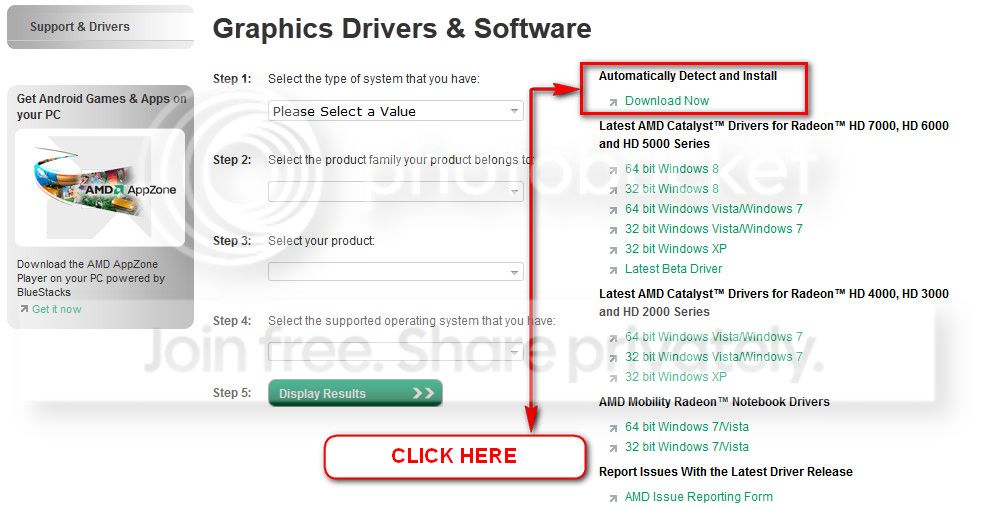
AMD Graphics Driver and Software and opt for Automatically Detect and Install the appropriate driver for your card.
During installation, you may opt for advanced installation, and install the display driver only, not the Catalyst Control Center.
Also, as the computer is somehow old, do two other things, but after updating the display driver:
Stress test the Graphics Card using Furmark.
Video Card - Stress Test with Furmark
Is the computer hot? Report us the heat of the computer after a couple of hours of your normal usage. Upload a screenshot of the summery tab of
Speccy. Alternatively, you can publish a Speccy snapshot too:
http://www.sevenforums.com/tutorials/311593-speccy-publish-snapshot-your-system-specs.html .
One more and very important thing, as it BSODs during startup. Free up the startup. Windows does not need any other program to auto start with it, but the auto start programs often conflicts and causes various problems including BSODs.
- Click on the Start button
- Type “msconfig (without quotes), click the resulting link. It will open the System Configuration window.
- Select the “Startup” tab.
- Deselect all items other than the antivirus and Cypress Trackpad drivers, CyCpIo and CyHidWin.
- Apply > OK
- Accept then restart.
Let us know the results.


 but i've used it quite a lot.

