It is an iMac 14.2. I am not very sure about Mac's hardware, but the GPU seems to be for a portable computer (laptop).
GeForce GTX 780M | Specifications | GeForce says:
GeForce >
Hardware >
Notebook GPUs >
GeForce GTX 780M
Install Service pack 1 and all other windows updates. Otherwise the system will remain vulnerable to crashes.
Code:
[COLOR=Red]Windows 7 Kernel Version 7600 MP[/COLOR] (8 procs) Free x64
Product: WinNt, suite: TerminalServer SingleUserTS
Built by: 7600.16385.amd64fre.win7_rtm.090713-1255
Learn how to install Windows 7 Service Pack 1 (SP1)
Service Pack and Update Center - Microsoft Windows
The display driver is failing here.
Code:
fffff800`00b9c158  fffff880`0852695aUnable to load image \SystemRoot\system32\DRIVERS\nvlddmkm.sys, Win32 error 0n2
[COLOR=Red]*** WARNING: Unable to verify timestamp for nvlddmkm.sys
*** ERROR: Module load completed but symbols could not be loaded for nvlddmkm.sys[/COLOR]
 nvlddmkm+0xc095a
And unfortunately I dont know any driver version that works good with GTX 700 series. You may try the drivers on a trial and error basis:
- 320.49 WHQL
- 327.23 WHQL
- 331.58 WHWL
- 331.65 WHQL
- 331.82 WHQL
- 332.21 WHQL
- Any other version later .......
Get them from
Drivers - Download NVIDIA Drivers
Do a clean install on all of them. Uninstall the previously installed driver first.
Uninstall All nvidia items in Control Panel > Programs and features
- 3D Vision Control Driver
- 3D Vision Driver
- Graphics Driver
- HD Audio Driver
- PhysX
- nvidia Update
- GeForec Experience.
(Are you using nvidia chipset drivers? If so, dont uninstall anything other than those are listed).- Now follow Drivers - Clean Left over Files after Uninstalling
- Download the target WHQL. While installing, Select Custom (Advanced) install. In the next page, follow this settings:
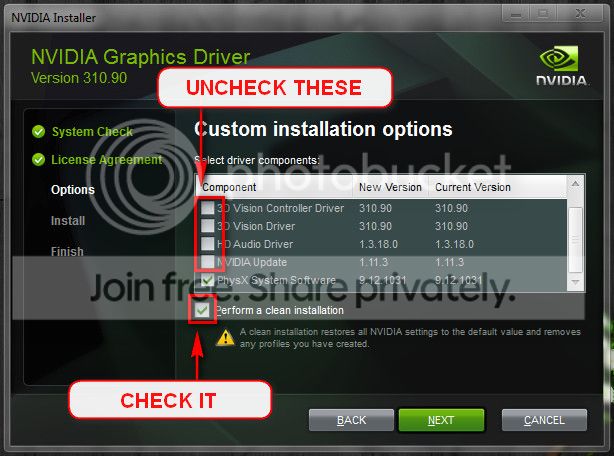
Lengthy process, but the only stable version of nvidia is 314.22 lately, which does not support 700 series GPU.
Broadcom NetXtreme Gigabit Ethernet driver is failing, too.
Code:
fffff800`00b9c188  fffff880`04fc66b1Unable to load image \SystemRoot\system32\DRIVERS\b57nd60a.sys, Win32 error 0n2
[COLOR=Red]*** WARNING: Unable to verify timestamp for b57nd60a.sys
*** ERROR: Module load completed but symbols could not be loaded for b57nd60a.sys[/COLOR]
 b57nd60a+0x406b1
And it is old.
Code:
fffff880`04b76000 fffff880`04be1000   b57nd60a   (deferred)
    Image path: \SystemRoot\system32\DRIVERS\b57nd60a.sys
[COLOR=Red]    Image name: b57nd60a.sys
    Timestamp:        Wed Sep 05 02:59:46 2012[/COLOR] (504672CA)
    CheckSum:         0006E511
    ImageSize:        0006B000
    Translations:     0000.04b0 0000.04e4 0409.04b0 0409.04e4
Try to update it from
Ethernet NIC Driver Downloads | Broadcom.
From the situation you explained, you should test the hardware performance, too. How your Mac installation works?
Test your RAM modules for possible errors.
How to Test and Diagnose RAM Issues with Memtest86+
Run memtest for at least 8 passes, preferably overnight.
If it start showing errors/red lines, stop testing. A single error is enough to determine that something is going bad there.
Stress test the Graphics Card using Furmark.
Video Card - Stress Test with Furmark
Stress test the CPU.
Hardware - Stress Test With Prime95
Let us know the results.



