BSOD on resume from sleep

PureDynamo

New member
Local time
11:53 PM
Messages
2
Hello,

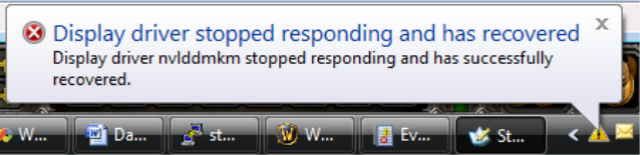
I'm having some problems whenever i resume from sleep. Typically, I'll resume and I'll get a message stating that the display driver failed to respond and has recovered. Sometimes, I'll resume and get a black screen, so I'll reboot and then I'll get the BSOD pointing to nvlddmkm.sys I tried reverting to many different driver versions, but the problem still persists. Any insight on what might be happening and how to fix it would be appreciated.
 

My Computer My Computer

Computer type
PC/Desktop
OS
Windows 7 Professional 64 bit
I'll get a message stating that the display driver failed to respond and has recovered.
Like this?

image016.png


I know that the display driver version that you are using right now is the most stable one lately released, but I will suggest you to install the latest one, on a test basis.

Get the latest driver by following the option 2 here: http://www.nvidia.in/Download/index.aspx; install it using the advanced mode. Dont install anything other than the "display driver" and "PhysX Software".

If you already tried that version too, then it would be better to test the situation with a replacement GPU.

I personally experienced the display driver failed to respond and has recovered issue, on my desktop. Similarly no driver version can make the situation better. I had no way other than replacing the GPU.

Did a wide research on it, and it appeared to be a hardware issue, provided multiple versions of the driver is giving the same result.

You may perform a stress test of the Graphics Card using Furmark.
Video Card - Stress Test with Furmark
But this issue is too occasional to be caught by furmark.
 

My Computer My Computer

Computer type
PC/Desktop
Computer Manufacturer/Model Number
Self Assembled
OS
Microsoft Windows 10 Pro Insider Preview 64-bit
CPU
Intel(R) Core(TM) i3-4130 CPU @ 3.40GHz
Motherboard
Gigabyte Technology Co., Ltd. B85M-D3H
Memory
Corsair Vengence 4GB x2 (8.00GB Dual-Channel DDR3 @ 798MHz)
Graphics Card(s)
2047MB GeForce GTS 450 (ZOTAC International)
Sound Card
Onboard (Realtek High Definition Audio)
Monitor(s) Displays
LG Flatron E2040T
Screen Resolution
1600x900
Hard Drives
Western Digital 1 TB
Seagate 500 GB
PSU
Corsair VS550
Case
Cooler Master K380
Cooling
Cooler Master Seidon 120V Plus
Keyboard
Logitech MK260r
Mouse
Logitech MK260r
Internet Speed
PMPL Broadband
Antivirus
Windows Defender + MBAM
Browser
Firefox
Other Info
Dell Studio 15" Laptop
That is the message I am getting. I tried running the stress test but didn 't find that it would crash or BSOD. I switched to an older video card I had tried resuming from sleep and there were no problems. However, the older card was an ATI card, so I'll need to see if I can track down another nVidia card from a friend.

Thanks for the help. I'll post an update when I can.
 

My Computer My Computer

Computer type
PC/Desktop
OS
Windows 7 Professional 64 bit
Back
Top