BSOd playing Dota 2, error ox000000d1

JacobMH

New member
Local time
11:33 PM
Messages
8
Computer has been bluescreening ever since i put in this new graphics card. Same issue every time at the top, driver_irql_not_less_or_equal. So i figured it was a driver issue, so I uninstalled all remnants of NVIDIA drivers and folders, reinstalled latest drivers in safe mode and still got bluescreens, so I updated my bios, and it didnt bluescreen for a good 12 hours, and now its back to the same thing. I have absolutely no idea how to fix a bluescreen, and I was hoping I could find some help here. I will post the bluescreen below, and a picture.

ZQE2oam.jpg


Log Name: System
Source: Microsoft-Windows-Kernel-Power
Date: 5/24/2014 7:41:29 PM
Event ID: 41
Task Category: (63)
Level: Critical
Keywords: (2)
User: SYSTEM
Computer: Jacob-PC
Description:
The system has rebooted without cleanly shutting down first. This error could be caused if the system stopped responding, crashed, or lost power unexpectedly.
Event Xml:
<Event xmlns="http://schemas.microsoft.com/win/2004/08/events/event">
<System>
<Provider Name="Microsoft-Windows-Kernel-Power" Guid="{331C3B3A-2005-44C2-AC5E-77220C37D6B4}" />
<EventID>41</EventID>
<Version>2</Version>
<Level>1</Level>
<Task>63</Task>
<Opcode>0</Opcode>
<Keywords>0x8000000000000002</Keywords>
<TimeCreated SystemTime="2014-05-25T00:41:29.152455600Z" />
<EventRecordID>103036</EventRecordID>
<Correlation />
<Execution ProcessID="4" ThreadID="8" />
<Channel>System</Channel>
<Computer>Jacob-PC</Computer>
<Security UserID="S-1-5-18" />
</System>
<EventData>
<Data Name="BugcheckCode">209</Data>
<Data Name="BugcheckParameter1">0x0</Data>
<Data Name="BugcheckParameter2">0x2</Data>
<Data Name="BugcheckParameter3">0x0</Data>
<Data Name="BugcheckParameter4">0xfffff880019590d2</Data>
<Data Name="SleepInProgress">false</Data>
<Data Name="PowerButtonTimestamp">0</Data>
</EventData>
</Event>
 

My Computer My Computer

Computer type
PC/Desktop
Computer Manufacturer/Model Number
custom build
OS
Windows 7 Home Premium 64bit
CPU
i7 3820
Motherboard
ASRock Extreme6 2011
Graphics Card(s)
PNY 4 GB OC 770
Additional information is required.

1. Download the DM Log Collector application to your desktop by clicking the link below

DM Log Collector.exe

2. Run it by double-clicking the icon on your desktop, and follow the prompts.
3. Locate the .ZIP file that is created on your desktop, and upload it here in your next reply.

picture.php
 

My Computer My Computer

Computer type
PC/Desktop
Computer Manufacturer/Model Number
Golden Mk. I.4
OS
Windows 10 Pro x64 ; Xubuntu x64
CPU
Intel i7 860 @ 2.80 GHz O/C'ed to 4.0GHz
Motherboard
Gigabyte P55A-UD3R Rev.1. Award BIOS F13
Memory
16GB Corsair Vengance DDR3 @ 661 MHz Dual Channel (9-9-9-24)
Graphics Card(s)
EVGA NVidia GTX 560 1024MB
Sound Card
Realtek Integrated
Monitor(s) Displays
Dual Samsung SyncMaster 2494HS
Screen Resolution
1920*1080 and 1920*1080
Hard Drives
1*Samsung 840 EVO 120GB SSD;
1*OCZ Vertex 2 60GB SSD;
2*Samsung F3 SpinPoint 1TB in RAID0;
1*Samsung F1 SpinPoint 1TB;
2*Western Digital 1TB External USB 3.0
1*Western Digital 500GB External USB 3.0
1*Seagate 500GB External USB 2.0
PSU
Thermaltake ToughPower QFan 750W
Case
Thermaltake Element S VK60001W2Z
Cooling
Corsair H60 Water Cooling, 2*230mm and 2*80mm case fans
Keyboard
Logitech G110
Mouse
Logitech MX518

My Computer My Computer

Computer type
PC/Desktop
Computer Manufacturer/Model Number
custom build
OS
Windows 7 Home Premium 64bit
CPU
i7 3820
Motherboard
ASRock Extreme6 2011
Graphics Card(s)
PNY 4 GB OC 770
Code:
*******************************************************************************
*                                                                             *
*                        Bugcheck Analysis                                    *
*                                                                             *
*******************************************************************************

Use !analyze -v to get detailed debugging information.

BugCheck D1, {0, 2, 0, fffff880019590d2}

*** WARNING: Unable to verify timestamp for iaStorA.sys
*** ERROR: Module load completed but symbols could not be loaded for iaStorA.sys
Probably caused by : iaStorA.sys ( iaStorA+63aa8 )

Followup: MachineOwner
---------
Remove Intel Rapid Storage Technology applications.

1. Uninstall it from Control Panel > Programs and Features.
2. Uninstall the driver from device manager:
- Right click on "my computer" icon and click "manage" on the context menu.
- In the "Computer Management" window that opens:
- Select "Device Manager" in the left pane, It will list all the existing devices.
- Expand "IDE ATA/ATAPI controllers" by clicking on the triangle in front of it.
- Select one Intel device item under it, right click, then uninstall.
- Repeat the process for all Intel items under "IDE ATA/ATAPI controllers"
3. Now restart the computer.
4. Once booted, Windows will auto configure the appropriate native system driver.
 

My Computer My Computer

Computer type
PC/Desktop
Computer Manufacturer/Model Number
Golden Mk. I.4
OS
Windows 10 Pro x64 ; Xubuntu x64
CPU
Intel i7 860 @ 2.80 GHz O/C'ed to 4.0GHz
Motherboard
Gigabyte P55A-UD3R Rev.1. Award BIOS F13
Memory
16GB Corsair Vengance DDR3 @ 661 MHz Dual Channel (9-9-9-24)
Graphics Card(s)
EVGA NVidia GTX 560 1024MB
Sound Card
Realtek Integrated
Monitor(s) Displays
Dual Samsung SyncMaster 2494HS
Screen Resolution
1920*1080 and 1920*1080
Hard Drives
1*Samsung 840 EVO 120GB SSD;
1*OCZ Vertex 2 60GB SSD;
2*Samsung F3 SpinPoint 1TB in RAID0;
1*Samsung F1 SpinPoint 1TB;
2*Western Digital 1TB External USB 3.0
1*Western Digital 500GB External USB 3.0
1*Seagate 500GB External USB 2.0
PSU
Thermaltake ToughPower QFan 750W
Case
Thermaltake Element S VK60001W2Z
Cooling
Corsair H60 Water Cooling, 2*230mm and 2*80mm case fans
Keyboard
Logitech G110
Mouse
Logitech MX518
ignore this
 

My Computer My Computer

Computer type
PC/Desktop
Computer Manufacturer/Model Number
custom build
OS
Windows 7 Home Premium 64bit
CPU
i7 3820
Motherboard
ASRock Extreme6 2011
Graphics Card(s)
PNY 4 GB OC 770
Code:
*******************************************************************************
*                                                                             *
*                        Bugcheck Analysis                                    *
*                                                                             *
*******************************************************************************

Use !analyze -v to get detailed debugging information.

BugCheck D1, {0, 2, 0, fffff880019590d2}

*** WARNING: Unable to verify timestamp for iaStorA.sys
*** ERROR: Module load completed but symbols could not be loaded for iaStorA.sys
Probably caused by : iaStorA.sys ( iaStorA+63aa8 )

Followup: MachineOwner
---------
Remove Intel Rapid Storage Technology applications.

1. Uninstall it from Control Panel > Programs and Features.
2. Uninstall the driver from device manager:
- Right click on "my computer" icon and click "manage" on the context menu.
- In the "Computer Management" window that opens:
- Select "Device Manager" in the left pane, It will list all the existing devices.
- Expand "IDE ATA/ATAPI controllers" by clicking on the triangle in front of it.
- Select one Intel device item under it, right click, then uninstall.
- Repeat the process for all Intel items under "IDE ATA/ATAPI controllers"
3. Now restart the computer.
4. Once booted, Windows will auto configure the appropriate native system driver.

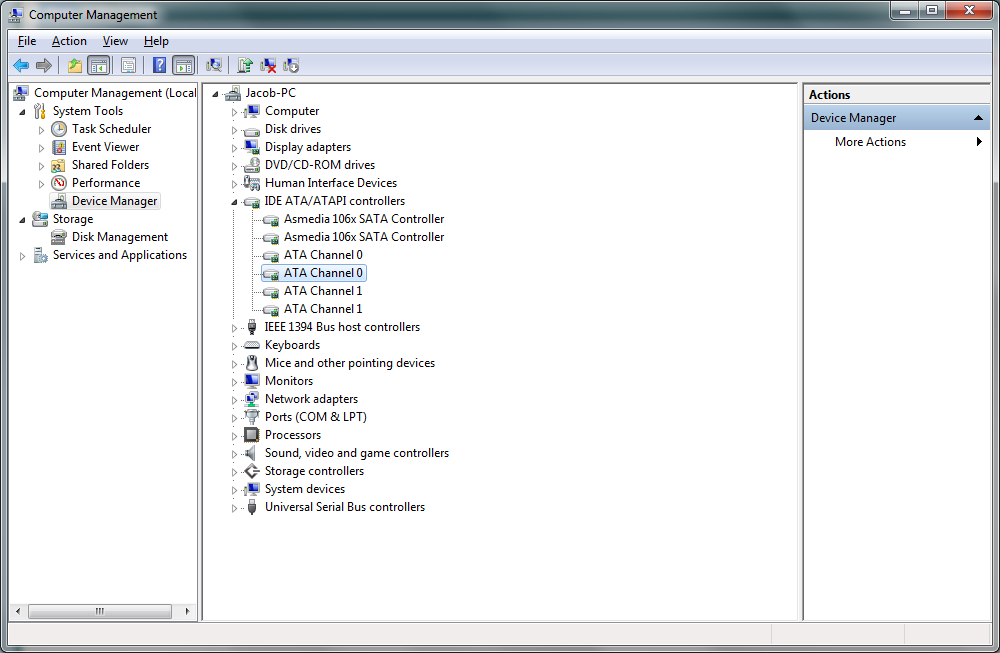
Under the "IDE ATA/ATAPI controllers" there are many items and none are listed to be intel. What do you mean by intel items.

cEwR3FY.png
 

My Computer My Computer

Computer type
PC/Desktop
Computer Manufacturer/Model Number
custom build
OS
Windows 7 Home Premium 64bit
CPU
i7 3820
Motherboard
ASRock Extreme6 2011
Graphics Card(s)
PNY 4 GB OC 770
OK. Did you uninstall any Intel Rapid Storage Technology applications?
 

My Computer My Computer

Computer type
PC/Desktop
Computer Manufacturer/Model Number
Golden Mk. I.4
OS
Windows 10 Pro x64 ; Xubuntu x64
CPU
Intel i7 860 @ 2.80 GHz O/C'ed to 4.0GHz
Motherboard
Gigabyte P55A-UD3R Rev.1. Award BIOS F13
Memory
16GB Corsair Vengance DDR3 @ 661 MHz Dual Channel (9-9-9-24)
Graphics Card(s)
EVGA NVidia GTX 560 1024MB
Sound Card
Realtek Integrated
Monitor(s) Displays
Dual Samsung SyncMaster 2494HS
Screen Resolution
1920*1080 and 1920*1080
Hard Drives
1*Samsung 840 EVO 120GB SSD;
1*OCZ Vertex 2 60GB SSD;
2*Samsung F3 SpinPoint 1TB in RAID0;
1*Samsung F1 SpinPoint 1TB;
2*Western Digital 1TB External USB 3.0
1*Western Digital 500GB External USB 3.0
1*Seagate 500GB External USB 2.0
PSU
Thermaltake ToughPower QFan 750W
Case
Thermaltake Element S VK60001W2Z
Cooling
Corsair H60 Water Cooling, 2*230mm and 2*80mm case fans
Keyboard
Logitech G110
Mouse
Logitech MX518
My computer just bluescreened again, even after I have updated my BIOS, my graphics card, and did what you said. I uninstalled intel rapid storage, then went to my device manager and uninstalled both of the Asmedia controllers. When I uninstalled the first one it took out 2 of the ATA channels, and when I uninstalled the other, it took the other 2 channels, so I was never able to actually uninstall the 4 ATA channels separately, because they disappeared when i uninstalled the ASmedia controllers. Anyhow, I just got another BSOD, I will provide a picture and a dump as I did earlier.

8dyfGKh.jpg


View attachment 319204
 

My Computer My Computer

Computer type
PC/Desktop
Computer Manufacturer/Model Number
custom build
OS
Windows 7 Home Premium 64bit
CPU
i7 3820
Motherboard
ASRock Extreme6 2011
Graphics Card(s)
PNY 4 GB OC 770
See if you can update the IRST drivers instead - they are still shown as present.

https://downloadcenter.intel.com/Se...t=Intel®+Rapid+Storage+Technology+(Intel®+RST)


Code:
iaStorA      iaStorA                iaStorA                Kernel        Boot       Running    OK         TRUE        FALSE        0          507,904    0      8/7/2012 10:43:10 AM   C:\Windows\system32\DRIVERS\iaStorA.sys          4,096     
iaStorF      iaStorF                iaStorF                Kernel        Boot       Running    OK         TRUE        FALSE        4,096      8,192      0      8/7/2012 10:42:20 AM   C:\Windows\system32\DRIVERS\iaStorF.sys          4,096     
iaStorV      Intel RAID Controller  Intel RAID Controller  Kernel        Manual     Stopped    OK         FALSE       FALSE        0          364,544    0      6/10/2010 7:46:19 PM   C:\Windows\system32\drivers\iaStorV.sys          8,192
 

My Computer My Computer

Computer type
PC/Desktop
Computer Manufacturer/Model Number
Golden Mk. I.4
OS
Windows 10 Pro x64 ; Xubuntu x64
CPU
Intel i7 860 @ 2.80 GHz O/C'ed to 4.0GHz
Motherboard
Gigabyte P55A-UD3R Rev.1. Award BIOS F13
Memory
16GB Corsair Vengance DDR3 @ 661 MHz Dual Channel (9-9-9-24)
Graphics Card(s)
EVGA NVidia GTX 560 1024MB
Sound Card
Realtek Integrated
Monitor(s) Displays
Dual Samsung SyncMaster 2494HS
Screen Resolution
1920*1080 and 1920*1080
Hard Drives
1*Samsung 840 EVO 120GB SSD;
1*OCZ Vertex 2 60GB SSD;
2*Samsung F3 SpinPoint 1TB in RAID0;
1*Samsung F1 SpinPoint 1TB;
2*Western Digital 1TB External USB 3.0
1*Western Digital 500GB External USB 3.0
1*Seagate 500GB External USB 2.0
PSU
Thermaltake ToughPower QFan 750W
Case
Thermaltake Element S VK60001W2Z
Cooling
Corsair H60 Water Cooling, 2*230mm and 2*80mm case fans
Keyboard
Logitech G110
Mouse
Logitech MX518
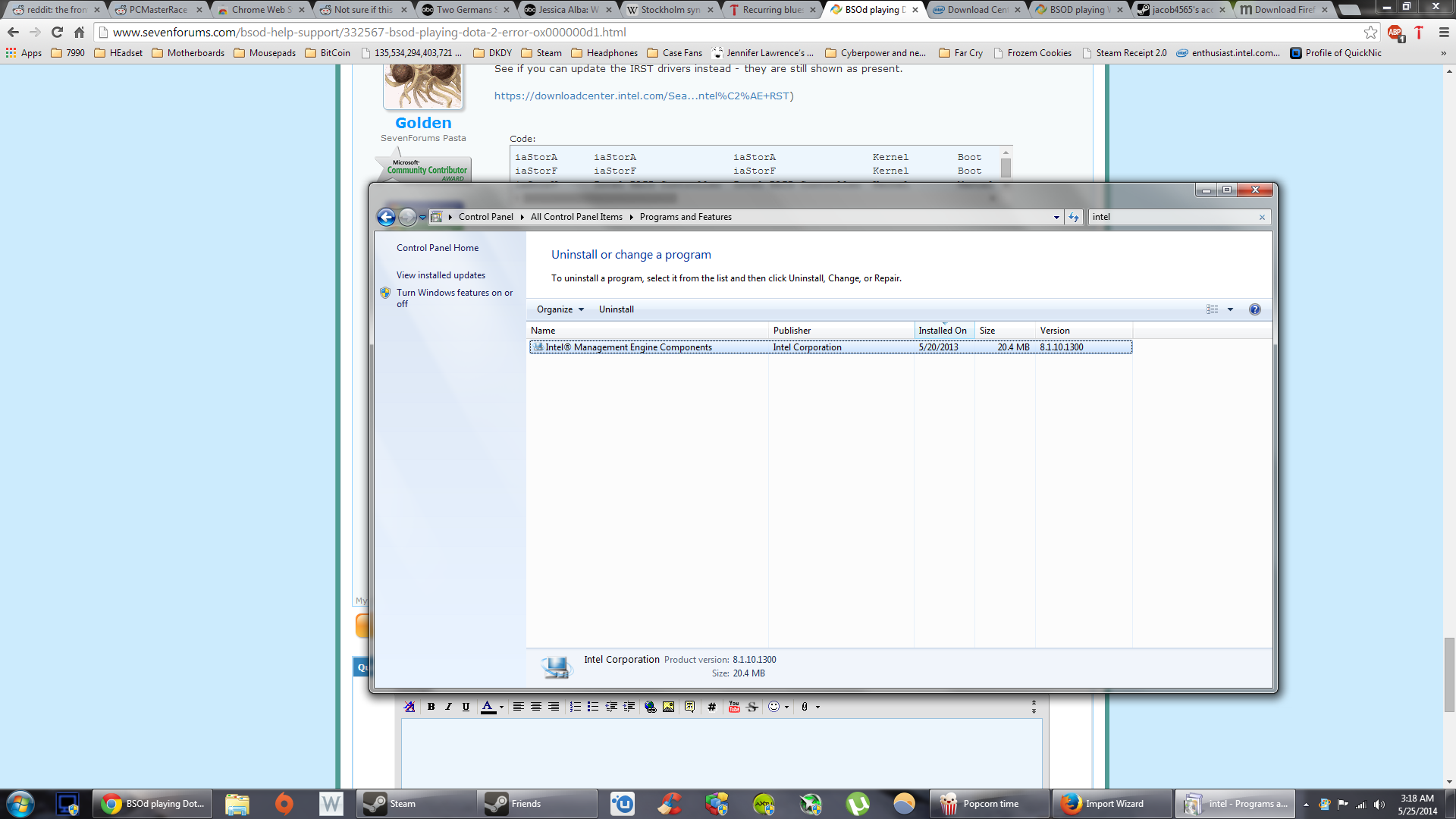
There is still an Intel program under Programs and Features. Should i uninstall it?

9VULxtP.png
 

My Computer My Computer

Computer type
PC/Desktop
Computer Manufacturer/Model Number
custom build
OS
Windows 7 Home Premium 64bit
CPU
i7 3820
Motherboard
ASRock Extreme6 2011
Graphics Card(s)
PNY 4 GB OC 770
In your BIOS, are you using the AHCI or RAID controller? Can you confirm you have a single HDD?
 

My Computer My Computer

Computer type
PC/Desktop
Computer Manufacturer/Model Number
Golden Mk. I.4
OS
Windows 10 Pro x64 ; Xubuntu x64
CPU
Intel i7 860 @ 2.80 GHz O/C'ed to 4.0GHz
Motherboard
Gigabyte P55A-UD3R Rev.1. Award BIOS F13
Memory
16GB Corsair Vengance DDR3 @ 661 MHz Dual Channel (9-9-9-24)
Graphics Card(s)
EVGA NVidia GTX 560 1024MB
Sound Card
Realtek Integrated
Monitor(s) Displays
Dual Samsung SyncMaster 2494HS
Screen Resolution
1920*1080 and 1920*1080
Hard Drives
1*Samsung 840 EVO 120GB SSD;
1*OCZ Vertex 2 60GB SSD;
2*Samsung F3 SpinPoint 1TB in RAID0;
1*Samsung F1 SpinPoint 1TB;
2*Western Digital 1TB External USB 3.0
1*Western Digital 500GB External USB 3.0
1*Seagate 500GB External USB 2.0
PSU
Thermaltake ToughPower QFan 750W
Case
Thermaltake Element S VK60001W2Z
Cooling
Corsair H60 Water Cooling, 2*230mm and 2*80mm case fans
Keyboard
Logitech G110
Mouse
Logitech MX518
Back
Top