BSOD Random Intervals; DRIVER IRQL NOT LESS OR EQUAL

BingoGaming

New member
Local time
6:12 AM
Messages
19
I keep getting bluescreens at random intervals, having just built my computer new at Christmas. Some bluescreens involve ataport.sys, some are saying MEMORY_MANAGEMENT, driver irql and some others that I can't remember. Here is some info:

Code:
Problem signature:
Problem Event Name:	BlueScreen
OS Version:	6.1.7601.2.1.0.256.1
Locale ID:	2057

Additional information about the problem:
BCCode:	f4
BCP1:	0000000000000003
BCP2:	FFFFFA8008886B30
BCP3:	FFFFFA8008886E10
BCP4:	FFFFF800031D2470
OS Version:	6_1_7601
Service Pack:	1_0
Product:	256_1

Files that help describe the problem:
C:\Windows\Minidump\033113-14664-01.dmp
C:\Users\Bingo\AppData\Local\Temp\WER-30638-0.sysdata.xml

Minidump http://www.**************/?swso1dxllwr7ugs
Sysinfo http://www.**************/?i06ycvf6il75l7d

^ Replace asterisk with the word media followed by fire.

Note this was from an ataport.sys bluescreen, although the driver irql BSOD's are more frequent, I havent got the minidump of any of them yet.

All help is appreciated.
 

My Computer

Computer type
PC/Desktop
Computer Manufacturer/Model Number
Custom Build
OS
Windows Ultimate x64
CPU
Intel Core i5-3570K 3.4GHz
Motherboard
Gigabyte GA-Z77X-UD3H
Memory
Corsair Vengeance 8GB (2 x 4GB) DDR3-1600
Graphics Card(s)
EVGA GTX 660Ti 2GB
Monitor(s) Displays
HP 2311x
Screen Resolution
1920x1080
Hard Drives
Western Digital Caviar Black 1TB 3.5" 7200RPM
PSU
NZXT HALE82 750W ATX12V / EPS12V
Case
NZXT Phantom 410 (Black) ATX Mid Tower
Keyboard
Razer Lycosa Mirror Edition
Mouse
Razer Deathadder Re-spawn
Internet Speed
5Mbp/s - 20 Mbp/s
Antivirus
Microsoft Security Essentials + Malwarebytes
Browser
Google Chrome

My Computer

Computer type
PC/Desktop
Computer Manufacturer/Model Number
Self Assembled
OS
Microsoft Windows 10 Pro Insider Preview 64-bit
CPU
Intel(R) Core(TM) i3-4130 CPU @ 3.40GHz
Motherboard
Gigabyte Technology Co., Ltd. B85M-D3H
Memory
Corsair Vengence 4GB x2 (8.00GB Dual-Channel DDR3 @ 798MHz)
Graphics Card(s)
2047MB GeForce GTS 450 (ZOTAC International)
Sound Card
Onboard (Realtek High Definition Audio)
Monitor(s) Displays
LG Flatron E2040T
Screen Resolution
1600x900
Hard Drives
Western Digital 1 TB
Seagate 500 GB
PSU
Corsair VS550
Case
Cooler Master K380
Cooling
Cooler Master Seidon 120V Plus
Keyboard
Logitech MK260r
Mouse
Logitech MK260r
Internet Speed
PMPL Broadband
Antivirus
Windows Defender + MBAM
Browser
Firefox
Other Info
Dell Studio 15" Laptop
Added Zip File

Added Zip file to comply with posting rules. Check for all system info.
 

My Computer

Computer type
PC/Desktop
Computer Manufacturer/Model Number
Custom Build
OS
Windows Ultimate x64
CPU
Intel Core i5-3570K 3.4GHz
Motherboard
Gigabyte GA-Z77X-UD3H
Memory
Corsair Vengeance 8GB (2 x 4GB) DDR3-1600
Graphics Card(s)
EVGA GTX 660Ti 2GB
Monitor(s) Displays
HP 2311x
Screen Resolution
1920x1080
Hard Drives
Western Digital Caviar Black 1TB 3.5" 7200RPM
PSU
NZXT HALE82 750W ATX12V / EPS12V
Case
NZXT Phantom 410 (Black) ATX Mid Tower
Keyboard
Razer Lycosa Mirror Edition
Mouse
Razer Deathadder Re-spawn
Internet Speed
5Mbp/s - 20 Mbp/s
Antivirus
Microsoft Security Essentials + Malwarebytes
Browser
Google Chrome
View attachment 264033

The zip you uploaded does not contain any crash dump.

Follow it: http://www.sevenforums.com/tutorials/174459-dump-files-configure-windows-create-bsod.html
Go to Option Two, Point 2. Download the .reg file and merge it in registry by double clicking it.

Now wait for another BSOD. When it occurred, search the .dmp files manually in the default path: C:\Windows\Minidump or %SystemRoot%\Minidump. See if the crash dump is recorded or not (hopefully it will be recorded).Post it following the Blue Screen of Death (BSOD) Posting Instructions.

Dont run any disc cleanup utility before you upload another one zip. Those utilities clean the minidump folder up.
 

My Computer

Computer type
PC/Desktop
Computer Manufacturer/Model Number
Self Assembled
OS
Microsoft Windows 10 Pro Insider Preview 64-bit
CPU
Intel(R) Core(TM) i3-4130 CPU @ 3.40GHz
Motherboard
Gigabyte Technology Co., Ltd. B85M-D3H
Memory
Corsair Vengence 4GB x2 (8.00GB Dual-Channel DDR3 @ 798MHz)
Graphics Card(s)
2047MB GeForce GTS 450 (ZOTAC International)
Sound Card
Onboard (Realtek High Definition Audio)
Monitor(s) Displays
LG Flatron E2040T
Screen Resolution
1600x900
Hard Drives
Western Digital 1 TB
Seagate 500 GB
PSU
Corsair VS550
Case
Cooler Master K380
Cooling
Cooler Master Seidon 120V Plus
Keyboard
Logitech MK260r
Mouse
Logitech MK260r
Internet Speed
PMPL Broadband
Antivirus
Windows Defender + MBAM
Browser
Firefox
Other Info
Dell Studio 15" Laptop
No Minidump in the Minidump folder, I'll wait and see if I can grab it next time it happens. There is a Minidump attached to my original post if you want to check that in the mean time.
 

My Computer

Computer type
PC/Desktop
Computer Manufacturer/Model Number
Custom Build
OS
Windows Ultimate x64
CPU
Intel Core i5-3570K 3.4GHz
Motherboard
Gigabyte GA-Z77X-UD3H
Memory
Corsair Vengeance 8GB (2 x 4GB) DDR3-1600
Graphics Card(s)
EVGA GTX 660Ti 2GB
Monitor(s) Displays
HP 2311x
Screen Resolution
1920x1080
Hard Drives
Western Digital Caviar Black 1TB 3.5" 7200RPM
PSU
NZXT HALE82 750W ATX12V / EPS12V
Case
NZXT Phantom 410 (Black) ATX Mid Tower
Keyboard
Razer Lycosa Mirror Edition
Mouse
Razer Deathadder Re-spawn
Internet Speed
5Mbp/s - 20 Mbp/s
Antivirus
Microsoft Security Essentials + Malwarebytes
Browser
Google Chrome
In the mean time, do some Disc checks.

  1. Data Lifeguard For Windows.
  2. Reseat the sata and power. Also, if possible, try to change the cables and plug the SATA in another port in the motherboard.
    72974453_zps85c47d93.jpg
  3. Run chkdsk /f/r, following the option two of the tutorial Disk Check
  4. Seatool for dos: SeaTools | Seagate download
    Burn it in a blank cd. boot from the CD, click on "Accept", wait for it to finish detecting the drives, then in the upper left corner select "Basic Tests", then select "Long Test" and let it run.
Scan the system for possible virus infection with the following programs.

Free up the startup. Windows does not need any other program to auto start with it, but the auto start programs often conflicts and causes various problems including BSODs.

  1. Click on the Start button
  2. Type “msconfig (without quotes), click the resulting link. It will open the System Configuration window.
  3. Select the “Startup” tab.
  4. Deselect all items other than the antivirus.
  5. Apply > OK
  6. Accept then restart.
 

My Computer

Computer type
PC/Desktop
Computer Manufacturer/Model Number
Self Assembled
OS
Microsoft Windows 10 Pro Insider Preview 64-bit
CPU
Intel(R) Core(TM) i3-4130 CPU @ 3.40GHz
Motherboard
Gigabyte Technology Co., Ltd. B85M-D3H
Memory
Corsair Vengence 4GB x2 (8.00GB Dual-Channel DDR3 @ 798MHz)
Graphics Card(s)
2047MB GeForce GTS 450 (ZOTAC International)
Sound Card
Onboard (Realtek High Definition Audio)
Monitor(s) Displays
LG Flatron E2040T
Screen Resolution
1600x900
Hard Drives
Western Digital 1 TB
Seagate 500 GB
PSU
Corsair VS550
Case
Cooler Master K380
Cooling
Cooler Master Seidon 120V Plus
Keyboard
Logitech MK260r
Mouse
Logitech MK260r
Internet Speed
PMPL Broadband
Antivirus
Windows Defender + MBAM
Browser
Firefox
Other Info
Dell Studio 15" Laptop

My Computer

Computer type
PC/Desktop
Computer Manufacturer/Model Number
Custom Build
OS
Windows Ultimate x64
CPU
Intel Core i5-3570K 3.4GHz
Motherboard
Gigabyte GA-Z77X-UD3H
Memory
Corsair Vengeance 8GB (2 x 4GB) DDR3-1600
Graphics Card(s)
EVGA GTX 660Ti 2GB
Monitor(s) Displays
HP 2311x
Screen Resolution
1920x1080
Hard Drives
Western Digital Caviar Black 1TB 3.5" 7200RPM
PSU
NZXT HALE82 750W ATX12V / EPS12V
Case
NZXT Phantom 410 (Black) ATX Mid Tower
Keyboard
Razer Lycosa Mirror Edition
Mouse
Razer Deathadder Re-spawn
Internet Speed
5Mbp/s - 20 Mbp/s
Antivirus
Microsoft Security Essentials + Malwarebytes
Browser
Google Chrome

My Computer

Computer type
PC/Desktop
Computer Manufacturer/Model Number
Self Assembled
OS
Microsoft Windows 10 Pro Insider Preview 64-bit
CPU
Intel(R) Core(TM) i3-4130 CPU @ 3.40GHz
Motherboard
Gigabyte Technology Co., Ltd. B85M-D3H
Memory
Corsair Vengence 4GB x2 (8.00GB Dual-Channel DDR3 @ 798MHz)
Graphics Card(s)
2047MB GeForce GTS 450 (ZOTAC International)
Sound Card
Onboard (Realtek High Definition Audio)
Monitor(s) Displays
LG Flatron E2040T
Screen Resolution
1600x900
Hard Drives
Western Digital 1 TB
Seagate 500 GB
PSU
Corsair VS550
Case
Cooler Master K380
Cooling
Cooler Master Seidon 120V Plus
Keyboard
Logitech MK260r
Mouse
Logitech MK260r
Internet Speed
PMPL Broadband
Antivirus
Windows Defender + MBAM
Browser
Firefox
Other Info
Dell Studio 15" Laptop
Ah, damn it. Do you really think it could be failing so soon? Ordered it brand new at Christmas.

Anywho, heres what I got from CrystalDisk:

http://i.imgur.com/wKFAeal.png
 

My Computer

Computer type
PC/Desktop
Computer Manufacturer/Model Number
Custom Build
OS
Windows Ultimate x64
CPU
Intel Core i5-3570K 3.4GHz
Motherboard
Gigabyte GA-Z77X-UD3H
Memory
Corsair Vengeance 8GB (2 x 4GB) DDR3-1600
Graphics Card(s)
EVGA GTX 660Ti 2GB
Monitor(s) Displays
HP 2311x
Screen Resolution
1920x1080
Hard Drives
Western Digital Caviar Black 1TB 3.5" 7200RPM
PSU
NZXT HALE82 750W ATX12V / EPS12V
Case
NZXT Phantom 410 (Black) ATX Mid Tower
Keyboard
Razer Lycosa Mirror Edition
Mouse
Razer Deathadder Re-spawn
Internet Speed
5Mbp/s - 20 Mbp/s
Antivirus
Microsoft Security Essentials + Malwarebytes
Browser
Google Chrome
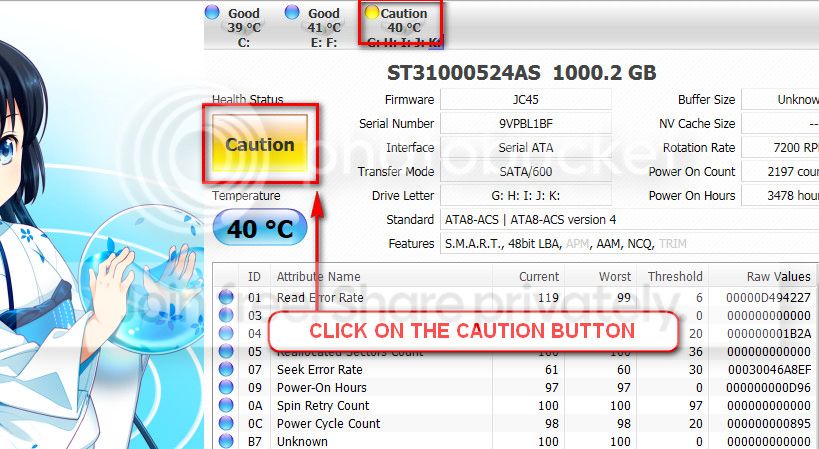
The caution indication can be converted to good using CrystalDiscInfo. Click on the caution Button, you will get another window ....
1_zps1eeadfca.jpg


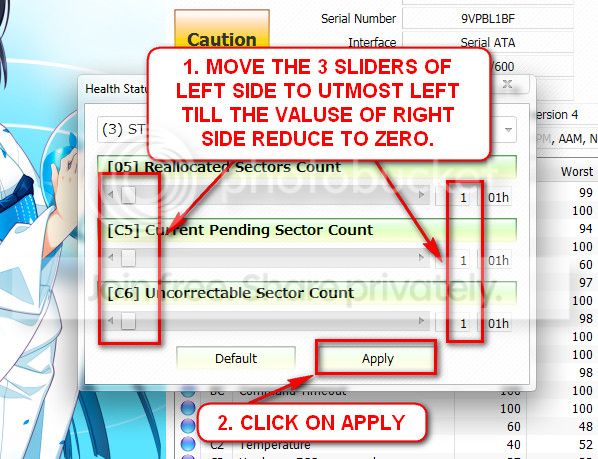
In the resulting window, there are three sliders in the left. Drag them to the ultimate left, and notice the values at the right side are converting to zeros.
2_zps50ae6eec.jpg


Now click the apply button, and notice that the caution is gone.

Now try to run the data lifeguard again. Can you complete it now?
 

My Computer

Computer type
PC/Desktop
Computer Manufacturer/Model Number
Self Assembled
OS
Microsoft Windows 10 Pro Insider Preview 64-bit
CPU
Intel(R) Core(TM) i3-4130 CPU @ 3.40GHz
Motherboard
Gigabyte Technology Co., Ltd. B85M-D3H
Memory
Corsair Vengence 4GB x2 (8.00GB Dual-Channel DDR3 @ 798MHz)
Graphics Card(s)
2047MB GeForce GTS 450 (ZOTAC International)
Sound Card
Onboard (Realtek High Definition Audio)
Monitor(s) Displays
LG Flatron E2040T
Screen Resolution
1600x900
Hard Drives
Western Digital 1 TB
Seagate 500 GB
PSU
Corsair VS550
Case
Cooler Master K380
Cooling
Cooler Master Seidon 120V Plus
Keyboard
Logitech MK260r
Mouse
Logitech MK260r
Internet Speed
PMPL Broadband
Antivirus
Windows Defender + MBAM
Browser
Firefox
Other Info
Dell Studio 15" Laptop
The caution went away, but still getting the exact same error from Lifeguard.
 

My Computer

Computer type
PC/Desktop
Computer Manufacturer/Model Number
Custom Build
OS
Windows Ultimate x64
CPU
Intel Core i5-3570K 3.4GHz
Motherboard
Gigabyte GA-Z77X-UD3H
Memory
Corsair Vengeance 8GB (2 x 4GB) DDR3-1600
Graphics Card(s)
EVGA GTX 660Ti 2GB
Monitor(s) Displays
HP 2311x
Screen Resolution
1920x1080
Hard Drives
Western Digital Caviar Black 1TB 3.5" 7200RPM
PSU
NZXT HALE82 750W ATX12V / EPS12V
Case
NZXT Phantom 410 (Black) ATX Mid Tower
Keyboard
Razer Lycosa Mirror Edition
Mouse
Razer Deathadder Re-spawn
Internet Speed
5Mbp/s - 20 Mbp/s
Antivirus
Microsoft Security Essentials + Malwarebytes
Browser
Google Chrome
Copy everything externally and RMA the HDD.

It is failing.
 

My Computer

Computer type
PC/Desktop
Computer Manufacturer/Model Number
Self Assembled
OS
Microsoft Windows 10 Pro Insider Preview 64-bit
CPU
Intel(R) Core(TM) i3-4130 CPU @ 3.40GHz
Motherboard
Gigabyte Technology Co., Ltd. B85M-D3H
Memory
Corsair Vengence 4GB x2 (8.00GB Dual-Channel DDR3 @ 798MHz)
Graphics Card(s)
2047MB GeForce GTS 450 (ZOTAC International)
Sound Card
Onboard (Realtek High Definition Audio)
Monitor(s) Displays
LG Flatron E2040T
Screen Resolution
1600x900
Hard Drives
Western Digital 1 TB
Seagate 500 GB
PSU
Corsair VS550
Case
Cooler Master K380
Cooling
Cooler Master Seidon 120V Plus
Keyboard
Logitech MK260r
Mouse
Logitech MK260r
Internet Speed
PMPL Broadband
Antivirus
Windows Defender + MBAM
Browser
Firefox
Other Info
Dell Studio 15" Laptop
Alright, thanks.
 

My Computer

Computer type
PC/Desktop
Computer Manufacturer/Model Number
Custom Build
OS
Windows Ultimate x64
CPU
Intel Core i5-3570K 3.4GHz
Motherboard
Gigabyte GA-Z77X-UD3H
Memory
Corsair Vengeance 8GB (2 x 4GB) DDR3-1600
Graphics Card(s)
EVGA GTX 660Ti 2GB
Monitor(s) Displays
HP 2311x
Screen Resolution
1920x1080
Hard Drives
Western Digital Caviar Black 1TB 3.5" 7200RPM
PSU
NZXT HALE82 750W ATX12V / EPS12V
Case
NZXT Phantom 410 (Black) ATX Mid Tower
Keyboard
Razer Lycosa Mirror Edition
Mouse
Razer Deathadder Re-spawn
Internet Speed
5Mbp/s - 20 Mbp/s
Antivirus
Microsoft Security Essentials + Malwarebytes
Browser
Google Chrome
Back
Top