Solved BSOD/ Shutdown after sleep

sverne

New member
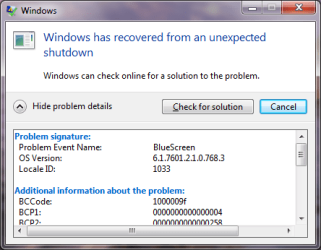
Just started occurring, Dell laptop shuts down instead of sleep, and after I power on a error box appears "Windows has recovered from an unexpected shutdown/ problem event name, BSOD".

I do not actually have a BSOD, but a full shutdown instead of remaining on sleep and then the message of BSOD.

I have tried to upload the folder 'SFdebugfiles" on this post through the paper clip, but it will not accept a folder, only individual files (which are many). Is there another way to attach the folder? I am not sure how to use WeTransfer as they request a recipient email.
Thanks

I have run chkdsk once and sfc 2X without any errors.
 
Last edited:

My Computer

Computer type
PC/Desktop
Computer Manufacturer/Model Number
Lenovo
OS
win7 64bit Pro
CPU
2.4
Memory
8G
Hard Drives
1T SSD
Is this occurring after you tell it to go to sleep or is it just occurring? If the latter, you may have a failing power supply or overheating CPU. Both cases cause your system to instantly shut down.
 

My Computer

Computer type
Laptop
Computer Manufacturer/Model Number
Dell M6500 Precision Work Station
OS
Windows 7 Pro SP1 64 bit
Memory
8 GB
Screen Resolution
1920x
Internet Speed
30 Mbps
Antivirus
Norton Security
Browser
IE 11
Forgive for the delay in responding; the problem is very unpredictable and infrequent---just occurred today since last post.
The automatic shutdown occurs when it is asleep (??), and when I reopen, the error box appears. I actually do not see the BSOD.

I will clean the fan anyway for maintenance, but I don't think the heat build up would only occur when the laptop is closed for sleep.
 

My Computer

Computer type
PC/Desktop
Computer Manufacturer/Model Number
Lenovo
OS
win7 64bit Pro
CPU
2.4
Memory
8G
Hard Drives
1T SSD
Sure smells like a failing PSU. On the other hand, if that were the case, I think you would have this happen while you were using Windows.

Would you go here- C:\Windows\Logs\CBS and attach the CBS.log file here? I'm don't how it's creating a BSOD while in sleep mode.
 

My Computer

Computer type
Laptop
Computer Manufacturer/Model Number
Dell M6500 Precision Work Station
OS
Windows 7 Pro SP1 64 bit
Memory
8 GB
Screen Resolution
1920x
Internet Speed
30 Mbps
Antivirus
Norton Security
Browser
IE 11
OK, thanks for following along.
A problem occurs--the CBS file is too large to upload, is there a way of just uploading the last few months, or whatever is needed as the log starts from 2020?

(Interesting that that after sfc scannow "some corrupted files could not be fixed" appears, and DOS tells you to look at the CBS files).
 

My Computer

Computer type
PC/Desktop
Computer Manufacturer/Model Number
Lenovo
OS
win7 64bit Pro
CPU
2.4
Memory
8G
Hard Drives
1T SSD
I suggest uploading the CBS.log file to a website such as dropbox, wetransfer, one drive etc. and sharing it. Then get a link and post the link here.
 

My Computer

Computer type
Laptop
Computer Manufacturer/Model Number
Dell M6500 Precision Work Station
OS
Windows 7 Pro SP1 64 bit
Memory
8 GB
Screen Resolution
1920x
Internet Speed
30 Mbps
Antivirus
Norton Security
Browser
IE 11
Here's the link to view the CBS.

CBS.log - pCloud

Just click on "telechargement direct/download now".
 

My Computer

Computer type
PC/Desktop
Computer Manufacturer/Model Number
Lenovo
OS
win7 64bit Pro
CPU
2.4
Memory
8G
Hard Drives
1T SSD
About the only thing I can tell you is that the problem described in your log is identical to this-

SEVERAL HRESULT = 0x800f0805 - CBS_E_INVALID_PACKAGE - Microsoft Community

I don't know if the advice given there is appropriate. You could try it but I would set a system restore point first.

Doesn't seem like that would cause the problem you originally posted but I'm not an expert.
 

My Computer

Computer type
Laptop
Computer Manufacturer/Model Number
Dell M6500 Precision Work Station
OS
Windows 7 Pro SP1 64 bit
Memory
8 GB
Screen Resolution
1920x
Internet Speed
30 Mbps
Antivirus
Norton Security
Browser
IE 11
Looked at the link and this problem was due to corrupted updates---something that does not apply to me as auto update is off (except for security updates).

I'll leave this thread as unsolved for now and perhaps someone will have a go at it.
 

My Computer

Computer type
PC/Desktop
Computer Manufacturer/Model Number
Lenovo
OS
win7 64bit Pro
CPU
2.4
Memory
8G
Hard Drives
1T SSD
Looked at the link and this problem was due to corrupted updates---something that does not apply to me as auto update is off (except for security updates).

I'll leave this thread as unsolved for now and perhaps someone will have a go at it.

Sorry about that but up through 3/14, which is where the log ends, it seems to be something related to Windows Update. Perhaps I'm mis-reading it.
 

My Computer

Computer type
Laptop
Computer Manufacturer/Model Number
Dell M6500 Precision Work Station
OS
Windows 7 Pro SP1 64 bit
Memory
8 GB
Screen Resolution
1920x
Internet Speed
30 Mbps
Antivirus
Norton Security
Browser
IE 11
You would know better than I in deciphering the CBS.....There should be no update problem as I do not--although previously I had to install a microsoft patch to have my downloaded updates installed as they were stuck forever.

Perhaps there is a corrupted update (which even micros. admits to)?
 

My Computer

Computer type
PC/Desktop
Computer Manufacturer/Model Number
Lenovo
OS
win7 64bit Pro
CPU
2.4
Memory
8G
Hard Drives
1T SSD
Please follow the instructions here to load the logfiles which may help in finding more about the problem.

Blue Screen of Death (BSOD) Posting Instructions

I'll take your suggestion as I was able to upload the SFdebug folder on my cloud now.

DM log - pCloud

Just to reiterate, when my laptop lid closes for sleep, at infrequent times when I re-open, the desktop is all visible, but all my open applications have closed, plus an error message of BSOD occurs in just a small box. It is as if it rebooted while it was in sleep mode--otherwise how could the apps be closed?

Everything else is fine, except the usual slowness at times which requires a reboot; I don't have any malware, nor unwanted apps, and limit the background services.
 

My Computer

Computer type
PC/Desktop
Computer Manufacturer/Model Number
Lenovo
OS
win7 64bit Pro
CPU
2.4
Memory
8G
Hard Drives
1T SSD
Do you have any USB devices plugged in when you put it to sleep?
 

My Computer

Computer type
Laptop
Computer Manufacturer/Model Number
Dell M6500 Precision Work Station
OS
Windows 7 Pro SP1 64 bit
Memory
8 GB
Screen Resolution
1920x
Internet Speed
30 Mbps
Antivirus
Norton Security
Browser
IE 11
No, except the mouse.

bluesc..PNG This is the "shutdown" message, perhaps it will help.
 
Last edited:

My Computer

Computer type
PC/Desktop
Computer Manufacturer/Model Number
Lenovo
OS
win7 64bit Pro
CPU
2.4
Memory
8G
Hard Drives
1T SSD
Yes, I had pursued that yesterday. Here's what the event log eventually says-

"The system has rebooted without cleanly shutting down first. This error could be caused if the system stopped responding, crashed, or lost power unexpectedly."

There's no indication of what caused it and, at the time it happened, there's no event shown. I don't know what driver is causing the problem.

Would you run SFC again and provide the new CBS log?
 

My Computer

Computer type
Laptop
Computer Manufacturer/Model Number
Dell M6500 Precision Work Station
OS
Windows 7 Pro SP1 64 bit
Memory
8 GB
Screen Resolution
1920x
Internet Speed
30 Mbps
Antivirus
Norton Security
Browser
IE 11
Will do....
Just finished with "no integrity violations found". That's good news I suppose, perhaps the shutdown is cleared?
New log:

CBS.last.txt - pCloud
 
Last edited:

My Computer

Computer type
PC/Desktop
Computer Manufacturer/Model Number
Lenovo
OS
win7 64bit Pro
CPU
2.4
Memory
8G
Hard Drives
1T SSD
I just love looking at those logs- NOT! I won't pretend to understand everything it's doing but it appears all the errors have been repaired.

You'll have to tell us if the shutdown is cleared.
 

My Computer

Computer type
Laptop
Computer Manufacturer/Model Number
Dell M6500 Precision Work Station
OS
Windows 7 Pro SP1 64 bit
Memory
8 GB
Screen Resolution
1920x
Internet Speed
30 Mbps
Antivirus
Norton Security
Browser
IE 11
Thanks for the news!
OK, I'll let you know in about a weeks time if it returns.
Should we mark this as solved or keep it open?
 

My Computer

Computer type
PC/Desktop
Computer Manufacturer/Model Number
Lenovo
OS
win7 64bit Pro
CPU
2.4
Memory
8G
Hard Drives
1T SSD
I would keep it open until you're satisfied the problem is resolved.
 

My Computer

Computer type
Laptop
Computer Manufacturer/Model Number
Dell M6500 Precision Work Station
OS
Windows 7 Pro SP1 64 bit
Memory
8 GB
Screen Resolution
1920x
Internet Speed
30 Mbps
Antivirus
Norton Security
Browser
IE 11
Back
Top