BSOD since i5 install

anthm13

New member
Local time
6:19 AM
Messages
1
I bought an i5 3570 3.4Ghz today and installed it, all seemed well, i reinstalled my gpu drivers and i started to get bsod after a few mins every time i logged into my account on windows 7, I looked it up and found that i could heighten my voltage on my ram, so i raised it to 1.8, my computer now lasts longer but eventually does come to a crash can anyone please help
 

My Computer My Computer

At a glance

Windows 7 Ultimate 64biti5 3570 3.4Ghz6gbATI RADEON 7770 HD
Computer type
PC/Desktop
Computer Manufacturer/Model Number
custom build
OS
Windows 7 Ultimate 64bit
CPU
i5 3570 3.4Ghz
Motherboard
Gigabyte
Memory
6gb
Graphics Card(s)
ATI RADEON 7770 HD
Hard Drives
1TB SATA HDD
Browser
Google Chrome
Hi anthm13.

Most of your crash dumps are stop 0x50 (reason not disclosed), but there is a stop 0x116 too, caused by display environment.

You are using 13.11 BETA display driver. Install the latest WHQL only, 13.12 WHQL.
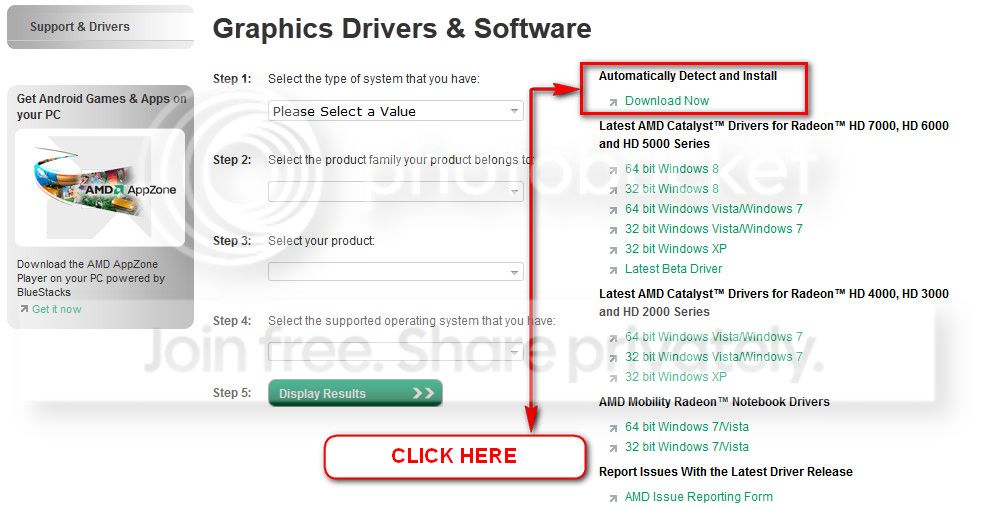
You can get it from the link in our forum, http://www.sevenforums.com/graphic-...alyst-video-driver-windows-7-a.html#post17671, or you may go to AMD Graphics Driver and Software and opt for Automatically Detect and Install the appropriate driver for your card.
ATI_zps0bc28aaa.jpg


During installation, you may opt for advanced installation, and install the display driver only, not the Catalyst Control Center.

Stress test the Graphics Card using Furmark.
Video Card - Stress Test with Furmark

Check if the Power Supply Unit (PSU) supplying adequate power to the computer or not.
eXtreme Power Supply Calculator
Also let us know the wattage of the PSU.

Is the computer hot? Report us the heat of the computer after a couple of hours of your normal usage. Upload a screenshot of the summery tab of Speccy. Alternatively, you can publish a Speccy snapshot too: http://www.sevenforums.com/tutorials/311593-speccy-publish-snapshot-your-system-specs.html .

Get @BIOS from GIGABYTE - Motherboard - Socket 1155 - GA-H61M-S2-B3 (rev. 1.0) (Support and Downloads > Utility) and update the BIOS to F5 version (dated 2012/03/27; your present one is F2).

Let us know the results. We have to take further steps depending on the results.
http://www.google.co.in/url?sa=t&rc...p8zQKYOPoO5_49yoCQ&bvm=bv.59568121,bs.1,d.bmk
 

My Computer My Computer

At a glance

Microsoft Windows 10 Pro Insider Preview 64-bitIntel(R) Core(TM) i3-4130 CPU @ 3.40GHzCorsair Vengence 4GB x2 (8.00GB Dual-Channel ...2047MB GeForce GTS 450 (ZOTAC International)
Computer type
PC/Desktop
Computer Manufacturer/Model Number
Self Assembled
OS
Microsoft Windows 10 Pro Insider Preview 64-bit
CPU
Intel(R) Core(TM) i3-4130 CPU @ 3.40GHz
Motherboard
Gigabyte Technology Co., Ltd. B85M-D3H
Memory
Corsair Vengence 4GB x2 (8.00GB Dual-Channel DDR3 @ 798MHz)
Graphics Card(s)
2047MB GeForce GTS 450 (ZOTAC International)
Sound Card
Onboard (Realtek High Definition Audio)
Monitor(s) Displays
LG Flatron E2040T
Screen Resolution
1600x900
Hard Drives
Western Digital 1 TB
Seagate 500 GB
PSU
Corsair VS550
Case
Cooler Master K380
Cooling
Cooler Master Seidon 120V Plus
Keyboard
Logitech MK260r
Mouse
Logitech MK260r
Internet Speed
PMPL Broadband
Antivirus
Windows Defender + MBAM
Browser
Firefox
Other Info
Dell Studio 15" Laptop
Back
Top