BSOD - SYSTEM_SERVICE_EXCEPTION - 0x0000003B

acejig

New member
Local time
2:26 PM
Messages
12
Location
Chicago
I am getting random Blue Screens that seem to (sometimes) trigger whenever I download something, run an application, or load a web page.
  • I just reinstalled windows in an attempt to stop these errors.
  • I have updated all of my drivers using Dell's System Detect.
  • I installed Malwarebytes Anti-Malware and received no threats on a threat scan.
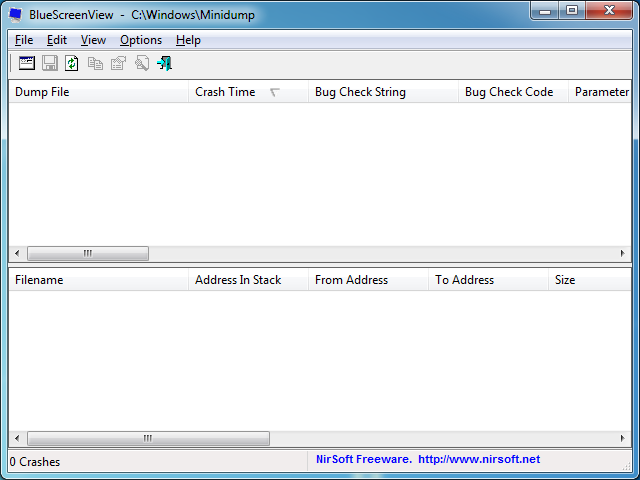
  • BlueScreenView displays no log files of any of my bluescreens:
kcpndF9.png


Any help or suggestions would be appreciated.
 

My Computer

Computer type
PC/Desktop
Computer Manufacturer/Model Number
Alienware X51
OS
Windows 7 Home Premium 64 Bit
Antivirus
Avast Free Antivirus
Browser
Google Chrome
Hi acejig.

The zip you uploaded does not contain any crash dump.

Follow it: http://www.sevenforums.com/tutorials/174459-dump-files-configure-windows-create-bsod.html
Go to Option Two, Point 2. Download the .reg file and merge it in registry by double clicking it.

Now wait for another BSOD. When it occurred, search the .dmp files manually in the default path: C:\Windows\Minidump or %SystemRoot%\Minidump. See if the crash dump is recorded or not (hopefully it will be recorded).Post it following the Blue Screen of Death (BSOD) Posting Instructions.

Dont run any disc cleanup tool before you upload another zip.
 

My Computer

Computer type
PC/Desktop
Computer Manufacturer/Model Number
Self Assembled
OS
Microsoft Windows 10 Pro Insider Preview 64-bit
CPU
Intel(R) Core(TM) i3-4130 CPU @ 3.40GHz
Motherboard
Gigabyte Technology Co., Ltd. B85M-D3H
Memory
Corsair Vengence 4GB x2 (8.00GB Dual-Channel DDR3 @ 798MHz)
Graphics Card(s)
2047MB GeForce GTS 450 (ZOTAC International)
Sound Card
Onboard (Realtek High Definition Audio)
Monitor(s) Displays
LG Flatron E2040T
Screen Resolution
1600x900
Hard Drives
Western Digital 1 TB
Seagate 500 GB
PSU
Corsair VS550
Case
Cooler Master K380
Cooling
Cooler Master Seidon 120V Plus
Keyboard
Logitech MK260r
Mouse
Logitech MK260r
Internet Speed
PMPL Broadband
Antivirus
Windows Defender + MBAM
Browser
Firefox
Other Info
Dell Studio 15" Laptop
I have attached the new updated .zip file onto this post. I followed the steps and I think that I did everything correctly. Feel free to take a look and see what you can find, thank you for your help!
 

My Computer

Computer type
PC/Desktop
Computer Manufacturer/Model Number
Alienware X51
OS
Windows 7 Home Premium 64 Bit
Antivirus
Avast Free Antivirus
Browser
Google Chrome
Code:
BugCheck 3B, {c000001d, fffff800033aa236, fffff8800a7246d0, 0}

[COLOR=Red][B]Probably caused by : Unknown_Image [/B][/COLOR]( nt!CmpBuildHashStackAndLookupCache+486 )

Followup: MachineOwner
---------
As you see, the crash dump recording mechanism failed to trace the crasher.

But, a stop 0x3B is mostly (there are some other causes too) caused by the display driver. And your installed display driver is old enough.
Code:
    Image name: nvlddmkm.sys
[COLOR=Red]    Timestamp:        Fri Jan 18 18:52:15 2013[/COLOR] (50F94C87)
Moreover, that one is not a good driver version.

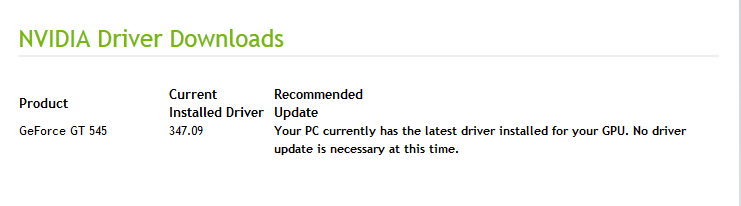
Go to Drivers - Download NVIDIA Drivers ... take the Option 2: Automatically find drivers for my NVIDIA products. See it is suggests an update for your GeForce GT 545. If suggests, install it.

Let us know the result.
 

My Computer

Computer type
PC/Desktop
Computer Manufacturer/Model Number
Self Assembled
OS
Microsoft Windows 10 Pro Insider Preview 64-bit
CPU
Intel(R) Core(TM) i3-4130 CPU @ 3.40GHz
Motherboard
Gigabyte Technology Co., Ltd. B85M-D3H
Memory
Corsair Vengence 4GB x2 (8.00GB Dual-Channel DDR3 @ 798MHz)
Graphics Card(s)
2047MB GeForce GTS 450 (ZOTAC International)
Sound Card
Onboard (Realtek High Definition Audio)
Monitor(s) Displays
LG Flatron E2040T
Screen Resolution
1600x900
Hard Drives
Western Digital 1 TB
Seagate 500 GB
PSU
Corsair VS550
Case
Cooler Master K380
Cooling
Cooler Master Seidon 120V Plus
Keyboard
Logitech MK260r
Mouse
Logitech MK260r
Internet Speed
PMPL Broadband
Antivirus
Windows Defender + MBAM
Browser
Firefox
Other Info
Dell Studio 15" Laptop
I did the second option on NVIDIA Driver Downloads like you mentioned, but I got a result telling me that all of my drivers were up to date.

F388ICz.png
 
Last edited:

My Computer

Computer type
PC/Desktop
Computer Manufacturer/Model Number
Alienware X51
OS
Windows 7 Home Premium 64 Bit
Antivirus
Avast Free Antivirus
Browser
Google Chrome
Also to mention, usually after I get the 0x3b stop, upon startup I get "could not detect hard disk" or something along the lines of that, and it asks me to reseat my drive. A hard reset usually fixes this, so I don't think I actually need to reseat my hard disk.
 

My Computer

Computer type
PC/Desktop
Computer Manufacturer/Model Number
Alienware X51
OS
Windows 7 Home Premium 64 Bit
Antivirus
Avast Free Antivirus
Browser
Google Chrome
In that case you install 314.22 WHQL driver.

  • Uninstall All nvidia items in Control Panel > Programs and features
    • 3D Vision Control Driver
    • 3D Vision Driver
    • Graphics Driver
    • HD Audio Driver
    • PhysX
    • nvidia Update
    (Are you using nvidia chipset drivers? If so, dont uninstall anything other than those are listed).
  • Now follow Drivers - Clean Left over Files after Uninstalling
  • Download 314.22 WHQL. While installing, Select Custom (Advanced) install. In the next page, follow this settings:

It is supposed to work better than your installed driver.
 

My Computer

Computer type
PC/Desktop
Computer Manufacturer/Model Number
Self Assembled
OS
Microsoft Windows 10 Pro Insider Preview 64-bit
CPU
Intel(R) Core(TM) i3-4130 CPU @ 3.40GHz
Motherboard
Gigabyte Technology Co., Ltd. B85M-D3H
Memory
Corsair Vengence 4GB x2 (8.00GB Dual-Channel DDR3 @ 798MHz)
Graphics Card(s)
2047MB GeForce GTS 450 (ZOTAC International)
Sound Card
Onboard (Realtek High Definition Audio)
Monitor(s) Displays
LG Flatron E2040T
Screen Resolution
1600x900
Hard Drives
Western Digital 1 TB
Seagate 500 GB
PSU
Corsair VS550
Case
Cooler Master K380
Cooling
Cooler Master Seidon 120V Plus
Keyboard
Logitech MK260r
Mouse
Logitech MK260r
Internet Speed
PMPL Broadband
Antivirus
Windows Defender + MBAM
Browser
Firefox
Other Info
Dell Studio 15" Laptop
The NVIDIA drivers that I have are:

  • NVIDIA 3D Vision Controller Driver 347.09
  • NVIDIA 3D Vision Driver 347.09
  • NVIDIA Graphics Driver 347.09
  • NVIDIA HD Audio Driver 1.3.33.0
  • NVIDIA PhysX System Software 9.11.0621
I'm not trying to say that you're wrong, but why would it make sense to downgrade my drivers? I'm completely willing to do it, and I probably will, but I'm just curious.

Edit:

Okay, I uninstalled all of my current NVIDIA drivers (except for the chipset drivers) and installed the 314.22 WHQL in it's place. Let's see what happens, I guess.

I'll update soon letting you know if I get any blue screens.
 
Last edited:

My Computer

Computer type
PC/Desktop
Computer Manufacturer/Model Number
Alienware X51
OS
Windows 7 Home Premium 64 Bit
Antivirus
Avast Free Antivirus
Browser
Google Chrome
Unfortunately, even after the driver change, I'm still receiving just as many blue screens as I did before I changed my drivers. Any other suggestions that you could toss at me?

Edit:

I have just encountered a new error:

"a clock interrupt was not received on a secondary processor within the allocated time interval"

I couldn't catch the Stop code, but I managed to write this down as soon as I could.
 
Last edited:

My Computer

Computer type
PC/Desktop
Computer Manufacturer/Model Number
Alienware X51
OS
Windows 7 Home Premium 64 Bit
Antivirus
Avast Free Antivirus
Browser
Google Chrome
I have just encountered a new error:

"a clock interrupt was not received on a secondary processor within the allocated time interval"

I couldn't catch the Stop code, but I managed to write this down as soon as I could.
That is stop 0x101. CLOCK_WATCHDOG_TIMEOUT.

It is mostly a hardware failure. I would suggest you to follow these two guides to troubleshoot hardware:

Let us know about your advancement. Also let us know about any queries you face in the process.
 

My Computer

Computer type
PC/Desktop
Computer Manufacturer/Model Number
Self Assembled
OS
Microsoft Windows 10 Pro Insider Preview 64-bit
CPU
Intel(R) Core(TM) i3-4130 CPU @ 3.40GHz
Motherboard
Gigabyte Technology Co., Ltd. B85M-D3H
Memory
Corsair Vengence 4GB x2 (8.00GB Dual-Channel DDR3 @ 798MHz)
Graphics Card(s)
2047MB GeForce GTS 450 (ZOTAC International)
Sound Card
Onboard (Realtek High Definition Audio)
Monitor(s) Displays
LG Flatron E2040T
Screen Resolution
1600x900
Hard Drives
Western Digital 1 TB
Seagate 500 GB
PSU
Corsair VS550
Case
Cooler Master K380
Cooling
Cooler Master Seidon 120V Plus
Keyboard
Logitech MK260r
Mouse
Logitech MK260r
Internet Speed
PMPL Broadband
Antivirus
Windows Defender + MBAM
Browser
Firefox
Other Info
Dell Studio 15" Laptop
I preformed the FurMark GPU stress test and I crashed with the 0x3B error after about a minute of doing it. After the crash my computer showed black screen reading "internal hard disk could not be found". Any idea why this could be happening?
 

My Computer

Computer type
PC/Desktop
Computer Manufacturer/Model Number
Alienware X51
OS
Windows 7 Home Premium 64 Bit
Antivirus
Avast Free Antivirus
Browser
Google Chrome

My Computer

Computer type
PC/Desktop
Computer Manufacturer/Model Number
Self Assembled
OS
Microsoft Windows 10 Pro Insider Preview 64-bit
CPU
Intel(R) Core(TM) i3-4130 CPU @ 3.40GHz
Motherboard
Gigabyte Technology Co., Ltd. B85M-D3H
Memory
Corsair Vengence 4GB x2 (8.00GB Dual-Channel DDR3 @ 798MHz)
Graphics Card(s)
2047MB GeForce GTS 450 (ZOTAC International)
Sound Card
Onboard (Realtek High Definition Audio)
Monitor(s) Displays
LG Flatron E2040T
Screen Resolution
1600x900
Hard Drives
Western Digital 1 TB
Seagate 500 GB
PSU
Corsair VS550
Case
Cooler Master K380
Cooling
Cooler Master Seidon 120V Plus
Keyboard
Logitech MK260r
Mouse
Logitech MK260r
Internet Speed
PMPL Broadband
Antivirus
Windows Defender + MBAM
Browser
Firefox
Other Info
Dell Studio 15" Laptop
I'm having a hard time getting Seatools for Dos to work, I managed to do everything correctly when it comes to getting the Image onto a USB Stick, the only problem is that when I change the BIOS startup order, it just kind of skips to my Hard Disk and normally starts windows every time, where it even detects that I have a USB Stick in and even displays "Lexar".

So pretty much my issue right now:

  • BIOS Start sequence is not running my USB first, even though it's set.
I've been googling around but it's been difficult trying to find someone with the same problem that I have. Someone mentioned something about a "Legacy USB Boot" or something along the lines of that, but I couldn't find any setting in my BIOS that has anything to do with Legacy USB Booting. Any ideas?
 

My Computer

Computer type
PC/Desktop
Computer Manufacturer/Model Number
Alienware X51
OS
Windows 7 Home Premium 64 Bit
Antivirus
Avast Free Antivirus
Browser
Google Chrome
You should try seatools with a bootable CD in this case.
 

My Computer

Computer type
PC/Desktop
Computer Manufacturer/Model Number
Self Assembled
OS
Microsoft Windows 10 Pro Insider Preview 64-bit
CPU
Intel(R) Core(TM) i3-4130 CPU @ 3.40GHz
Motherboard
Gigabyte Technology Co., Ltd. B85M-D3H
Memory
Corsair Vengence 4GB x2 (8.00GB Dual-Channel DDR3 @ 798MHz)
Graphics Card(s)
2047MB GeForce GTS 450 (ZOTAC International)
Sound Card
Onboard (Realtek High Definition Audio)
Monitor(s) Displays
LG Flatron E2040T
Screen Resolution
1600x900
Hard Drives
Western Digital 1 TB
Seagate 500 GB
PSU
Corsair VS550
Case
Cooler Master K380
Cooling
Cooler Master Seidon 120V Plus
Keyboard
Logitech MK260r
Mouse
Logitech MK260r
Internet Speed
PMPL Broadband
Antivirus
Windows Defender + MBAM
Browser
Firefox
Other Info
Dell Studio 15" Laptop
Just a quick update: I managed to find this thing called "ePSB Test" or something along the lines of that in my boot menu. It does a scan of all of my hardware components, including cables, fans, and all of that stuff. The weird thing is, is that when it was going down the list and checking all of these things, it never really finished scanning the hard drive, and once it reached the processor, the scan crashed and my computer restarted, so I was never able to view the test results.

Would this be a sign that my hard-drive is getting an error, or would it be a sign that my processor is getting an error? I can post a picture of the scan right before it crashes if necessary, but I'd have to take the picture with my phone.

Also, I seem to be pretty unsuccessful in attempting to run the Seatools for DOS. I'm not 100% sure how to get this working, but it seems like everything that I've tried is a failure. Do you think I should call the alienware support phone line and see if they can assist me with any of this? I don't have warranty so I'm afraid they're just gonna be like:
"Oh, you don't have warranty, goodbye."
 

My Computer

Computer type
PC/Desktop
Computer Manufacturer/Model Number
Alienware X51
OS
Windows 7 Home Premium 64 Bit
Antivirus
Avast Free Antivirus
Browser
Google Chrome
They will not say goodbie, but may take a charge for their service.

As you have doubt about the processor, stress test the CPU. It saves the result as a .txt file in the prime95's folder. Upload the file for us.

The Seatools test is failing .... explain it?
 

My Computer

Computer type
PC/Desktop
Computer Manufacturer/Model Number
Self Assembled
OS
Microsoft Windows 10 Pro Insider Preview 64-bit
CPU
Intel(R) Core(TM) i3-4130 CPU @ 3.40GHz
Motherboard
Gigabyte Technology Co., Ltd. B85M-D3H
Memory
Corsair Vengence 4GB x2 (8.00GB Dual-Channel DDR3 @ 798MHz)
Graphics Card(s)
2047MB GeForce GTS 450 (ZOTAC International)
Sound Card
Onboard (Realtek High Definition Audio)
Monitor(s) Displays
LG Flatron E2040T
Screen Resolution
1600x900
Hard Drives
Western Digital 1 TB
Seagate 500 GB
PSU
Corsair VS550
Case
Cooler Master K380
Cooling
Cooler Master Seidon 120V Plus
Keyboard
Logitech MK260r
Mouse
Logitech MK260r
Internet Speed
PMPL Broadband
Antivirus
Windows Defender + MBAM
Browser
Firefox
Other Info
Dell Studio 15" Laptop
Back
Top