BSOD variety of crashes while playing BF3

sandford84

New member
Local time
12:29 AM
Messages
3
Hello everyone,

Over the past few months my PC has been affected by BSOD crashes while playing BF3. The crashes have been for a number of seemingly different reasons and I need help with where to go next. I have read through your forum instructions about posting and hope that I've attached the necessary files in order to help me find out what is causing the crashes.

My PC runs absolutely fine while completing day to day tasks and has never BSOD'ed during these tasks. The crashes usually happen about 20 mins into game play on BF3. The screen will freeze then distort for about 2 seconds then show the BSOD crash reason. I've downloaded and looked through some of the .dmp files using Blue Screen View and one of the most popular reason is SYSTEM_THREAD_EXCEPTION_NOT_HANDLED. Having looked at it, it seems that this crash is caused by a driver named dxgmms1.sys which I've read on the net is in relation to DirectX. Is that correct? I've read through quite a few reasons online and played around myself with uninstalling drivers and re-installing up to date ones for my Graphics Card, Motherboard, USB Devices etc. I've also had BSOD crashes in relation to MEMORY_MANAGEMENT. I've run Memtest86 for about 6 hours and I believe it completed 7 passes with no errors on either stick. I've also run chkdsk on my HDD's and that doesn't seem to find any errors. I'm currently running on old AMD Catalyst Drivers 12.10, I had 13.1 installed but the crashes still occurred with the update of that. My Graphics Card is OC'd but it was a factory OC from when I bought the card. I've tried other games and stress tests such as 3dMark and it seems to pass fine and also other games seem to run without failure. I hope from the minidump files you might be able to asses if there is something in particular that is causing the crashes.

I've also run Malware Bytes and Virus scan and nothing shows.

If I've not post all of my PC Specs on my profile page here is another run down:

AMD Phenom II X4 965 (@stock 3.4Ghz)
Asus M4A88t EVO Mobo (880G)
4GB 2x2GB Corsair (CPU-Z shows 667mhz DDR3 PC3 - 10700 - don't know If I'm looking at the right section!)
1x 250GB Maxtor HDD
1x 500GB Seagate HDD
MSI Radeon HD6850 1Gb (860 /1100)
beQuiet 530W PSU
MS Windows 7 SP1 Home Premium


Full list of crash errors:

MEMORY_MANAGEMENT, NTFS_FILE_SYSTEM, SYSTEM_THREAD_EXCEPTION_NOT_HANDLED, IRQL_NOT_LESS_EQUAL, DRIVER_CORRUPTED_EXPOOL, KMODE_EXCEPTION_NOT_HANDLED, BAD_POOL_HEADER, CACHE_MANAGER, SYSTEM_SERVICE EXCEPTION, DRIVER_IRQL_NOT_LESS_OR_EQUAL

Any help appreciated!

Thanks in Advance.

Sandy
 

My Computer My Computer

At a glance

Windows 7 64bit SP1AMD Phenom II x4 965Corsair 4gb PC3 10700 @ 667mhz 2 x 2gbAMD Radeon HD 6850 1gb
Computer type
PC/Desktop
Computer Manufacturer/Model Number
Custom
OS
Windows 7 64bit SP1
CPU
AMD Phenom II x4 965
Motherboard
Asus M488t EVO 880G
Memory
Corsair 4gb PC3 10700 @ 667mhz 2 x 2gb
Graphics Card(s)
AMD Radeon HD 6850 1gb
Hard Drives
Maxtor 250gb, Seagate 500gb
Antivirus
Avira AV
Browser
Google Chrome
Not getting anything precisely form your crash dumps, those are either incomplete or silent.

Scan the system for possible virus infection with the following programs.

Test your RAM modules for possible errors.
How to Test and Diagnose RAM Issues with Memtest86+
Run memtest for at least 8 passes, preferably overnight.

Do some Disc checks.

  1. Re-seat the sata and power.
    72974453_zps85c47d93.jpg
  2. Run chkdsk /f/r, following the option two of the tutorial Disk Check
  3. Seatool for dos: SeaTools | Seagate download
    Burn it in a blank cd. boot from the CD, click on "Accept", wait for it to finish detecting the drives, then in the upper left corner select "Basic Tests", then select "Long Test" and let it run.
  4. Post screenshots of both your HDDs using CrystalDiscInfo.
Also as your crash dumps are not showing any finite probable cause, in such a situation it is better to enable Driver Verifier to monitor the drivers.
Driver Verifier - Enable and Disable
Run Driver Verifier for 24 hours or the occurrence of the next crash, whichever is earlier.

   Information
Why Driver Verifier:
It puts a stress on the drivers, ans so it makes the unstable drivers crash. Hopefully the driver that crashes is recorded in the memory dump.

How Can we know that DV is enabled:
It will make the system bit of slow, laggy.

   Warning
Before enabling DV, make it sure that you have earlier System restore points made in your computer. You can check it easily by using CCleaner looking at Tools > System Restore.

If there is no points, make a System Restore Point manually before enabling DV.

   Tip


Let us know the results, with the subsequent crash dumps, if any. Post it following the Blue Screen of Death (BSOD) Posting Instructions.
 

My Computer My Computer

At a glance

Microsoft Windows 10 Pro Insider Preview 64-bitIntel(R) Core(TM) i3-4130 CPU @ 3.40GHzCorsair Vengence 4GB x2 (8.00GB Dual-Channel ...2047MB GeForce GTS 450 (ZOTAC International)
Computer type
PC/Desktop
Computer Manufacturer/Model Number
Self Assembled
OS
Microsoft Windows 10 Pro Insider Preview 64-bit
CPU
Intel(R) Core(TM) i3-4130 CPU @ 3.40GHz
Motherboard
Gigabyte Technology Co., Ltd. B85M-D3H
Memory
Corsair Vengence 4GB x2 (8.00GB Dual-Channel DDR3 @ 798MHz)
Graphics Card(s)
2047MB GeForce GTS 450 (ZOTAC International)
Sound Card
Onboard (Realtek High Definition Audio)
Monitor(s) Displays
LG Flatron E2040T
Screen Resolution
1600x900
Hard Drives
Western Digital 1 TB
Seagate 500 GB
PSU
Corsair VS550
Case
Cooler Master K380
Cooling
Cooler Master Seidon 120V Plus
Keyboard
Logitech MK260r
Mouse
Logitech MK260r
Internet Speed
PMPL Broadband
Antivirus
Windows Defender + MBAM
Browser
Firefox
Other Info
Dell Studio 15" Laptop
Thanks for the reply Arc.

I have followed the steps that you have laid out in your post. I will go through the results so far:

1. TDSS Killer - nothing found
2. Windows Defender Offline - nothing found
3. Memtest 86+ - passed for 8 passes, nothing showing
4. Crystal Disc - See Screenshots below from Crystal Disc (installed some Malware called Delta Search while installing. That was a pain to remove, but done now)
5. Driver verifier - Enabling DV has been a problem child so far. I followed the instructions in the tutorial you posted and the system confirmed that it was ready to be restarted for the changes to take affect. So I restarted and the PC boots to the Windows log in screen, I type in my password and then my PC hangs while displaying the 'Welcome Screen' and the Windows Blue loading circle stops (I left it for about 5 mins as you said it could make the PC lag, no change) The computer seems to freeze and all I can do is reboot and load into safe mode. After going into safe mode I can check the DV status which shows its running. I turn it off and safely boot back into normal windows and try to repeat the process. The same outcome happens and the PC freezes with DV turned on at the 'Welcome' screen.

Am I right in saying that DV has to be on while the PC is in normal mode. I can't run DV while in safe mode? Is this because most of the drivers that need to be tested aren't running in safe mode?

I did have one BSOD today but i'm afraid I'm not sure If it will be any help or not. I have included it in the updated .rar on this post.


I haven't been able to test the drivers during DV operating as I was hoping to boot into windows and then run BF3 to see if it would crash and record the faulty driver. Any ideas about why DV won't allow me to boot into windows??

Thanks again.

Sandy
 

My Computer My Computer

At a glance

Windows 7 64bit SP1AMD Phenom II x4 965Corsair 4gb PC3 10700 @ 667mhz 2 x 2gbAMD Radeon HD 6850 1gb
Computer type
PC/Desktop
Computer Manufacturer/Model Number
Custom
OS
Windows 7 64bit SP1
CPU
AMD Phenom II x4 965
Motherboard
Asus M488t EVO 880G
Memory
Corsair 4gb PC3 10700 @ 667mhz 2 x 2gb
Graphics Card(s)
AMD Radeon HD 6850 1gb
Hard Drives
Maxtor 250gb, Seagate 500gb
Antivirus
Avira AV
Browser
Google Chrome
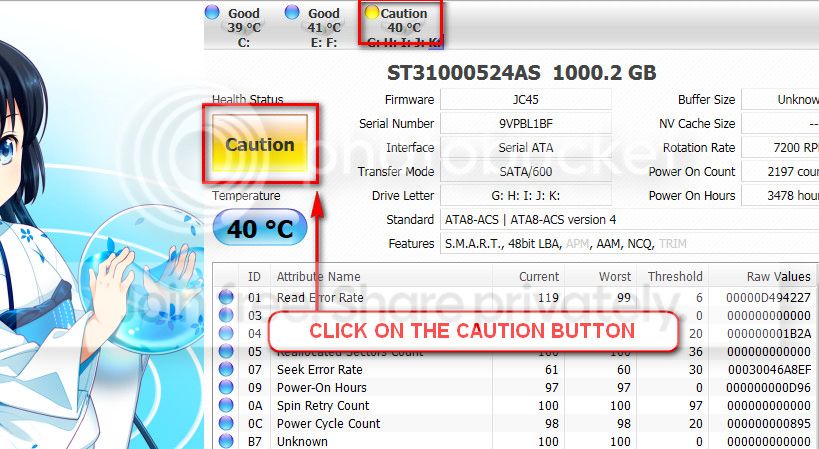
The caution indication can be converted to good using CrystalDiscInfo. Click on the caution Button, you will get another window ....
1_zps1eeadfca.jpg


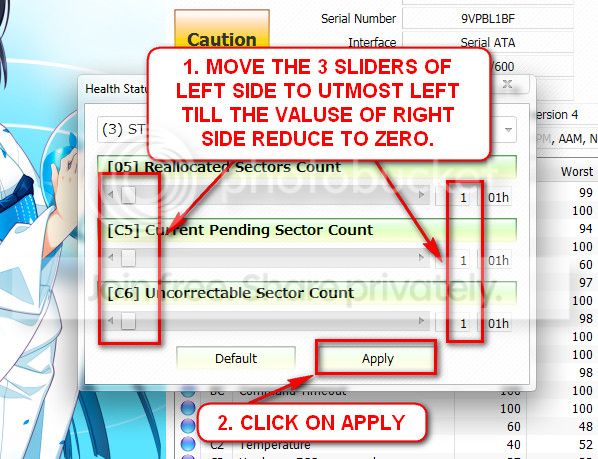
In the resulting window, there are three sliders in the left. Drag them to the ultimate left, and notice the values at the right side are converting to zeros.
2_zps50ae6eec.jpg


Now click the apply button, and notice that the caution is gone.

Test the Seagate 500 GB with Seatool for dos: SeaTools | Seagate download. Burn it in a blank cd. boot from the CD, click on "Accept", wait for it to finish detecting the drives, then in the upper left corner select "Basic Tests", then select "Long Test" and let it run.

Got this one from your latest dump ... Logitech WingMan Hid Filter driver is failing.
Code:
Unable to load image \SystemRoot\system32\drivers\[URL="http://www.carrona.org/drivers/driver.php?id=WmFilter.sys"]WmFilter.sys[/URL], Win32 error 0n2
*** WARNING: Unable to verify timestamp for [URL="http://www.carrona.org/drivers/driver.php?id=WmFilter.sys"]WmFilter.sys[/URL]
*** ERROR: Module load completed but symbols could not be loaded for [URL="http://www.carrona.org/drivers/driver.php?id=WmFilter.sys"]WmFilter.sys[/URL]
And the driver is old enough.
Code:
fffff880`06a2b000 fffff880`06a34180   WmFilter T (no symbols)           
    Loaded symbol image file: WmFilter.sys
    Image path: \SystemRoot\system32\drivers\WmFilter.sys
[COLOR=Red]    Image name: WmFilter.sys
    Timestamp:        Wed Apr 28 01:40:19 2010[/COLOR] (4BD744AB)
    CheckSum:         00010799
    ImageSize:        00009180
    Translations:     0000.04b0 0000.04e4 0409.04b0 0409.04e4
Update your logitech drivers....

NAME | DESCRIPTION | FILE | TYPE
wmbenum | Logitech Virtual Bus Enumerator Driver | c:\windows\system32\drivers\wmbenum.sys | Kernel Driver
wmfilter | Logitech Gaming HID Filter Driver | c:\windows\system32\drivers\wmfilter.sys | Kernel Driver

Search in Logitech - Support & Software Downloads.

Let us know the results.
 

My Computer My Computer

At a glance

Microsoft Windows 10 Pro Insider Preview 64-bitIntel(R) Core(TM) i3-4130 CPU @ 3.40GHzCorsair Vengence 4GB x2 (8.00GB Dual-Channel ...2047MB GeForce GTS 450 (ZOTAC International)
Computer type
PC/Desktop
Computer Manufacturer/Model Number
Self Assembled
OS
Microsoft Windows 10 Pro Insider Preview 64-bit
CPU
Intel(R) Core(TM) i3-4130 CPU @ 3.40GHz
Motherboard
Gigabyte Technology Co., Ltd. B85M-D3H
Memory
Corsair Vengence 4GB x2 (8.00GB Dual-Channel DDR3 @ 798MHz)
Graphics Card(s)
2047MB GeForce GTS 450 (ZOTAC International)
Sound Card
Onboard (Realtek High Definition Audio)
Monitor(s) Displays
LG Flatron E2040T
Screen Resolution
1600x900
Hard Drives
Western Digital 1 TB
Seagate 500 GB
PSU
Corsair VS550
Case
Cooler Master K380
Cooling
Cooler Master Seidon 120V Plus
Keyboard
Logitech MK260r
Mouse
Logitech MK260r
Internet Speed
PMPL Broadband
Antivirus
Windows Defender + MBAM
Browser
Firefox
Other Info
Dell Studio 15" Laptop
Thanks again mate,

I completed the fix on the HDD using Crystal Disc as instructed and have also completed a long run test on my Seagate HDD which passed with no problems being identified, using SeaTools.

In the next part you mention updating my Logitech driver. I have visited the link you posted and the only Logitech device I have installed is a Joystick (Attack 3). I downloaded the driver from the Logitech support site and installed the file. I'm now looking at Device Manager in Windows and when I select properties on the Logitech device it still shows the driver date to be 27/04/2010 and not more recent. Since I just installed a new driver I thought this would change? I have included a screenshot of my device manager, to show where I have been selecting the device properties from.

I know in your message you said I need to update: 'wmbenum' and 'wmfilter' which I suppose are parts of the Logitech driver? or are they separate files that I need to get from Logitech? I'm a bit newbish at this stage.

Thanks again.
 

My Computer My Computer

At a glance

Windows 7 64bit SP1AMD Phenom II x4 965Corsair 4gb PC3 10700 @ 667mhz 2 x 2gbAMD Radeon HD 6850 1gb
Computer type
PC/Desktop
Computer Manufacturer/Model Number
Custom
OS
Windows 7 64bit SP1
CPU
AMD Phenom II x4 965
Motherboard
Asus M488t EVO 880G
Memory
Corsair 4gb PC3 10700 @ 667mhz 2 x 2gb
Graphics Card(s)
AMD Radeon HD 6850 1gb
Hard Drives
Maxtor 250gb, Seagate 500gb
Antivirus
Avira AV
Browser
Google Chrome
View attachment 266550

These two drivers are included in the single installer, Logitech Attack 3.

As you have updated the drivers, now observe how it runs. If the necessities arise again, we will check the timestraps again. OK? :)
 

My Computer My Computer

At a glance

Microsoft Windows 10 Pro Insider Preview 64-bitIntel(R) Core(TM) i3-4130 CPU @ 3.40GHzCorsair Vengence 4GB x2 (8.00GB Dual-Channel ...2047MB GeForce GTS 450 (ZOTAC International)
Computer type
PC/Desktop
Computer Manufacturer/Model Number
Self Assembled
OS
Microsoft Windows 10 Pro Insider Preview 64-bit
CPU
Intel(R) Core(TM) i3-4130 CPU @ 3.40GHz
Motherboard
Gigabyte Technology Co., Ltd. B85M-D3H
Memory
Corsair Vengence 4GB x2 (8.00GB Dual-Channel DDR3 @ 798MHz)
Graphics Card(s)
2047MB GeForce GTS 450 (ZOTAC International)
Sound Card
Onboard (Realtek High Definition Audio)
Monitor(s) Displays
LG Flatron E2040T
Screen Resolution
1600x900
Hard Drives
Western Digital 1 TB
Seagate 500 GB
PSU
Corsair VS550
Case
Cooler Master K380
Cooling
Cooler Master Seidon 120V Plus
Keyboard
Logitech MK260r
Mouse
Logitech MK260r
Internet Speed
PMPL Broadband
Antivirus
Windows Defender + MBAM
Browser
Firefox
Other Info
Dell Studio 15" Laptop
Back
Top