BSOD when trying to resume form sleep

Wnt2bsleepin

New member
Local time
4:18 AM
Messages
6
Hello all,

My computer is blue screening when I try to resume from sleep. I don't have a dump file as one doesn't seem to be generated, but I do have a log file. The computer seems to go through a full reboot when I resume from suspend.

Code:
Log Name:      System
Source:        Microsoft-Windows-Kernel-Power
Date:          10/22/2013 2:29:00 PM
Event ID:      41
Task Category: (63)
Level:         Critical
Keywords:      (2)
User:          SYSTEM
Computer:      Mark-PC
Description:
The system has rebooted without cleanly shutting down first. This error could be caused if the system stopped responding, crashed, or lost power unexpectedly.
Event Xml:
<Event xmlns="http://schemas.microsoft.com/win/2004/08/events/event">
  <System>
    <Provider Name="Microsoft-Windows-Kernel-Power" Guid="{331C3B3A-2005-44C2-AC5E-77220C37D6B4}" />
    <EventID>41</EventID>
    <Version>2</Version>
    <Level>1</Level>
    <Task>63</Task>
    <Opcode>0</Opcode>
    <Keywords>0x8000000000000002</Keywords>
    <TimeCreated SystemTime="2013-10-22T18:29:00.499234900Z" />
    <EventRecordID>9519</EventRecordID>
    <Correlation />
    <Execution ProcessID="4" ThreadID="8" />
    <Channel>System</Channel>
    <Computer>Mark-PC</Computer>
    <Security UserID="S-1-5-18" />
  </System>
  <EventData>
    <Data Name="BugcheckCode">0</Data>
    <Data Name="BugcheckParameter1">0x0</Data>
    <Data Name="BugcheckParameter2">0x0</Data>
    <Data Name="BugcheckParameter3">0x0</Data>
    <Data Name="BugcheckParameter4">0x0</Data>
    <Data Name="SleepInProgress">true</Data>
    <Data Name="PowerButtonTimestamp">0</Data>
  </EventData>
</Event>


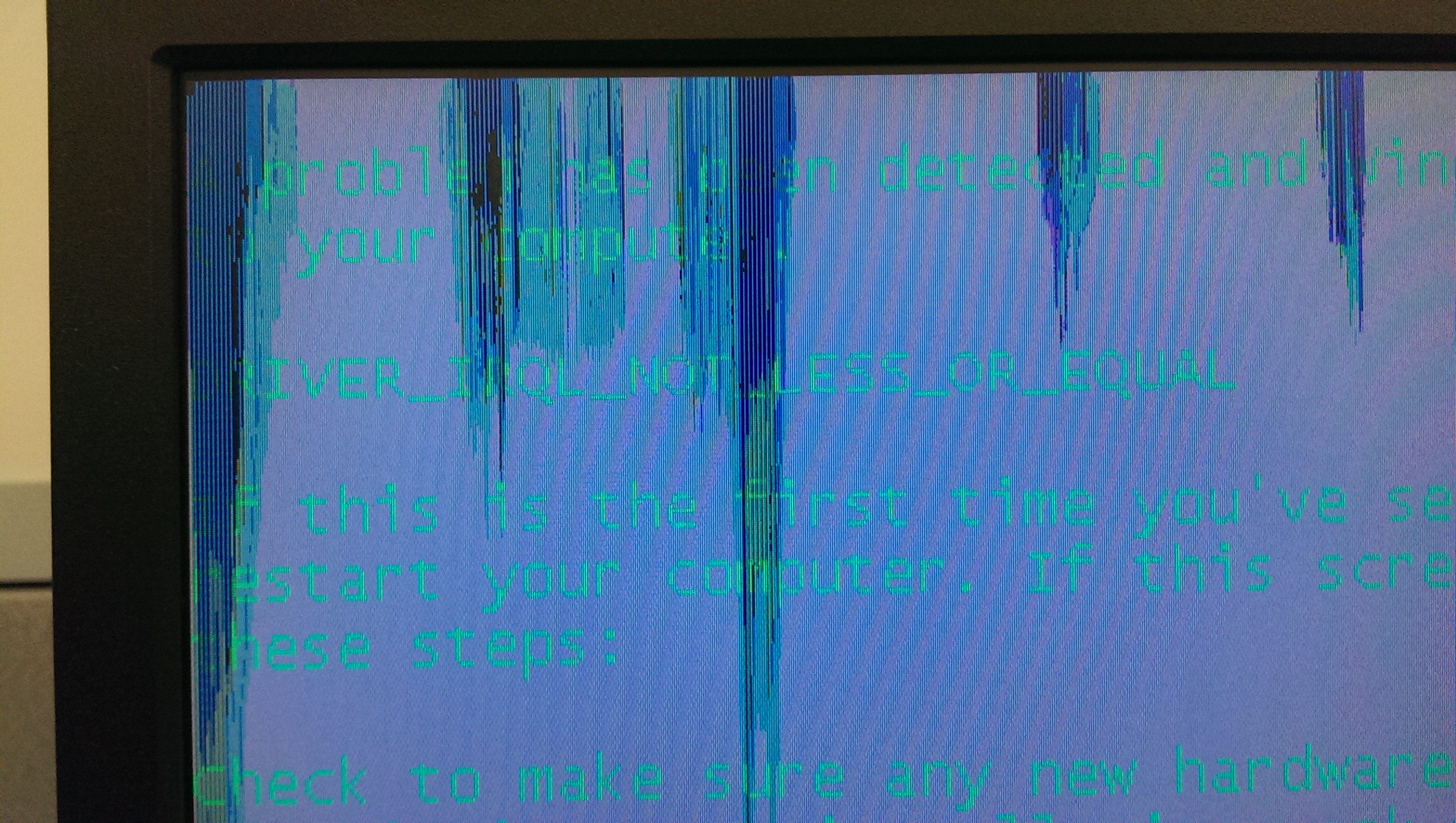
The BSOD code is

Code:
driver_irql_not_less_or_equal

Any help is much appreciated

I also added the diag tool information.
 
Last edited:

My Computer My Computer

At a glance

Windows 7 64
Computer type
PC/Desktop
OS
Windows 7 64

My Computer My Computer

At a glance

Microsoft Windows 10 Pro Insider Preview 64-bitIntel(R) Core(TM) i3-4130 CPU @ 3.40GHzCorsair Vengence 4GB x2 (8.00GB Dual-Channel ...2047MB GeForce GTS 450 (ZOTAC International)
Computer type
PC/Desktop
Computer Manufacturer/Model Number
Self Assembled
OS
Microsoft Windows 10 Pro Insider Preview 64-bit
CPU
Intel(R) Core(TM) i3-4130 CPU @ 3.40GHz
Motherboard
Gigabyte Technology Co., Ltd. B85M-D3H
Memory
Corsair Vengence 4GB x2 (8.00GB Dual-Channel DDR3 @ 798MHz)
Graphics Card(s)
2047MB GeForce GTS 450 (ZOTAC International)
Sound Card
Onboard (Realtek High Definition Audio)
Monitor(s) Displays
LG Flatron E2040T
Screen Resolution
1600x900
Hard Drives
Western Digital 1 TB
Seagate 500 GB
PSU
Corsair VS550
Case
Cooler Master K380
Cooling
Cooler Master Seidon 120V Plus
Keyboard
Logitech MK260r
Mouse
Logitech MK260r
Internet Speed
PMPL Broadband
Antivirus
Windows Defender + MBAM
Browser
Firefox
Other Info
Dell Studio 15" Laptop
Some quick googling has led me to it probably being a driver issue. Is there anyway to narrow it down? It only happens when the computer goes to sleep.
 

My Computer My Computer

At a glance

Windows 7 64
Computer type
PC/Desktop
OS
Windows 7 64
The zip you uploaded does not contain any crash dump.

Follow it: http://www.sevenforums.com/tutorials/174459-dump-files-configure-windows-create-bsod.html
Go to Option Two, Point 2. Download the .reg file and merge it in registry by double clicking it.

Now wait for another BSOD. When it occurred, search the .dmp files manually in the default path: C:\Windows\Minidump or %SystemRoot%\Minidump. See if the crash dump is recorded or not (hopefully it will be recorded).Post it following the Blue Screen of Death (BSOD) Posting Instructions.

Dont run any sort of disc cleanup tool before you upload another zip.

And, dont alter the original post, upload the data in your subsequent post only.
 

My Computer My Computer

At a glance

Microsoft Windows 10 Pro Insider Preview 64-bitIntel(R) Core(TM) i3-4130 CPU @ 3.40GHzCorsair Vengence 4GB x2 (8.00GB Dual-Channel ...2047MB GeForce GTS 450 (ZOTAC International)
Computer type
PC/Desktop
Computer Manufacturer/Model Number
Self Assembled
OS
Microsoft Windows 10 Pro Insider Preview 64-bit
CPU
Intel(R) Core(TM) i3-4130 CPU @ 3.40GHz
Motherboard
Gigabyte Technology Co., Ltd. B85M-D3H
Memory
Corsair Vengence 4GB x2 (8.00GB Dual-Channel DDR3 @ 798MHz)
Graphics Card(s)
2047MB GeForce GTS 450 (ZOTAC International)
Sound Card
Onboard (Realtek High Definition Audio)
Monitor(s) Displays
LG Flatron E2040T
Screen Resolution
1600x900
Hard Drives
Western Digital 1 TB
Seagate 500 GB
PSU
Corsair VS550
Case
Cooler Master K380
Cooling
Cooler Master Seidon 120V Plus
Keyboard
Logitech MK260r
Mouse
Logitech MK260r
Internet Speed
PMPL Broadband
Antivirus
Windows Defender + MBAM
Browser
Firefox
Other Info
Dell Studio 15" Laptop
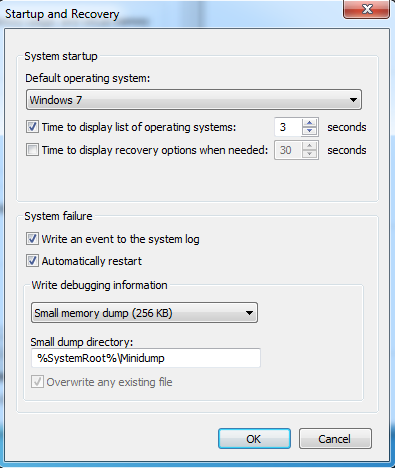
It doesn't seem to be generating a dump when it crashes.

Here is how I replicate the BSOD

Boot to windows
Sleep the computer
Wake from sleep. (Computer does a fresh boot on this, saying Windows did not shut down properly)
Sometimes it BSOD, other times it boots fine.
 

My Computer My Computer

At a glance

Windows 7 64
Computer type
PC/Desktop
OS
Windows 7 64
What you are saying is the nature of stop 0x9F BSOD, Driver Power-state Failure.

To debug this issue, we need to identify the driver that is failing the power state, and to identify the driver, we need to see the crash dumps.

If you have configured the crash dump recording properly as mentioned earlier, there should be recorded crash dumps.

Anyway, hibernation is not anything needed for a desktop PC. If you disable hibernate, it may be expected that the BSOD will not occur.
 

My Computer My Computer

At a glance

Microsoft Windows 10 Pro Insider Preview 64-bitIntel(R) Core(TM) i3-4130 CPU @ 3.40GHzCorsair Vengence 4GB x2 (8.00GB Dual-Channel ...2047MB GeForce GTS 450 (ZOTAC International)
Computer type
PC/Desktop
Computer Manufacturer/Model Number
Self Assembled
OS
Microsoft Windows 10 Pro Insider Preview 64-bit
CPU
Intel(R) Core(TM) i3-4130 CPU @ 3.40GHz
Motherboard
Gigabyte Technology Co., Ltd. B85M-D3H
Memory
Corsair Vengence 4GB x2 (8.00GB Dual-Channel DDR3 @ 798MHz)
Graphics Card(s)
2047MB GeForce GTS 450 (ZOTAC International)
Sound Card
Onboard (Realtek High Definition Audio)
Monitor(s) Displays
LG Flatron E2040T
Screen Resolution
1600x900
Hard Drives
Western Digital 1 TB
Seagate 500 GB
PSU
Corsair VS550
Case
Cooler Master K380
Cooling
Cooler Master Seidon 120V Plus
Keyboard
Logitech MK260r
Mouse
Logitech MK260r
Internet Speed
PMPL Broadband
Antivirus
Windows Defender + MBAM
Browser
Firefox
Other Info
Dell Studio 15" Laptop
It should be configured correctly to dump.

41z00mZ.png


Here is an image of the actual BSOD

2lBHg5z.jpg


and the top part

hLQbQGn.jpg
 

My Computer My Computer

At a glance

Windows 7 64
Computer type
PC/Desktop
OS
Windows 7 64
You are getting stop 0xD1 during wake-up?

As you are failing to get a crash dump, we may take a different way, which is not exact, but may help.

Upload the list of all the third party drivers Using NirSoft DriverView :

  • Download and execute Driverview
  • View > Hide Microsoft Drivers
  • Edit > Select all
  • File > Save Selected Items
  • In the Save dialog, Set the path to desktop, Put "Driverview" in the name field, and save.
  • Zip the .txt file and upload it.
 

My Computer My Computer

At a glance

Microsoft Windows 10 Pro Insider Preview 64-bitIntel(R) Core(TM) i3-4130 CPU @ 3.40GHzCorsair Vengence 4GB x2 (8.00GB Dual-Channel ...2047MB GeForce GTS 450 (ZOTAC International)
Computer type
PC/Desktop
Computer Manufacturer/Model Number
Self Assembled
OS
Microsoft Windows 10 Pro Insider Preview 64-bit
CPU
Intel(R) Core(TM) i3-4130 CPU @ 3.40GHz
Motherboard
Gigabyte Technology Co., Ltd. B85M-D3H
Memory
Corsair Vengence 4GB x2 (8.00GB Dual-Channel DDR3 @ 798MHz)
Graphics Card(s)
2047MB GeForce GTS 450 (ZOTAC International)
Sound Card
Onboard (Realtek High Definition Audio)
Monitor(s) Displays
LG Flatron E2040T
Screen Resolution
1600x900
Hard Drives
Western Digital 1 TB
Seagate 500 GB
PSU
Corsair VS550
Case
Cooler Master K380
Cooling
Cooler Master Seidon 120V Plus
Keyboard
Logitech MK260r
Mouse
Logitech MK260r
Internet Speed
PMPL Broadband
Antivirus
Windows Defender + MBAM
Browser
Firefox
Other Info
Dell Studio 15" Laptop
Yeah, that's the error that occurs during wakeup. Technically, it is more like a cold boot than waking from sleep though.

I attached the DriverView Text Log
 

My Computer My Computer

At a glance

Windows 7 64
Computer type
PC/Desktop
OS
Windows 7 64
Update AMD AHCI Compatible RAID Controller (ahcix64s.sys): AMD Chipset Drivers

If it does not work, we need to disable RAID, and try to not use nvidia's drivers (like nvraid and nvstor) as much as possible.
 

My Computer My Computer

At a glance

Microsoft Windows 10 Pro Insider Preview 64-bitIntel(R) Core(TM) i3-4130 CPU @ 3.40GHzCorsair Vengence 4GB x2 (8.00GB Dual-Channel ...2047MB GeForce GTS 450 (ZOTAC International)
Computer type
PC/Desktop
Computer Manufacturer/Model Number
Self Assembled
OS
Microsoft Windows 10 Pro Insider Preview 64-bit
CPU
Intel(R) Core(TM) i3-4130 CPU @ 3.40GHz
Motherboard
Gigabyte Technology Co., Ltd. B85M-D3H
Memory
Corsair Vengence 4GB x2 (8.00GB Dual-Channel DDR3 @ 798MHz)
Graphics Card(s)
2047MB GeForce GTS 450 (ZOTAC International)
Sound Card
Onboard (Realtek High Definition Audio)
Monitor(s) Displays
LG Flatron E2040T
Screen Resolution
1600x900
Hard Drives
Western Digital 1 TB
Seagate 500 GB
PSU
Corsair VS550
Case
Cooler Master K380
Cooling
Cooler Master Seidon 120V Plus
Keyboard
Logitech MK260r
Mouse
Logitech MK260r
Internet Speed
PMPL Broadband
Antivirus
Windows Defender + MBAM
Browser
Firefox
Other Info
Dell Studio 15" Laptop
Looks like it still crashed. Some of the software from HP's site would not install saying that the platform was not supported. I was able to extract the executable and install the driver manually for one of the devices. Oddly enough, there aren't any Nvidia devices on this computer as far as I can tell.

I also disabled RAID in the BIOS.
 
Last edited:

My Computer My Computer

At a glance

Windows 7 64
Computer type
PC/Desktop
OS
Windows 7 64
Back
Top