BSOD with blame on ntoskrnl.exe and ntkrnlmp.exe

Those drivers refer to the drivers for the hardware that came preinstalled from the factory, or that you custom ordered. If you bought a video card you'd get it's driver from it's maker's Support Downloads webpage.

Did WIndows Update deliver a driver for the card? What driver is showing in Device Manager for it? If it gives you good resolution and performance then unless it is Standard VGA you may want to try it for awhile.

Is there any chance you have both onboard GPU and the card you added in? Is this switchable graphics or are you choosing which one in the BIOS?
 
Windows Updater didn't download a graphics driver for my computer with the exception of the "standard VGA Graphics Adapter." As such, everything looks huge on my one monitor (when I have two) and is rather unusable. As for the other questions regarding GPU and Bios, I honestly don't remember or know (I'm pretty computer illiterate). I apologize, truly! What do you suggest I do?

BTW: Like I've said earlier, SF Diagnostics finally works now after your suggestion re Window Updates so I ran it and have uploaded the zip file (though of the text files, for some reason, contains zero information). Hope it helps and I sincerely appreciate your efforts!
 

My Computer My Computer

At a glance

Windows 7 Home Premium x64 Service Pack 1
Computer type
PC/Desktop
Computer Manufacturer/Model Number
Gateway DX4840
OS
Windows 7 Home Premium x64 Service Pack 1
I said you need to replace Standard VGA display driver. If after enabling Automatically deliver drivers via Windows Update (Step 3) it is not delivered as an Important or Optional Windows Update soon, import it from the Support Downloads webpage for the model. If you have Nvidia and didn't buy a separate card than came with the machine, then install the Nvidia driver. Otherwise go to the Nvidia website, let it scan and download the driver for the device.

If none of these work use Speccy - Advanced System Information Tool - Windows 7 Help Forums
to find the display device's make/model and import its drive from its Support Downloads webpage. If not given, trace it using Hardware Identification.
 
Thanks for the quick response. It's weird but right after I posted my last response, I had another BSOD! I've included the new SF Diagnostic zip file here. Can we safely say the BSOD problems--at least, the last one--aren't caused by the Nvidia driver then? Thanks. I'll follow your instructions in your last email too.
 

My Computer My Computer

At a glance

Windows 7 Home Premium x64 Service Pack 1
Computer type
PC/Desktop
Computer Manufacturer/Model Number
Gateway DX4840
OS
Windows 7 Home Premium x64 Service Pack 1
The latest BSOD is a network issue, apparently.
Code:
BugCheck 3B, {c0000005, fffff88001928c1d, fffff88007664a70, 0}

[COLOR=Red]Probably caused by : tcpip.sys [/COLOR]( tcpip!IppInspectBuildHeaders+54d )

Followup: MachineOwner
---------
It is also visible that Malwarebytes Web Access Control (a service of MBAM Pro) is causing the issue there.
Code:
fffff880`07664920  fffff880`065e5964Unable to load image \??\C:\Windows\system32\drivers\mwac.sys, Win32 error 0n2
[COLOR=Red]*** WARNING: Unable to verify timestamp for mwac.sys
*** ERROR: Module load completed but symbols could not be loaded for mwac.sys[/COLOR]
 mwac+0x9964
Not a very regular situation. MBAM does not do this way. But I would suggest you to uninstall MBAM Pro and get MBAM free. Nothing will be reduced, as the on demand scanner of the free MBAM is industry leader scanner.

Also, Uninstall McAfee Security Scan plus. McAfee is the topmost victim in blocking network and causing BSODs thereby.
Code:
Start Menu\Programs\McAfee Security Scan Plus
Only uninstallation is not enough. Make it sure that you never get it in future. Be cautious whenever you download updates to Adobe Flash Player or Adobe Reader. See the image below .... Some hints of the storage (storage blocking) is also seen, though very mild. Suspecting the defragger, but there is not enough evidence to say anything preciously.

Let us know the situation after doing these.
 

My Computer My Computer

At a glance

Microsoft Windows 10 Pro Insider Preview 64-bitIntel(R) Core(TM) i3-4130 CPU @ 3.40GHzCorsair Vengence 4GB x2 (8.00GB Dual-Channel ...2047MB GeForce GTS 450 (ZOTAC International)
Computer type
PC/Desktop
Computer Manufacturer/Model Number
Self Assembled
OS
Microsoft Windows 10 Pro Insider Preview 64-bit
CPU
Intel(R) Core(TM) i3-4130 CPU @ 3.40GHz
Motherboard
Gigabyte Technology Co., Ltd. B85M-D3H
Memory
Corsair Vengence 4GB x2 (8.00GB Dual-Channel DDR3 @ 798MHz)
Graphics Card(s)
2047MB GeForce GTS 450 (ZOTAC International)
Sound Card
Onboard (Realtek High Definition Audio)
Monitor(s) Displays
LG Flatron E2040T
Screen Resolution
1600x900
Hard Drives
Western Digital 1 TB
Seagate 500 GB
PSU
Corsair VS550
Case
Cooler Master K380
Cooling
Cooler Master Seidon 120V Plus
Keyboard
Logitech MK260r
Mouse
Logitech MK260r
Internet Speed
PMPL Broadband
Antivirus
Windows Defender + MBAM
Browser
Firefox
Other Info
Dell Studio 15" Laptop
Okay, I've implemented both of you gentlemen's suggestions. I've downloaded the Nvidia driver and ONLY the driver, not the bloatware. The 2 monitors look great now.

However, I haven't uninstalled Malware Bytes Pro but instead of turned off Malicious Website Protection (which I hope is the same as the Malwarebytes Web Access Control, and from what I've read on other threads, it is). I've included a screenshot of what I did. If it isn't, please let me know, and I will completely uninstall Malware Bytes Pro and just use the free version.

I've uninstalled McAfee Anti-virus and reinstalled AVG free anti-virus. Which is sort of funny since the last time (on another thread) suggested I get rid of AVG free anti-virus and install McAfee! If installing AVG was a bad idea, please let me know. It just runs splendidly on my laptop, zero problems. And yes, I'll be very careful with downloading McAfee with Flash updates in the future. Thank you.

Okay, that's about it. Once again, a million thanks. Let's see if the BSODs stop, and like I've said, if I've made any mistakes, please let me know (i.e., if i have to totally uninstall Malware Bytes Pro and shouldn't have installed AVG).
 

My Computer My Computer

At a glance

Windows 7 Home Premium x64 Service Pack 1
Computer type
PC/Desktop
Computer Manufacturer/Model Number
Gateway DX4840
OS
Windows 7 Home Premium x64 Service Pack 1
No one here would ever advise installing MacAfee. The recommended AV's here are MSE and Panda Cloud, for best performance and light weight.

Since you paid for it and it's normally reliable I'd try again running MBAM at defaults to see if problems return. If not then the display driver was likely the cause of your problem.

If problems persist then try disabling internet protection to see if the relieves it and if not you can uninstall MBAM Real Time to see if that does it.
 
Oh, wait, you're right! The guy previously did recommend Microsoft Security Essentials. I must've accidentally installed McAfee. I'll uninstall AVG and install MSE if it's not already installed. Thanks!
 

My Computer My Computer

At a glance

Windows 7 Home Premium x64 Service Pack 1
Computer type
PC/Desktop
Computer Manufacturer/Model Number
Gateway DX4840
OS
Windows 7 Home Premium x64 Service Pack 1
I've uninstalled McAfee Anti-virus and reinstalled AVG free anti-virus. Which is sort of funny since the last time (on another thread) suggested I get rid of AVG free anti-virus and install McAfee! If installing AVG was a bad idea, please let me know. It just runs splendidly on my laptop, zero problems. And yes, I'll be very careful with downloading McAfee with Flash updates in the future. Thank you.
Please let us see that thread. Is it on this forums?

I must've accidentally installed McAfee.
The version of McAfee you got not accidentally but carelessly. Always be careful about what you are downloading and what you are installing. When something sneaks in, that is not anything desired.
 

My Computer My Computer

At a glance

Microsoft Windows 10 Pro Insider Preview 64-bitIntel(R) Core(TM) i3-4130 CPU @ 3.40GHzCorsair Vengence 4GB x2 (8.00GB Dual-Channel ...2047MB GeForce GTS 450 (ZOTAC International)
Computer type
PC/Desktop
Computer Manufacturer/Model Number
Self Assembled
OS
Microsoft Windows 10 Pro Insider Preview 64-bit
CPU
Intel(R) Core(TM) i3-4130 CPU @ 3.40GHz
Motherboard
Gigabyte Technology Co., Ltd. B85M-D3H
Memory
Corsair Vengence 4GB x2 (8.00GB Dual-Channel DDR3 @ 798MHz)
Graphics Card(s)
2047MB GeForce GTS 450 (ZOTAC International)
Sound Card
Onboard (Realtek High Definition Audio)
Monitor(s) Displays
LG Flatron E2040T
Screen Resolution
1600x900
Hard Drives
Western Digital 1 TB
Seagate 500 GB
PSU
Corsair VS550
Case
Cooler Master K380
Cooling
Cooler Master Seidon 120V Plus
Keyboard
Logitech MK260r
Mouse
Logitech MK260r
Internet Speed
PMPL Broadband
Antivirus
Windows Defender + MBAM
Browser
Firefox
Other Info
Dell Studio 15" Laptop
Hello! After a couple of crash-free weeks, my computer crashed again today--twice within an hour! The first time, it saved the minidump files, but the second time, it went to blue screen and continuously said it was saving files when it wasn't. Anyways, I've unchecked Malware Bytes Malicious Website Protection option if that's causing it, and I've run SF Diagnostic. Can anyone take a peek to see what caused my crash? Thanks.
 

My Computer My Computer

At a glance

Windows 7 Home Premium x64 Service Pack 1
Computer type
PC/Desktop
Computer Manufacturer/Model Number
Gateway DX4840
OS
Windows 7 Home Premium x64 Service Pack 1
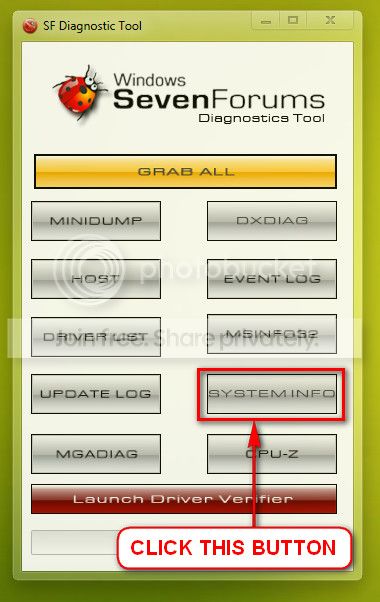
I am wondering that the systeminfo.txt file is empty in all your uploads. Is it just a coincidence? Can you tell us that you did not move the texts from there manually?

Upload your SystemInfo.txt file.

    • Click this button of SF Diag Tool.
      2013-01-23_143245_zpsca2553b4.jpg
  • Zip the output on desktop
  • Upload it here following http://www.sevenforums.com/tutorials/9733-screenshots-files-upload-post-seven-forums.html
If you dont let us see the correct file, our help to you will not be effective at all.
 

My Computer My Computer

At a glance

Microsoft Windows 10 Pro Insider Preview 64-bitIntel(R) Core(TM) i3-4130 CPU @ 3.40GHzCorsair Vengence 4GB x2 (8.00GB Dual-Channel ...2047MB GeForce GTS 450 (ZOTAC International)
Computer type
PC/Desktop
Computer Manufacturer/Model Number
Self Assembled
OS
Microsoft Windows 10 Pro Insider Preview 64-bit
CPU
Intel(R) Core(TM) i3-4130 CPU @ 3.40GHz
Motherboard
Gigabyte Technology Co., Ltd. B85M-D3H
Memory
Corsair Vengence 4GB x2 (8.00GB Dual-Channel DDR3 @ 798MHz)
Graphics Card(s)
2047MB GeForce GTS 450 (ZOTAC International)
Sound Card
Onboard (Realtek High Definition Audio)
Monitor(s) Displays
LG Flatron E2040T
Screen Resolution
1600x900
Hard Drives
Western Digital 1 TB
Seagate 500 GB
PSU
Corsair VS550
Case
Cooler Master K380
Cooling
Cooler Master Seidon 120V Plus
Keyboard
Logitech MK260r
Mouse
Logitech MK260r
Internet Speed
PMPL Broadband
Antivirus
Windows Defender + MBAM
Browser
Firefox
Other Info
Dell Studio 15" Laptop
No, I did not remove the information from the SystemInfo.txt file at all. When I run SFDiagnostic, a number of items turn up blank. In fact, a number of buttons don't work too well for me (for example, the CPU-Z button goes to a "This page can’t be displayed" URL (I had to Google CPU-Z to find the right URL address).

Anyways, I followed some instructions I found on a Google search to get the systeminfo.txt file and I've uploaded it here. Thanks!
 

My Computer My Computer

At a glance

Windows 7 Home Premium x64 Service Pack 1
Computer type
PC/Desktop
Computer Manufacturer/Model Number
Gateway DX4840
OS
Windows 7 Home Premium x64 Service Pack 1
Well, the latest BSOD is a stop 0x3B with no feasible probable cause.
Code:
[COLOR=Red]BugCheck 3B[/COLOR], {c0000005, fffff800039794fd, fffff88003c13df0, 0}

Probably caused by : ntkrnlmp.exe ( nt!ObpLookupObjectName+20d )

Followup: MachineOwner
---------
The most likely causes of a stop 0x3B are ...

  • Failing RAM
  • Failing driver (specially a display driver)
  • System services.
Let us check them, again.

Test your RAM modules for possible errors. Run memtest86+ for at least 8 consecutive passes.

If it start showing errors/red lines, stop testing. A single error is enough to determine that something is going bad there.

If it does not show any error, enable Driver Verifier to monitor the drivers. Run Driver Verifier for 24 hours or the occurrence of the next crash, whichever is earlier.

   Information
Why Driver Verifier:
It puts a stress on the drivers, ans so it makes the unstable drivers crash. Hopefully the driver that crashes is recorded in the memory dump.

How Can we know that DV is enabled:
It will make the system bit of slow, laggy.

   Warning
Before enabling DV, make it sure that you have earlier System restore points made in your computer. You can check it easily by using CCleaner looking at Tools > System Restore.

If there is no points, make a System Restore Point manually before enabling DV.

   Tip


Let us know the results, with the subsequent crash dumps, if any.

The third point, system services, we will have a look at that point after seeing the results to these two. But the probability might be there, as the windows installation is old, and it may cause those issues.
Code:
Original Install Date:     4/10/2011, 1:04:17 AM
So let us know the results upto this point.
 

My Computer My Computer

At a glance

Microsoft Windows 10 Pro Insider Preview 64-bitIntel(R) Core(TM) i3-4130 CPU @ 3.40GHzCorsair Vengence 4GB x2 (8.00GB Dual-Channel ...2047MB GeForce GTS 450 (ZOTAC International)
Computer type
PC/Desktop
Computer Manufacturer/Model Number
Self Assembled
OS
Microsoft Windows 10 Pro Insider Preview 64-bit
CPU
Intel(R) Core(TM) i3-4130 CPU @ 3.40GHz
Motherboard
Gigabyte Technology Co., Ltd. B85M-D3H
Memory
Corsair Vengence 4GB x2 (8.00GB Dual-Channel DDR3 @ 798MHz)
Graphics Card(s)
2047MB GeForce GTS 450 (ZOTAC International)
Sound Card
Onboard (Realtek High Definition Audio)
Monitor(s) Displays
LG Flatron E2040T
Screen Resolution
1600x900
Hard Drives
Western Digital 1 TB
Seagate 500 GB
PSU
Corsair VS550
Case
Cooler Master K380
Cooling
Cooler Master Seidon 120V Plus
Keyboard
Logitech MK260r
Mouse
Logitech MK260r
Internet Speed
PMPL Broadband
Antivirus
Windows Defender + MBAM
Browser
Firefox
Other Info
Dell Studio 15" Laptop
Okay, I've followed the instructions. (Apologies for being so late.) Anyways, the computer had been running somewhat OK for the past 1.5 months with the occasional computer freeze or shutdown. I ran the Memtest86+ a couple weeks ago for 9 cycles and it showed no errors.

This morning, my computer had a BSOD and I ran the Driver Verifier, and the computer wouldn't even start (another BSOD) popped out so I system restored, turned off the verifier, and then I ran SF Diag (the dump file did show the BSOD, though I'm not sure if it was after the Verifier or not [I think it is]).

A lot of the buttons on SF Diag didn't work for me so I gathered the info manually the best I could from other methods. Hope one of you can help! You've been terrific so far!
 

My Computer My Computer

At a glance

Windows 7 Home Premium x64 Service Pack 1
Computer type
PC/Desktop
Computer Manufacturer/Model Number
Gateway DX4840
OS
Windows 7 Home Premium x64 Service Pack 1
This is a driver verifier enabled BSOD which points to Glary Utilities 5.
Code:
BugCheck C4, {e1, fffff980014aefb8, 0, 0}

*** WARNING: Unable to verify timestamp for GUBootStartup.sys
*** ERROR: Module load completed but symbols could not be loaded for GUBootStartup.sys
[COLOR=Red]Probably caused by : GUBootStartup.sys[/COLOR] ( GUBootStartup+103c )

Followup: MachineOwner
---------
Disable Driver Verifier. Uninstall Glary Utilities 5. See how it runs. Let us know for any further BSOD.

I wonder why people use crapeware like Glary Utilities.
 

My Computer My Computer

At a glance

Microsoft Windows 10 Pro Insider Preview 64-bitIntel(R) Core(TM) i3-4130 CPU @ 3.40GHzCorsair Vengence 4GB x2 (8.00GB Dual-Channel ...2047MB GeForce GTS 450 (ZOTAC International)
Computer type
PC/Desktop
Computer Manufacturer/Model Number
Self Assembled
OS
Microsoft Windows 10 Pro Insider Preview 64-bit
CPU
Intel(R) Core(TM) i3-4130 CPU @ 3.40GHz
Motherboard
Gigabyte Technology Co., Ltd. B85M-D3H
Memory
Corsair Vengence 4GB x2 (8.00GB Dual-Channel DDR3 @ 798MHz)
Graphics Card(s)
2047MB GeForce GTS 450 (ZOTAC International)
Sound Card
Onboard (Realtek High Definition Audio)
Monitor(s) Displays
LG Flatron E2040T
Screen Resolution
1600x900
Hard Drives
Western Digital 1 TB
Seagate 500 GB
PSU
Corsair VS550
Case
Cooler Master K380
Cooling
Cooler Master Seidon 120V Plus
Keyboard
Logitech MK260r
Mouse
Logitech MK260r
Internet Speed
PMPL Broadband
Antivirus
Windows Defender + MBAM
Browser
Firefox
Other Info
Dell Studio 15" Laptop
That's a valid point. :geek:
 

My Computer My Computer

At a glance

Microsoft Windows 10 Pro Insider Preview 64-bitIntel(R) Core(TM) i3-4130 CPU @ 3.40GHzCorsair Vengence 4GB x2 (8.00GB Dual-Channel ...2047MB GeForce GTS 450 (ZOTAC International)
Computer type
PC/Desktop
Computer Manufacturer/Model Number
Self Assembled
OS
Microsoft Windows 10 Pro Insider Preview 64-bit
CPU
Intel(R) Core(TM) i3-4130 CPU @ 3.40GHz
Motherboard
Gigabyte Technology Co., Ltd. B85M-D3H
Memory
Corsair Vengence 4GB x2 (8.00GB Dual-Channel DDR3 @ 798MHz)
Graphics Card(s)
2047MB GeForce GTS 450 (ZOTAC International)
Sound Card
Onboard (Realtek High Definition Audio)
Monitor(s) Displays
LG Flatron E2040T
Screen Resolution
1600x900
Hard Drives
Western Digital 1 TB
Seagate 500 GB
PSU
Corsair VS550
Case
Cooler Master K380
Cooling
Cooler Master Seidon 120V Plus
Keyboard
Logitech MK260r
Mouse
Logitech MK260r
Internet Speed
PMPL Broadband
Antivirus
Windows Defender + MBAM
Browser
Firefox
Other Info
Dell Studio 15" Laptop
Thanks for the info! I've uninstalled Glary Utilities. Do you know of any "safer" software that automatically fixes various issues like Glary Utilities does with its one-click button (empties the trash, the temp files, etc.)? Or does such a software even exist?
 

My Computer My Computer

At a glance

Windows 7 Home Premium x64 Service Pack 1
Computer type
PC/Desktop
Computer Manufacturer/Model Number
Gateway DX4840
OS
Windows 7 Home Premium x64 Service Pack 1
What works best to maintain a Win7 install is compiled in this tutorial Clean Reinstall Windows 7 based on tens of thousands of installs we've helped with here at the home of Win7. You can skip to the end where it talks about setting up your install and how to maintain it best, although I'd read the actual install steps closely to compare to how you installed WIn7 as this can make a big difference in overall performance.

And if you still have the factory install, that is the worst install of Win7 one can have, larded with bloatware and duplicate utilties that intefere with better versions built into Win7. So I'd strongly consider following that tutorial to get and keep the best Win7 install one can have today. More than a million consumers have followed it without a single complaint.
 
Back
Top