Bubbles Screen Saver - Change Settings

How to Change the "Bubbles Screen Saver" Settings in Windows 7 and Windows 8


   Information
By default the Bubbles screen saver has no settings to set in the Screen Saver Settings window in Windows 7 and Windows 8. However, you can change the Bubbles screen saver settings through the registry instead. This will show you how to.

   Note
The default location of the Bubbles screen saver file is at:

C:\Windows\System32\Bubbles.scr.
   Tip
You will just need to play with the settings below and adjust the Value Data (step 8) until you get the desired affect from the selected DWORD Name (step 5).


EXAMPLE: Bubbles Screen SaverBubbles.jpg


OPTION ONE

To Restore the Default Bubbles Screen Saver Settings

1. Click/tap on the download button below to download the file below.Restore_Default_Bubbles.reg


Download


2. Save the .reg file to your desktop.

3. Double click/tap on the downloaded .reg file to merge it.

4. Click/tap on Run, Yes (UAC), Yes, and OK when prompted.

5. When finished, you can delete the downloaded .reg if you like.


OPTION TWO

To Customize the Bubbles Screen Saver Settings

1. Press the Windows+R keys to open the Run dialog, type regedit, and press Enter.

2. If prompted by UAC, then click /tap on Yes.

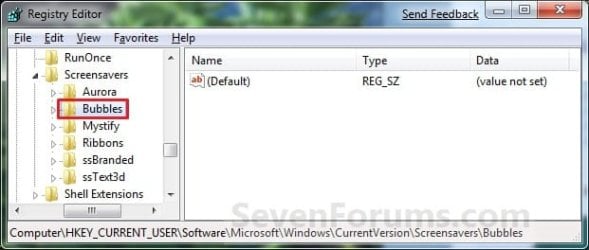
3. In regedit, navigate to the location below. (See screenshot below)

Code:
HKEY_CURRENT_USER\Software\Microsoft\Windows\CurrentVersion\Screensavers\Bubbles
Reg_Bubbles.jpg

4. In the right pane, right click on a empty area, and click/tap on New and DWORD (32-bit) Value. (see screenshot above)

5. Type in a DWORD Name from the table below that you want to change and press Enter.

DWORD NameValue DataDescription
MaterialGlass0 or 1Set this value to 0 for solid bubbles, 1 for transparent bubbles.
Radius1130000000 to 1090000000For smaller or larger bubbles. Higher value number for larger bubbles.
ShowBubbles0 or 1Set this value to 1 for current desktop background, 0 for black desktop background.
ShowShadows0 or 1Set this value to 1 to enable, 0 to disable bubble shadows.
SphereDensity1000000000 to 2100000000For more or less bubbles on screen. Higher value number for more bubbles.
TurbulenceForce1000000000 to 2000000000How strong the "wind" is on your screen. 1000000000 = No turbulence, and bubbles move inertially in straight lines until they hit something. 1100000000 = very slight turbulence, not really noticeable but enough to keep the pattern changing. 1150000000 = noticeable turbulence; the screen starts to look as if small gusts of wind are batting the bubbles about. 1200000000 = strong turbulence, with whirls of bubbles whipping about all over the place.
TurbulenceNumOctaves1 to 255For how fast the bubble colors are distributed on the screen. Higher value number for faster color change.
TurbulenceSpeed1000000000 to 2000000000Affects how quickly colors change across the screen. This is most noticeable with a screen well packed with little bubbles. 1000000000 = bubble that's stationary or barely moving will change color very slowly. 2000000000 = stationary bubble will change quite rapidly.

6. Double click/tap on the DWORD Name (from step 5) to modify it.

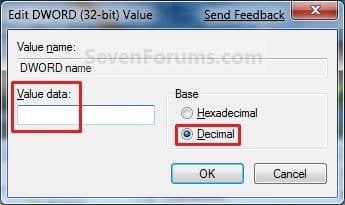
7. Dot Decimal, type in the Value Data you want in the table above, and click/tap on OK. (see example screenshot below)Modify.jpg

8. Repeat steps 4 to 7 to change another available DWORD Name option.
NOTE: You can add and customize one, a few, or all of the available options if you like (see table below step 6), but only add one instance of each DWORD Name in step 5 to prevent problems.

9. Close Regedit when done.

That's it,
Shawn Brink


Attachments

Last edited:
Thanks Shawn,

The really weird thing is that is was working properly on this boot, but then after an hour or so doing various things on the machine it has now reverted to the black background. I guess that's MS for you! For a screensaver I think I'll just leave it be, maybe in time I'll notice a pattern, or maybe MS will issue an update that fixes it for good.

Alex
 

My Computer

Computer Manufacturer/Model Number
HP
OS
Windows 7 Home Premium 64 bit
CPU
AMD
Ok Alex. Please let us know if you spot a pattern or cause.
 

My Computer

Computer type
PC/Desktop
Computer Manufacturer/Model Number
Self built custom
OS
64-bit Windows 11 Pro for Workstations
CPU
Intel i7-8700K OC'd to 5 GHz
Motherboard
ASUS ROG Maximus XI Formula Z390
Memory
64 GB (4x16GB) G.SKILL TridentZ RGB DDR4 3600 MHz
Graphics Card(s)
ASUS ROG-STRIX-GTX1080TI-O11G-GAMING
Sound Card
Integrated
Monitor(s) Displays
2 x Samsung Odyssey G7 27"
Screen Resolution
2560x1440
Hard Drives
1TB Samsung 990 PRO M.2,
4TB Samsung 990 PRO PRO M.2,
TerraMaster F8 SSD Plus NAS
PSU
Seasonic Prime Titanium 850W
Case
Thermaltake Core P3
Cooling
Corsair Hydro H115i
Keyboard
Logitech wireless K800
Mouse
Logitech MX Master 4
Internet Speed
2 Gb/s Download and 100 Mb/s Upload
Antivirus
Malwarebyte Anti-Malware Premium
Browser
Google Chrome
Other Info
Logitech Z625 speaker system,
Logitech BRIO 4K Pro webcam,
HP Color LaserJet Pro MFP M477fdn,
APC SMART-UPS RT 1000 XL - SURT1000XLI,
Galaxy S23 Plus phone
Goofy Bubbles

Oddly enough, I had my new, Windows 7 computer for 3 months before my bubbles screen saver started tossing the bubbles around the screen at 90 miles an hour after an hour and a half or so.

I find all the information on this forum very interesting, but I'm too much of a non-Geek to try the solutions here. I'm scared skinny to mess around with the registry since I still don't even understand what the darn registry is. LOL

But I've said all the info here in Favorites and when I finally get my tower back to the computer store that built my computer, I will show it to them. Happily, I'm still under warranty.
 

My Computer

Computer Manufacturer/Model Number
Local Computer Store/Repair Sergvice
OS
Windows 7 Home Premium
Motherboard
ASUS
Memory
4GB
Graphics Card(s)
?
Sound Card
?
Monitor(s) Displays
Asus HDMI 23 inch
Hard Drives
?
PSU
?
Case
Sentey Slim
Cooling
3 or 4 internal fans
Hello Appreciator, and welcome to Seven Forums.

We'll always be here if you have any questions. :)

Since you're new with this, I would recommend that you could create a restore point before making any changes with something you're not comfortable with first when you're ready. This way if a mistake is made, you could easily do a system restore to go back to that created restore point to undo the mistake.
 

My Computer

Computer type
PC/Desktop
Computer Manufacturer/Model Number
Self built custom
OS
64-bit Windows 11 Pro for Workstations
CPU
Intel i7-8700K OC'd to 5 GHz
Motherboard
ASUS ROG Maximus XI Formula Z390
Memory
64 GB (4x16GB) G.SKILL TridentZ RGB DDR4 3600 MHz
Graphics Card(s)
ASUS ROG-STRIX-GTX1080TI-O11G-GAMING
Sound Card
Integrated
Monitor(s) Displays
2 x Samsung Odyssey G7 27"
Screen Resolution
2560x1440
Hard Drives
1TB Samsung 990 PRO M.2,
4TB Samsung 990 PRO PRO M.2,
TerraMaster F8 SSD Plus NAS
PSU
Seasonic Prime Titanium 850W
Case
Thermaltake Core P3
Cooling
Corsair Hydro H115i
Keyboard
Logitech wireless K800
Mouse
Logitech MX Master 4
Internet Speed
2 Gb/s Download and 100 Mb/s Upload
Antivirus
Malwarebyte Anti-Malware Premium
Browser
Google Chrome
Other Info
Logitech Z625 speaker system,
Logitech BRIO 4K Pro webcam,
HP Color LaserJet Pro MFP M477fdn,
APC SMART-UPS RT 1000 XL - SURT1000XLI,
Galaxy S23 Plus phone
Mmm. I've got the million-miles-an-hour bubbles flying across the screen, but I've nevered edited the screensaver settings. Is anyone else seeing this?

Regards,
Golden
 

My Computer

Computer type
PC/Desktop
Computer Manufacturer/Model Number
Golden Mk. I.4
OS
Windows 10 Pro x64 ; Xubuntu x64
CPU
Intel i7 860 @ 2.80 GHz O/C'ed to 4.0GHz
Motherboard
Gigabyte P55A-UD3R Rev.1. Award BIOS F13
Memory
16GB Corsair Vengance DDR3 @ 661 MHz Dual Channel (9-9-9-24)
Graphics Card(s)
EVGA NVidia GTX 560 1024MB
Sound Card
Realtek Integrated
Monitor(s) Displays
Dual Samsung SyncMaster 2494HS
Screen Resolution
1920*1080 and 1920*1080
Hard Drives
1*Samsung 840 EVO 120GB SSD;
1*OCZ Vertex 2 60GB SSD;
2*Samsung F3 SpinPoint 1TB in RAID0;
1*Samsung F1 SpinPoint 1TB;
2*Western Digital 1TB External USB 3.0
1*Western Digital 500GB External USB 3.0
1*Seagate 500GB External USB 2.0
PSU
Thermaltake ToughPower QFan 750W
Case
Thermaltake Element S VK60001W2Z
Cooling
Corsair H60 Water Cooling, 2*230mm and 2*80mm case fans
Keyboard
Logitech G110
Mouse
Logitech MX518
Hello Golden,

Could you export and upload your registry settings from the Bubbles key at the registry location below while it is still running fast like that? I'll be happy to take a look to compare them with my entries to see if anything may stand out as why. :)

HKEY_CURRENT_USER\Software\Microsoft\Windows\Current Version\Screensavers\Bubbles
 

My Computer

Computer type
PC/Desktop
Computer Manufacturer/Model Number
Self built custom
OS
64-bit Windows 11 Pro for Workstations
CPU
Intel i7-8700K OC'd to 5 GHz
Motherboard
ASUS ROG Maximus XI Formula Z390
Memory
64 GB (4x16GB) G.SKILL TridentZ RGB DDR4 3600 MHz
Graphics Card(s)
ASUS ROG-STRIX-GTX1080TI-O11G-GAMING
Sound Card
Integrated
Monitor(s) Displays
2 x Samsung Odyssey G7 27"
Screen Resolution
2560x1440
Hard Drives
1TB Samsung 990 PRO M.2,
4TB Samsung 990 PRO PRO M.2,
TerraMaster F8 SSD Plus NAS
PSU
Seasonic Prime Titanium 850W
Case
Thermaltake Core P3
Cooling
Corsair Hydro H115i
Keyboard
Logitech wireless K800
Mouse
Logitech MX Master 4
Internet Speed
2 Gb/s Download and 100 Mb/s Upload
Antivirus
Malwarebyte Anti-Malware Premium
Browser
Google Chrome
Other Info
Logitech Z625 speaker system,
Logitech BRIO 4K Pro webcam,
HP Color LaserJet Pro MFP M477fdn,
APC SMART-UPS RT 1000 XL - SURT1000XLI,
Galaxy S23 Plus phone
Thanks Brink. I just activated buble again, and it seems to be normal speed now - not sure what has changed. Export attached.

Regards,
Golden
 

Attachments

My Computer

Computer type
PC/Desktop
Computer Manufacturer/Model Number
Golden Mk. I.4
OS
Windows 10 Pro x64 ; Xubuntu x64
CPU
Intel i7 860 @ 2.80 GHz O/C'ed to 4.0GHz
Motherboard
Gigabyte P55A-UD3R Rev.1. Award BIOS F13
Memory
16GB Corsair Vengance DDR3 @ 661 MHz Dual Channel (9-9-9-24)
Graphics Card(s)
EVGA NVidia GTX 560 1024MB
Sound Card
Realtek Integrated
Monitor(s) Displays
Dual Samsung SyncMaster 2494HS
Screen Resolution
1920*1080 and 1920*1080
Hard Drives
1*Samsung 840 EVO 120GB SSD;
1*OCZ Vertex 2 60GB SSD;
2*Samsung F3 SpinPoint 1TB in RAID0;
1*Samsung F1 SpinPoint 1TB;
2*Western Digital 1TB External USB 3.0
1*Western Digital 500GB External USB 3.0
1*Seagate 500GB External USB 2.0
PSU
Thermaltake ToughPower QFan 750W
Case
Thermaltake Element S VK60001W2Z
Cooling
Corsair H60 Water Cooling, 2*230mm and 2*80mm case fans
Keyboard
Logitech G110
Mouse
Logitech MX518
Thank you Golden. :)

Yep, those are the same registry entries I have for mine running at normal speed as well.
 

My Computer

Computer type
PC/Desktop
Computer Manufacturer/Model Number
Self built custom
OS
64-bit Windows 11 Pro for Workstations
CPU
Intel i7-8700K OC'd to 5 GHz
Motherboard
ASUS ROG Maximus XI Formula Z390
Memory
64 GB (4x16GB) G.SKILL TridentZ RGB DDR4 3600 MHz
Graphics Card(s)
ASUS ROG-STRIX-GTX1080TI-O11G-GAMING
Sound Card
Integrated
Monitor(s) Displays
2 x Samsung Odyssey G7 27"
Screen Resolution
2560x1440
Hard Drives
1TB Samsung 990 PRO M.2,
4TB Samsung 990 PRO PRO M.2,
TerraMaster F8 SSD Plus NAS
PSU
Seasonic Prime Titanium 850W
Case
Thermaltake Core P3
Cooling
Corsair Hydro H115i
Keyboard
Logitech wireless K800
Mouse
Logitech MX Master 4
Internet Speed
2 Gb/s Download and 100 Mb/s Upload
Antivirus
Malwarebyte Anti-Malware Premium
Browser
Google Chrome
Other Info
Logitech Z625 speaker system,
Logitech BRIO 4K Pro webcam,
HP Color LaserJet Pro MFP M477fdn,
APC SMART-UPS RT 1000 XL - SURT1000XLI,
Galaxy S23 Plus phone
Thanks Brink....we'll put it down to some sort of quirky behaviour. If I see it again, I'll try to work out what is happenning.
 

My Computer

Computer type
PC/Desktop
Computer Manufacturer/Model Number
Golden Mk. I.4
OS
Windows 10 Pro x64 ; Xubuntu x64
CPU
Intel i7 860 @ 2.80 GHz O/C'ed to 4.0GHz
Motherboard
Gigabyte P55A-UD3R Rev.1. Award BIOS F13
Memory
16GB Corsair Vengance DDR3 @ 661 MHz Dual Channel (9-9-9-24)
Graphics Card(s)
EVGA NVidia GTX 560 1024MB
Sound Card
Realtek Integrated
Monitor(s) Displays
Dual Samsung SyncMaster 2494HS
Screen Resolution
1920*1080 and 1920*1080
Hard Drives
1*Samsung 840 EVO 120GB SSD;
1*OCZ Vertex 2 60GB SSD;
2*Samsung F3 SpinPoint 1TB in RAID0;
1*Samsung F1 SpinPoint 1TB;
2*Western Digital 1TB External USB 3.0
1*Western Digital 500GB External USB 3.0
1*Seagate 500GB External USB 2.0
PSU
Thermaltake ToughPower QFan 750W
Case
Thermaltake Element S VK60001W2Z
Cooling
Corsair H60 Water Cooling, 2*230mm and 2*80mm case fans
Keyboard
Logitech G110
Mouse
Logitech MX518
Ok. :)
 

My Computer

Computer type
PC/Desktop
Computer Manufacturer/Model Number
Self built custom
OS
64-bit Windows 11 Pro for Workstations
CPU
Intel i7-8700K OC'd to 5 GHz
Motherboard
ASUS ROG Maximus XI Formula Z390
Memory
64 GB (4x16GB) G.SKILL TridentZ RGB DDR4 3600 MHz
Graphics Card(s)
ASUS ROG-STRIX-GTX1080TI-O11G-GAMING
Sound Card
Integrated
Monitor(s) Displays
2 x Samsung Odyssey G7 27"
Screen Resolution
2560x1440
Hard Drives
1TB Samsung 990 PRO M.2,
4TB Samsung 990 PRO PRO M.2,
TerraMaster F8 SSD Plus NAS
PSU
Seasonic Prime Titanium 850W
Case
Thermaltake Core P3
Cooling
Corsair Hydro H115i
Keyboard
Logitech wireless K800
Mouse
Logitech MX Master 4
Internet Speed
2 Gb/s Download and 100 Mb/s Upload
Antivirus
Malwarebyte Anti-Malware Premium
Browser
Google Chrome
Other Info
Logitech Z625 speaker system,
Logitech BRIO 4K Pro webcam,
HP Color LaserJet Pro MFP M477fdn,
APC SMART-UPS RT 1000 XL - SURT1000XLI,
Galaxy S23 Plus phone
First, I couldn't figure out how to reply without getting the window that says "reply with quote," Which was quite long, and I've noticed few others "reply with quote." So, I deleted the quote.

Thank you Brink. I will keep the information at hand and wait for one of my computer expert friends to be on hand before I attempt your solution.

Interestingly, since I posted my note about bubbles going 90 miles an hour after a while, the problem has not appeared again. Yesterday the bubbles were on for over 5 hours and still moving in slow motion. I know, give it time; they will certainly go kaflooey again, just as the blank screensaver, which I use at night, will, soon enough, refuse to work unless I hit "preview." When either screensaver won't work go on except in preview, the preview will run for forever until I hit a key or move the mouse. Quite odd.

Am I correct in assuming Microsoft knows about this problem? And is it possible, as another blogger suggested, that MS will come up with a patch or an update to fix the issue?
 

My Computer

Computer Manufacturer/Model Number
Local Computer Store/Repair Sergvice
OS
Windows 7 Home Premium
Motherboard
ASUS
Memory
4GB
Graphics Card(s)
?
Sound Card
?
Monitor(s) Displays
Asus HDMI 23 inch
Hard Drives
?
PSU
?
Case
Sentey Slim
Cooling
3 or 4 internal fans
Appreciator,

I'm not aware of any fix for this yet since there doesn't seem to be a specific cause found yet for it. :(
 

My Computer

Computer type
PC/Desktop
Computer Manufacturer/Model Number
Self built custom
OS
64-bit Windows 11 Pro for Workstations
CPU
Intel i7-8700K OC'd to 5 GHz
Motherboard
ASUS ROG Maximus XI Formula Z390
Memory
64 GB (4x16GB) G.SKILL TridentZ RGB DDR4 3600 MHz
Graphics Card(s)
ASUS ROG-STRIX-GTX1080TI-O11G-GAMING
Sound Card
Integrated
Monitor(s) Displays
2 x Samsung Odyssey G7 27"
Screen Resolution
2560x1440
Hard Drives
1TB Samsung 990 PRO M.2,
4TB Samsung 990 PRO PRO M.2,
TerraMaster F8 SSD Plus NAS
PSU
Seasonic Prime Titanium 850W
Case
Thermaltake Core P3
Cooling
Corsair Hydro H115i
Keyboard
Logitech wireless K800
Mouse
Logitech MX Master 4
Internet Speed
2 Gb/s Download and 100 Mb/s Upload
Antivirus
Malwarebyte Anti-Malware Premium
Browser
Google Chrome
Other Info
Logitech Z625 speaker system,
Logitech BRIO 4K Pro webcam,
HP Color LaserJet Pro MFP M477fdn,
APC SMART-UPS RT 1000 XL - SURT1000XLI,
Galaxy S23 Plus phone
Sir Brink ,

Please Help me in my Bubble Screen Saver Here's the screenshot of my Registry Editor

as you can see i modified already the settings , the background should be my desktop background but when i preview it , it was black . :(

Please Help :)
 
Last edited by a moderator:

My Computer

OS
Windows XP
Hello Jason, and welcome to Seven Forums.

I'm not sure if this will work in XP or not. Vista and Windows 7 screen savers are not supported in XP. :(
 

My Computer

Computer type
PC/Desktop
Computer Manufacturer/Model Number
Self built custom
OS
64-bit Windows 11 Pro for Workstations
CPU
Intel i7-8700K OC'd to 5 GHz
Motherboard
ASUS ROG Maximus XI Formula Z390
Memory
64 GB (4x16GB) G.SKILL TridentZ RGB DDR4 3600 MHz
Graphics Card(s)
ASUS ROG-STRIX-GTX1080TI-O11G-GAMING
Sound Card
Integrated
Monitor(s) Displays
2 x Samsung Odyssey G7 27"
Screen Resolution
2560x1440
Hard Drives
1TB Samsung 990 PRO M.2,
4TB Samsung 990 PRO PRO M.2,
TerraMaster F8 SSD Plus NAS
PSU
Seasonic Prime Titanium 850W
Case
Thermaltake Core P3
Cooling
Corsair Hydro H115i
Keyboard
Logitech wireless K800
Mouse
Logitech MX Master 4
Internet Speed
2 Gb/s Download and 100 Mb/s Upload
Antivirus
Malwarebyte Anti-Malware Premium
Browser
Google Chrome
Other Info
Logitech Z625 speaker system,
Logitech BRIO 4K Pro webcam,
HP Color LaserJet Pro MFP M477fdn,
APC SMART-UPS RT 1000 XL - SURT1000XLI,
Galaxy S23 Plus phone
Hello Jason, and welcome to Seven Forums.

I'm not sure if this will work in XP or not. Vista and Windows 7 screen savers are not supported in XP. :(


Thank you for that warm welcome

oh i see thx again :D
 

My Computer

OS
Windows XP
resetting bubbles screensaver problem

I followed Shawn's instructions to eliminate the desktop image on the bubbles screensaver and it worked fine on my windows 7 computer. But when I tried it on my sister's windows 7 professional computer, I could not switch from hexadecimal to decimal.
I would switch from hexadecimal to decimal and then close the window but then it would default to hexadecimal.
Can someone help?
Thanks
 

My Computer

OS
windows 7 home premium
Hello John, and welcome to Seven Forums.

This is normal. By default, when you modify a registry value, it will have "Hexadecimal" selected. For the purposes of the tutorial, you would just select "Decimal" to make entering the data value easier since trying to enter a hexadecimal value would be much more unnecessarily complicated. That's all.
 

My Computer

Computer type
PC/Desktop
Computer Manufacturer/Model Number
Self built custom
OS
64-bit Windows 11 Pro for Workstations
CPU
Intel i7-8700K OC'd to 5 GHz
Motherboard
ASUS ROG Maximus XI Formula Z390
Memory
64 GB (4x16GB) G.SKILL TridentZ RGB DDR4 3600 MHz
Graphics Card(s)
ASUS ROG-STRIX-GTX1080TI-O11G-GAMING
Sound Card
Integrated
Monitor(s) Displays
2 x Samsung Odyssey G7 27"
Screen Resolution
2560x1440
Hard Drives
1TB Samsung 990 PRO M.2,
4TB Samsung 990 PRO PRO M.2,
TerraMaster F8 SSD Plus NAS
PSU
Seasonic Prime Titanium 850W
Case
Thermaltake Core P3
Cooling
Corsair Hydro H115i
Keyboard
Logitech wireless K800
Mouse
Logitech MX Master 4
Internet Speed
2 Gb/s Download and 100 Mb/s Upload
Antivirus
Malwarebyte Anti-Malware Premium
Browser
Google Chrome
Other Info
Logitech Z625 speaker system,
Logitech BRIO 4K Pro webcam,
HP Color LaserJet Pro MFP M477fdn,
APC SMART-UPS RT 1000 XL - SURT1000XLI,
Galaxy S23 Plus phone
bubbles problem

If going back to the hexadecimal button is normal, is there another reason for resetting the bubbles screensaver works on my computer but not on my sister's computer?
Thanks for welcoming me to the forum.
John Tysz
 

My Computer

OS
windows 7 home premium
Are you able to select Decimal to enter the decimal value?

Please go ahead and post back with some screenshots showing what you have in the registry for this to see if there may be something wrong.
 

My Computer

Computer type
PC/Desktop
Computer Manufacturer/Model Number
Self built custom
OS
64-bit Windows 11 Pro for Workstations
CPU
Intel i7-8700K OC'd to 5 GHz
Motherboard
ASUS ROG Maximus XI Formula Z390
Memory
64 GB (4x16GB) G.SKILL TridentZ RGB DDR4 3600 MHz
Graphics Card(s)
ASUS ROG-STRIX-GTX1080TI-O11G-GAMING
Sound Card
Integrated
Monitor(s) Displays
2 x Samsung Odyssey G7 27"
Screen Resolution
2560x1440
Hard Drives
1TB Samsung 990 PRO M.2,
4TB Samsung 990 PRO PRO M.2,
TerraMaster F8 SSD Plus NAS
PSU
Seasonic Prime Titanium 850W
Case
Thermaltake Core P3
Cooling
Corsair Hydro H115i
Keyboard
Logitech wireless K800
Mouse
Logitech MX Master 4
Internet Speed
2 Gb/s Download and 100 Mb/s Upload
Antivirus
Malwarebyte Anti-Malware Premium
Browser
Google Chrome
Other Info
Logitech Z625 speaker system,
Logitech BRIO 4K Pro webcam,
HP Color LaserJet Pro MFP M477fdn,
APC SMART-UPS RT 1000 XL - SURT1000XLI,
Galaxy S23 Plus phone
bubbles problem

I can enter a value, in this case there is the option of 0 or 1. I can enter either one when the decimal button is pressed. The 0 value is supposed to make the background black.

Again, this works on my computer but I have tried it repeatedly on my sister's computer and it will not remove the desktop image from the bubbles screensaver.
My sister's computer is not available to me at this time so I am unable to send any screenshots.

John
 

My Computer

OS
windows 7 home premium
Back
Top