Bug in Windows 7 RTM

Access is denied...

Can't run here... what are the commands? CHKDSK <C:> /r

I have two HDs let's see if this crash my system...

I think it's without CHKDSK <C:> /r
 

My Computer

Computer Manufacturer/Model Number
Home Brew
OS
Windows 7 Ultimate Vista Ultimate x64
CPU
Core 2 Duo E8500 3.16Ghz @ 3.8Ghz
Motherboard
eVGA 750i FTW
Memory
2x2Gigs Patriot PC2-6400 LL
Graphics Card(s)
Inno3D GeForce GTX260 216 SP
Monitor(s) Displays
ASUS VW222U 22" 2ms Response time
Screen Resolution
1680x1050
Hard Drives
SATA 150GB
SATA II 250GB
USB IDE 750GB Ext.
PSU
HYTEC 600W & Thermaltake 650W Toughpower Power Exp
Case
Thermaltake Armor LCS (Liquid Cooling System)
Cooling
Liquid Cooling System
Keyboard
Logitech G15 Gaming Keyboard
Mouse
Logitech G9 Gaming Mouse
I think it's without CHKDSK <C:> /r

All right just show this:

D:\>CHKDSK D: /r
The type of the file system is NTFS.
Cannot lock current drive.

Chkdsk cannot run because the volume is in use by another
process. Chkdsk may run if this volume is dismounted first.
ALL OPENED HANDLES TO THIS VOLUME WOULD THEN BE INVALID.
Would you like to force a dismount on this volume? (Y/N)

Is this safe? should I type Yes?
 

My Computer

OS
Windows7 Enterprise SP1 x64 (Technet)
All right just show this:


Is this safe? should I type Yes?

As long as you are not using the drive then you can press yes, as it will become inaccessible during the process.
 

My Computer

Computer Manufacturer/Model Number
Home Brew
OS
Windows 7 Ultimate Vista Ultimate x64
CPU
Core 2 Duo E8500 3.16Ghz @ 3.8Ghz
Motherboard
eVGA 750i FTW
Memory
2x2Gigs Patriot PC2-6400 LL
Graphics Card(s)
Inno3D GeForce GTX260 216 SP
Monitor(s) Displays
ASUS VW222U 22" 2ms Response time
Screen Resolution
1680x1050
Hard Drives
SATA 150GB
SATA II 250GB
USB IDE 750GB Ext.
PSU
HYTEC 600W & Thermaltake 650W Toughpower Power Exp
Case
Thermaltake Armor LCS (Liquid Cooling System)
Cooling
Liquid Cooling System
Keyboard
Logitech G15 Gaming Keyboard
Mouse
Logitech G9 Gaming Mouse
Is this safe? should I type Yes?
If you are not calling anything on the drive, it is safe. It is what I have been doing all along.

I tried to do it on a drive that I knew it was not safe, and 7 refused. Just ignored me, no error dialog.
 
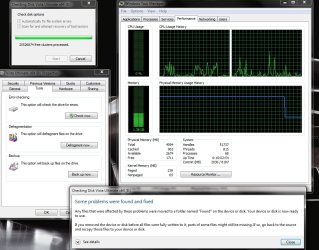
And the conclusion, NO BSOD and memory usage remained at the posted screen shot until completion and then went back to normal, not much of a "show stopper" IMO.

2009-08-06_050852.jpg
 

My Computer

Computer Manufacturer/Model Number
Home Brew
OS
Windows 7 Ultimate Vista Ultimate x64
CPU
Core 2 Duo E8500 3.16Ghz @ 3.8Ghz
Motherboard
eVGA 750i FTW
Memory
2x2Gigs Patriot PC2-6400 LL
Graphics Card(s)
Inno3D GeForce GTX260 216 SP
Monitor(s) Displays
ASUS VW222U 22" 2ms Response time
Screen Resolution
1680x1050
Hard Drives
SATA 150GB
SATA II 250GB
USB IDE 750GB Ext.
PSU
HYTEC 600W & Thermaltake 650W Toughpower Power Exp
Case
Thermaltake Armor LCS (Liquid Cooling System)
Cooling
Liquid Cooling System
Keyboard
Logitech G15 Gaming Keyboard
Mouse
Logitech G9 Gaming Mouse
And the conclusion, NO BSOD and memory usage remained at the posted screen shot until completion and then went back to normal, not much of a "show stopper" IMO.

View attachment 21515
I think the name of the thread should be changed...if it is actually a showstopper than it is only for a certain group of people
 

My Computer

Computer Manufacturer/Model Number
Compal JFT02 (Custom Build Laptop)
OS
Windows 7 Home Premium x64 - Mac OS X 10.6.4 x64
CPU
Intel Core 2 Duo T9300 2.5 GHz
Motherboard
JFT02
Memory
4GB Kingston DDR2-800
Graphics Card(s)
NVIDIA Geforce 8600M GT (512MB Model)
Sound Card
Realtek HD Audio
Monitor(s) Displays
WUXGA Standard Laptop Display
Screen Resolution
1680*1050
Hard Drives
Toshiba 320GB 5400RPM Laptop HD
PSU
Standard Laptop Power Supply
Case
Standard Laptop Case
Cooling
Standard Laptop Cooling
Keyboard
Standard Laptop 105 Key-Keyboard
Mouse
Synaptics Touchpad
Internet Speed
Verizion Online DSL 3360/864 kbs (dl/up)
I think the name of the thread should be changed...if it is actually a showstopper than it is only for a certain group of people

Done. ;)
 

My Computer

Computer Manufacturer/Model Number
Home Brew
OS
Windows 7 Ultimate Vista Ultimate x64
CPU
Core 2 Duo E8500 3.16Ghz @ 3.8Ghz
Motherboard
eVGA 750i FTW
Memory
2x2Gigs Patriot PC2-6400 LL
Graphics Card(s)
Inno3D GeForce GTX260 216 SP
Monitor(s) Displays
ASUS VW222U 22" 2ms Response time
Screen Resolution
1680x1050
Hard Drives
SATA 150GB
SATA II 250GB
USB IDE 750GB Ext.
PSU
HYTEC 600W & Thermaltake 650W Toughpower Power Exp
Case
Thermaltake Armor LCS (Liquid Cooling System)
Cooling
Liquid Cooling System
Keyboard
Logitech G15 Gaming Keyboard
Mouse
Logitech G9 Gaming Mouse
thanks Mark...I think the thread name was giving people a rather un-educated insight on what was really going on here
 

My Computer

Computer Manufacturer/Model Number
Compal JFT02 (Custom Build Laptop)
OS
Windows 7 Home Premium x64 - Mac OS X 10.6.4 x64
CPU
Intel Core 2 Duo T9300 2.5 GHz
Motherboard
JFT02
Memory
4GB Kingston DDR2-800
Graphics Card(s)
NVIDIA Geforce 8600M GT (512MB Model)
Sound Card
Realtek HD Audio
Monitor(s) Displays
WUXGA Standard Laptop Display
Screen Resolution
1680*1050
Hard Drives
Toshiba 320GB 5400RPM Laptop HD
PSU
Standard Laptop Power Supply
Case
Standard Laptop Case
Cooling
Standard Laptop Cooling
Keyboard
Standard Laptop 105 Key-Keyboard
Mouse
Synaptics Touchpad
Internet Speed
Verizion Online DSL 3360/864 kbs (dl/up)
And the conclusion, NO BSOD and memory usage remained at the posted screen shot until completion and then went back to normal, not much of a "show stopper" IMO.
I do not see the issue as a showstopper. No forum member has reported a BSOD as a result and MD is spot on regarding when chkdsk is run. I wonder what would happen if I ran my mobo with 1GB RAM, or even two. Would chkdsk start paging? And what if the drive I'm testing is my page volume?

Interesting that your test released the memory while other tests, from drive/tools, did not.

Cool that this process resulted in the correction of previously undetected errors on your drive.
 
Maybe the only bug is that "Cancel" does not cancel?

I did another test run from the disk Properties>Tools>Error-Checking option.

The Explorer process started and all memory was promptly used, page faulting began, etc. as in other tests.

I clicked the "Cancel" button (twice maybe?), and the dialog box closed. However, the Explorer process continued on. This time I let it run to completion and monitored it rather than abort it manually. When it completed the memory was freed, system performance returned to normal and a successful CHKDSK event was entered in the Application event log.

If this glitch still exists in the v7600 RTM (I'm still on 7232) then "Cancel" not canceling could be a source for confusion and irritation but hardly a showstopper.

I also tested a small 10GB partition and the Working Set of the Explorer process remained very low.

Nice work folks. Any chance we can bury this dead horse and give MS permission to release the Retail ISO on Technet tomorrow? :D

P.S. Antman my Doctor won't even let me play with her stethoscope. And believe me I would like to check her heartbeat! :)
 

My Computer

OS
XP Pro & Vista Home Premium (x86); Windows Ultimate 7600 x64 Retail
Well, I tried the CHKDSK with repair (from Windows Properties) on one of my 100GB RAID 0 partitions. Soon it took up most of my 12GB of memory, but it didn't break anything and I could surf with my browser and such. AFAICT it's just using as much memory as it can. When it finished it reported no errors and mem usage went down to normal. Looks good to me.

Edit: I tried another run this time cancelling after it had started. It cancelled OK, and after a few seconds memory usage returned to normal. Again looks OK to me.

P.S. Antman my Doctor won't even let me play with her stethoscope. And believe me I would like to check her heartbeat! :)
It's OK as long as she doesn't start playing with your stethoscope. And we know it's not really her heartbeat you want to check out ... :sarc:
 

My Computer

Computer Manufacturer/Model Number
Custom workstation /// Lenovo X61t tablet notebook
OS
Windows 7 RTM x64
CPU
Core i7 980X @ 4.04GHz OC /// Core Duo L7500 @ 1.6GHz
Motherboard
Asus P6T6 WS Revolution ///
Memory
12GB G. Skill @ DDR-1600 OC /// 4GB
Graphics Card(s)
Saphire HD4870 Toxic 1GB /// Intel Mobile GMA X3100
Monitor(s) Displays
Dual Eizo 24" SX2461W /// 12"
Screen Resolution
1920x1200 /// 1400x1050
Hard Drives
Workstation:
5x 750GB Barracuda-11 on Areca ARC-1220;
4x 1.5TB Barracuda-11 on Intel ICH10R;
Volumes:
300GB RAID 0, 2.7TB RAID 10 on Intel;
100GB RAID 0, 1.4TB RAID 10 on Areca ///
Notebook: G.Skill Titan 256GB SSD
PSU
Tagan ITZ 1100
Case
GHS-1500 ///
Cooling
Thermalright IFX-14 + a slew of stealth fans ///
Keyboard
Logitech Edge ///
Mouse
Logitech Wireless Optical Trackball
Internet Speed
5Mbps down / 820Kbps up
Other Info
Main use: photography;
DVD Drive: L.G GGW-H20L Blu-Ray / DVD;
OC: QPI/DRAM @ 1.33v, CPU @ 1.293v, DRAM Bus @ 1.65v, CPU PLL @ 1.88v, CPU mult = 25x, BCLK = 160, DDR3-1604 @ 7-8-7-24
The members of SF have done an excellent job of scrutinizing this issue in detail. I can find no other example of such in-depth examination elsewhere, only arguments on whether or not it is a showstopper.

The executive and administrative staff of SF should take pride in work well done. Motivated personnel should post links to this thread on the other, less well-endowed, sites.
 
I did find this, from some guy named Steven Sinofsky. Whoever that is ;-)

Oddly, I found it by Googling "explorer.exe failed to release the RAM when I canceled the disk check and grew even more despite the fact that the check was now aborted"
 
A killer Windows 7 bug? Sorry, no by Ed Bott

The blogosphere is abuzz over a newly publicized bug in Windows 7. I read about it yesterday on Chris123NT’s blog, where it was described as a “critical bug in Windows 7 RTM.” The story picked up momentum today when InfoWorld’s Randall Kennedy (the man behind the “Save XP” Astroturf campaign) published a sensational polemic: “Critical Windows 7 bug risks derailing product launch.” Tom Warren at Neowin called it “rather nasty” but sensibly concluded that it’s far from a “show stopper.”
My conclusion? It’s alarming behavior if you’re unaware of what’s happening. But when you look more carefully, it’s arguably a feature, not a bug, and the likelihood that you’ll ever crash a system this way is very, very small and completely avoidable.
 

My Computer

Computer Manufacturer/Model Number
Intel
OS
Windows 7 Professional, Windows XP
CPU
Intel Dual Core
Motherboard
Intel D945GCNL
Memory
2GB
Graphics Card(s)
Intel 82945G Express
Monitor(s) Displays
HP Pavilion 1859m
Screen Resolution
1366x768
Hard Drives
Samsung 250GB SATA
Maxtor 80GB SATA
Case
High Tower
Cooling
Air
Keyboard
Delux
Mouse
A4Tech
Internet Speed
512kbps downlink and 128kbps uplink :(
There might be more to this memory leaking bug, ie. i've got PS CS4 running, several images loaded in, IE8 running with several tabs up, WLM running and a few ancillary background programs inc. (and don't start, it's not the resource-hog it used to be) NIS2010 beta and after a while IE8 starts lagging as does PS CS4 and WLM. so what's that all about? In Taskmanager everything seems to be running normally.
 

My Computer

OS
Windows 7 Ultimate 64Bit
CPU
AMD Athlon x4 650 3Ghz
Motherboard
ASUS
Memory
4gb
Graphics Card(s)
ATI Radeon 3000 series Onboard
Well, that is odd. Running it from Tools caused dllhost, not Explorer, to consume ~2.26 GB vs ~3.1 GB running in cmd. Still haven't updated chipset.

I tested this myself as well.

dllhost.exe used 2.69GB RAM, and released it as soon as I cancelled the scan.

Ran it in cmd again and 3.1GB was used. Released as soon as I ended it as well.

I'm using Nforce chipset drivers 15.35 on a 750i chipset.

Those two values are the highest the usage got, and computer didn't crash.


I'm famous :geek:

I wonder what would happen if I ran my mobo with 1GB RAM, or even two. Would chkdsk start paging? And what if the drive I'm testing is my page volume?

I thought I'd try testing the drive while my page file was on it. It wouldn't let me saying it's in use, and it would need to run when the computer next restarts.

And as it's becoming clearer that this isn't as much of a bug as we thought at the start, I don't think there would be any problems either when running just 1GB of RAM.

I think the RAM usage, like what ReadyBoost does, is relative to the amount of RAM in total, such as I have 4GB and the max usage of RAM altogether on my system is 3.59GB while chkdsk is running (chkdsk uses 3.1GB), so with 1GB RAM, I think the you'd see around 800MB total usage (as an example). Though that's just based on the fact nobody here has reported a system crash or a BSoD yet.
 

My Computer

Computer type
PC/Desktop
Computer Manufacturer/Model Number
Custom Built
OS
Windows 8.1 Pro x64
CPU
Intel Core i7 4790k
Motherboard
MSI Z97S Krait Edition
Memory
8GB Corsair Dominator 1600MHz
Graphics Card(s)
MSI TwinFrozr GeForce GTX770
Sound Card
ASUS Xonar DX/XD 7.1
Monitor(s) Displays
Dell 24" S2409W + Dell 20" E207WFP
Screen Resolution
1920x1080 + 1680x1050
Hard Drives
1x 120GB OCZ Agility 3, 1x 750GB Western Digital Caviar Black, 1x 1TB Western Digital Caviar Blue
PSU
Corsair HX850 modular
Case
Fractal Design Define R4
Cooling
Corsair H60 w/ twin Corsair SP120 fans
Keyboard
Logitech G510S Keyboard
Mouse
Logitech G500S Laser Mouse
Internet Speed
40Mbps
Antivirus
Microsoft Security Essentials
Browser
Google Chrome
Other Info
LG Blu-Ray player
.
..
....

Reminds me of the guy who goes to the Doctor with a rock in his hand. Every few seconds he hits himself in the face with the rock and says, "Doc every time I do this it hurts!". The Doctor says "Don't do that anymore. That will be $25 please."

If it is not a bug, MS may be the Doctor. Just don't be surprised. :D

The Doctor has spoken. ;)

Downloading from Technet now.
 

My Computer

OS
XP Pro & Vista Home Premium (x86); Windows Ultimate 7600 x64 Retail
Back
Top