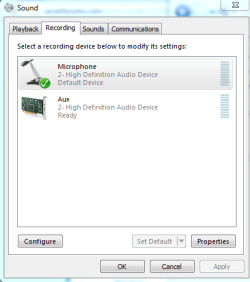
One of my old MB's had a internal AUX connecter (Auxiliary input) that allowed you to connect other Audio devices such as early TV Tuner cards. I think it's possible that the internal mic could use the same type of connector.
The old Sound Blaster sound cards had them two, identical to CD IN header on the board. It could be used if you have a second optical drive if you had one.
My Computer
At a glance
Windows 10 Education 64 bitAMD Phenom II X4 980 Black Edition Deneb 3.7GHz8GB 4GBx2 Kingston PC10600 DDR3 1333 MemoryZotac NVIDIA Geforce GT640 2 Gig DDR3 PCIe
Computer type
PC/Desktop
Computer Manufacturer/Model Number
Home Built
OS
Windows 10 Education 64 bit
CPU
AMD Phenom II X4 980 Black Edition Deneb 3.7GHz
Motherboard
Asus M4N68T-M V2 µATX Motherboard
Memory
8GB 4GBx2 Kingston PC10600 DDR3 1333 Memory
Graphics Card(s)
Zotac NVIDIA Geforce GT640 2 Gig DDR3 PCIe
Sound Card
VIA VT1708s High Definition Audio 8-channel Onboard
Thanks for all the other reply's; the AUX doesn't seem to be recording anything and i've tried playing round with it to identify but i can't find anything. Where abouts would this 'broken cable' be if it was broke? Can i open my laptop to have a look at it?
The cable would go from the motherboard up though the hing to the top of the display where the microphones are. It flexes or twists where it goes though the hing every time you open close the laptop. I'm just guessing that one of the wires may have finally broken. It's no east feat to get the screen section apart and you could end up breaking something or at least scratching things up if you aren't careful. I'd save that as a last option and maybe try to hunt up a service manual for your laptop before you tackle it. You don't want to break the display or back light and make things much worse.
My Computer
At a glance
Windows 10 Education 64 bitAMD Phenom II X4 980 Black Edition Deneb 3.7GHz8GB 4GBx2 Kingston PC10600 DDR3 1333 MemoryZotac NVIDIA Geforce GT640 2 Gig DDR3 PCIe
Computer type
PC/Desktop
Computer Manufacturer/Model Number
Home Built
OS
Windows 10 Education 64 bit
CPU
AMD Phenom II X4 980 Black Edition Deneb 3.7GHz
Motherboard
Asus M4N68T-M V2 µATX Motherboard
Memory
8GB 4GBx2 Kingston PC10600 DDR3 1333 Memory
Graphics Card(s)
Zotac NVIDIA Geforce GT640 2 Gig DDR3 PCIe
Sound Card
VIA VT1708s High Definition Audio 8-channel Onboard
As far as I can see the problem is that the Microphone entry under the recording tab is grayed out and it says "unplugged". It won't let you set it as default device.
Ironically, I don't have a MIC connected on this PC, but my Microphone entry is checked as default anyway? And It doesn't say unplugged even though there isn't one plugged in. This motherboard has auto detection on the jacks but I don't know if that plays into this or not. Later on I'll have another look at my laptop and give this some more thought.
cameronfal Is there another sound app/control panel installed for your onboard sound. On this motherboard I also have a VIA control panel app for jack selection etc. I can also set default device settings in there. On my other motherboard its a ReakTek control panel. I'll have to check my laptop to see if it has one. If you do have another one installed with your drivers it should show up in control panel and the start menu, or even in the task monitor area down by the clock. If you have it open it up and see if you can set your MIC as default device in there.
My Computer
At a glance
Windows 10 Education 64 bitAMD Phenom II X4 980 Black Edition Deneb 3.7GHz8GB 4GBx2 Kingston PC10600 DDR3 1333 MemoryZotac NVIDIA Geforce GT640 2 Gig DDR3 PCIe
Computer type
PC/Desktop
Computer Manufacturer/Model Number
Home Built
OS
Windows 10 Education 64 bit
CPU
AMD Phenom II X4 980 Black Edition Deneb 3.7GHz
Motherboard
Asus M4N68T-M V2 µATX Motherboard
Memory
8GB 4GBx2 Kingston PC10600 DDR3 1333 Memory
Graphics Card(s)
Zotac NVIDIA Geforce GT640 2 Gig DDR3 PCIe
Sound Card
VIA VT1708s High Definition Audio 8-channel Onboard
Yeah, I guess what it comes down to is, is the Microphone entry the microphone jack or the actual built in microphones. Seeing as it says "unplugged" I'm guessing it's the jack? If thats true then is AUX the built in Microphones? It might be time to take a good look at the owners manual and hope there is actually some useful info in it.
My Computer
At a glance
Windows 10 Education 64 bitAMD Phenom II X4 980 Black Edition Deneb 3.7GHz8GB 4GBx2 Kingston PC10600 DDR3 1333 MemoryZotac NVIDIA Geforce GT640 2 Gig DDR3 PCIe
Computer type
PC/Desktop
Computer Manufacturer/Model Number
Home Built
OS
Windows 10 Education 64 bit
CPU
AMD Phenom II X4 980 Black Edition Deneb 3.7GHz
Motherboard
Asus M4N68T-M V2 µATX Motherboard
Memory
8GB 4GBx2 Kingston PC10600 DDR3 1333 Memory
Graphics Card(s)
Zotac NVIDIA Geforce GT640 2 Gig DDR3 PCIe
Sound Card
VIA VT1708s High Definition Audio 8-channel Onboard
I downloaded the manual and I can't say I found anything useful but I may have missed something.
The AUX device has me wondering, if it's not the in-built mic then what is it? Cameronfol can't work it out and I couldn't really guess without having it in front of me.
On my Acer laptop it also has the Realtek app for speaker setup etc. In the windows Sound app under the Recording tab, it shows Microphone as default device. Line in is grayed out and shows "Not plugged in".
Cameronfol, do you have anything at all plugged into any of the audio jacks on that laptop? On a laptop a lot of the time if you plug in external speakers or headphones the built in speakers get disabled automatically. Same thing with the built in Mic, if you plug something into the Mic jack it turns off the built in Mic. Its an either or thing. So if you plugged something into the wrong jack (the Mic jack) you could end up with no working Mic. Can you tell I'm running out of ideas.
My Computer
At a glance
Windows 10 Education 64 bitAMD Phenom II X4 980 Black Edition Deneb 3.7GHz8GB 4GBx2 Kingston PC10600 DDR3 1333 MemoryZotac NVIDIA Geforce GT640 2 Gig DDR3 PCIe
Computer type
PC/Desktop
Computer Manufacturer/Model Number
Home Built
OS
Windows 10 Education 64 bit
CPU
AMD Phenom II X4 980 Black Edition Deneb 3.7GHz
Motherboard
Asus M4N68T-M V2 µATX Motherboard
Memory
8GB 4GBx2 Kingston PC10600 DDR3 1333 Memory
Graphics Card(s)
Zotac NVIDIA Geforce GT640 2 Gig DDR3 PCIe
Sound Card
VIA VT1708s High Definition Audio 8-channel Onboard
I'm not sure? What OS was on this PC before Windows 7? Did the Mic work then with that OS? What are you doing that makes you think the Mic isn't working now? Have you installed all the manufacturer recommended drivers etc for your model laptop?
My Computer
At a glance
Windows 10 Education 64 bitAMD Phenom II X4 980 Black Edition Deneb 3.7GHz8GB 4GBx2 Kingston PC10600 DDR3 1333 MemoryZotac NVIDIA Geforce GT640 2 Gig DDR3 PCIe
Computer type
PC/Desktop
Computer Manufacturer/Model Number
Home Built
OS
Windows 10 Education 64 bit
CPU
AMD Phenom II X4 980 Black Edition Deneb 3.7GHz
Motherboard
Asus M4N68T-M V2 µATX Motherboard
Memory
8GB 4GBx2 Kingston PC10600 DDR3 1333 Memory
Graphics Card(s)
Zotac NVIDIA Geforce GT640 2 Gig DDR3 PCIe
Sound Card
VIA VT1708s High Definition Audio 8-channel Onboard
If you have 'Realtek HD Audio' Go into the Control Panel and select the 'Realtek Control panel' (or something like that) then go to the tab 'Microphone' and take a look at that settings maybe your mic is disabled in there (or another wrong setting) ???
My Computer
At a glance
Windows 7 Home Premium x64Core i7 2600K4GB DDR3 Kingston HyperXGigabyte GTX 670
I have, i reinstalled windows 7 because of a problem with my connection to my network so i reset my laptop back to defaults. All my drivers are installed correctly, check that previously. I don't have that program but i shall install that and try to see if that works, thankyou.
I dont know if it will apply to built in mic but my acer with win7 desktop wouldnt recognize any mics either ran windows fix it for sound record and playback then turned on voice recognition and boom it works great now. I bought roxio creater 2012 special ed. and couldnt narrat movies so had to find out why mic not working . I think it may be the voice recognition that did it. good luck
My Computer
At a glance
windows 7 profesionalamd quad core4 gignvidia built in
Have you actually tried to use Youcam or any other webcam software or are you just presumming it doesn't work because it's not listed under sound manager?
You can search your Windows drive for "RAVCpl64.exe" and try to run it. This file has the File Description "Realtek HD Audio Manager" and is included in your Audio drivers, whether it's installed for your particular hardware or not I don't know.
I would also consider contacting Fujitsu there maybe something we're missing or at least they should be able to tell you what the Aux device is and if the Realtek HD Audio Manager should be available. If you do contact them I would include a link to this thread.
I've tried using it throigh the software but it still isn't recognised. I've just searched my laptop for that now and nothing was found. Does this mean i have to install it from somewhere and mabye run it through there? If yes, where could i locate this? If this doesn't work, i will contact Fujitsu and see what suggestions they have to solve the problem. I will also ask them if this software should be available or not.