Burning Audio CD's

flogit

New member
Member
VIP
Local time
10:21 PM
Messages
359
Location
south wales uk
Good day to all.Maybe someone can help me out here.I have a fair amount of music on my pc,Now the problem I'm getting when trying to burn an album to a blank CD.I have tried using the windows media player and the CD BurnerXP Pro..CDBurnerXP Pro - Free download and software reviews - CNET Download.com .All goes well with the burning but the big bug is only one out of six will play on a CD player.:mad:
I did one for my pal the other day it was a CD of irish jokes,Didn't work so tried another one no joy so he brought it back for me to try and no joy on four cd players.What am I doing wrong is it the discs or the burning software that I'm using,If so what is the best software to achieve this cd burning.
PS have tried various burners over the month only problems I'm getting.:mad:
Any help please.
Many Thanks.
 

My Computer

Computer Manufacturer/Model Number
compaq presario CQ61
OS
windows 7 home premium 64bit
The CDs may have compatibility issues with the drive. Search for a firmware update for your model.
Drive may be going bad, can you check with another one?
Are you using verify option in burner software?
 

My Computer

Computer type
PC/Desktop
Computer Manufacturer/Model Number
Custom Build
OS
Windows 7 Ultimate x64 SP1
CPU
AMD Phenom 2 1090T
Motherboard
Gigabyte GA-890FXA-UD5
Memory
2x8GB Kingston HyperX Fury Black 1600Mhz Unganged
Graphics Card(s)
MSI GTX 970 Gaming 4G
Sound Card
Realtek On-Board HD 7.1 Audio / Logitech G35
Monitor(s) Displays
3xAcer GD245HQ
Screen Resolution
1920x1080
Hard Drives
Samsung 850 Pro 512GB SSD - OS /
WD Caviar Black SATA 3 - 1 TBx2 - Dynamic RAID 0 /
WD Caviar Green SATA 2 - 640GBx2 - Dynamic RAID 0 /
WD Caviar Green SATA 2 - 640GB - Internal Backup /
Seagate Barracude SATA 3 - 3TB - External Backup/ Sync
PSU
HighPower 1000W
Case
Cooler Master HAF 932
Cooling
Noctua NH-D14
Keyboard
Logitech G19
Mouse
Logitech G500
Internet Speed
100/4 Mbit Cable (100GB quota)
Antivirus
ZoneAlarm Extreme Security / MBAM Pro / MBAE Free / SAS Free
Browser
IE 11 - Firefox - Chrome
Other Info
Logitech F710/ G27/ G940/ Z5500 // TrackIR 5 // Nvidia 3D Surround Vision
Yea thanks for the reply.
.Are you using verify option in burner software?
No Should I,Never thought about that.
Is that option in the CD BurnerXP Pro?
Thanks.
 

My Computer

Computer Manufacturer/Model Number
compaq presario CQ61
OS
windows 7 home premium 64bit

My Computer

Computer type
PC/Desktop
Computer Manufacturer/Model Number
Custom Build
OS
Windows 7 Ultimate x64 SP1
CPU
AMD Phenom 2 1090T
Motherboard
Gigabyte GA-890FXA-UD5
Memory
2x8GB Kingston HyperX Fury Black 1600Mhz Unganged
Graphics Card(s)
MSI GTX 970 Gaming 4G
Sound Card
Realtek On-Board HD 7.1 Audio / Logitech G35
Monitor(s) Displays
3xAcer GD245HQ
Screen Resolution
1920x1080
Hard Drives
Samsung 850 Pro 512GB SSD - OS /
WD Caviar Black SATA 3 - 1 TBx2 - Dynamic RAID 0 /
WD Caviar Green SATA 2 - 640GBx2 - Dynamic RAID 0 /
WD Caviar Green SATA 2 - 640GB - Internal Backup /
Seagate Barracude SATA 3 - 3TB - External Backup/ Sync
PSU
HighPower 1000W
Case
Cooler Master HAF 932
Cooling
Noctua NH-D14
Keyboard
Logitech G19
Mouse
Logitech G500
Internet Speed
100/4 Mbit Cable (100GB quota)
Antivirus
ZoneAlarm Extreme Security / MBAM Pro / MBAE Free / SAS Free
Browser
IE 11 - Firefox - Chrome
Other Info
Logitech F710/ G27/ G940/ Z5500 // TrackIR 5 // Nvidia 3D Surround Vision
Thanks.
I just had a go with the CDurnerXP Pro And burnt it on a 8 speed.and verified.
Put the disc into my Bose player and it did not reckognise the disc,Then tried another player
Been having this issue for a while,Just cant seem to get it sorted.Also did a check on the drive and all showed up okay windows said it has the latest updates.:cry:
Thank You very much I much appreciate your help.
 

My Computer

Computer Manufacturer/Model Number
compaq presario CQ61
OS
windows 7 home premium 64bit
The speed the audio CD's are burned at can be an issue with some Audio CD players.

I do a lot of Audio CD burning, as I have a recording studio. I also make copies for customers. My audio CD burn speed standard is 8X, however with most SATA CD/DVD burners the lowest burn speed is 16X. I would try burning at the lowest speed of your drive and see if that helps. If you have an older system with PATA (IDE) CD/DVDE burners, 8X is usually available.

CDBurnerXP will allow setting the burn speed. I don't use, I use Nero BurningROM, but I've looked at CDBurnerXP.
 

My Computer

Computer type
PC/Desktop
Computer Manufacturer/Model Number
My Own Build
OS
Windows 10 64 bit
CPU
Intel i7 6700K
Motherboard
ASUS ROG Maximus VIII Hero
Memory
16GB Corsair Dominator
Graphics Card(s)
Intel CPU Graphics
Sound Card
RealTek
Monitor(s) Displays
27" Dell S2719dgf
Screen Resolution
2560X1440
Hard Drives
1 TB Samsung 850 EVO SSD for Win 10 Pro
500GB Samsung 850 EVO SSD for Win 10 Insider
2 TB drive for backup
PSU
EVGA Supernova 750G2
Case
BeQuiet Silent Base 600
Cooling
Deepcool Captain 120EX
Keyboard
Microsoft Wireless 2000
Mouse
Microsoft wireless
Internet Speed
100 MB/sec (Cable)
Antivirus
Microsoft Defender and Malwarebytes
Browser
Edge/Firefox
Other Info
Cakewalk (Sonar) by BandLab and Studio One 4.1 Pro recording studio software. MOTU 896Mk3 Hybrid recording interface, Frontier Tranzport wireless control unit, Behringer X-Touch Control Surface.
Five USB connected optical drives for CD Audio production using Nero BurningROM
After I made my post, I see where you did burn at 8X.

Let me check CDBurnerXP and I'll get back.
 

My Computer

Computer type
PC/Desktop
Computer Manufacturer/Model Number
My Own Build
OS
Windows 10 64 bit
CPU
Intel i7 6700K
Motherboard
ASUS ROG Maximus VIII Hero
Memory
16GB Corsair Dominator
Graphics Card(s)
Intel CPU Graphics
Sound Card
RealTek
Monitor(s) Displays
27" Dell S2719dgf
Screen Resolution
2560X1440
Hard Drives
1 TB Samsung 850 EVO SSD for Win 10 Pro
500GB Samsung 850 EVO SSD for Win 10 Insider
2 TB drive for backup
PSU
EVGA Supernova 750G2
Case
BeQuiet Silent Base 600
Cooling
Deepcool Captain 120EX
Keyboard
Microsoft Wireless 2000
Mouse
Microsoft wireless
Internet Speed
100 MB/sec (Cable)
Antivirus
Microsoft Defender and Malwarebytes
Browser
Edge/Firefox
Other Info
Cakewalk (Sonar) by BandLab and Studio One 4.1 Pro recording studio software. MOTU 896Mk3 Hybrid recording interface, Frontier Tranzport wireless control unit, Behringer X-Touch Control Surface.
Five USB connected optical drives for CD Audio production using Nero BurningROM
Sorry GoKay.I missed you posting.
I will check that link out in a little while.Thanks.
 

My Computer

Computer Manufacturer/Model Number
compaq presario CQ61
OS
windows 7 home premium 64bit
First, use CD-R's for burning audio CD's, NOT CD-RW.

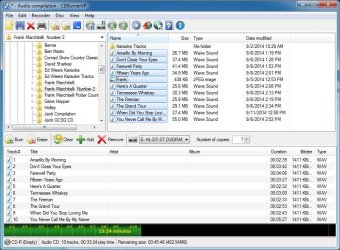
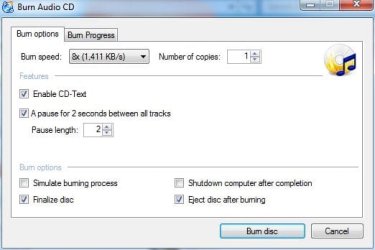
Here is the setup I used to burn an audio CD with CDBurnerXP
 

Attachments

  • burner.JPG
    burner.JPG
    112.4 KB · Views: 0
  • Capture.JPG
    Capture.JPG
    29.3 KB · Views: 21

My Computer

Computer type
PC/Desktop
Computer Manufacturer/Model Number
My Own Build
OS
Windows 10 64 bit
CPU
Intel i7 6700K
Motherboard
ASUS ROG Maximus VIII Hero
Memory
16GB Corsair Dominator
Graphics Card(s)
Intel CPU Graphics
Sound Card
RealTek
Monitor(s) Displays
27" Dell S2719dgf
Screen Resolution
2560X1440
Hard Drives
1 TB Samsung 850 EVO SSD for Win 10 Pro
500GB Samsung 850 EVO SSD for Win 10 Insider
2 TB drive for backup
PSU
EVGA Supernova 750G2
Case
BeQuiet Silent Base 600
Cooling
Deepcool Captain 120EX
Keyboard
Microsoft Wireless 2000
Mouse
Microsoft wireless
Internet Speed
100 MB/sec (Cable)
Antivirus
Microsoft Defender and Malwarebytes
Browser
Edge/Firefox
Other Info
Cakewalk (Sonar) by BandLab and Studio One 4.1 Pro recording studio software. MOTU 896Mk3 Hybrid recording interface, Frontier Tranzport wireless control unit, Behringer X-Touch Control Surface.
Five USB connected optical drives for CD Audio production using Nero BurningROM
fireberd.Many thanks for that image,That is the same settings that I just tried.
Something gone wrong somewhere.I will have a look for some other make of disc and try again and the disc id CD-R.
Will let you know later.
Thank You.
 

My Computer

Computer Manufacturer/Model Number
compaq presario CQ61
OS
windows 7 home premium 64bit
Hi.Had a different blank cd from a mate it worked,But it only worked on the cd player on the second attempt suppose it's one step forward.
Will keep trying.maybe try another software.
Many thanks to all.
 

My Computer

Computer Manufacturer/Model Number
compaq presario CQ61
OS
windows 7 home premium 64bit
Use quality CD-R's, no-names maybe incompatible. And CD-R's are real cheap anyway. Still search for a firmware for your writer. It may increase compatibility (if there is one around).
 

My Computer

Computer type
PC/Desktop
Computer Manufacturer/Model Number
Custom Build
OS
Windows 7 Ultimate x64 SP1
CPU
AMD Phenom 2 1090T
Motherboard
Gigabyte GA-890FXA-UD5
Memory
2x8GB Kingston HyperX Fury Black 1600Mhz Unganged
Graphics Card(s)
MSI GTX 970 Gaming 4G
Sound Card
Realtek On-Board HD 7.1 Audio / Logitech G35
Monitor(s) Displays
3xAcer GD245HQ
Screen Resolution
1920x1080
Hard Drives
Samsung 850 Pro 512GB SSD - OS /
WD Caviar Black SATA 3 - 1 TBx2 - Dynamic RAID 0 /
WD Caviar Green SATA 2 - 640GBx2 - Dynamic RAID 0 /
WD Caviar Green SATA 2 - 640GB - Internal Backup /
Seagate Barracude SATA 3 - 3TB - External Backup/ Sync
PSU
HighPower 1000W
Case
Cooler Master HAF 932
Cooling
Noctua NH-D14
Keyboard
Logitech G19
Mouse
Logitech G500
Internet Speed
100/4 Mbit Cable (100GB quota)
Antivirus
ZoneAlarm Extreme Security / MBAM Pro / MBAE Free / SAS Free
Browser
IE 11 - Firefox - Chrome
Other Info
Logitech F710/ G27/ G940/ Z5500 // TrackIR 5 // Nvidia 3D Surround Vision

My Computer

Computer type
Laptop
OS
Windows 7 Home Premium 64 bit
Joseph L.
Hi.Many thannks for that link,Will have look at it later on this evening.Any tips that you may pass on to me on the user issue etc.
Many thanks once again.:cool:
 

My Computer

Computer Manufacturer/Model Number
compaq presario CQ61
OS
windows 7 home premium 64bit
Try to get your hands on Taiyo Yuden blank discs.

As of several years ago, there were a very few retail brand names whose discs were in fact made by Taiyo Yuden, but I have not kept up with that in recent years because I don't burn much anymore.

Taiyo Yuden discs are not sold under that name in retail stores as far as I know, but they are easily found online.

The last I checked, they were the highest quality discs out there and the least likely to have issues, although any brand can have issues with certain players.
 

My Computer

Computer type
PC/Desktop
Computer Manufacturer/Model Number
Ignatz Special; 4 speed manual gearbox; factory air conditioning; one of one
OS
Windows 7 Home Premium SP1, 64-bit
CPU
Intel Skylake i5-6600K, not overclocked
Motherboard
AsRock Z170M Extreme 4, micro ATX
Memory
8 GB HyperX DDR4-2666 (2 x 4 GB)
Graphics Card(s)
none; graphics are integrated on CPU
Sound Card
onboard: Realtek ALC1150; external: USB Behringer UF0-202
Monitor(s) Displays
Dell S2340M 23 inch IPS
Screen Resolution
1600 x 900
Hard Drives
System: Crucial MX100 series SSD, 128 GB;
Data: Samsung Spinpoint 103SJ, 1 TB;
Backup: WD Caviar Green WD30EZRX-00D8PB0, 3 TB
PSU
Rosewill SilentNight 500 watt fanless, semi-modular
Case
Antec Solo II
Cooling
Noctua NH-U12S; Noctua F12 intake, Noctua S12A exhaust
Keyboard
Microsoft 200 6JH-00001 USB
Mouse
Dell or Microsoft optical wired; USB
Antivirus
Microsoft Security Essentials and Malwarebytes Premium
Browser
Pale Moon
Other Info
All fans PWM; speeds at idle: CPU circa 500 rpm; intake circa 600 rpm; exhaust circa 600 rpm; CPU temps 27 idle and 47 C load in a warm room (27 C/81 F) when running Intel Extreme Tuning Utility stress test.
Thank You will do.:thumbsup:
 

My Computer

Computer Manufacturer/Model Number
compaq presario CQ61
OS
windows 7 home premium 64bit
It is now JVC/Taiyo Yuden discs. That is what I use in my recording studio but there are others that should work.
Avoid the "no names" and avoid Memorex as they tend to be iffy. Verbatim is generally good grade discs.

You only need "Data" CD-R's. You don't need the more expensive "music" CD-R's.
 

My Computer

Computer type
PC/Desktop
Computer Manufacturer/Model Number
My Own Build
OS
Windows 10 64 bit
CPU
Intel i7 6700K
Motherboard
ASUS ROG Maximus VIII Hero
Memory
16GB Corsair Dominator
Graphics Card(s)
Intel CPU Graphics
Sound Card
RealTek
Monitor(s) Displays
27" Dell S2719dgf
Screen Resolution
2560X1440
Hard Drives
1 TB Samsung 850 EVO SSD for Win 10 Pro
500GB Samsung 850 EVO SSD for Win 10 Insider
2 TB drive for backup
PSU
EVGA Supernova 750G2
Case
BeQuiet Silent Base 600
Cooling
Deepcool Captain 120EX
Keyboard
Microsoft Wireless 2000
Mouse
Microsoft wireless
Internet Speed
100 MB/sec (Cable)
Antivirus
Microsoft Defender and Malwarebytes
Browser
Edge/Firefox
Other Info
Cakewalk (Sonar) by BandLab and Studio One 4.1 Pro recording studio software. MOTU 896Mk3 Hybrid recording interface, Frontier Tranzport wireless control unit, Behringer X-Touch Control Surface.
Five USB connected optical drives for CD Audio production using Nero BurningROM
Joseph L.
Hi.Many thannks for that link,Will have look at it later on this evening.Any tips that you may pass on to me on the user issue etc.
Many thanks once again.:cool:

You're very welcome flogit. I know how confusing tech stuff can be. I'm not sure to what user issue you refer, but when you first click on the program after the free download, a "yes"/"no" screen will pop up. Click "no" which will direct you to the basic version of the program. Hovering your mouse over the top icons will display the functions available to you. The ones available are highlit in blue. The ones that aren't are greyed out. If the ones available suit your purposes, you can keep using the program freely. The "yes"/"no" screen will pop up every time, but so what if the basics give you what you need. If you want more than the basics, try the trial version, or just pick it up for the price requested. In my opinion, it's easily worth twice that.

P.S. When using any of program's functions, take a moment to study the methods provided to accomplish your goal rather than making mistakes by diving right in. Taking that moment will demonstrate that the methods are pretty much self-explanatory and easy to work with. You may find that any previous experience you've had with other programs (such as "drag and drop" for example) will also work with this one.

Hope this covers your concerns.

Cheers,

JL.
 

My Computer

Computer type
Laptop
OS
Windows 7 Home Premium 64 bit
Back
Top