
Businesses Save $$$ Moving to Microsoft Virtualization

Night Hawk

caught multibooting
Guru
Gold Member
VIP
Local time
4:20 PM
Messages
8,373
Location
New England
News Press Release
Businesses Save Thousands Moving to Microsoft Virtualization

Customers can save $170,000 on average when switching from VMware; Microsoft management business grew 30 percent annually due to server virtualization.

"REDMOND, Wash. — Aug. 27, 2009 — Microsoft Corp. today announced that some business customers are saving on average $170,000 (U.S.) when they switch to Microsoft virtualization software from VMware Inc. software. Customers are turning to Windows Server 2008 Hyper-V and Microsoft System Center management tools to help reduce energy consumption, hardware costs and recurring licensing costs, and improve their overall management of virtual and nonvirtual applications, servers and computers.

Customers that have switched to Windows Server 2008 Hyper-V, System Center and other Microsoft virtualization solutions include Avanade; Brick Township Board of Education, New Jersey (U.S.); Convergent Computing; Crutchfield Corp.; INA (Croatia); Ingersoll Rand plc; Jackson Energy Authority; Mamut ASA (Norway); the National Concert Hall of Ireland; NetBenefits (U.K.); PoundHost Internet Ltd. (U.K.); Siemens Standard Drives (U.K.); T2 Systems Inc.; Voith IT (Germany); and University of Miami.

Strong customer adoption of server and application virtualization software helped drive growth of the Microsoft System Center suite of management tools. Microsoft recently reported that the company’s management division revenues grew more than 30 percent from 2008 to 2009 and is now at approximately $1 billion in annual sales.

Industry consulting firm Information Technology Intelligence Corp. recently published its “2009 Global Virtualization Deployment Trends Survey” of more than 700 IT professionals. The results showed that Microsoft made big year-over-year market share gains across small and midsize businesses and enterprise organizations. The survey showed current use of Windows Server 2008 Hyper-V is 32 percent. The survey also showed that 59 percent of the respondents plan to adopt Windows Server 2008 R2 Hyper-V in the next 12 to 18 months.

“The light switch has gone on for customers, and they realize they no longer have to pay a virtualization tax with VMware that creates an isolated, virtual island within their IT departments,” said David Greschler, director of virtualization and management marketing in the Server and Tools Business at Microsoft. “The System Center management suite and Windows Server 2008 Hyper-V provide a cost-effective, interoperable and scalable enterprise-class virtualization solution. As a result, more and more customers are switching to the Microsoft solution, and some are saving on average $170,000 when they switch.”

Customers Switch to Microsoft Virtualization

PoundHost is a fast-growing hosting service provider in Maidenhead, England, that embraced server virtualization as a way to curb hardware costs and lower hosting prices. However, the high cost of VMware software and lack of physical management tools hurt PoundHost’s competitiveness and ability to manage its entire infrastructure. PoundHost turned to Windows Server 2008 R2 Hyper-V technology to help reduce licensing costs by 80 percent and add new services. With the addition of Microsoft System Center management tools, automated server provisioning has reduced IT costs by more than $50,000 annually. The dramatic increase in virtual machine sales and reduced licensing costs has enabled PoundHost to increase profitability by 55 percent.

“We could use VMware tools to manage the virtual machines, but we wanted to offer server monitoring, backup and software-update services to increase our services and revenue,” said Matthew Munson, group technical director, PoundHost Internet Ltd. and BlueSquare Data Group Services Ltd. “VMware didn’t have a suite of tools to do these things. The Microsoft System Center products work with Hyper-V, so we could manage and provision servers much more easily than we could with VMware.”

Crutchfield, based in Charlottesville, Va., is a leading consumer electronics retailer with a mail-order catalog and e-commerce Web site. The company’s IT staff turned to virtualization to cut datacenter costs, improve IT staff productivity, and promote business agility. However, its VMware-based solution limited its server consolidation ratios, and a software upgrade would have cost $44,000. Instead, Crutchfield deployed a cost-effective solution using Windows Server 2008 with Hyper-V technology and the Microsoft System Center management suite. Today, Crutchfield has cut datacenter heating output by 50 percent and reduced physical servers by 30 percent. The IT staff uses Microsoft System Center to manage both physical and virtual servers, boosting IT staff productivity by 40 percent.

“We had so many reasons for building out our virtualization solution, but with the VMware-based platform we couldn’t make any headway,” said Craig Vanhuss, system administrator, Enterprise System Group at Crutchfield. “Since deploying Hyper-V, IT has shown a new level of agility and responsiveness. Thanks to our Microsoft virtualization solution, we are meeting the needs of the business while minimizing costs.”

More information about how to begin cutting costs, including case studies on PoundHost and Crutchfield, can be found at http://www.microsoft.com/virtualization. Microsoft product and solution experts at VMworld 2009 can be followed via Twitter at http://www.twitter.com/virtualization or by monitoring the hash tag #MS_Virt.

Founded in 1975, Microsoft (Nasdaq “MSFT”) is the worldwide leader in software, services and solutions that help people and businesses realize their full potential.
Note to editors: If you are interested in viewing additional information on Microsoft, please visit the Microsoft Web page at http://www.microsoft.com/presspass on Microsoft’s corporate information pages. Web links, telephone numbers and titles were correct at time of publication, but may since have changed. For additional assistance, journalists and analysts may contact Microsoft’s Rapid Response Team or other appropriate contacts listed at http://www.microsoft.com/presspass/contactpr.mspx."

Businesses Save Thousands Moving to Microsoft Virtualization: Customers can save $170,000 on average when switching from VMware; Microsoft management business grew 30 percent annually due to server virtualization.
 

My Computers

System One System Two

  • Computer type
    PC/Desktop
    Computer Manufacturer/Model Number
    Custom builds = 2
    OS
    W7 Ultimate x64/W10 Pro x64/W11 Pro Triple Boot - Main PC W7 Remote PC Micro ATX W7 Pro x64/W11 Pro
    CPU
    AMD Phenom II X4 975 Deneb 3.6ghz - 965 2nd remote pc
    Motherboard
    Gigabyte GA-790XTA-UD4-Gigabyte GA-880GM-D2H remote pc
    Memory
    Kingston Hyper X DDR3 1600 1.5v 16gb - Hyper X Fury 8gb 2nd
    Graphics Card(s)
    MSI HD Radeon 5750 1gb - MSI HD Radeon 6450 on mini tower
    Sound Card
    Creative Labs X-Fi Xtreme Audio P - Realtek onooard 2nd case
    Monitor(s) Displays
    ASUS VW199T-P 19" HP 2082a Main-HP 2082a 20" remote pc
    Screen Resolution
    Asus 1440x900 - HP 1600x900
    Hard Drives
    WD Black 1TB HD per OS W7, W10, and pending W11 presently on 500gb OS Drive - Pending Triple 1TB HDs for Spanned Storage/backup volume
    Single 2TB external USB enclosure, single 1TB System 7 Host/Boot drive, Pending 8TB external HD for system image b
    PSU
    Corsair 750TX - primary / Corsair CX600 - second
    Case
    Antec 900-2 - SSD compatible / NZXT Vulcan mini tower
    Cooling
    Zalman CNPS9900A
    Keyboard
    AZIO L70 Backlit Letters Gaming - ONN Cordless/USB
    Mouse
    MSI DS200 Programmable, Logitech Cordless
    Internet Speed
    30mbps upgrade - primary hard wired - mini tower usb WiFi
    Antivirus
    GFI VIPRE Internet Security 2014 on W7 2016 beta on W10,
    Browser
    Cyberfox, WaterFox 64bit FF variants, FireFox x64, Pale Moon
    Other Info
    Accomdata fan cooled usb 2.0 PIDE/Sata II, III external enclosure.
    Sambient usb/eSata PATA/Sata II, III external enclosure.
  • Computer type
    PC/Desktop
    System Manufacturer/Model Number
    CUSTOM ASSEMBLY
    OS
    W7 Pro x64/W11 Pro
    CPU
    AMD Deneb 3.6ghz - 965
    Motherboard
    Gigabyte GA-880GM-D2H remote pc
    Memory
    Kingston Hyper X Fury 8gb
    Graphics Card(s)
    MSI HD Radeon 6450 DVI Output
    Sound Card
    Realtek onooard Creative or Other separate PENDING
    Monitor(s) Displays
    VIZIO 32" LCD TV Separate LCD Pending
    Screen Resolution
    1600x1080
    Hard Drives
    WD 500GB OS Host/Boot WD Green 1TB Storage/Backup
    PSU
    Corsair 600W - THERMALTAKE 600W spare case
    Case
    NZXT Vulcan mini tower
    Cooling
    Twin 120mm Top Fans - 240mm Side Cover
    Keyboard
    ONN Cordless/USB Logitech Cordless
    Mouse
    ONN USB/Cordless - Logitech Cordless
    Internet Speed
    DSL 5G
    Browser
    MS Edge, FireFox, WaterFox x64, FireFox Nightly
    Other Info
    OS Testing-Remote Access to Main TeamViewer
People might be saving money, but after spending a few days working with Hyper V 2008, I was not impressed in the least. It was a nightmare trying to attach my Vista machine (on a domain) to my Hyper V machine (not on a domain) simply to run the management tools to create a virtual machine. For our company, our virtualized stuff is on the web and mostly served up and run on Linux machines. That so called "island of virtualization" concept scoffed at above, is one of the primary goals of virtualization for my company.

Oh well, that's why there are options and choices out there. And I will be the first to admit that VMWare, when licensed, ain't cheap. But you can do a whole lot with their free tools.
 

My Computer

Computer Manufacturer/Model Number
Self-Built in July 2009
OS
Windows 7 Ultimate x64
CPU
Intel Q9550 2.83Ghz OC'd to 3.40Ghz
Motherboard
Gigabyte GA-EP45-UD3R rev. 1.1, F12 BIOS
Memory
8GB G.Skill PI DDR2-800, 4-4-4-12 timings
Graphics Card(s)
EVGA 1280MB Nvidia GeForce GTX570
Sound Card
Realtek ALC899A 8 channel onboard audio
Monitor(s) Displays
23" Acer x233H
Screen Resolution
1920x1080
Hard Drives
Intel X25-M 80GB Gen 2 SSD
Western Digital 1TB Caviar Black, 32MB cache. WD1001FALS
PSU
Corsair 620HX modular
Case
Antec P182
Cooling
stock
Keyboard
ABS M1 Mechanical
Mouse
Logitech G9 Laser Mouse
Internet Speed
15/2 cable modem
Other Info
Windows and Linux enthusiast. Logitech G35 Headset.
One thing you hit the head right off is there being a large variety of options to choose from. MS is actually arriving late and now investing a lot more in virtualization which has now been reflected for the desktop as well as the server environments.
 

My Computers

System One System Two

  • Computer type
    PC/Desktop
    Computer Manufacturer/Model Number
    Custom builds = 2
    OS
    W7 Ultimate x64/W10 Pro x64/W11 Pro Triple Boot - Main PC W7 Remote PC Micro ATX W7 Pro x64/W11 Pro
    CPU
    AMD Phenom II X4 975 Deneb 3.6ghz - 965 2nd remote pc
    Motherboard
    Gigabyte GA-790XTA-UD4-Gigabyte GA-880GM-D2H remote pc
    Memory
    Kingston Hyper X DDR3 1600 1.5v 16gb - Hyper X Fury 8gb 2nd
    Graphics Card(s)
    MSI HD Radeon 5750 1gb - MSI HD Radeon 6450 on mini tower
    Sound Card
    Creative Labs X-Fi Xtreme Audio P - Realtek onooard 2nd case
    Monitor(s) Displays
    ASUS VW199T-P 19" HP 2082a Main-HP 2082a 20" remote pc
    Screen Resolution
    Asus 1440x900 - HP 1600x900
    Hard Drives
    WD Black 1TB HD per OS W7, W10, and pending W11 presently on 500gb OS Drive - Pending Triple 1TB HDs for Spanned Storage/backup volume
    Single 2TB external USB enclosure, single 1TB System 7 Host/Boot drive, Pending 8TB external HD for system image b
    PSU
    Corsair 750TX - primary / Corsair CX600 - second
    Case
    Antec 900-2 - SSD compatible / NZXT Vulcan mini tower
    Cooling
    Zalman CNPS9900A
    Keyboard
    AZIO L70 Backlit Letters Gaming - ONN Cordless/USB
    Mouse
    MSI DS200 Programmable, Logitech Cordless
    Internet Speed
    30mbps upgrade - primary hard wired - mini tower usb WiFi
    Antivirus
    GFI VIPRE Internet Security 2014 on W7 2016 beta on W10,
    Browser
    Cyberfox, WaterFox 64bit FF variants, FireFox x64, Pale Moon
    Other Info
    Accomdata fan cooled usb 2.0 PIDE/Sata II, III external enclosure.
    Sambient usb/eSata PATA/Sata II, III external enclosure.
  • Computer type
    PC/Desktop
    System Manufacturer/Model Number
    CUSTOM ASSEMBLY
    OS
    W7 Pro x64/W11 Pro
    CPU
    AMD Deneb 3.6ghz - 965
    Motherboard
    Gigabyte GA-880GM-D2H remote pc
    Memory
    Kingston Hyper X Fury 8gb
    Graphics Card(s)
    MSI HD Radeon 6450 DVI Output
    Sound Card
    Realtek onooard Creative or Other separate PENDING
    Monitor(s) Displays
    VIZIO 32" LCD TV Separate LCD Pending
    Screen Resolution
    1600x1080
    Hard Drives
    WD 500GB OS Host/Boot WD Green 1TB Storage/Backup
    PSU
    Corsair 600W - THERMALTAKE 600W spare case
    Case
    NZXT Vulcan mini tower
    Cooling
    Twin 120mm Top Fans - 240mm Side Cover
    Keyboard
    ONN Cordless/USB Logitech Cordless
    Mouse
    ONN USB/Cordless - Logitech Cordless
    Internet Speed
    DSL 5G
    Browser
    MS Edge, FireFox, WaterFox x64, FireFox Nightly
    Other Info
    OS Testing-Remote Access to Main TeamViewer
Hi all
Cost is not the overriding requirement these days -- I know especially to US readers that might seem like one of the most heinous crimes to say "costs are NOT the overriding factor". Ease of use and reliability are often even MORE important when running a business that.s dependent on being available 100% to external customers.

It's no point driving your costs down to zero whilst losing all your customers. Of course you try and avoid spending UNNECESSARY money.

An example can be seen in the backlash customers have against companies using "Overseas Call Centres". Whilst the cost savings might have seen considerable to management, to customers their use was often totally unsatisfactory and many companies are beginning to relocate this stuff back home even if the cost is a bit more.

Currently the MS virtualisation products are cumbersome and very difficult to manage - but competition is great and I expect with a few years MS will be a real player in this market.

One of the main problems is that you invariably have to manage the whole "Virtual Server" from ANOTHER machine within the network -- problem if network is partially unavailable - or even worse have to manage it via a web interface / portal - same problem if network is inacessible.

Why these products can't be managed from the LOCAL machine they are installed on I really don't know but I suppose the "base kernel OS" doesn't support a GUI.

VMware ESX etc. definitely still edge it over MS but we'll see what happens soon.
Let battle commence.

cheers
jimbo
 

My Computer

Computer type
PC/Desktop
Computer Manufacturer/Model Number
Custom built, several laptops HP/ASUS
OS
Linux CENTOS 7 / various Windows OS'es and servers
CPU
Intel i7 Intel i5
Memory
8GB, 16GB
Graphics Card(s)
On Motherboard
Sound Card
Realtek HD audio
Monitor(s) Displays
Apple Cinema display, Samsung LCD
Screen Resolution
1920 X 1080
Hard Drives
4 X 1TB SATA
Mouse
Toshiba wireless laser
Internet Speed
> 20MB up
Hi,

is there any info (official MS statement) about Virtualization rights (Can be installed in a virtual environment) - will license on Windows 7 Home Premium allow this?
I remember that EULA's Vista doesn't allow to install VM on Home Premium edition.
 

My Computer

Computer type
PC/Desktop
Computer Manufacturer/Model Number
Self Built
OS
Windows 7 Home Premium x32 SP1
CPU
x2 2.6 GHz
Motherboard
Asus
Memory
A-Data 2GB DDR2-800
Graphics Card(s)
ATI X1250
Sound Card
SB 5.1 Live!
Hard Drives
WD and Seagate FAP
PSU
Tagan TG-480-U01
Keyboard
BTC 6300
Mouse
Logitech VX Nano
Antivirus
None
I don't think you can say that "cost" isn't a factor though. For example, at my company, for production purposes we use VMWare ESX connected to a 3par storage area network.

However, in our other data center for stage, qa, and pilot purposes, the costs associated with using vmware and taking advantage of features like Vmotion run tens of thousands of dollars just for the licensing...not to mention the associated costs with the storage area network.

With that said, we just make do with VMWare ESXi...which is free and deal with slight cumbersome admin tasks by not having everything centralized. However, the associated pains here are far less than I experienced when I gave Hyper V 2008 a run for the money. Maybe later down the road, it will get better. But for the few dozen virtual linux boxes that we run....VMware ESXi seems to be a better fit, both functionally as well as administratively.
 

My Computer

Computer Manufacturer/Model Number
Self-Built in July 2009
OS
Windows 7 Ultimate x64
CPU
Intel Q9550 2.83Ghz OC'd to 3.40Ghz
Motherboard
Gigabyte GA-EP45-UD3R rev. 1.1, F12 BIOS
Memory
8GB G.Skill PI DDR2-800, 4-4-4-12 timings
Graphics Card(s)
EVGA 1280MB Nvidia GeForce GTX570
Sound Card
Realtek ALC899A 8 channel onboard audio
Monitor(s) Displays
23" Acer x233H
Screen Resolution
1920x1080
Hard Drives
Intel X25-M 80GB Gen 2 SSD
Western Digital 1TB Caviar Black, 32MB cache. WD1001FALS
PSU
Corsair 620HX modular
Case
Antec P182
Cooling
stock
Keyboard
ABS M1 Mechanical
Mouse
Logitech G9 Laser Mouse
Internet Speed
15/2 cable modem
Other Info
Windows and Linux enthusiast. Logitech G35 Headset.
Hi,

is there any info (official MS statement) about Virtualization rights (Can be installed in a virtual environment) - will license on Windows 7 Home Premium allow this?
I remember that EULA's Vista doesn't allow to install VM on Home Premium edition.

In order to install a Microsoft operating system on a virtual machine, you must have a valid license to install and use that software. With Windows 7 Professional, Enterprise and Ultimate, Microsoft is providing a license to use Windows XP mode...which provides you with a free Windows XP box running inside of their own virtual software.

So, if you are using Home Premium...you could download something like Microsoft Virtual PC or Sun Virtual Box and install Windows XP as a virtual machine...but you would have to have a valid Windows XP license to run it and activate it.
 

My Computer

Computer Manufacturer/Model Number
Self-Built in July 2009
OS
Windows 7 Ultimate x64
CPU
Intel Q9550 2.83Ghz OC'd to 3.40Ghz
Motherboard
Gigabyte GA-EP45-UD3R rev. 1.1, F12 BIOS
Memory
8GB G.Skill PI DDR2-800, 4-4-4-12 timings
Graphics Card(s)
EVGA 1280MB Nvidia GeForce GTX570
Sound Card
Realtek ALC899A 8 channel onboard audio
Monitor(s) Displays
23" Acer x233H
Screen Resolution
1920x1080
Hard Drives
Intel X25-M 80GB Gen 2 SSD
Western Digital 1TB Caviar Black, 32MB cache. WD1001FALS
PSU
Corsair 620HX modular
Case
Antec P182
Cooling
stock
Keyboard
ABS M1 Mechanical
Mouse
Logitech G9 Laser Mouse
Internet Speed
15/2 cable modem
Other Info
Windows and Linux enthusiast. Logitech G35 Headset.
Hi,

is there any info (official MS statement) about Virtualization rights (Can be installed in a virtual environment) - will license on Windows 7 Home Premium allow this?
I remember that EULA's Vista doesn't allow to install VM on Home Premium edition.

It has nothing to do with the EULA or OEM licensing but the edition itself simply lacking the necessary support. In 7 as well the Home Premium edition won't support the new XP mode as not seeing any support for the updated VPC there. Pro, Ultimate, or Enterprise are the choices.

In order to install a Microsoft operating system on a virtual machine, you must have a valid license to install and use that software. With Windows 7 Professional, Enterprise and Ultimate, Microsoft is providing a license to use Windows XP mode...which provides you with a free Windows XP box running inside of their own virtual software.

So, if you are using Home Premium...you could download something like Microsoft Virtual PC or Sun Virtual Box and install Windows XP as a virtual machine...but you would have to have a valid Windows XP license to run it and activate it.

Downloading and running the VPC requires Windows to be activated and pass the WGA verification. For 7 the updated Windows installer tool also has to go on first before you see updates. Again the Home Premium editions in both Vista and 7 do not support the MS Virtual PC While you might slip past with the SUN program being a 3rd party tool there.
 

My Computers

System One System Two

  • Computer type
    PC/Desktop
    Computer Manufacturer/Model Number
    Custom builds = 2
    OS
    W7 Ultimate x64/W10 Pro x64/W11 Pro Triple Boot - Main PC W7 Remote PC Micro ATX W7 Pro x64/W11 Pro
    CPU
    AMD Phenom II X4 975 Deneb 3.6ghz - 965 2nd remote pc
    Motherboard
    Gigabyte GA-790XTA-UD4-Gigabyte GA-880GM-D2H remote pc
    Memory
    Kingston Hyper X DDR3 1600 1.5v 16gb - Hyper X Fury 8gb 2nd
    Graphics Card(s)
    MSI HD Radeon 5750 1gb - MSI HD Radeon 6450 on mini tower
    Sound Card
    Creative Labs X-Fi Xtreme Audio P - Realtek onooard 2nd case
    Monitor(s) Displays
    ASUS VW199T-P 19" HP 2082a Main-HP 2082a 20" remote pc
    Screen Resolution
    Asus 1440x900 - HP 1600x900
    Hard Drives
    WD Black 1TB HD per OS W7, W10, and pending W11 presently on 500gb OS Drive - Pending Triple 1TB HDs for Spanned Storage/backup volume
    Single 2TB external USB enclosure, single 1TB System 7 Host/Boot drive, Pending 8TB external HD for system image b
    PSU
    Corsair 750TX - primary / Corsair CX600 - second
    Case
    Antec 900-2 - SSD compatible / NZXT Vulcan mini tower
    Cooling
    Zalman CNPS9900A
    Keyboard
    AZIO L70 Backlit Letters Gaming - ONN Cordless/USB
    Mouse
    MSI DS200 Programmable, Logitech Cordless
    Internet Speed
    30mbps upgrade - primary hard wired - mini tower usb WiFi
    Antivirus
    GFI VIPRE Internet Security 2014 on W7 2016 beta on W10,
    Browser
    Cyberfox, WaterFox 64bit FF variants, FireFox x64, Pale Moon
    Other Info
    Accomdata fan cooled usb 2.0 PIDE/Sata II, III external enclosure.
    Sambient usb/eSata PATA/Sata II, III external enclosure.
  • Computer type
    PC/Desktop
    System Manufacturer/Model Number
    CUSTOM ASSEMBLY
    OS
    W7 Pro x64/W11 Pro
    CPU
    AMD Deneb 3.6ghz - 965
    Motherboard
    Gigabyte GA-880GM-D2H remote pc
    Memory
    Kingston Hyper X Fury 8gb
    Graphics Card(s)
    MSI HD Radeon 6450 DVI Output
    Sound Card
    Realtek onooard Creative or Other separate PENDING
    Monitor(s) Displays
    VIZIO 32" LCD TV Separate LCD Pending
    Screen Resolution
    1600x1080
    Hard Drives
    WD 500GB OS Host/Boot WD Green 1TB Storage/Backup
    PSU
    Corsair 600W - THERMALTAKE 600W spare case
    Case
    NZXT Vulcan mini tower
    Cooling
    Twin 120mm Top Fans - 240mm Side Cover
    Keyboard
    ONN Cordless/USB Logitech Cordless
    Mouse
    ONN USB/Cordless - Logitech Cordless
    Internet Speed
    DSL 5G
    Browser
    MS Edge, FireFox, WaterFox x64, FireFox Nightly
    Other Info
    OS Testing-Remote Access to Main TeamViewer
The Sun VirtualBox app works just fine on Win7 and so does VMWare Server 2.0. Both of these apps are worlds better than Microsoft Virtual PC and have far better support for non MS operating systems.
 

My Computer

Computer Manufacturer/Model Number
Self-Built in July 2009
OS
Windows 7 Ultimate x64
CPU
Intel Q9550 2.83Ghz OC'd to 3.40Ghz
Motherboard
Gigabyte GA-EP45-UD3R rev. 1.1, F12 BIOS
Memory
8GB G.Skill PI DDR2-800, 4-4-4-12 timings
Graphics Card(s)
EVGA 1280MB Nvidia GeForce GTX570
Sound Card
Realtek ALC899A 8 channel onboard audio
Monitor(s) Displays
23" Acer x233H
Screen Resolution
1920x1080
Hard Drives
Intel X25-M 80GB Gen 2 SSD
Western Digital 1TB Caviar Black, 32MB cache. WD1001FALS
PSU
Corsair 620HX modular
Case
Antec P182
Cooling
stock
Keyboard
ABS M1 Mechanical
Mouse
Logitech G9 Laser Mouse
Internet Speed
15/2 cable modem
Other Info
Windows and Linux enthusiast. Logitech G35 Headset.
The one main thing that still lacks with anything other then the XP mode is full access to all drives even usb devices while some VMs allow for a dvd drive. That can make the Grabinet cloud desktop program someone came across and wrote a guide become kind of a life saver if you use the Windows Live Mail Skydrive feature. http://www.sevenforums.com/tutorials/19765-upload-windows-skydrive-desktop.html
 

My Computers

System One System Two

  • Computer type
    PC/Desktop
    Computer Manufacturer/Model Number
    Custom builds = 2
    OS
    W7 Ultimate x64/W10 Pro x64/W11 Pro Triple Boot - Main PC W7 Remote PC Micro ATX W7 Pro x64/W11 Pro
    CPU
    AMD Phenom II X4 975 Deneb 3.6ghz - 965 2nd remote pc
    Motherboard
    Gigabyte GA-790XTA-UD4-Gigabyte GA-880GM-D2H remote pc
    Memory
    Kingston Hyper X DDR3 1600 1.5v 16gb - Hyper X Fury 8gb 2nd
    Graphics Card(s)
    MSI HD Radeon 5750 1gb - MSI HD Radeon 6450 on mini tower
    Sound Card
    Creative Labs X-Fi Xtreme Audio P - Realtek onooard 2nd case
    Monitor(s) Displays
    ASUS VW199T-P 19" HP 2082a Main-HP 2082a 20" remote pc
    Screen Resolution
    Asus 1440x900 - HP 1600x900
    Hard Drives
    WD Black 1TB HD per OS W7, W10, and pending W11 presently on 500gb OS Drive - Pending Triple 1TB HDs for Spanned Storage/backup volume
    Single 2TB external USB enclosure, single 1TB System 7 Host/Boot drive, Pending 8TB external HD for system image b
    PSU
    Corsair 750TX - primary / Corsair CX600 - second
    Case
    Antec 900-2 - SSD compatible / NZXT Vulcan mini tower
    Cooling
    Zalman CNPS9900A
    Keyboard
    AZIO L70 Backlit Letters Gaming - ONN Cordless/USB
    Mouse
    MSI DS200 Programmable, Logitech Cordless
    Internet Speed
    30mbps upgrade - primary hard wired - mini tower usb WiFi
    Antivirus
    GFI VIPRE Internet Security 2014 on W7 2016 beta on W10,
    Browser
    Cyberfox, WaterFox 64bit FF variants, FireFox x64, Pale Moon
    Other Info
    Accomdata fan cooled usb 2.0 PIDE/Sata II, III external enclosure.
    Sambient usb/eSata PATA/Sata II, III external enclosure.
  • Computer type
    PC/Desktop
    System Manufacturer/Model Number
    CUSTOM ASSEMBLY
    OS
    W7 Pro x64/W11 Pro
    CPU
    AMD Deneb 3.6ghz - 965
    Motherboard
    Gigabyte GA-880GM-D2H remote pc
    Memory
    Kingston Hyper X Fury 8gb
    Graphics Card(s)
    MSI HD Radeon 6450 DVI Output
    Sound Card
    Realtek onooard Creative or Other separate PENDING
    Monitor(s) Displays
    VIZIO 32" LCD TV Separate LCD Pending
    Screen Resolution
    1600x1080
    Hard Drives
    WD 500GB OS Host/Boot WD Green 1TB Storage/Backup
    PSU
    Corsair 600W - THERMALTAKE 600W spare case
    Case
    NZXT Vulcan mini tower
    Cooling
    Twin 120mm Top Fans - 240mm Side Cover
    Keyboard
    ONN Cordless/USB Logitech Cordless
    Mouse
    ONN USB/Cordless - Logitech Cordless
    Internet Speed
    DSL 5G
    Browser
    MS Edge, FireFox, WaterFox x64, FireFox Nightly
    Other Info
    OS Testing-Remote Access to Main TeamViewer
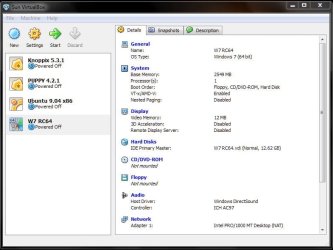
The one main thing that still lacks with anything other then the XP mode is full access to all drives even usb devices while some VMs allow for a dvd drive.

Ummm...you can do "Shared Folder" on Sun VirtualBox...thus giving you access to the drives on the host computer. In addition, you can do USB devices on both VirtualBox and VMWare.
 

My Computer

Computer Manufacturer/Model Number
Self-Built in July 2009
OS
Windows 7 Ultimate x64
CPU
Intel Q9550 2.83Ghz OC'd to 3.40Ghz
Motherboard
Gigabyte GA-EP45-UD3R rev. 1.1, F12 BIOS
Memory
8GB G.Skill PI DDR2-800, 4-4-4-12 timings
Graphics Card(s)
EVGA 1280MB Nvidia GeForce GTX570
Sound Card
Realtek ALC899A 8 channel onboard audio
Monitor(s) Displays
23" Acer x233H
Screen Resolution
1920x1080
Hard Drives
Intel X25-M 80GB Gen 2 SSD
Western Digital 1TB Caviar Black, 32MB cache. WD1001FALS
PSU
Corsair 620HX modular
Case
Antec P182
Cooling
stock
Keyboard
ABS M1 Mechanical
Mouse
Logitech G9 Laser Mouse
Internet Speed
15/2 cable modem
Other Info
Windows and Linux enthusiast. Logitech G35 Headset.
I haven't been running any VM player since that wouldn't work on the Vista Home Premium some time back when first looking for something a little more then DOSBox. The Portable Virtual Box requires the program in the guide to have a shared virtual drive on the host where you upload through Live Mail storage in order to download onto the Portable VBox vhd there.

That's more or less a two step process required for seeing files transferred over from the main to PVBox 7 installation. The SUN program does offers a couple of interesting items not seen in the MS Virtual PC and XP mode alike with the option to raise the video memory up from the default 12mb to 128mb and switch between the default Realtek audio to the SB 16bit for sound.

With something to enable direct access to at leasr the optical drive older dos/95/98 compatible and other slightly newer games for 98-XP would like run with sound due to those two options! The 128mb would be a match for some requiring 128mb and the older dos Window 9x compatible games seeing the 64mb required.

The MS angle at present is geared mainly at business and commecial server application rather then the home user type desktop application at this stage while improvement will eventually be seen at their rate for home use. The 3rd party programmers might be able to take advantage of that fact to get into the home market with their offers.

I still have to try working with the regular VBox you run from the main drive. Once I am able to get into that further I can give you some ideas there.
 

My Computers

System One System Two

  • Computer type
    PC/Desktop
    Computer Manufacturer/Model Number
    Custom builds = 2
    OS
    W7 Ultimate x64/W10 Pro x64/W11 Pro Triple Boot - Main PC W7 Remote PC Micro ATX W7 Pro x64/W11 Pro
    CPU
    AMD Phenom II X4 975 Deneb 3.6ghz - 965 2nd remote pc
    Motherboard
    Gigabyte GA-790XTA-UD4-Gigabyte GA-880GM-D2H remote pc
    Memory
    Kingston Hyper X DDR3 1600 1.5v 16gb - Hyper X Fury 8gb 2nd
    Graphics Card(s)
    MSI HD Radeon 5750 1gb - MSI HD Radeon 6450 on mini tower
    Sound Card
    Creative Labs X-Fi Xtreme Audio P - Realtek onooard 2nd case
    Monitor(s) Displays
    ASUS VW199T-P 19" HP 2082a Main-HP 2082a 20" remote pc
    Screen Resolution
    Asus 1440x900 - HP 1600x900
    Hard Drives
    WD Black 1TB HD per OS W7, W10, and pending W11 presently on 500gb OS Drive - Pending Triple 1TB HDs for Spanned Storage/backup volume
    Single 2TB external USB enclosure, single 1TB System 7 Host/Boot drive, Pending 8TB external HD for system image b
    PSU
    Corsair 750TX - primary / Corsair CX600 - second
    Case
    Antec 900-2 - SSD compatible / NZXT Vulcan mini tower
    Cooling
    Zalman CNPS9900A
    Keyboard
    AZIO L70 Backlit Letters Gaming - ONN Cordless/USB
    Mouse
    MSI DS200 Programmable, Logitech Cordless
    Internet Speed
    30mbps upgrade - primary hard wired - mini tower usb WiFi
    Antivirus
    GFI VIPRE Internet Security 2014 on W7 2016 beta on W10,
    Browser
    Cyberfox, WaterFox 64bit FF variants, FireFox x64, Pale Moon
    Other Info
    Accomdata fan cooled usb 2.0 PIDE/Sata II, III external enclosure.
    Sambient usb/eSata PATA/Sata II, III external enclosure.
  • Computer type
    PC/Desktop
    System Manufacturer/Model Number
    CUSTOM ASSEMBLY
    OS
    W7 Pro x64/W11 Pro
    CPU
    AMD Deneb 3.6ghz - 965
    Motherboard
    Gigabyte GA-880GM-D2H remote pc
    Memory
    Kingston Hyper X Fury 8gb
    Graphics Card(s)
    MSI HD Radeon 6450 DVI Output
    Sound Card
    Realtek onooard Creative or Other separate PENDING
    Monitor(s) Displays
    VIZIO 32" LCD TV Separate LCD Pending
    Screen Resolution
    1600x1080
    Hard Drives
    WD 500GB OS Host/Boot WD Green 1TB Storage/Backup
    PSU
    Corsair 600W - THERMALTAKE 600W spare case
    Case
    NZXT Vulcan mini tower
    Cooling
    Twin 120mm Top Fans - 240mm Side Cover
    Keyboard
    ONN Cordless/USB Logitech Cordless
    Mouse
    ONN USB/Cordless - Logitech Cordless
    Internet Speed
    DSL 5G
    Browser
    MS Edge, FireFox, WaterFox x64, FireFox Nightly
    Other Info
    OS Testing-Remote Access to Main TeamViewer
It has nothing to do with the EULA or OEM licensing but the edition itself simply lacking the necessary support. In 7 as well the Home Premium edition won't support the new XP mode as not seeing any support for the updated VPC there. Pro, Ultimate, or Enterprise are the choices.
(...)

Thanks for reply.
Please take a look here:
Vista EULA forbids virtualization
I haven't seen any info (reliable) yet about this for Windows 7 so I'm still not sure if HP version of W7 will be able to support VM in accordance with the license.
 

My Computer

Computer type
PC/Desktop
Computer Manufacturer/Model Number
Self Built
OS
Windows 7 Home Premium x32 SP1
CPU
x2 2.6 GHz
Motherboard
Asus
Memory
A-Data 2GB DDR2-800
Graphics Card(s)
ATI X1250
Sound Card
SB 5.1 Live!
Hard Drives
WD and Seagate FAP
PSU
Tagan TG-480-U01
Keyboard
BTC 6300
Mouse
Logitech VX Nano
Antivirus
None
Thanks for reply.
Please take a look here:
Vista EULA forbids virtualization
I haven't seen any info (reliable) yet about this for Windows 7 so I'm still not sure if HP version of W7 will be able to support VM in accordance with the license.

I cannot believe they put this wording into the EULA. But I guess that most people don't even realize they are subject to these restrictions since they don't use the EULA. And people often ask me, "why do you bother with stuff like Linux"? Well, it's because of BS just like this.
 

My Computer

Computer Manufacturer/Model Number
Self-Built in July 2009
OS
Windows 7 Ultimate x64
CPU
Intel Q9550 2.83Ghz OC'd to 3.40Ghz
Motherboard
Gigabyte GA-EP45-UD3R rev. 1.1, F12 BIOS
Memory
8GB G.Skill PI DDR2-800, 4-4-4-12 timings
Graphics Card(s)
EVGA 1280MB Nvidia GeForce GTX570
Sound Card
Realtek ALC899A 8 channel onboard audio
Monitor(s) Displays
23" Acer x233H
Screen Resolution
1920x1080
Hard Drives
Intel X25-M 80GB Gen 2 SSD
Western Digital 1TB Caviar Black, 32MB cache. WD1001FALS
PSU
Corsair 620HX modular
Case
Antec P182
Cooling
stock
Keyboard
ABS M1 Mechanical
Mouse
Logitech G9 Laser Mouse
Internet Speed
15/2 cable modem
Other Info
Windows and Linux enthusiast. Logitech G35 Headset.
And, most consumers do not have access to read the EULA until after the shrink wrap is removed creating a nearly unreturnable item.
 
And, most consumers do not have access to read the EULA until after the shrink wrap is removed creating a nearly unreturnable item.
Yes, but since the whole world pirates software these days, there is nothing that could be returned.
 

My Computer

Computer Manufacturer/Model Number
Self-Built in July 2009
OS
Windows 7 Ultimate x64
CPU
Intel Q9550 2.83Ghz OC'd to 3.40Ghz
Motherboard
Gigabyte GA-EP45-UD3R rev. 1.1, F12 BIOS
Memory
8GB G.Skill PI DDR2-800, 4-4-4-12 timings
Graphics Card(s)
EVGA 1280MB Nvidia GeForce GTX570
Sound Card
Realtek ALC899A 8 channel onboard audio
Monitor(s) Displays
23" Acer x233H
Screen Resolution
1920x1080
Hard Drives
Intel X25-M 80GB Gen 2 SSD
Western Digital 1TB Caviar Black, 32MB cache. WD1001FALS
PSU
Corsair 620HX modular
Case
Antec P182
Cooling
stock
Keyboard
ABS M1 Mechanical
Mouse
Logitech G9 Laser Mouse
Internet Speed
15/2 cable modem
Other Info
Windows and Linux enthusiast. Logitech G35 Headset.
Thanks for reply.
Please take a look here:
Vista EULA forbids virtualization
I haven't seen any info (reliable) yet about this for Windows 7 so I'm still not sure if HP version of W7 will be able to support VM in accordance with the license.

That's interesting there since I ended up trying the Home Premium edition on the new VPC for a look. That was later replaced with the 32bit RC on the exact same vhd made up. The 64bit RC ended up on the SUN Portable VBox for a look there as well as a few distros.
 

Attachments

  • Portable Linux on USB7 Mutliboot.jpg
    Portable Linux on USB7 Mutliboot.jpg
    54 KB · Views: 11

My Computers

System One System Two

  • Computer type
    PC/Desktop
    Computer Manufacturer/Model Number
    Custom builds = 2
    OS
    W7 Ultimate x64/W10 Pro x64/W11 Pro Triple Boot - Main PC W7 Remote PC Micro ATX W7 Pro x64/W11 Pro
    CPU
    AMD Phenom II X4 975 Deneb 3.6ghz - 965 2nd remote pc
    Motherboard
    Gigabyte GA-790XTA-UD4-Gigabyte GA-880GM-D2H remote pc
    Memory
    Kingston Hyper X DDR3 1600 1.5v 16gb - Hyper X Fury 8gb 2nd
    Graphics Card(s)
    MSI HD Radeon 5750 1gb - MSI HD Radeon 6450 on mini tower
    Sound Card
    Creative Labs X-Fi Xtreme Audio P - Realtek onooard 2nd case
    Monitor(s) Displays
    ASUS VW199T-P 19" HP 2082a Main-HP 2082a 20" remote pc
    Screen Resolution
    Asus 1440x900 - HP 1600x900
    Hard Drives
    WD Black 1TB HD per OS W7, W10, and pending W11 presently on 500gb OS Drive - Pending Triple 1TB HDs for Spanned Storage/backup volume
    Single 2TB external USB enclosure, single 1TB System 7 Host/Boot drive, Pending 8TB external HD for system image b
    PSU
    Corsair 750TX - primary / Corsair CX600 - second
    Case
    Antec 900-2 - SSD compatible / NZXT Vulcan mini tower
    Cooling
    Zalman CNPS9900A
    Keyboard
    AZIO L70 Backlit Letters Gaming - ONN Cordless/USB
    Mouse
    MSI DS200 Programmable, Logitech Cordless
    Internet Speed
    30mbps upgrade - primary hard wired - mini tower usb WiFi
    Antivirus
    GFI VIPRE Internet Security 2014 on W7 2016 beta on W10,
    Browser
    Cyberfox, WaterFox 64bit FF variants, FireFox x64, Pale Moon
    Other Info
    Accomdata fan cooled usb 2.0 PIDE/Sata II, III external enclosure.
    Sambient usb/eSata PATA/Sata II, III external enclosure.
  • Computer type
    PC/Desktop
    System Manufacturer/Model Number
    CUSTOM ASSEMBLY
    OS
    W7 Pro x64/W11 Pro
    CPU
    AMD Deneb 3.6ghz - 965
    Motherboard
    Gigabyte GA-880GM-D2H remote pc
    Memory
    Kingston Hyper X Fury 8gb
    Graphics Card(s)
    MSI HD Radeon 6450 DVI Output
    Sound Card
    Realtek onooard Creative or Other separate PENDING
    Monitor(s) Displays
    VIZIO 32" LCD TV Separate LCD Pending
    Screen Resolution
    1600x1080
    Hard Drives
    WD 500GB OS Host/Boot WD Green 1TB Storage/Backup
    PSU
    Corsair 600W - THERMALTAKE 600W spare case
    Case
    NZXT Vulcan mini tower
    Cooling
    Twin 120mm Top Fans - 240mm Side Cover
    Keyboard
    ONN Cordless/USB Logitech Cordless
    Mouse
    ONN USB/Cordless - Logitech Cordless
    Internet Speed
    DSL 5G
    Browser
    MS Edge, FireFox, WaterFox x64, FireFox Nightly
    Other Info
    OS Testing-Remote Access to Main TeamViewer
Back
Top