BUY? Driver Updates or Scanner Updates

HelpMe7

New member
Member
Local time
8:50 AM
Messages
67
I have a DELL (one year) w/ Windows 7 and I’ve downloaded Driver Updates and Scanner Update software, and I see that I have several “Drivers” that came up out-dated. Is this even true?

If so, why doesn’t DELL send me emails or update automatically?

I won’t mind buying a software, but which one?

Sorry, so many questions. Thanks in advance.
Scotty
 

My Computer

OS
C:\
Forget the driver update software, unless you are having issues you don't need to update any drivers and if you do you should get then directly from the manufacturers website and not via a 3rd party product.

Also please do not repost the same question in multiple sections of the site as that is against forum rules.
 

My Computer

Computer type
PC/Desktop
OS
Windows 11
All Dell driver updates are free from the Dell website.
 

My Computer

OS
ME/XP/Vista/Win7
Thanks to both of you. I'll go to DELL website and ck.
 

My Computer

OS
C:\
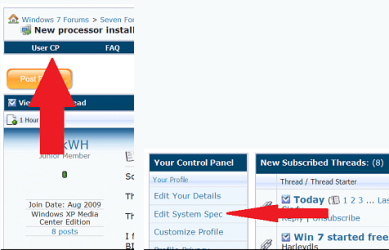
Please also fill in your entire system specs here
usercp 1.png
It will hellp us hlep you.
Thanks.
Fabe
 

My Computer

Computer Manufacturer/Model Number
Self Built
OS
Windows 7 ultimate 64 bit / XP Home sp3
CPU
intel Core 2 Duo E8400 3.0ghz
Motherboard
Asus P5ND bios 1401
Memory
8 gigs 1066 OCZ Fata1ty
Graphics Card(s)
EVGA GTX 580 Call of Duty Black Ops Edition
Sound Card
Creative Soundblaster Audigy 2zs
Monitor(s) Displays
Asus 24in LCD's 2MS X2
Screen Resolution
1920x1080p @60Hz
Hard Drives
WD Caviar 500 Black/ WD Caviar 200 Blue
PSU
OCZ 700W GameXtreme
Case
NZXT Apollo
Cooling
Corsair H50 CPU/120mm x3 /60mm x2 /Corsair Dominator Ram
Keyboard
Logitech Bluetooth Wireless MX5000
Mouse
Logitech Bluetooth Wireless MX1000
Internet Speed
Download 19.83 Upload 0.97
Other Info
Logitech Z2300 Speakers/ Bose Noise Cancelling Headphones/Avermedia PCI-e Hybrid TV Bravo/Epson NX415 all in one/ 4 Port Powered USB Hub/ LG 10x Bluray Burner /TSST Corp DVDRW External
Back
Top