Buzzing/System freeze when downloading

TristanN47

New member
Local time
9:11 AM
Messages
4
Hi all

Been a lurker for a while and need some help.

I work in tech support and can normally isolate an issue pretty fast but I am seriously stuck with this one.
Just to clear up, I am getting no BSOD.

As soon as I start downloading, whether that be from utorrent or chrome, my computer does intermittent freezes where the sound loops and makes a buzzing sound.

I have the main OS on mt Vertex 4 SSD while all my games/programs & the downloaded files location goes onto my 1TB WD Caviar Black.

It happens more often when I'm playing a game, but I believe it's when the HDD is being read from rapidly.

I've uploaded a video of it here:


That buzzing sound comes out of the speakers, the whole system freezes when it happens.

I can only replicate this when downloading something.

What I've done so far;
Replaced the CPU cooler & Motherboard.
Installed the OS onto another drive.
Wiped the SSD and re-installed windows.
Disabled antivirus.
Replaced the RAM
Tested a different power supply.

Only ideas I have at this stage is something to do with the 1TB HDD.

Any suggestions?

Thanks :)
 
Last edited by a moderator:

My Computer

Computer type
PC/Desktop
Computer Manufacturer/Model Number
Custom
OS
Windows 7 Professional x64
CPU
Intel Core i5 3570K
Motherboard
Gigabyte Z77X-D3H
Memory
8GB Geil Sniper 1600Mhz DDR3
Graphics Card(s)
Gigabyte Geforce 660Ti Windforce
Hard Drives
1TB WD Caviar Black
64GB OCZ Vertex 4
Antivirus
Microsoft Security Essentials
Browser
Google Chrome
Upload your MSINFO32.nfo file.

  1. Click on the start button
  2. Type "msinfo32" (without quotes) in the search bar of the start menu, click the resulting link. It will open the System Information window.
  3. File>Save. In the "File Name" filed, put "MSINFO32" (without Quote), give the save location to desktop, and click the "save" button.
  4. Give the time for processing, it will save a .nfo file on your desktop.
  5. Zip it, and upload it following the instruction.
 

My Computer

Computer type
PC/Desktop
Computer Manufacturer/Model Number
Self Assembled
OS
Microsoft Windows 10 Pro Insider Preview 64-bit
CPU
Intel(R) Core(TM) i3-4130 CPU @ 3.40GHz
Motherboard
Gigabyte Technology Co., Ltd. B85M-D3H
Memory
Corsair Vengence 4GB x2 (8.00GB Dual-Channel DDR3 @ 798MHz)
Graphics Card(s)
2047MB GeForce GTS 450 (ZOTAC International)
Sound Card
Onboard (Realtek High Definition Audio)
Monitor(s) Displays
LG Flatron E2040T
Screen Resolution
1600x900
Hard Drives
Western Digital 1 TB
Seagate 500 GB
PSU
Corsair VS550
Case
Cooler Master K380
Cooling
Cooler Master Seidon 120V Plus
Keyboard
Logitech MK260r
Mouse
Logitech MK260r
Internet Speed
PMPL Broadband
Antivirus
Windows Defender + MBAM
Browser
Firefox
Other Info
Dell Studio 15" Laptop
Not a problem, uploaded now

Cheers.
 

Attachments

Last edited:

My Computer

Computer type
PC/Desktop
Computer Manufacturer/Model Number
Custom
OS
Windows 7 Professional x64
CPU
Intel Core i5 3570K
Motherboard
Gigabyte Z77X-D3H
Memory
8GB Geil Sniper 1600Mhz DDR3
Graphics Card(s)
Gigabyte Geforce 660Ti Windforce
Hard Drives
1TB WD Caviar Black
64GB OCZ Vertex 4
Antivirus
Microsoft Security Essentials
Browser
Google Chrome
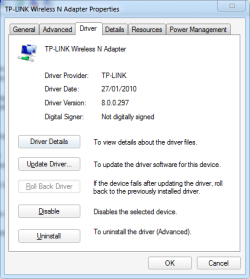
Let us know something more about the TP-LINK Wireless N Adapter. As you are in tech support, you can understand easily if I say that I want to see the driver's version and date.

If anybody who does not know the process but is watching the thread, the procedure is ....

  1. Click the Start Button, type "devmgmt.msc" (without quotation marks) in the Start Menu Search box and press Enter.
  2. Double click to expand "Network adaptors".
  3. Right click TP-LINK Wireless N Adapter and click Properties.
  4. Check the "Driver" tab..
  5. Take a screenshot : How to Use the Snipping Tool in Vista
  6. Upload the screenshot here: http://www.sevenforums.com/tutorials/9733-screenshots-files-upload-post-seven-forums.html
 

My Computer

Computer type
PC/Desktop
Computer Manufacturer/Model Number
Self Assembled
OS
Microsoft Windows 10 Pro Insider Preview 64-bit
CPU
Intel(R) Core(TM) i3-4130 CPU @ 3.40GHz
Motherboard
Gigabyte Technology Co., Ltd. B85M-D3H
Memory
Corsair Vengence 4GB x2 (8.00GB Dual-Channel DDR3 @ 798MHz)
Graphics Card(s)
2047MB GeForce GTS 450 (ZOTAC International)
Sound Card
Onboard (Realtek High Definition Audio)
Monitor(s) Displays
LG Flatron E2040T
Screen Resolution
1600x900
Hard Drives
Western Digital 1 TB
Seagate 500 GB
PSU
Corsair VS550
Case
Cooler Master K380
Cooling
Cooler Master Seidon 120V Plus
Keyboard
Logitech MK260r
Mouse
Logitech MK260r
Internet Speed
PMPL Broadband
Antivirus
Windows Defender + MBAM
Browser
Firefox
Other Info
Dell Studio 15" Laptop
Yeah all good mate!

Uploaded.
 

Attachments

  • Untitled-1.png
    Untitled-1.png
    12.7 KB · Views: 14

My Computer

Computer type
PC/Desktop
Computer Manufacturer/Model Number
Custom
OS
Windows 7 Professional x64
CPU
Intel Core i5 3570K
Motherboard
Gigabyte Z77X-D3H
Memory
8GB Geil Sniper 1600Mhz DDR3
Graphics Card(s)
Gigabyte Geforce 660Ti Windforce
Hard Drives
1TB WD Caviar Black
64GB OCZ Vertex 4
Antivirus
Microsoft Security Essentials
Browser
Google Chrome
Exactly what I thought ..... the driver is outdated.

279990d1375783741-buzzing-system-freeze-when-downloading-untitled-1.png


Try to update the driver by matching your device's model number from Download - Welcome to TP-LINK .... and let us see the driver's date, in the same way.


AR9271? Be sure next. Is it 2011?.
 

My Computer

Computer type
PC/Desktop
Computer Manufacturer/Model Number
Self Assembled
OS
Microsoft Windows 10 Pro Insider Preview 64-bit
CPU
Intel(R) Core(TM) i3-4130 CPU @ 3.40GHz
Motherboard
Gigabyte Technology Co., Ltd. B85M-D3H
Memory
Corsair Vengence 4GB x2 (8.00GB Dual-Channel DDR3 @ 798MHz)
Graphics Card(s)
2047MB GeForce GTS 450 (ZOTAC International)
Sound Card
Onboard (Realtek High Definition Audio)
Monitor(s) Displays
LG Flatron E2040T
Screen Resolution
1600x900
Hard Drives
Western Digital 1 TB
Seagate 500 GB
PSU
Corsair VS550
Case
Cooler Master K380
Cooling
Cooler Master Seidon 120V Plus
Keyboard
Logitech MK260r
Mouse
Logitech MK260r
Internet Speed
PMPL Broadband
Antivirus
Windows Defender + MBAM
Browser
Firefox
Other Info
Dell Studio 15" Laptop
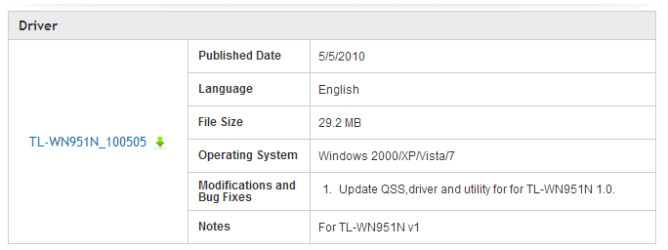
Downloaded the latest driver it's the same as the one installed.
I have the V1 card.

The driver from here shows up with this date.


Does seem to be the latest driver even though the dates mismatch.


I might remove the card, bridge the internet connection to my laptop as try to replicate the problem later tonight.
 

Attachments

  • 2.PNG
    2.PNG
    5.4 KB · Views: 3
  • Capture.PNG
    Capture.PNG
    1.3 KB · Views: 10
Last edited:

My Computer

Computer type
PC/Desktop
Computer Manufacturer/Model Number
Custom
OS
Windows 7 Professional x64
CPU
Intel Core i5 3570K
Motherboard
Gigabyte Z77X-D3H
Memory
8GB Geil Sniper 1600Mhz DDR3
Graphics Card(s)
Gigabyte Geforce 660Ti Windforce
Hard Drives
1TB WD Caviar Black
64GB OCZ Vertex 4
Antivirus
Microsoft Security Essentials
Browser
Google Chrome
Anyway, the update is not an "update" in the true sense, isn't it?

TP Link mostly uses drivers made by Atheros. As the devices are not by Atheros, they dont update the drivers, and hence the situation is.

If the issue continues, I will suggest you to get an adapter sold by Atheros themselves, as you will be able to get updates time to time.
 

My Computer

Computer type
PC/Desktop
Computer Manufacturer/Model Number
Self Assembled
OS
Microsoft Windows 10 Pro Insider Preview 64-bit
CPU
Intel(R) Core(TM) i3-4130 CPU @ 3.40GHz
Motherboard
Gigabyte Technology Co., Ltd. B85M-D3H
Memory
Corsair Vengence 4GB x2 (8.00GB Dual-Channel DDR3 @ 798MHz)
Graphics Card(s)
2047MB GeForce GTS 450 (ZOTAC International)
Sound Card
Onboard (Realtek High Definition Audio)
Monitor(s) Displays
LG Flatron E2040T
Screen Resolution
1600x900
Hard Drives
Western Digital 1 TB
Seagate 500 GB
PSU
Corsair VS550
Case
Cooler Master K380
Cooling
Cooler Master Seidon 120V Plus
Keyboard
Logitech MK260r
Mouse
Logitech MK260r
Internet Speed
PMPL Broadband
Antivirus
Windows Defender + MBAM
Browser
Firefox
Other Info
Dell Studio 15" Laptop
Back
Top