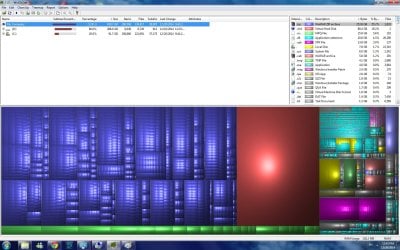
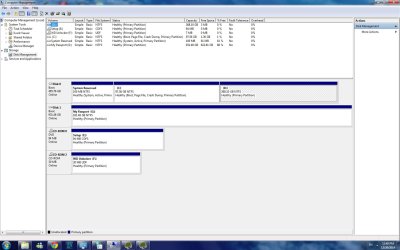
C and D drivers at full capacity.

Kingish

New member
Local time
1:56 PM
Messages
2
Greetings,

So I didn't take care of my computer lately for traveling and work purposes, but anyhow, I searched and read few posts about the same issue. I just don't know what I'm doing wrong.

As advised and FYI. Attached are snap-screens of Computer Management and WinDirStat.


Any help would be much appreciated.
 

Attachments
  • 1.jpg
    1.jpg
    129.8 KB · Views: 13
  • 2.jpg
    2.jpg
    207.8 KB · Views: 10

My Computer My Computer

Computer type
PC/Desktop
Computer Manufacturer/Model Number
custom build
OS
Windows 7 Home Premium 64
CPU
Intel(R) Core(TM) i5 CPU 760 @ 2.80GHz
Memory
RAM 4.00GB
Graphics Card(s)
NVIDIA GeForce GTS 450
Hard Drives
C/
D/
Antivirus
Avira
Browser
Chrome
You need to buy another large drive, 1 TB or larger, add it to the system. Then copy everything from D to it, then delete D. Then extend C into the un allocated space you created from deleting D.

Or simply copy everything from D to G. Then delete D
 

My Computer My Computer

Computer type
PC/Desktop
Computer Manufacturer/Model Number
Skylake Special #666
OS
Windows 10 Pro x64
CPU
Intel Core i7 6700K
Motherboard
Asus Sabertooth Z170 Mark 1
Memory
GSkill TridentZ RGB 16GB 3600 16-16-16-36
Graphics Card(s)
EVGA GTX 980 Ti SC x2
Sound Card
Realtek High Definition
Monitor(s) Displays
AOC G2460PG
Screen Resolution
1920 x 1080 144Hz
Hard Drives
Samsung 860 Pro 256GB, Seagate Barracuda 4TB x2
PSU
EVGA 1000 P2, EVGA White Custom Braided Cables
Case
Corsair Vengeance C70 Gunmetal Black
Cooling
Corsair H100i v2, Corsair ML120 x2, Thermal Grizzly Kryonaut
Keyboard
Logitech G910 Orion Spectrum
Mouse
Logitech G700s
Internet Speed
Verizon Fios Quantum Gateway 75/75
Antivirus
Windows Defender, Malwarebytes Free 3.8.3
Browser
Chrome
Other Info
Corsair SP120 x4, LG Blu-ray Drive, Durabrand HT-395 100 Watt Dolby Digital Amp, Corsair H2100 Wireless 7.1 Headset
You need to buy another large drive, 1 TB or larger, add it to the system. Then copy everything from D to it, then delete D. Then extend C into the un allocated space you created from deleting D.

Or simply copy everything from D to G. Then delete D

Can I do it, as to move them from D to my portable drive G? and then extend C with D?


Thanks in advance!
 

My Computer My Computer

Computer type
PC/Desktop
Computer Manufacturer/Model Number
custom build
OS
Windows 7 Home Premium 64
CPU
Intel(R) Core(TM) i5 CPU 760 @ 2.80GHz
Memory
RAM 4.00GB
Graphics Card(s)
NVIDIA GeForce GTS 450
Hard Drives
C/
D/
Antivirus
Avira
Browser
Chrome
I've done it with a data-only drive. If the D: partition has installed programs on it they probably will need re-installing.
 

My Computer My Computer

Computer type
PC/Desktop
Computer Manufacturer/Model Number
Customs, Dell, Gateway, HP, Toshiba, Acer, ASUS
OS
Windows 7 Ultimate 64-bit, Windows 8.1 64-bit, Mac OS X 10.10, Linux Mint 17, Windows 10 Pro TP
Keyboard
Microsoft
Mouse
Microsoft
Back
Top