C drive in the Music folder?

Chaosgrunt

New member
Local time
4:25 PM
Messages
2
Ok so i would really like to get rid of the C: folder inside the music folder. I have no idea what its doing there and its making Windows Media Player and iTunes get every music file from the C: drive. That means all the sounds from my games and such get imported. It would be alot easier if i could just unassociate the C: drive in my Music folder. Can anyone help?
 

My Computer My Computer

At a glance

Windows 7 Home Premium 64bit
OS
Windows 7 Home Premium 64bit
How did the C: get into the music folder? Probably by some drag and drop that went wrong - bad habit those drag and drops. Now you have to move it back where it belongs which is "Computer".
 

My Computer My Computer

At a glance

Vista, Windows7, Mint Mate, Zorin, Windows 8from 1.6GHz Duo to i7
Computer Manufacturer/Model Number
HP, Dell, Gateway, Toshiba - 4 laptops and 2 desktops
OS
Vista, Windows7, Mint Mate, Zorin, Windows 8
CPU
from 1.6GHz Duo to i7
Monitor(s) Displays
2x HP w2207
Hard Drives
5x HDD, 7x SSD, 12x Externals
Keyboard
with trackball - no mices
Mouse
Trackball mice
Internet Speed
DSL 6000
Does It Say This? "Shortcut?


If It Does... Your Safe To Delete It.. Its Not Actually A Copy Of Your Hard Drive.. It Is A Shortcut..
 

Attachments

  • Capture.PNG
    Capture.PNG
    19.5 KB · Views: 7

My Computer My Computer

At a glance

Windows 7 Home Premium 64 bit SP1[01]: Intel64 GenuineIntel 2.20 GHz2.0GB Dual-Channel DDR2 @ 332MHz (5-5-5-14)Mobile Intel(R) GMA 4500M (797MB Memory)(64 D...
Computer Manufacturer/Model Number
Compaq Presario CQ60
OS
Windows 7 Home Premium 64 bit SP1
CPU
[01]: Intel64 GenuineIntel 2.20 GHz
Motherboard
Hewlett-Packard 3612 (CPU)
Memory
2.0GB Dual-Channel DDR2 @ 332MHz (5-5-5-14)
Graphics Card(s)
Mobile Intel(R) GMA 4500M (797MB Memory)(64 Dedicated)
Sound Card
Conexant Pebble High Definition SmartAudio
Screen Resolution
1366x768 HD Intel 4 Series Express
Hard Drives
245GB High Speed TOSHIBA Disk Drive ATA Device (SATA) (Primary)
Cooling
Stock, w/ High Quality Cooling Pad.
Mouse
Synaptics Touchpad V 7.0
Internet Speed
Around 10 to 20 MB Per Sec. Comcast Internet.
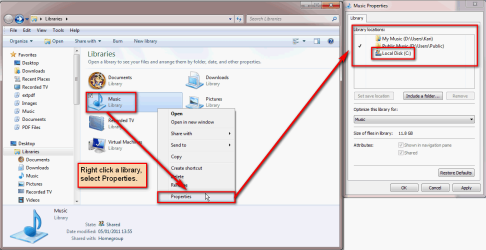
Could it be that you mean Music library, not folder My Music in your user folder? If so, do this:

  • Open Libraries
  • Right click the Music library, select Properties
    .
    Libraries_remove_location_1.png
    .
  • If the C: drive is shown on Library locations, select it and click Remove
    .
    Libraries_remove_location_2.png

Kari
 

My Computer My Computer

At a glance

Windows 10 Pro x64 EN-GB1.6 GHz Intel Core i7-720QM Processor6 GBATI Mobility Radeon HD 5850 Graphics
Computer type
Laptop
Computer Manufacturer/Model Number
HP ENVY 17-1150eg
OS
Windows 10 Pro x64 EN-GB
CPU
1.6 GHz Intel Core i7-720QM Processor
Memory
6 GB
Graphics Card(s)
ATI Mobility Radeon HD 5850 Graphics
Sound Card
Beats sound system with integrated subwoofer
Monitor(s) Displays
17" laptop display, 22" LED and 32" Full HD TV through HDMI
Screen Resolution
1600*900 (1), 1920*1080 (2&3)
Hard Drives
Internal: 2 x 500 GB SATA Hard Disk Drive 7200 rpm
External: 2TB for backups, 3TB USB3 network drive for media
Cooling
As Envy runs a bit warm, I have it on a Cooler Master pad
Keyboard
Logitech diNovo Media Desktop Laser (bluetooth)
Mouse
Logitech Performance Mouse MX
Internet Speed
50/10 Mbps VDSL
Antivirus
Windows Defender 4.3.9431.0
Browser
Maxthon 3.5.2., IE11
WARNING

The OP may be referring to the Music Library as viewed from Windows Media Player. The default install includes an option to delete files from the hard drive when removed from the library.
 

My Computer My Computer

At a glance

Windows 7 Ultimate x64P4 3.2DDR 400ATI HD3850
OS
Windows 7 Ultimate x64
CPU
P4 3.2
Motherboard
Intel 815GM
Memory
DDR 400
Graphics Card(s)
ATI HD3850
Sound Card
C-Media 7.1
Monitor(s) Displays
SyncMaster 244T
Screen Resolution
1920*1200
Hard Drives
Several
PSU
500
Case
PowerSpec $24
Cooling
ThermalTake copper
Internet Speed
Blazing
Thanks so much Kari! That worked! I appreciate it everyone. Also Kari, i like how you put in photos. Although the photos for this situation were unnecessary, its great to see someone take the extra step.
 

My Computer My Computer

At a glance

Windows 7 Home Premium 64bit
OS
Windows 7 Home Premium 64bit
Thanks for your nice words.

When posting screenshots, I try to think that every solved issue can in the future help another user, maybe a newbie to solve his or her similar issue, so even if I know the OP to have some experience, I try to post like if it was for a total newbie. According to an old saying, a picture is worth thousand words; I've noticed it's often true.

Kari
 

My Computer My Computer

At a glance

Windows 10 Pro x64 EN-GB1.6 GHz Intel Core i7-720QM Processor6 GBATI Mobility Radeon HD 5850 Graphics
Computer type
Laptop
Computer Manufacturer/Model Number
HP ENVY 17-1150eg
OS
Windows 10 Pro x64 EN-GB
CPU
1.6 GHz Intel Core i7-720QM Processor
Memory
6 GB
Graphics Card(s)
ATI Mobility Radeon HD 5850 Graphics
Sound Card
Beats sound system with integrated subwoofer
Monitor(s) Displays
17" laptop display, 22" LED and 32" Full HD TV through HDMI
Screen Resolution
1600*900 (1), 1920*1080 (2&3)
Hard Drives
Internal: 2 x 500 GB SATA Hard Disk Drive 7200 rpm
External: 2TB for backups, 3TB USB3 network drive for media
Cooling
As Envy runs a bit warm, I have it on a Cooler Master pad
Keyboard
Logitech diNovo Media Desktop Laser (bluetooth)
Mouse
Logitech Performance Mouse MX
Internet Speed
50/10 Mbps VDSL
Antivirus
Windows Defender 4.3.9431.0
Browser
Maxthon 3.5.2., IE11
Thanks for your nice words.

When posting screenshots, I try to think that every solved issue can in the future help another user, maybe a newbie to solve his or her similar issue, so even if I know the OP to have some experience, I try to post like if it was for a total newbie. According to an old saying, a picture is worth thousand words; I've noticed it's often true.

Kari
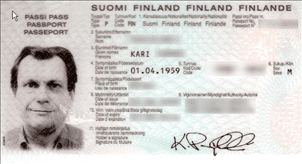
Well, that explains this...
 

Attachments

  • Passport.png
    Passport.png
    24.1 KB · Views: 175

My Computer My Computer

At a glance

Windows 7 Ultimate x64P4 3.2DDR 400ATI HD3850
OS
Windows 7 Ultimate x64
CPU
P4 3.2
Motherboard
Intel 815GM
Memory
DDR 400
Graphics Card(s)
ATI HD3850
Sound Card
C-Media 7.1
Monitor(s) Displays
SyncMaster 244T
Screen Resolution
1920*1200
Hard Drives
Several
PSU
500
Case
PowerSpec $24
Cooling
ThermalTake copper
Internet Speed
Blazing
That was a mistake to post the old scan of my passport in that other thread, I should have known it could be used against me in the future... ;)
 

My Computer My Computer

At a glance

Windows 10 Pro x64 EN-GB1.6 GHz Intel Core i7-720QM Processor6 GBATI Mobility Radeon HD 5850 Graphics
Computer type
Laptop
Computer Manufacturer/Model Number
HP ENVY 17-1150eg
OS
Windows 10 Pro x64 EN-GB
CPU
1.6 GHz Intel Core i7-720QM Processor
Memory
6 GB
Graphics Card(s)
ATI Mobility Radeon HD 5850 Graphics
Sound Card
Beats sound system with integrated subwoofer
Monitor(s) Displays
17" laptop display, 22" LED and 32" Full HD TV through HDMI
Screen Resolution
1600*900 (1), 1920*1080 (2&3)
Hard Drives
Internal: 2 x 500 GB SATA Hard Disk Drive 7200 rpm
External: 2TB for backups, 3TB USB3 network drive for media
Cooling
As Envy runs a bit warm, I have it on a Cooler Master pad
Keyboard
Logitech diNovo Media Desktop Laser (bluetooth)
Mouse
Logitech Performance Mouse MX
Internet Speed
50/10 Mbps VDSL
Antivirus
Windows Defender 4.3.9431.0
Browser
Maxthon 3.5.2., IE11
Back
Top