
System:
Win7 Pro, ASUS B35M-E motherboard, 16GB ram, one 256GB SSD and one 1-TB HDD.
I just finished doing a clean install of Win7 Pro.
I successfully moved my Desktop, My Music, My Videos to my D-data drive from their
default location in C:\Users\(username).
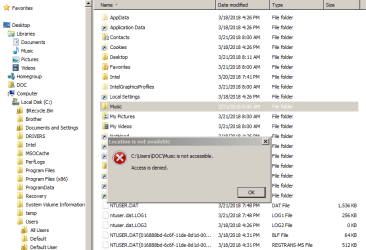
But there's this one folder, Music, in my user profile in C:\Users\(username) that I can't
even open.
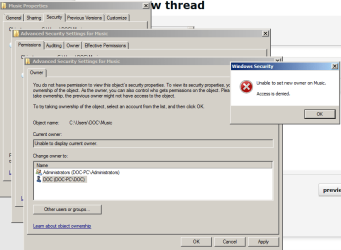
I've tried all the permission, ownership, auditing etc., tricks under
Properties >Security tab > Advanced
that I know of and am able to do, to no avail. Access denied . . . Access denied is what
I get when I try to change Owner, Permissions, Auditing . . . I've even tried a couple of
those context menu "Take Ownership" utilities with no success.
Anyone got any idea what this Music folder is and why I can't get into it?
Do I need it?
Can I get rid of it?
Thanks!
Win7 Pro, ASUS B35M-E motherboard, 16GB ram, one 256GB SSD and one 1-TB HDD.
I just finished doing a clean install of Win7 Pro.
I successfully moved my Desktop, My Music, My Videos to my D-data drive from their
default location in C:\Users\(username).
But there's this one folder, Music, in my user profile in C:\Users\(username) that I can't
even open.
I've tried all the permission, ownership, auditing etc., tricks under
Properties >Security tab > Advanced
that I know of and am able to do, to no avail. Access denied . . . Access denied is what
I get when I try to change Owner, Permissions, Auditing . . . I've even tried a couple of
those context menu "Take Ownership" utilities with no success.
Anyone got any idea what this Music folder is and why I can't get into it?
Do I need it?
Can I get rid of it?
Thanks!
Attachments
My Computer
At a glance
Windows 7 Pro 64 bit
- Computer type
- PC/Desktop
- Computer Manufacturer/Model Number
- Acer
- OS
- Windows 7 Pro 64 bit


