C: Drive nearing full when it's containing ONLY program files...

alecela

New member
Local time
3:55 AM
Messages
18
Ok I have a 120Gb SSD as my C drive, for the Windows and Program files while all my data are stored on 2Tb HD (D drive). Yet I'm now getting the warning that my C drive is 90% full.

When I look into it, the biggest folder is my own personal folder, which comes out to 60+Gb. Once I clicked into it, it's got a "links" folder (which again, is 60+Gb in size). Within the "links" folder, I have the following shortcuts:

Desktop
Downloads
iCloud Photos
Library
Receipts or Invoices
Recent Places
Recorded TV

Notice that Library shortcut & Receipts or Invoices shortcut both got a Folder icon w/ Arrow. Once I click into it, I'll be on my D drive. Funny enough these directories in my D drive would make up about 60Gb in total!!! So are the 'links' not properly setup hence I'm having problem like this? Any idea? Tx in advance.
 

My Computer

OS
Windows 7
CPU
AMD64X2 Toledo 4200+ @ 2.8G (255 x 11)
Motherboard
MSI K8N Diamond Plus Bios 1.34
Memory
Corsair TWINX1024-3200C2 1GBx2 @ 213:CL2/1T/3/7/3
Graphics Card(s)
Zotac GeForce 8800GT 512Mb GDDR3 @ 700/2000
Sound Card
Onboard Creative Audigy
Monitor(s) Displays
BenQ 241W
Screen Resolution
1920x1080
Hard Drives
Seagate Cuda 7200.11 SATA 500GB
PSU
Corsair HX620
Case
Thermaltake Tsunami Dream
Cooling
Thermalright XP90
Did you check the size of other folders?
Also to make sure that you can make optimal use of your SSD, reduce the space allocated for recycle bin.
Right click on Recycle Bin and click on 'Properties'. Now reduce the size allocated to Recycle Bin by C: drive.
Also you can either turn off system restore for SSD and enable it on 2TB HDD, or you may reduce the storage size allocated to system restore by C: drive.

You can execute the following command in Elevated CMD
vssadmin delete shadows /for=c: /all

make a restore point after executing this command as above command will delete all the restore points.
 

My Computer

Computer type
Laptop
Computer Manufacturer/Model Number
Dell Vostro 2520
OS
Windows 10 Tech Preview
CPU
Intel i5 (3rd Gen)
Motherboard
Intel® Mobile HM75 Express chipset
Memory
4GB
Graphics Card(s)
Intel HD Graphics 4000
Hard Drives
500GB
Keyboard
onboard keypad, USB keyboard
Mouse
touchpad, USB mouse, wireless muse
Internet Speed
4 Mbps
Antivirus
No
Browser
IE, chrome, firefox
Did you check the size of other folders?
Also to make sure that you can make optimal use of your SSD, reduce the space allocated for recycle bin.
Right click on Recycle Bin and click on 'Properties'. Now reduce the size allocated to Recycle Bin by C: drive.
Also you can either turn off system restore for SSD and enable it on 2TB HDD, or you may reduce the storage size allocated to system restore by C: drive.

You can execute the following command in Elevated CMD
vssadmin delete shadows /for=c: /all

make a restore point after executing this command as above command will delete all the restore points.

Yes, I did check on the other folders, and they're all of insignificant sizes. What I don't understand is the system is REPORTING the size of two folders which actually resides on the HDD (D drive) BUT it's taking up space in the SSD (C drive) which looks totally weird to me...
 

My Computer

OS
Windows 7
CPU
AMD64X2 Toledo 4200+ @ 2.8G (255 x 11)
Motherboard
MSI K8N Diamond Plus Bios 1.34
Memory
Corsair TWINX1024-3200C2 1GBx2 @ 213:CL2/1T/3/7/3
Graphics Card(s)
Zotac GeForce 8800GT 512Mb GDDR3 @ 700/2000
Sound Card
Onboard Creative Audigy
Monitor(s) Displays
BenQ 241W
Screen Resolution
1920x1080
Hard Drives
Seagate Cuda 7200.11 SATA 500GB
PSU
Corsair HX620
Case
Thermaltake Tsunami Dream
Cooling
Thermalright XP90
You can only really find out, if you run WinDirStat. https://windirstat.info/

However, this will not show the shadowstorage. For that, you have to run this command:

vssadmin list shadowstorage

If you then add the allocated shadowstorage to what WinDirStat shows, then you have a full picture.
 

My Computer

Computer Manufacturer/Model Number
HP, Dell, Gateway, Toshiba - 4 laptops and 2 desktops
OS
Vista, Windows7, Mint Mate, Zorin, Windows 8
CPU
from 1.6GHz Duo to i7
Monitor(s) Displays
2x HP w2207
Hard Drives
5x HDD, 7x SSD, 12x Externals
Keyboard
with trackball - no mices
Mouse
Trackball mice
Internet Speed
DSL 6000
I embellish the command to save a text file on my HDD. The location for storing the file can be whichever Folder desired.
vssadmin list shadowstorage>C:\shadow.txt
 

My Computer

Computer type
PC/Desktop
Computer Manufacturer/Model Number
Customs, Dell, Gateway, HP, Toshiba, Acer, ASUS
OS
Windows 7 Ultimate 64-bit, Windows 8.1 64-bit, Mac OS X 10.10, Linux Mint 17, Windows 10 Pro TP
Keyboard
Microsoft
Mouse
Microsoft
I embellish the command to save a text file on my HDD. The location for storing the file can be whichever Folder desired.
vssadmin list shadowstorage>C:\shadow.txt
Nice idea but not really necessary. All you want is to read the 3 nums (used, allocated and maximum).
 

My Computer

Computer Manufacturer/Model Number
HP, Dell, Gateway, Toshiba - 4 laptops and 2 desktops
OS
Vista, Windows7, Mint Mate, Zorin, Windows 8
CPU
from 1.6GHz Duo to i7
Monitor(s) Displays
2x HP w2207
Hard Drives
5x HDD, 7x SSD, 12x Externals
Keyboard
with trackball - no mices
Mouse
Trackball mice
Internet Speed
DSL 6000
You can only really find out, if you run WinDirStat. https://windirstat.info/

However, this will not show the shadowstorage. For that, you have to run this command:

vssadmin list shadowstorage

If you then add the allocated shadowstorage to what WinDirStat shows, then you have a full picture.

Hmm, I guess I've been away from this for too long. I've logged in as myself and I DO have administrator right, yet when I tried to execute the above command, I was told that I do not have correct permissions to run this command....
 

My Computer

OS
Windows 7
CPU
AMD64X2 Toledo 4200+ @ 2.8G (255 x 11)
Motherboard
MSI K8N Diamond Plus Bios 1.34
Memory
Corsair TWINX1024-3200C2 1GBx2 @ 213:CL2/1T/3/7/3
Graphics Card(s)
Zotac GeForce 8800GT 512Mb GDDR3 @ 700/2000
Sound Card
Onboard Creative Audigy
Monitor(s) Displays
BenQ 241W
Screen Resolution
1920x1080
Hard Drives
Seagate Cuda 7200.11 SATA 500GB
PSU
Corsair HX620
Case
Thermaltake Tsunami Dream
Cooling
Thermalright XP90
You can only really find out, if you run WinDirStat. https://windirstat.info/

However, this will not show the shadowstorage. For that, you have to run this command:

vssadmin list shadowstorage

If you then add the allocated shadowstorage to what WinDirStat shows, then you have a full picture.

Sure enough, windirstat shows that there's a few 'hidden' directories, one of them being AppData and within that, surely enough some backup data from the Apple is taking up a LOT of spaces...

Tx all!
 

My Computer

OS
Windows 7
CPU
AMD64X2 Toledo 4200+ @ 2.8G (255 x 11)
Motherboard
MSI K8N Diamond Plus Bios 1.34
Memory
Corsair TWINX1024-3200C2 1GBx2 @ 213:CL2/1T/3/7/3
Graphics Card(s)
Zotac GeForce 8800GT 512Mb GDDR3 @ 700/2000
Sound Card
Onboard Creative Audigy
Monitor(s) Displays
BenQ 241W
Screen Resolution
1920x1080
Hard Drives
Seagate Cuda 7200.11 SATA 500GB
PSU
Corsair HX620
Case
Thermaltake Tsunami Dream
Cooling
Thermalright XP90
You can only really find out, if you run WinDirStat. https://windirstat.info/

However, this will not show the shadowstorage. For that, you have to run this command:

vssadmin list shadowstorage

If you then add the allocated shadowstorage to what WinDirStat shows, then you have a full picture.

Hmm, I guess I've been away from this for too long. I've logged in as myself and I DO have administrator right, yet when I tried to execute the above command, I was told that I do not have correct permissions to run this command....
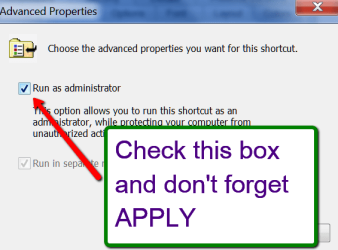
Go to All Programs > Accessories > Command promt > right click and go to Properties > then check the box on the picture.
 

Attachments

  • 2014-12-08_0959.png
    2014-12-08_0959.png
    16.4 KB · Views: 10

My Computer

Computer Manufacturer/Model Number
HP, Dell, Gateway, Toshiba - 4 laptops and 2 desktops
OS
Vista, Windows7, Mint Mate, Zorin, Windows 8
CPU
from 1.6GHz Duo to i7
Monitor(s) Displays
2x HP w2207
Hard Drives
5x HDD, 7x SSD, 12x Externals
Keyboard
with trackball - no mices
Mouse
Trackball mice
Internet Speed
DSL 6000
Back
Top