Solved c drive

Are you going to have alook at it with gparted boot cd?

You can take a screenie with it too.
 

My Computers

System One System Two

  • Computer type
    PC/Desktop
    OS
    7 X64
    CPU
    i5 8400
    Motherboard
    gigabyte b365m ds3h
    Memory
    2x8gb 3200mhz
    Hard Drives
    various
    PSU
    pure power 11 400w cm
    Case
    Coolermaster
    Cooling
    cryorig m9i
  • Computer type
    PC/Desktop
    OS
    7x64
    CPU
    g5400
    Motherboard
    ga b365m ds3h
    Memory
    8gb ddr4 2400
    PSU
    xfx pro 450w
Yes we have been discussing that - unfortunately, PW is an app that reads the same as windows.

Gparted gets it's info in a different way - that's why it was suggested.
 

My Computers

System One System Two

  • Computer type
    PC/Desktop
    OS
    7 X64
    CPU
    i5 8400
    Motherboard
    gigabyte b365m ds3h
    Memory
    2x8gb 3200mhz
    Hard Drives
    various
    PSU
    pure power 11 400w cm
    Case
    Coolermaster
    Cooling
    cryorig m9i
  • Computer type
    PC/Desktop
    OS
    7x64
    CPU
    g5400
    Motherboard
    ga b365m ds3h
    Memory
    8gb ddr4 2400
    PSU
    xfx pro 450w
If he had used Acronis to clone a 500 to a terabyte Acronis would have extended the partition to fit the new drive.
 

My Computer

Computer Manufacturer/Model Number
I trust nobody!
OS
Windows 7 Ultimate x64/x86 Windows 7 Pro x64/x86 Windows 7 Home Premium x64/x86
CPU
Intel C2Q 9650
Motherboard
Intel
Memory
8GB DDR2800 Corsair
Graphics Card(s)
NVIDIA 260 GTX
Sound Card
Onboard
Monitor(s) Displays
Dell 2409w
Screen Resolution
1920x1080
Hard Drives
10 of em!
PSU
600 Watt FSP Group
Case
Antec
Cooling
Fresh Air
Keyboard
Microsoft
Mouse
Razer
Internet Speed
Fast enough
Automatically ?

Or do you have to tell Acronis to resize proportionately ?

If Acronis resizes - does it also expand the 100mb partition - or does it have the capability to leave that as it is during proportionate resize ?
 

My Computers

System One System Two

  • Computer type
    PC/Desktop
    OS
    7 X64
    CPU
    i5 8400
    Motherboard
    gigabyte b365m ds3h
    Memory
    2x8gb 3200mhz
    Hard Drives
    various
    PSU
    pure power 11 400w cm
    Case
    Coolermaster
    Cooling
    cryorig m9i
  • Computer type
    PC/Desktop
    OS
    7x64
    CPU
    g5400
    Motherboard
    ga b365m ds3h
    Memory
    8gb ddr4 2400
    PSU
    xfx pro 450w
I will admit that I'm not very familiar with Partition Wizard, yet it seems to me that the screenshot taken of it indicates that the lost space is unallocated. It would seem that the solution is to resize C: so that it includes that unallocated space.
 

My Computer

Computer Manufacturer/Model Number
DIY
OS
W7x64 Pro, SuSe 12.1/** W7 x64 Pro, XP MCE
CPU
Phenom II 1090T w/Noctua NH-D14 /**4400+ X2 w/CM Hyper TX 3
Motherboard
ASRock 890FX Deluxe 4/**A8N-SLI
Memory
2 x 2GB Patriot PGS34g1600LLKA/**4x1GB Corsair VS
Graphics Card(s)
EVGA GTX460 SC/**EVGA 8800GTS
Sound Card
Asus Xonar D2X/**Xonar D1
Monitor(s) Displays
Acer X233H, Dell E152FPc /**LG M237-WD
Screen Resolution
1920x1080 & 1024x768/**1980x1080
Hard Drives
WDC 2TB, 1.5TB, 1TB, 500GB,Seagate 500GB , Maxtor 80GB /**500GB Seagate & WDC 1TB Black
PSU
CM RS600 w/ APC BX1000G/**Antec 500 TP w/ APC BX1000
Case
HAF922/**Antec 1040IIB
Cooling
3x200mm, 1x140 and 1x120mm/**5x80mm fans
Keyboard
Logitech Media USB/**Saitek Eclipse
Mouse
Cordless Trackman Wheel/**Ditto
Internet Speed
3.3Mbps
Other Info
SB 560 5.1 w/ Sennheiser RS140/**Creative T20 speakers, Dvico FusionHDTV7 Gold RT, Cisco E3000, HP 5510V AIO, Linksys E3000, Belkin F5U237 hub and **F5D8055 adapter
(** = 2nd rig)
I have used Acronis to clone a larger drive to a smaller one. It will do that if the used portion of the larger drive is the same or smaller than the new drive. It has never changed the partition size on me. It is the same program Intel offers to clone a HD to SSD.

I like Parted Magic. It is a good tool to have. It is about 15 programs in one. The partition manager is gparted. I have used it several times and it will manipulate partitions very well. It's just extremely slow.
 

My Computers

System One System Two

  • Computer type
    PC/Desktop
    Computer Manufacturer/Model Number
    ALWAYS UNDER CONSTRUCTION
    OS
    Windows 11 Pro
    CPU
    Ryzen 9 5900X
    Motherboard
    Asus X570 Crosshair Viii Hero
    Memory
    32GB G Skill DDR4-3600
    Graphics Card(s)
    EVGA RTX 3080 FTW 3 Ultra
    Sound Card
    On Board/Sennheiser PC37X Headset
    Monitor(s) Displays
    3 X Asus 27"
    Screen Resolution
    2560x1440
    Hard Drives
    2 X 1 TB NVME drives
    PSU
    EVGA 850
    Case
    Phanteks Eclipse P400A
    Cooling
    EVGA 280 AIO
    Keyboard
    Logitech G510s/ Logitech G13
    Mouse
    Logitech G502
    Internet Speed
    24/1
    Antivirus
    ESET/MBAM Pro/SAS Pro
    Browser
    Chrome/ Firefox/ Edge
  • Computer type
    Laptop
    System Manufacturer/Model Number
    Dell 16 Plus
    OS
    Windows 11 Pro
    CPU
    Intel Ultra 9 288V
    Memory
    32 GB LPDDR5X 8533
    Monitor(s) Displays
    16" Mini-LED HDR600 Touch 90 Hz
    Screen Resolution
    2560X1600
    Hard Drives
    1 TB NVME
Yes, parted magic can be useful - I have an older - smaller, and terrific gparted.

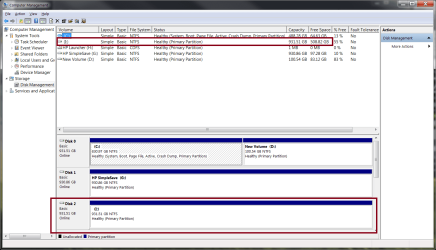
Seekermeister- Partition Wizard is not showing any unallocated space.

It agrees with Disk Management List View. List view is the top bit in his screenie - where the partitions are listed.

It does not agree with Disk Management Disk View. That is the bottom bit in his screenie - the Disk Map , if you like.
 

My Computers

System One System Two

  • Computer type
    PC/Desktop
    OS
    7 X64
    CPU
    i5 8400
    Motherboard
    gigabyte b365m ds3h
    Memory
    2x8gb 3200mhz
    Hard Drives
    various
    PSU
    pure power 11 400w cm
    Case
    Coolermaster
    Cooling
    cryorig m9i
  • Computer type
    PC/Desktop
    OS
    7x64
    CPU
    g5400
    Motherboard
    ga b365m ds3h
    Memory
    8gb ddr4 2400
    PSU
    xfx pro 450w
Yes, parted magic can be useful - I have an older - smaller, and terrific gparted.

Seekermeister- Partition Wizard is not showing any unallocated space.

It agrees with Disk Management List View.

It does not agree with Disk Management Disk View.

That is exactly what I read. Somehow Disk Management is showing 2 different things in the seperate views. What is needed is a program such as gparted to see what it reads. Somehow, there is an error in disk management. Try running diskpart and see what it reads. Also, what does explorer say is the size of C ?
 

My Computers

System One System Two

  • Computer type
    PC/Desktop
    Computer Manufacturer/Model Number
    ALWAYS UNDER CONSTRUCTION
    OS
    Windows 11 Pro
    CPU
    Ryzen 9 5900X
    Motherboard
    Asus X570 Crosshair Viii Hero
    Memory
    32GB G Skill DDR4-3600
    Graphics Card(s)
    EVGA RTX 3080 FTW 3 Ultra
    Sound Card
    On Board/Sennheiser PC37X Headset
    Monitor(s) Displays
    3 X Asus 27"
    Screen Resolution
    2560x1440
    Hard Drives
    2 X 1 TB NVME drives
    PSU
    EVGA 850
    Case
    Phanteks Eclipse P400A
    Cooling
    EVGA 280 AIO
    Keyboard
    Logitech G510s/ Logitech G13
    Mouse
    Logitech G502
    Internet Speed
    24/1
    Antivirus
    ESET/MBAM Pro/SAS Pro
    Browser
    Chrome/ Firefox/ Edge
  • Computer type
    Laptop
    System Manufacturer/Model Number
    Dell 16 Plus
    OS
    Windows 11 Pro
    CPU
    Intel Ultra 9 288V
    Memory
    32 GB LPDDR5X 8533
    Monitor(s) Displays
    16" Mini-LED HDR600 Touch 90 Hz
    Screen Resolution
    2560X1600
    Hard Drives
    1 TB NVME
I think the op has lost interest.
 

My Computers

System One System Two

  • Computer type
    PC/Desktop
    OS
    7 X64
    CPU
    i5 8400
    Motherboard
    gigabyte b365m ds3h
    Memory
    2x8gb 3200mhz
    Hard Drives
    various
    PSU
    pure power 11 400w cm
    Case
    Coolermaster
    Cooling
    cryorig m9i
  • Computer type
    PC/Desktop
    OS
    7x64
    CPU
    g5400
    Motherboard
    ga b365m ds3h
    Memory
    8gb ddr4 2400
    PSU
    xfx pro 450w
If he had used Acronis to clone a 500 to a terabyte Acronis would have extended the partition to fit the new drive.

Never CLONED a drive with Acronis True Image but if you Image one drive and the load that image onto another drive True Image makes all the partitions on the new drive the same size as the drive the image was made from.

The only exception to this is if you load that image on a smaller drive then what it came from. TI will make the last partition whatever space is left on the smaller drive.
But if you load that image on a bigger drive it leaves unallocated space after the last partition.
Done this many times and that is how it works

I would suspect it works the same way when CLONING. It sets up all partitions and places all data on the newer drive just like it was on the older drive. That's what CLONING is.
 

My Computer

Computer Manufacturer/Model Number
Built be Me
OS
Windows 7 Pro x64
CPU
i5 760
Motherboard
Asus P7P55D-E Pro
Memory
16GB
Graphics Card(s)
Nvidia GTS450
Sound Card
On board
Monitor(s) Displays
Dell 2007WFP Dell 1800FP
Screen Resolution
1680x1050 1280x1024
Hard Drives
Seagate 250GB & 750GB
WD 1TB
PSU
Antec 750
Case
In Win
Cooling
Cooler Master Hyper 212+
Keyboard
IBM
Mouse
MS
I think the op has lost interest.

Sorry 8 hours ago when you posted this was bed time for me, besides I moved on to cloning the drive as everyone said i need to wipe the drive clean and start over. I will give gparted a try today before I wipe the drive clean though.
 

My Computer

Computer Manufacturer/Model Number
Dell XPS-730
OS
Windows 7 pro x64
If he had used Acronis to clone a 500 to a terabyte Acronis would have extended the partition to fit the new drive.

Never CLONED a drive with Acronis True Image but if you Image one drive and the load that image onto another drive True Image makes all the partitions on the new drive the same size as the drive the image was made from.

The only exception to this is if you load that image on a smaller drive then what it came from. TI will make the last partition whatever space is left on the smaller drive.
But if you load that image on a bigger drive it leaves unallocated space after the last partition.
Done this many times and that is how it works

I would suspect it works the same way when CLONING. It sets up all partitions and places all data on the newer drive just like it was on the older drive. That's what CLONING is.

If I recall right I did have to partition the drives again after the clone, thats why I downloaded partition wizard. If there was unallocated space though it would show up. I'm going to check it in gparted and post a screen shot.
 

My Computer

Computer Manufacturer/Model Number
Dell XPS-730
OS
Windows 7 pro x64
If he had used Acronis to clone a 500 to a terabyte Acronis would have extended the partition to fit the new drive.

Never CLONED a drive with Acronis True Image but if you Image one drive and the load that image onto another drive True Image makes all the partitions on the new drive the same size as the drive the image was made from.

The only exception to this is if you load that image on a smaller drive then what it came from. TI will make the last partition whatever space is left on the smaller drive.
But if you load that image on a bigger drive it leaves unallocated space after the last partition.
Done this many times and that is how it works

I would suspect it works the same way when CLONING. It sets up all partitions and places all data on the newer drive just like it was on the older drive. That's what CLONING is.

If I recall right I did have to partition the drives again after the clone, thats why I downloaded partition wizard. If there was unallocated space though it would show up. I'm going to check it in gparted and post a screen shot.

Like I said I have never used the Clone feature. The one time I used some type of Cloning software, I think it was from the drive maker, it took like 6 hours to clone a drive. This was years ago when PC weren't as fast. Since then I have always made images of the older drive and loaded those on the newer drive. Storing the image on another hard drive in the system speeds this up. I can re-image my C drive with Win 7 and all my programs and a lot of my personal files in less then 7 minutes. Doing that from a external USB drive takes about twice as long. That is over 50GB of stuff.
After using a cloning software, and having it take so long, I said never again.

May I suggest you look at Acronis Disk Director. I've been using this software for years, V10 and now V11, after Norton/Symantic bought Partition Magic and it was never the same.

Good luck in getting this straightened out.
 

My Computer

Computer Manufacturer/Model Number
Built be Me
OS
Windows 7 Pro x64
CPU
i5 760
Motherboard
Asus P7P55D-E Pro
Memory
16GB
Graphics Card(s)
Nvidia GTS450
Sound Card
On board
Monitor(s) Displays
Dell 2007WFP Dell 1800FP
Screen Resolution
1680x1050 1280x1024
Hard Drives
Seagate 250GB & 750GB
WD 1TB
PSU
Antec 750
Case
In Win
Cooling
Cooler Master Hyper 212+
Keyboard
IBM
Mouse
MS
... after Norton/Symantic bought Partition Magic and it was never the same.


We're seeing a few issues with this S/W destroying the partition structure for people.
 

My Computer

Computer Manufacturer/Model Number
* BFK Customs *
OS
W 7 64-bit Ultimate
CPU
Intel Q9550 Yorkfield
Motherboard
ASUS P5Q Pro
Memory
8GB Dominator 8500C5D
Graphics Card(s)
ATI : XFX 5870
Sound Card
Realtek HD Audio 7-1
Monitor(s) Displays
1x 47" LCD HDMI & 3x 26" LCD HDMI
Screen Resolution
1920x1080P & 1920x1200
Hard Drives
1x 80GB Intel X25-M G2 SSD : 1x 500GB & 1x 640GB WD Caviar Black(s)
PSU
Corsair 620HX
Case
Cooler Master RC-690
Cooling
Tuniq Tower 120, 2x 140mm and 3x 120mm case fans
Keyboard
Microsoft 500
Mouse
Razer Diamondback 3G
Internet Speed
14 Mb/s
Other Info
1x Koutech 3Gb/s SATA HDD Hot Swap Rack
In the screen shot you will see the clone drive, drive I partition is different then that of c.

I'm going to change out the drives now and wipe the old drive clean. Obviously there is some error in the disk.
 

Attachments

  • desk.png
    desk.png
    49.1 KB · Views: 10

My Computer

Computer Manufacturer/Model Number
Dell XPS-730
OS
Windows 7 pro x64
Any report from gparted?
 

My Computers

System One System Two

  • Computer type
    PC/Desktop
    OS
    7 X64
    CPU
    i5 8400
    Motherboard
    gigabyte b365m ds3h
    Memory
    2x8gb 3200mhz
    Hard Drives
    various
    PSU
    pure power 11 400w cm
    Case
    Coolermaster
    Cooling
    cryorig m9i
  • Computer type
    PC/Desktop
    OS
    7x64
    CPU
    g5400
    Motherboard
    ga b365m ds3h
    Memory
    8gb ddr4 2400
    PSU
    xfx pro 450w
I misread your first screen shot & deleted my first post.
A readout of your MBR partition table would still be useful. Disk management and PW both appear to be reading partition information from 2 different sources.

It would be interesting to see what gparted had to say.
 

My Computer

Computer type
PC/Desktop
Computer Manufacturer/Model Number
Own build
OS
Windows 7x64 Home Premium SP1
CPU
Intel i7 2600k
Motherboard
ASUS P8Z68 Deluxe
Memory
G.Skill Ripjaws (DDR3-1600) 2x4GB
Graphics Card(s)
Nvidia GeForce GTS 450; Intel HD Graphics 3000(GT2+)
Monitor(s) Displays
Dell Ultrasharp IPS panel U2311H, Samsung SyncMaster P2350
Screen Resolution
1920x1080
Hard Drives
Samsung 850 Pro SSD 256GB, Samsung SSD 840 120GB, Seagates 1TB Barracuda ST31000528AS x2
PSU
Seasonic M12II 520W
Case
Lian Li Lancool PC-K60
Cooling
Case: 1x120mm, 3x140mm CPU: Hyper 212+
Keyboard
Logitech MK520 (wireless)
Mouse
Logitech MK520
Internet Speed
6-7 Mbps
Antivirus
Norton Security Premium, Malwarebytes on 2 (MSE on 3rd PC)
Browser
FireFox
Other Info
Audio: Logitech Z523 2.1
I haven't had time to use gparted, not sure how to install that on disk and make it bootable.

I had to clean the cloned drive I had made with ghost. The new drive wasn't loading and windows couldn't fix it. The desktop wasn't loading for some reason. I'm just now installing vista, I only have an upgrade disk for win7.

Honestly ghost hasn't been to reilable for me to well. I always have one problem or another.

I still have the mess up hd so If can figure how to burn iso on cd I will take a look at the drive.
 
Last edited:

My Computer

Computer Manufacturer/Model Number
Dell XPS-730
OS
Windows 7 pro x64

My Computer

Computer Manufacturer/Model Number
* BFK Customs *
OS
W 7 64-bit Ultimate
CPU
Intel Q9550 Yorkfield
Motherboard
ASUS P5Q Pro
Memory
8GB Dominator 8500C5D
Graphics Card(s)
ATI : XFX 5870
Sound Card
Realtek HD Audio 7-1
Monitor(s) Displays
1x 47" LCD HDMI & 3x 26" LCD HDMI
Screen Resolution
1920x1080P & 1920x1200
Hard Drives
1x 80GB Intel X25-M G2 SSD : 1x 500GB & 1x 640GB WD Caviar Black(s)
PSU
Corsair 620HX
Case
Cooler Master RC-690
Cooling
Tuniq Tower 120, 2x 140mm and 3x 120mm case fans
Keyboard
Microsoft 500
Mouse
Razer Diamondback 3G
Internet Speed
14 Mb/s
Other Info
1x Koutech 3Gb/s SATA HDD Hot Swap Rack
Back
Top