C-Media Audio device not working :(

Jayvee24

New member
Local time
6:52 PM
Messages
21
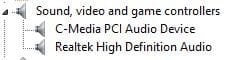
I recently had the no sound problem on my PC and decided to buy a PCI sound card. I installed the card on the motherboard and installed the drivers but still, no sounds coming out of my speakers/headphones. All I get is a screeching sound from the speaker and when I test the speaker I get the error "Failed to play test tone".. This is getting very frustrating :mad::mad::mad:

Here are the screenshots
 

Attachments
  • Capture.JPG
    Capture.JPG
    26.7 KB · Views: 11
  • 2.JPG
    2.JPG
    8.8 KB · Views: 11
  • 3.JPG
    3.JPG
    11.4 KB · Views: 11

My Computer

Computer type
PC/Desktop
OS
Windows 7 Ultimate x64
CPU
AMD A8 5600K
Motherboard
Asrock FM2A55M-VG3
First thing to do, and it may not solve this particular problem but needs to be done, is disable Realtek (integrated audio) in the BIOS. This will prevent any potential conflicts, and Windows only allows one default audio playback device.

What speakers do you have? USB connected? 2.1 Computer speakers, Stereo Speakers, 5.1 speaker system?
What happens if you connect the headphone to the GREEN speaker jack on the sound card?

With a separate sound card, the front panel audio connection that is on the motherboard needs to be moved to the new sound card. If its left on the motherboard there will be nothing.
 

My Computer

Computer type
PC/Desktop
Computer Manufacturer/Model Number
My Own Build
OS
Windows 10 64 bit
CPU
Intel i7 6700K
Motherboard
ASUS ROG Maximus VIII Hero
Memory
16GB Corsair Dominator
Graphics Card(s)
Intel CPU Graphics
Sound Card
RealTek
Monitor(s) Displays
27" Dell S2719dgf
Screen Resolution
2560X1440
Hard Drives
1 TB Samsung 850 EVO SSD for Win 10 Pro
500GB Samsung 850 EVO SSD for Win 10 Insider
2 TB drive for backup
PSU
EVGA Supernova 750G2
Case
BeQuiet Silent Base 600
Cooling
Deepcool Captain 120EX
Keyboard
Microsoft Wireless 2000
Mouse
Microsoft wireless
Internet Speed
100 MB/sec (Cable)
Antivirus
Microsoft Defender and Malwarebytes
Browser
Edge/Firefox
Other Info
Cakewalk (Sonar) by BandLab and Studio One 4.1 Pro recording studio software. MOTU 896Mk3 Hybrid recording interface, Frontier Tranzport wireless control unit, Behringer X-Touch Control Surface.
Five USB connected optical drives for CD Audio production using Nero BurningROM
I disabled the default audio in the BIOS and still nothing works. I have USB speakers and when I plug my headphones on the green jack I get the same result. There's no option in the BIOS to move the front panel to the sound card. It only has the enable disable function.
 

My Computer

Computer type
PC/Desktop
OS
Windows 7 Ultimate x64
CPU
AMD A8 5600K
Motherboard
Asrock FM2A55M-VG3
If you have USB speakers, they do not use the PC's sound card. They take digital data, via USB, and convert it to audio in the speakers.

The front panel is a physical connection on the motherboard, its not a software function. The connector (May be labeled HD Audio or AC97) has to be moved from the motherboard to the new sound card (assuming there is a connector on the sound card for the front panel connection).

Generally (on the majority of motherboards) the front panel motherboard connection is on the lower left of the motherboard. It can be other places but that is where it's located on the majority of motherboards.
 

My Computer

Computer type
PC/Desktop
Computer Manufacturer/Model Number
My Own Build
OS
Windows 10 64 bit
CPU
Intel i7 6700K
Motherboard
ASUS ROG Maximus VIII Hero
Memory
16GB Corsair Dominator
Graphics Card(s)
Intel CPU Graphics
Sound Card
RealTek
Monitor(s) Displays
27" Dell S2719dgf
Screen Resolution
2560X1440
Hard Drives
1 TB Samsung 850 EVO SSD for Win 10 Pro
500GB Samsung 850 EVO SSD for Win 10 Insider
2 TB drive for backup
PSU
EVGA Supernova 750G2
Case
BeQuiet Silent Base 600
Cooling
Deepcool Captain 120EX
Keyboard
Microsoft Wireless 2000
Mouse
Microsoft wireless
Internet Speed
100 MB/sec (Cable)
Antivirus
Microsoft Defender and Malwarebytes
Browser
Edge/Firefox
Other Info
Cakewalk (Sonar) by BandLab and Studio One 4.1 Pro recording studio software. MOTU 896Mk3 Hybrid recording interface, Frontier Tranzport wireless control unit, Behringer X-Touch Control Surface.
Five USB connected optical drives for CD Audio production using Nero BurningROM
Back
Top