C:\Users\Username\Desktop is Empty.

What program(s) are saving settings to documents?
He is right. None of the folders in the picture below were created by me. But I make seperate folders for all user files in a seperate partition and Include those into the repective libraries. This way I seperate system created folders from the ones which are my own.

Your screenshot does not illustrate normal behaviour. Nothing like this occurs on my system and never has. Once in a GREAT while a program will create a folder in Documents, but it is EXTREMELY rare.
It depends which programs you use. There are many programs that spread their stuff into the default user folders - Videos is another one where I have entries.
 

My Computer

Computer Manufacturer/Model Number
HP, Dell, Gateway, Toshiba - 4 laptops and 2 desktops
OS
Vista, Windows7, Mint Mate, Zorin, Windows 8
CPU
from 1.6GHz Duo to i7
Monitor(s) Displays
2x HP w2207
Hard Drives
5x HDD, 7x SSD, 12x Externals
Keyboard
with trackball - no mices
Mouse
Trackball mice
Internet Speed
DSL 6000
He is right. None of the folders in the picture below were created by me. But I make seperate folders for all user files in a seperate partition and Include those into the repective libraries. This way I seperate system created folders from the ones which are my own.

Your screenshot does not illustrate normal behaviour. Nothing like this occurs on my system and never has. Once in a GREAT while a program will create a folder in Documents, but it is EXTREMELY rare.
It depends which programs you use. There are many programs that spread their stuff into the default user folders - Videos is another one where I have entries.

I stand by my statement...this is VERY rare.
 

My Computer

Computer Manufacturer/Model Number
Custom
OS
Windows 7 Ultimate RTM (Technet)
CPU
3.00 gigahertz Intel Core2 Duo E8400
Motherboard
ASUSTeK Computer INC. P5K/EPU Rev 1.xx
Memory
4GB
Graphics Card(s)
ATI Radeon X1950 Pro
Sound Card
Built in HD Audio
Monitor(s) Displays
22" Gateway LCD
Screen Resolution
1920 x 1200
Hard Drives
ST3160023A [Hard drive] (160.04 GB) -- drive 0, rev 8.01, ST3500630AS [Hard drive] (500.11 GB) -- drive 2, rev 3.AAK
ST3500630AS [Hard drive] (500.11 GB) -- drive 1, rev 3.AAK
Keyboard
Logitech G11
Mouse
Microsoft Wireless Laser Mouse 5000
Internet Speed
13.44 Mbps
Your screenshot does not illustrate normal behaviour. Nothing like this occurs on my system and never has. Once in a GREAT while a program will create a folder in Documents, but it is EXTREMELY rare.
It depends which programs you use. There are many programs that spread their stuff into the default user folders - Videos is another one where I have entries.

I stand by my statement...this is VERY rare.
Very strange comment.

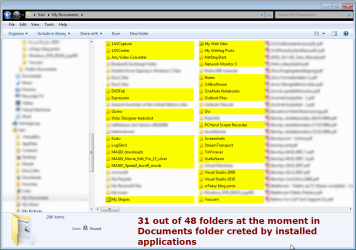
Out of 48 folders at the moment in this laptop's Kari\Documents folder, 31 are not created by Windows installation or by me. Instead they are created by installed applications:

Documents.png

So, in this computer it means 65% of all folders located in Kari\Documents. Results from my other rigs show 42%, 58% and 61%.

I wouldn't call this phenomena VERY rare.

Kari
 

My Computer

Computer type
Laptop
Computer Manufacturer/Model Number
HP ENVY 17-1150eg
OS
Windows 10 Pro x64 EN-GB
CPU
1.6 GHz Intel Core i7-720QM Processor
Memory
6 GB
Graphics Card(s)
ATI Mobility Radeon HD 5850 Graphics
Sound Card
Beats sound system with integrated subwoofer
Monitor(s) Displays
17" laptop display, 22" LED and 32" Full HD TV through HDMI
Screen Resolution
1600*900 (1), 1920*1080 (2&3)
Hard Drives
Internal: 2 x 500 GB SATA Hard Disk Drive 7200 rpm
External: 2TB for backups, 3TB USB3 network drive for media
Cooling
As Envy runs a bit warm, I have it on a Cooler Master pad
Keyboard
Logitech diNovo Media Desktop Laser (bluetooth)
Mouse
Logitech Performance Mouse MX
Internet Speed
50/10 Mbps VDSL
Antivirus
Windows Defender 4.3.9431.0
Browser
Maxthon 3.5.2., IE11
Hi

Ive have many system created folders in "My Documents" and other folders.Object dock for instance creates several folders in documents. I understand in what your saying that you want all your folders only on a separate partition but its also useful to have these folders on another drive also in case of the need for a clean install.I have tons of docks, icons, and backgrounds that are saved in these folders and because they are all located on a separate partition they are all included in my daily backup schedule therefore if im in need of a clean install they can easily be copied back to that folder without having to find and download them all again.

Danny
 

My Computer

Computer Manufacturer/Model Number
acer aspire 5935g
OS
Windows 7 Home Premium x64 SP1
CPU
intel(R)core(TM)2 duo CPU T6600 @ 2.20GHz
Motherboard
intel gm45/gm47 revision 07
Memory
3 gb ddr3
Graphics Card(s)
ati radeon hd4570/512mb
Monitor(s) Displays
lop156wh2-tle1 15.3 flat
Screen Resolution
1366x768
Hard Drives
OCZ-Agility3 60gig ssd
320gig external hdd
500gig external hdd
Mouse
Optical
Internet Speed
30Mbps Down/30Mbps Up
All I can tell you is that I have a TON of commercial software installed for web design and hosting, video and photo editing, etc., and checking my documents folder right now, I have 127 folders, and maybe 6 were not created by me. I call that very rare. Again, it's just my case, but I've not seen this work any differently in 30 years.
 

My Computer

Computer Manufacturer/Model Number
Custom
OS
Windows 7 Ultimate RTM (Technet)
CPU
3.00 gigahertz Intel Core2 Duo E8400
Motherboard
ASUSTeK Computer INC. P5K/EPU Rev 1.xx
Memory
4GB
Graphics Card(s)
ATI Radeon X1950 Pro
Sound Card
Built in HD Audio
Monitor(s) Displays
22" Gateway LCD
Screen Resolution
1920 x 1200
Hard Drives
ST3160023A [Hard drive] (160.04 GB) -- drive 0, rev 8.01, ST3500630AS [Hard drive] (500.11 GB) -- drive 2, rev 3.AAK
ST3500630AS [Hard drive] (500.11 GB) -- drive 1, rev 3.AAK
Keyboard
Logitech G11
Mouse
Microsoft Wireless Laser Mouse 5000
Internet Speed
13.44 Mbps
I have for instance installed nothing special on this laptop. You install Outlook 2010, it creates a folder in Documents. OneNote, too. The AV-converter I use, video editor, Visual Studio, Windows Live Writer for blog posts, Nokia Ovi Suite and so on.

I think I have never seen a Windows computer (XP or later) where when the computer has been used a bit longer period at least one third of folders in Documents wouldn't be created by installed applications. I'm so sure about this I could make a bet.

Just checked Angie's laptop over her shoulder while she's once again tagging her photos: 22 folders in her Documents folder created by installed applications. And she really has only the basic apps installed on her laptop, Office, Ovi and some image and video editing / manipulating apps.

Kari

 
Last edited:

My Computer

Computer type
Laptop
Computer Manufacturer/Model Number
HP ENVY 17-1150eg
OS
Windows 10 Pro x64 EN-GB
CPU
1.6 GHz Intel Core i7-720QM Processor
Memory
6 GB
Graphics Card(s)
ATI Mobility Radeon HD 5850 Graphics
Sound Card
Beats sound system with integrated subwoofer
Monitor(s) Displays
17" laptop display, 22" LED and 32" Full HD TV through HDMI
Screen Resolution
1600*900 (1), 1920*1080 (2&3)
Hard Drives
Internal: 2 x 500 GB SATA Hard Disk Drive 7200 rpm
External: 2TB for backups, 3TB USB3 network drive for media
Cooling
As Envy runs a bit warm, I have it on a Cooler Master pad
Keyboard
Logitech diNovo Media Desktop Laser (bluetooth)
Mouse
Logitech Performance Mouse MX
Internet Speed
50/10 Mbps VDSL
Antivirus
Windows Defender 4.3.9431.0
Browser
Maxthon 3.5.2., IE11
I think it relly depends on the applications you use. Some do, some don't create their own folders. But I have application created folders in Documents, Videos and Pictures. Only Music has none - but I really do not use any music programs.
 

My Computer

Computer Manufacturer/Model Number
HP, Dell, Gateway, Toshiba - 4 laptops and 2 desktops
OS
Vista, Windows7, Mint Mate, Zorin, Windows 8
CPU
from 1.6GHz Duo to i7
Monitor(s) Displays
2x HP w2207
Hard Drives
5x HDD, 7x SSD, 12x Externals
Keyboard
with trackball - no mices
Mouse
Trackball mice
Internet Speed
DSL 6000
Back
Top