Cameras not being recognized.

alant

New member
Local time
8:56 AM
Messages
21
Hello everyone,
I have 2 digital cameras that used to prompt me to download the pictures when I would plug them in to a USB port. Now, nothing happens. I see the cameras in Computer however. I do not have picture transfer software installed since I am using Windows 7. Any ideas? Thanks
 

My Computer My Computer

Computer Manufacturer/Model Number
GATEWAY DX4831
OS
Windows 7 Home Premium
Memory
RAM 6.00 GB RAM
Hard Drives
1TB
64-BIT
Well, as you can see the cameras in the computer, they are recognized.

You can do:

1. install the software that came along with the camera.
2. visit the manufactures homepage and download the software.
3. manually copy the photos from the camera to your desired location.
 

My Computer My Computer

Computer Manufacturer/Model Number
Home-made
OS
Windows 7 home premium X64
CPU
Amd 3.1 Blackboxed X4
Motherboard
Amd
Memory
8Gb
Graphics Card(s)
ATI 5770 HD 1gig
Monitor(s) Displays
Tripple Full HD screen
Screen Resolution
Full Hd
Hard Drives
500GB, 500GB
2000GB, 2000GB, 2000GB, 2000GB
1000GB, 1000GB, 1000GB
PSU
640W + 1800VA UPS
Case
Own Wodden box
Cooling
AC Cooling Device 1800BTU
Keyboard
Logitech G11
Mouse
Logitec
Internet Speed
16<->5
Software did not come with these cameras. Windows 7 did not require it.
 

My Computer My Computer

Computer Manufacturer/Model Number
GATEWAY DX4831
OS
Windows 7 Home Premium
Memory
RAM 6.00 GB RAM
Hard Drives
1TB
64-BIT
Then you have to manually copy them to the directory you want them to be on.

Normally when you insert a camera to the computer, a new drive appears on the "computer", and you just need to click it to access the camera.
Then you only need to copy the files..
 

My Computer My Computer

Computer Manufacturer/Model Number
Home-made
OS
Windows 7 home premium X64
CPU
Amd 3.1 Blackboxed X4
Motherboard
Amd
Memory
8Gb
Graphics Card(s)
ATI 5770 HD 1gig
Monitor(s) Displays
Tripple Full HD screen
Screen Resolution
Full Hd
Hard Drives
500GB, 500GB
2000GB, 2000GB, 2000GB, 2000GB
1000GB, 1000GB, 1000GB
PSU
640W + 1800VA UPS
Case
Own Wodden box
Cooling
AC Cooling Device 1800BTU
Keyboard
Logitech G11
Mouse
Logitec
Internet Speed
16<->5
On the Start Menu, look in "Default Programs" then under "change autoplay settings" you will see "Pictures" under Media, select your choice there. Then at the bottom you should see devices and hopefully your camera will be listed; make your selection of options to do there also, then save.

Hopefully that will take care of this problem for you.
 

My Computer My Computer

Computer Manufacturer/Model Number
My Build
OS
win7 Ult 64
CPU
i7 3930K & 3960X
Motherboard
ASUS P9X79 Deluxe
Memory
16GB G-Skill 2133MHz
Graphics Card(s)
Sapphire HD 7970
Sound Card
On-board
Monitor(s) Displays
ASUS 27 inch
Screen Resolution
1920X1080
Hard Drives
Crucial M4 256GB, 1.5TB WD Black for Data/Images
PSU
Corsair AX1200
Case
NZXT 810
Cooling
Custom Loop, Swiftech HDBlock
Keyboard
Mionix
Mouse
Mionix
Internet Speed
Cable
Software did not come with these cameras. Windows 7 did not require it.

What cameras are these?

I have a Nikon coolpix and it did come with a copy of Nikon Transfer, which does work on Windows 7 x64. And it does exactly what you're talking about if I plug my camera into a USB port.... that is provided I set the software to do so.

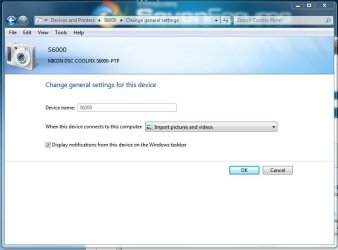
If you don't have this type of software, when you plug your camera into the USB port you should get a camera icon in the taskbar. If not.... Start, Devices and Printers, click on your camera, and double click Change general settings, and where it says When this device connects to this computer click the dropdown box and choose Import pictures and videos and click OK

Devices and Printers.JPG

Settings.JPG

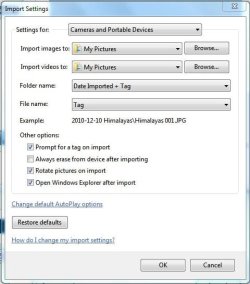
Once that's done, disconnect and reconnect from USB port and when the Window pops up for importing the photos, click Import settings and choose your settings.

import settings.JPG

import settings prefs.JPG

Next time you plug in your camera those settings should take hold.

Good luck :)
 

My Computer My Computer

Computer type
PC/Desktop
Computer Manufacturer/Model Number
Custom built by me.
OS
Windows 10 Pro
CPU
Intel Core i7-4770K (3.5Ghz)
Motherboard
Gigabyte G1 Sniper 5 (F10 Bios)
Memory
32 gig Corsair Dominator Platinum (4x8Gig)
Graphics Card(s)
Sapphire Tri-X R9 Fury
Sound Card
Soundblaster ZXR
Monitor(s) Displays
NEC PA242W 24" LCD Monitor
Screen Resolution
1920 x 1200
Hard Drives
Primary - Samsung 850 Pro (512gig), Samsung 840 Pro (256gig), 2TB WD Caviar Black.
PSU
EVGA Supernova 1000 G2
Case
Cooler Master HAF X
Cooling
Corsair H100i with Corsair Air Series SP120 Quiet Fans
Keyboard
Logitech Wireless Wave
Mouse
Logitech Performance MX
Internet Speed
High Speed Cable
Antivirus
Norton Security
Browser
IE11
Other Info
Memory Timings - 1866MHz @ 9-9-9-27-1T @ 1.5 volts
My Panasonic camera works. I have a Kodak N137 mini digital video camera that isn't even recognized when I plug it in.
 

My Computer My Computer

Computer Manufacturer/Model Number
GATEWAY DX4831
OS
Windows 7 Home Premium
Memory
RAM 6.00 GB RAM
Hard Drives
1TB
64-BIT
try using a different port, different cable and different media card in the camera. If none of those work try another pc. It might be the camera
 

My Computer My Computer

Computer Manufacturer/Model Number
Custom
OS
Windows 7 64 bit ultimate
CPU
Intel Core2Quad q8200 @ 2.33GHz
Memory
6144 MB
Graphics Card(s)
2x n Vidia 8800GS
Monitor(s) Displays
LG LCD 32LH3010
The camera probably has to be set to download the video.
When the camera is set up and plugged in as needed then.....

.....Go to Start> Control Panel> Devices and Printers
Click the Add a Device I circled in yellow on the picture below.

This will start the new hardware search tool. It should find the camera.
If it needs a driver or something it should get it from Microsoft.

Mike
 
Last edited:

My Computer My Computer

Computer Manufacturer/Model Number
Hopalong/ Godzilla
OS
Windows7 Pro 64bit SP-1; Windows XP Pro 32bit
CPU
Intel Core i7-870 Lynnfield 2.93GHz LGA 1156 95W Quad-Core
Motherboard
ASUS P7P55D-E PRO
Memory
8GB@1400MHz Crucial Ballistix DDR3-1600 4x2GB
Graphics Card(s)
ASUS ENGTX460 DirectCU/2DI/1GD5 1GB 256-bit GDDR5
Sound Card
VIA Onboard
Monitor(s) Displays
Asus VS248H-P 24"; Samsung SyncMaster 941BW 19"ws
Screen Resolution
1920x1080; 1440x900
Hard Drives
Samsung 830 120GB SSD
Intel 320 120GB SSD
Western Digital Caviar Black WD7501AALS 750GB 7200 RPM SATA 3.0Gb/s
Western Digital Caviar Black WD6401AALS 640GB 7200 RPM SATA 3.0Gb/s
PSU
COOLER MASTER Silent Pro RS850-AMBAJ3-US 850W Modular
Case
COOLER MASTER HAF 932 RC-932-KKN5-GP Black
Cooling
Scythe "Mugen-2 Rev.B" (2 ScytheKaze-Jyuni PWM fans)
Keyboard
Logitech K-320
Mouse
Kensington
Antivirus
Avast Inernet Suite
Browser
IE 9 ; Chrome
If it needs a driver or something it should get it from Microsoft.

Not necessarily. That problem is left up to Kodak.

He'll need to check the camera's manufacture and see if there is a driver for Windows 7 x64.

BTW I searched Kodak's site but "kodak n137" brings up nothing so.... :confused:
 

My Computer My Computer

Computer type
PC/Desktop
Computer Manufacturer/Model Number
Custom built by me.
OS
Windows 10 Pro
CPU
Intel Core i7-4770K (3.5Ghz)
Motherboard
Gigabyte G1 Sniper 5 (F10 Bios)
Memory
32 gig Corsair Dominator Platinum (4x8Gig)
Graphics Card(s)
Sapphire Tri-X R9 Fury
Sound Card
Soundblaster ZXR
Monitor(s) Displays
NEC PA242W 24" LCD Monitor
Screen Resolution
1920 x 1200
Hard Drives
Primary - Samsung 850 Pro (512gig), Samsung 840 Pro (256gig), 2TB WD Caviar Black.
PSU
EVGA Supernova 1000 G2
Case
Cooler Master HAF X
Cooling
Corsair H100i with Corsair Air Series SP120 Quiet Fans
Keyboard
Logitech Wireless Wave
Mouse
Logitech Performance MX
Internet Speed
High Speed Cable
Antivirus
Norton Security
Browser
IE11
Other Info
Memory Timings - 1866MHz @ 9-9-9-27-1T @ 1.5 volts
I was just chatting with Kodak for a couple of hours. I am going to be sending it to them for repair. Thanks for your suggestions.
 

My Computer My Computer

Computer Manufacturer/Model Number
GATEWAY DX4831
OS
Windows 7 Home Premium
Memory
RAM 6.00 GB RAM
Hard Drives
1TB
64-BIT
Good luck. And thanks for the update.

Peace :cool:
 

My Computer My Computer

Computer type
PC/Desktop
Computer Manufacturer/Model Number
Custom built by me.
OS
Windows 10 Pro
CPU
Intel Core i7-4770K (3.5Ghz)
Motherboard
Gigabyte G1 Sniper 5 (F10 Bios)
Memory
32 gig Corsair Dominator Platinum (4x8Gig)
Graphics Card(s)
Sapphire Tri-X R9 Fury
Sound Card
Soundblaster ZXR
Monitor(s) Displays
NEC PA242W 24" LCD Monitor
Screen Resolution
1920 x 1200
Hard Drives
Primary - Samsung 850 Pro (512gig), Samsung 840 Pro (256gig), 2TB WD Caviar Black.
PSU
EVGA Supernova 1000 G2
Case
Cooler Master HAF X
Cooling
Corsair H100i with Corsair Air Series SP120 Quiet Fans
Keyboard
Logitech Wireless Wave
Mouse
Logitech Performance MX
Internet Speed
High Speed Cable
Antivirus
Norton Security
Browser
IE11
Other Info
Memory Timings - 1866MHz @ 9-9-9-27-1T @ 1.5 volts
Back
Top