Can a live external hard drive version of wndows7 run on another pc?

sdowney717

New member
Power User
VIP
Local time
10:42 AM
Messages
705
Such as is done in Linux.
Install win7 onto drive, then put in an external HD case.
 

My Computer My Computer

At a glance

Windows 7 Ultimate x64
OS
Windows 7 Ultimate x64
Hi
To the best of my knowledge you can't. Why would you want to run windows on an external drive?
 

My Computer My Computer

At a glance

win 10
Computer type
PC/Desktop
Computer Manufacturer/Model Number
dell xps 9000
OS
win 10
Carry your own OS with you.
Imagine visiting friends, but you want to have your OS right there with you, with all your programs, data, pictures.

Or you can plug in anywhere from a different work PC with your OS.

So on an external drive boot off that using usb.

USB will continue to gain speed. The 3.1 standard is much faster than the 3.0 spec which is much faster than usb 2.0.
 

My Computer My Computer

At a glance

Windows 7 Ultimate x64
OS
Windows 7 Ultimate x64
Yeah but when you install the OS it takes a snap shot of the hardware it was installed on so if you try putting hard drive to another computer it will look for the hardware and it will not boot. Since has different hardware.
 

My Computer My Computer

At a glance

win 10
Computer type
PC/Desktop
Computer Manufacturer/Model Number
dell xps 9000
OS
win 10
yes, I suppose so, it is deliberate though, an imposed limitation to prevent piracy.
Earlier versions of windows would cross boot onto entirely different hardware.
I was wondering if MS had allowed an external separate drive do that.
But that works fine with Linux, booting from an external usb drive onto any hardware PC.
 

My Computer My Computer

At a glance

Windows 7 Ultimate x64
OS
Windows 7 Ultimate x64
If it is retail version can only be used on one computer at a time OEM is tied to the computer it was installed on.
 

My Computer My Computer

At a glance

win 10
Computer type
PC/Desktop
Computer Manufacturer/Model Number
dell xps 9000
OS
win 10
yes, I suppose so, it is deliberate though, an imposed limitation to prevent piracy.
Earlier versions of windows would cross boot onto entirely different hardware.
I was wondering if MS had allowed an external separate drive do that.
But that works fine with Linux, booting from an external usb drive onto any hardware PC.

Please provide an example of an earlier version of Windows that boots onto different hardware without issues.
 

My Computer My Computer

At a glance

Windows 7 x64 Ultimate and numerous virtual m...AMD FX-8350 Vishera 32nm Technology @ 4.2 GHz...G Skill 32.0GB Dual-Channel DDR3 @ 1204MHz (1...EVGA GeForce GTX 960 4GB Super SC ACX 2.0+ wi...
Computer type
PC/Desktop
Computer Manufacturer/Model Number
Bluethunder II
OS
Windows 7 x64 Ultimate and numerous virtual machines
CPU
AMD FX-8350 Vishera 32nm Technology @ 4.2 GHz default
Motherboard
ASUSTeK COMPUTER INC. SABERTOOTH 990FX R2.0 (Socket 942)
Memory
G Skill 32.0GB Dual-Channel DDR3 @ 1204MHz (11-13-13-31)
Graphics Card(s)
EVGA GeForce GTX 960 4GB Super SC ACX 2.0+ with Back Plate
Sound Card
Creative X-Fi Titanium HD Audiophile PCIe
Monitor(s) Displays
LG L227WTG x 3
Screen Resolution
1680 x 1050 16:10
Hard Drives
238GB Samsung850 PRO SATA Disk Device (SSD)
1863GB Seagate ST2000DM 001-1CH164 (SATA)
1397GB Seagate ST1500DL 003-9VT16L(SATA)
466GB Western Digital WDC WD50 03AZEX-00K1GA0 (SATA) x 2
932GB Seagate ST310005 28AS SATA Disk Device (SATA)
PSU
Enermax Revolution87+ 1000 Watts Gold Certified Power Supply
Case
Rocketfish Full Tower
Cooling
Cooler Master Hyper 212 EVO Push Pull 120mm Fans
Keyboard
Logitech K740
Mouse
Logitech G100S Laser LED + Logitech Gamepad F310
Internet Speed
500 mbs down and 30mbs up
Antivirus
Malwarebytes Pro & Avast and MSE on certain Virtual Machines
Browser
Firefox (Main) Chrome, Internet Explorer (Back Up)
Other Info
Logitech X 230 2.1 Stereo System and 5.1 Yamaha RX V2090
B&W DM6 Monitor Speakers + Center and Surround Speakers
Using Mouse Without Borders (Google it)

My Computer My Computer

At a glance

Windows 7 Pro x64 sp1i7 4770K8GB Corsair Vengeance 1600MHzonboard
Computer type
PC/Desktop
Computer Manufacturer/Model Number
self build
OS
Windows 7 Pro x64 sp1
CPU
i7 4770K
Motherboard
MSI B85M-E45
Memory
8GB Corsair Vengeance 1600MHz
Graphics Card(s)
onboard
Monitor(s) Displays
LG 27MP35
Screen Resolution
1920-1080
Hard Drives
Seagate 2TB
PSU
Cooler Master GX 750
Case
Antec 300
Cooling
Seidon 120V
Internet Speed
60/18
Antivirus
MSE
Browser
Firefox
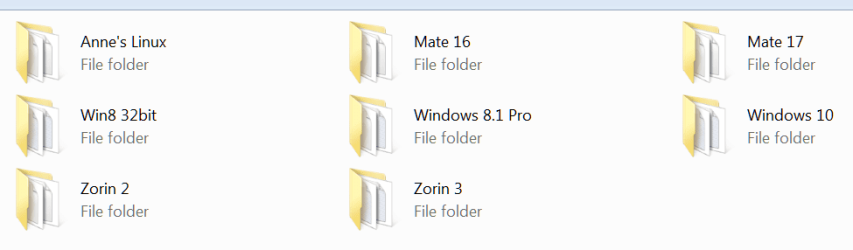
If you want to carry your OS aroun, install it under VMware Player on an external disk (best is a USB3 attached SSD). VMWare player becomes the host system and you can run it on any system that has VMWare Player installed. You need a product key for that installation. Here are all the systems I run from an external SSD.
 

Attachments

  • 2015-02-13_1948.png
    2015-02-13_1948.png
    9.2 KB · Views: 0

My Computer My Computer

At a glance

Vista, Windows7, Mint Mate, Zorin, Windows 8from 1.6GHz Duo to i7
Computer Manufacturer/Model Number
HP, Dell, Gateway, Toshiba - 4 laptops and 2 desktops
OS
Vista, Windows7, Mint Mate, Zorin, Windows 8
CPU
from 1.6GHz Duo to i7
Monitor(s) Displays
2x HP w2207
Hard Drives
5x HDD, 7x SSD, 12x Externals
Keyboard
with trackball - no mices
Mouse
Trackball mice
Internet Speed
DSL 6000
yes, I suppose so, it is deliberate though, an imposed limitation to prevent piracy.
Earlier versions of windows would cross boot onto entirely different hardware.
I was wondering if MS had allowed an external separate drive do that.
But that works fine with Linux, booting from an external usb drive onto any hardware PC.

Please provide an example of an earlier version of Windows that boots onto different hardware without issues.

Everything up to and including windows ME, I did that frequently. Are you that young and me that old?:D

As it booted on the new machine, it would re-detect all the devices on the new PC.

Windows XP broke that giving you the blue screen, the computer has been shut down to protect your PC, when really it should have said to protect our OS from being pirated..
 

My Computer My Computer

At a glance

Windows 7 Ultimate x64
OS
Windows 7 Ultimate x64
If you want to carry your OS aroun, install it under VMware Player on an external disk (best is a USB3 attached SSD). VMWare player becomes the host system and you can run it on any system that has VMWare Player installed. You need a product key for that installation. Here are all the systems I run from an external SSD.

yes, I have done that, but it adds another layer, the player.
 

My Computer My Computer

At a glance

Windows 7 Ultimate x64
OS
Windows 7 Ultimate x64
The Player is not really in the way. Big advantage though is that it shields you from any driver problems.
 

My Computer My Computer

At a glance

Vista, Windows7, Mint Mate, Zorin, Windows 8from 1.6GHz Duo to i7
Computer Manufacturer/Model Number
HP, Dell, Gateway, Toshiba - 4 laptops and 2 desktops
OS
Vista, Windows7, Mint Mate, Zorin, Windows 8
CPU
from 1.6GHz Duo to i7
Monitor(s) Displays
2x HP w2207
Hard Drives
5x HDD, 7x SSD, 12x Externals
Keyboard
with trackball - no mices
Mouse
Trackball mice
Internet Speed
DSL 6000
The Player is not really in the way. Big advantage though is that it shields you from any driver problems.

Yes, but another advantage of a true usb boot is say the PC has no working OS installed. Then you could access the files and folders.

How do windows users access files and folders if the OS is damaged or virus infected?
One difficult way which I have done and not just a few times is yank the drive and put it into another PC.
 

My Computer My Computer

At a glance

Windows 7 Ultimate x64
OS
Windows 7 Ultimate x64
How do windows users access files and folders if the OS is damaged or virus infected?
There are many ways to do that. I have 2 tutorials for my ways:

1. The easy way
2. The sophisticated way - watch my embedded video

But then there is always the live Linux CD option.
 

My Computer My Computer

At a glance

Vista, Windows7, Mint Mate, Zorin, Windows 8from 1.6GHz Duo to i7
Computer Manufacturer/Model Number
HP, Dell, Gateway, Toshiba - 4 laptops and 2 desktops
OS
Vista, Windows7, Mint Mate, Zorin, Windows 8
CPU
from 1.6GHz Duo to i7
Monitor(s) Displays
2x HP w2207
Hard Drives
5x HDD, 7x SSD, 12x Externals
Keyboard
with trackball - no mices
Mouse
Trackball mice
Internet Speed
DSL 6000
Back
Top