Can add printer but not show when switch user

densei27

New member
Local time
7:51 AM
Messages
3
Dear All

Our office used Windows 7 pro 32bit, when new PC come out team install OS and other application for user, but we used usr name "IT" that have permission to install on our domain. we have 1 LPT Driver , and 2 Network printer. I complete to install printer and can print out, but when I switch user to "IT1" that have permission only user. on IT1 user we not see any printer on "device and printer" but when we open microsoft outlook and select "print" we can found printer that user "IT" add, How I can set every user that login to this computer can see printer that add by user "IT"
 

My Computer My Computer

OS
Windows 7 Pro 32 bits
can somebody help me
 

My Computer My Computer

OS
Windows 7 Pro 32 bits
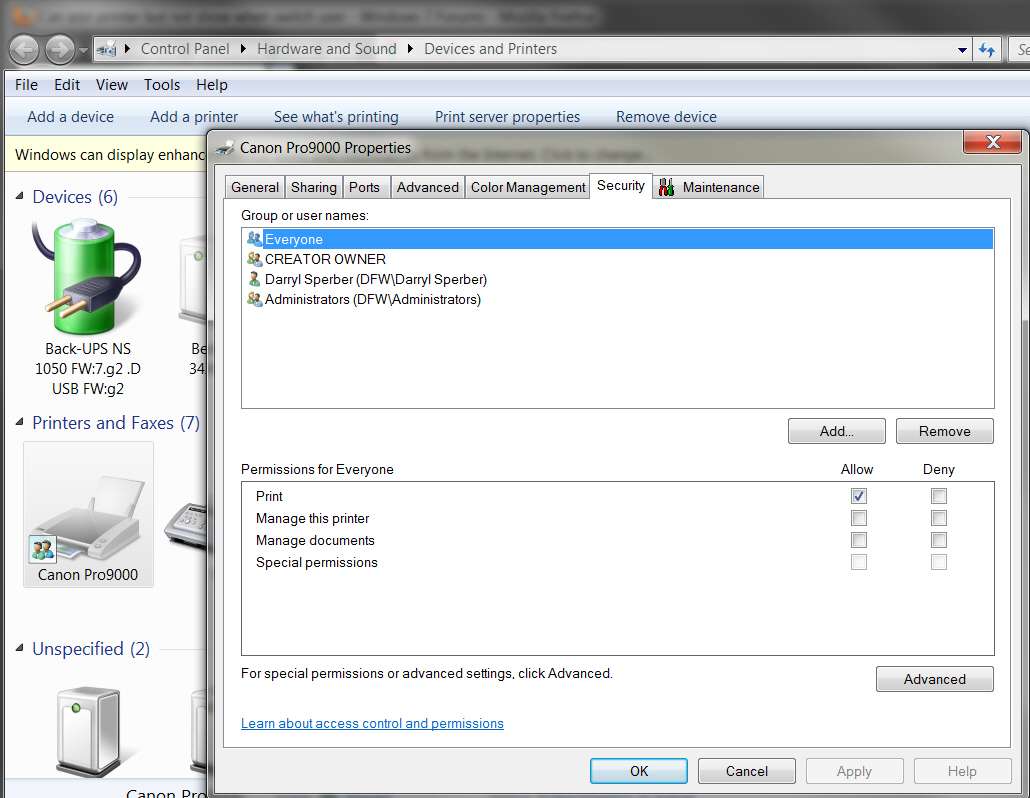
I'm not sure it will solve your problem, but if you get your "administrator" to update the Printer Properties -> Security tab on the printer, to add an "everyone" user which has "print" capability, that might cover all users.

printersecurity.jpg
 

My Computer My Computer

Computer type
PC/Desktop
Computer Manufacturer/Model Number
Home-built, two systems (1) and (2)
OS
Windows 7 Pro x64 (1), Win7 Pro X64 (2)
CPU
i5-3350p 3.1Ghz/6MB-cache (1); E8400 3.0Ghz/6MB-cache (2)
Motherboard
ASUS P8Z77-V Pro (1); ASUS P5Q3 (2)
Memory
8GB PC3-12800 DDR3 (1); 4GB PC3-10600 DDR3 (2)
Graphics Card(s)
ATI HD7750 (1), (see TV cards); ATI R7 250 (2)
Sound Card
Realtek ALC892 HD Audio (1); Realtek ALC1200 HD Audio (2)
Monitor(s) Displays
Eizo HD2441W LCD, Eizo S2433W (1); Eizo 24" S2433W (2)
Screen Resolution
1920x1200, 1920x1200 (1); 1920x1200 (2)
Hard Drives
(1) 1TB SATA-II (7200RPM), 2x2TB SATA-III (7200RPM), 250GB SATA-III (10000RPM) for OS; 2x2TB external USB 3.0

(2) 320GB SATA-II (7200RPM), 750GB SATA-II (7200RPM), 150GB SATA-II (10000RPM) for OS; 2TB external USB 3.0
PSU
Nesteq ECS-6001 600W (1); Nesteq ECS-5001 500W (2)
Case
Acousti-Case 360 (1) and (2)
Cooling
Noctua NH-U12P SE2 for CPU, 2x120mm case fans (1) and (2)
Keyboard
IBM PS/2 (1) and (2)
Mouse
Logitech MX Revolution wireless (1); Microsoft wired (2)
Internet Speed
100mbps down / 10mbps up
Antivirus
Microsoft Security Essentials; Malwarebyte Anti-Malware Pro
Browser
Firefox
Other Info
Ceton InfiniTV 4-tuner cablecard-enabled TV card as well as Hauppauge HVR-2250 OTA/ATSC 2-tuner TV card in (1), running under Win7 WMC
dear dsperber

sorry that comunicate worng, our problem is, when I manual add local printer (USB, LPT1 ) it compleate to install but it not show on device and printer, I already follow your recommend but it can not solve it
 

My Computer My Computer

OS
Windows 7 Pro 32 bits
Back
Top